Edc17c10 peugeot 308 1.6hdi 2014

  • Thread starter Thread starter Ton1
  • Start date Start date
  • Tagged users Tagged users None
  • Thread starter Thread starter Ton1
  • Start date Start date
  • Tagged users Tagged users None

Ton1

Member
Thread Owner
Joined
26.12.2025
Messages
11
Reaction score
1
Location
London uk
After cloning the ecu I have 1 fault code in the bsi b1003 configuration and in the instrument b1003 secure configuration.
Can anyone help, do I need to match ecu with bsi or carry out full telecoding.
Also if some can confirm the pin code CR28 is correct for the bin file attached.
Also if someone can decode the vin number for telecoding options.
VIN:VF3LB9HPAES159012
Anyone's help will be appreciated.
 

Attachments

After cloning the ecu I have 1 fault code in the bsi b1003 configuration and in the instrument b1003 secure configuration.
Can anyone help, do I need to match ecu with bsi or carry out full telecoding.
Also if some can confirm the pin code CR28 is correct for the bin file attached.
Also if someone can decode the vin number for telecoding options.
VIN:VF3LB9HPAES159012
Anyone's help will be appreciated.

Read PIN code -> OK

CR28

------------------------------

ECU Info:

- SW -> 1037508762, 1037535677

- ECU Prod. Number -> 9802577599

need more information about cloning (is it same parts number of ecu engine?)
 
I cloned with autotuner it support full backup.
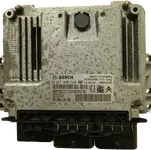
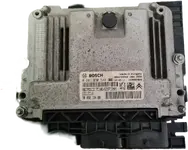
Both ecu pic attached.
 

Attachments

  • Clipped_image_20260118_205802.webp
    Clipped_image_20260118_205802.webp
    318 KB · Views: 3
  • Clipped_image_20260115_205749.webp
    Clipped_image_20260115_205749.webp
    215 KB · Views: 3
i think problem you have another fault in other module because that apear in bsi and dash
PM me better for more information i can fix it
 
i think problem you have another fault in other module because that apear in bsi and dash
PM me better for more information i can fix it
I'll recheck everything tomorrow at the workshop. I'll pm if I need help, thankyou.
 
im sorry my message was cute
i tell you think problem with flash file between manual or automatic gear and mecanic key .....good luck my freinds
 

B1003 is technically a "Secure configuration fault".

If the car starts and drives, the cloning (EEPROM/Immo data) is definitely correct. The CR28 PIN is working.

The reason you see B1003 in the BSI and Instrument Cluster is usually because the "Secure Configuration" handshake between the BSI and the ECU detected a discrepancy (possibly due to the ECU being powered on bench or just the swap process). It is not exactly a "ghost" code, but a configuration checksum/validation error.

To clear it properly, you usually need Diagbox:
  • Go to BSI -> Repair -> Configuration.
  • Look for Secure Configuration (or sometimes just re-saving the manual telecoding works).
  • Once the configuration is re-validated (telecoded), the code should clear.

If all features (Cruise Control, Speed Limiter, A/C) are working, you can safely ignore it, but it will remain stored until a configuration procedure is run.

Good job on the clone!
 
B1003 is technically a "Secure configuration fault".

If the car starts and drives, the cloning (EEPROM/Immo data) is definitely correct. The CR28 PIN is working.

The reason you see B1003 in the BSI and Instrument Cluster is usually because the "Secure Configuration" handshake between the BSI and the ECU detected a discrepancy (possibly due to the ECU being powered on bench or just the swap process). It is not exactly a "ghost" code, but a configuration checksum/validation error.

To clear it properly, you usually need Diagbox:
  • Go to BSI -> Repair -> Configuration.
  • Look for Secure Configuration (or sometimes just re-saving the manual telecoding works).
  • Once the configuration is re-validated (telecoded), the code should clear.

If all features (Cruise Control, Speed Limiter, A/C) are working, you can safely ignore it, but it will remain stored until a configuration procedure is run.

Good job on the clone!
Yes you are absolutely correct.
Problem is that this car is late 2014 and configuration is
online. I don't have a online account. I can try manual and just hit save to see of that changes anything.
I will try and get back.
 
Yes you are absolutely correct.
Problem is that this car is late 2014 and configuration is
online. ...

If you are using Diagbox 7.xx (e.g., 7.57 or 7.62), you should still be able to access Manual Telecoding without an online account for a 2014 model. The strict "Online Only" restriction is mostly present in Diagbox 9.xx or for the newer BSI EVO (2015/2016+).

A common trick if "Save" alone doesn't clear the B1003:
  • Go to Manual Telecoding in the BSI.
  • Change one minor parameter (e.g., "Rear wiper operation in reverse gear" or similar) to a different value.
  • Save the configuration.
  • Change it back to the original value.
  • Save again.
This forces the BSI to recalculate and re-write the configuration checksum/signature, which often clears the Secure Configuration fault.

If you are using Diagbox 9.xx (VM), manual telecoding is likely blocked/greyed out without a token. In that case, you would need an older version or a token, but as long as everything works, it is purely cosmetic.
 
If you are using Diagbox 7.xx (e.g., 7.57 or 7.62), you should still be able to access Manual Telecoding without an online account for a 2014 model. The strict "Online Only" restriction is mostly present in Diagbox 9.xx or for the newer BSI EVO (2015/2016+).

A common trick if "Save" alone doesn't clear the B1003:
  • Go to Manual Telecoding in the BSI.
  • Change one minor parameter (e.g., "Rear wiper operation in reverse gear" or similar) to a different value.
  • Save the configuration.
  • Change it back to the original value.
  • Save again.
This forces the BSI to recalculate and re-write the configuration checksum/signature, which often clears the Secure Configuration fault.

If you are using Diagbox 9.xx (VM), manual telecoding is likely blocked/greyed out without a token. In that case, you would need an older version or a token, but as long as everything works, it is purely cosmetic.
I'm running v7.58 diagbox ,I will try that trick to change one minor parameter.
I'll report back when done.
Thanks for your help.
 
I'm running v7.58 diagbox ,I will try that trick to change one minor parameter.
I'll report back wh...

v7.58 is perfect for this car. You are right at the limit before the "online only" restriction kicks in (usually 2015+), so you should have full offline access to manual telecoding.

Just a quick tip for the procedure:
  • Go to BSI -> Repair -> Telecoding -> Manual Telecoding -> Vehicle Configuration.
  • Look for the Driving Assistance or Visibility menu.
  • Toggle something simple like "Rear wiper in reverse gear" or "Automatic lighting".
  • After you save and revert the change, make sure to go back to the main menu and perform a Fault Code Erasure in the BSI. The B1003 often won't disappear from the list until a clear command is sent after the configuration save.

If the BSI telecoding doesn't solve it, try entering the Engine ECU manual telecoding menu as well and just hit save (without changing anything) to force a handshake update.

Let us know how it goes!
 
v7.58 is perfect for this car. You are right at the limit before the "online only" restriction kicks in (usually 2015+), so you should have full offline access to manual telecoding.

Just a quick tip for the procedure:
  • Go to BSI -> Repair -> Telecoding -> Manual Telecoding -> Vehicle Configuration.
  • Look for the Driving Assistance or Visibility menu.
  • Toggle something simple like "Rear wiper in reverse gear" or "Automatic lighting".
  • After you save and revert the change, make sure to go back to the main menu and perform a Fault Code Erasure in the BSI. The B1003 often won't disappear from the list until a clear command is sent after the configuration save.

If the BSI telecoding doesn't solve it, try entering the Engine ECU manual telecoding menu as well and just hit save (without changing anything) to force a handshake update.

Let us know how it goes!
No luck , manual configuration is greyed out on the bsi and engine ecu. It's a late 2014.
 
No luck , manual configuration is greyed out on the bsi and engine ecu. It's a late 2014.

If it is greyed out in v7.58, you likely have the 308 T9 (EMP2 platform) or a BSI EVO with firmware that enforces the online check. Diagbox disables the manual button if it detects these newer BSI variants (Secure Telecoding).

Two options left:

  1. Use an aftermarket tool:
    If you have access to Launch x431, Autel Maxisys, or ThinkDiag, try using that for the configuration.
    These tools often bypass the PSA online requirement because they reverse-engineered the commands. Go to BSI -> Coding/Configuration -> Manual. They can usually rewrite/save the configuration when Diagbox refuses.
  2. Leave it alone:
    Since the car starts and runs without dashboard warnings, B1003 is just a stored code for "Configuration Mismatch". It will not affect performance or inspection since the MIL is off.

If you really need to clear it with Diagbox, you would need a token (online account), which is not worth it just for a silent code. Try Launch/Autel if you have one nearby.
 
If it is greyed out in v7.58, you likely have the 308 T9 (EMP2 platform) or a BSI EVO with firmware that enforces the online check. Diagbox disables the manual button if it detects these newer BSI variants (Secure Telecoding).

Two options left:

  1. Use an aftermarket tool:
    If you have access to Launch x431, Autel Maxisys, or ThinkDiag, try using that for the configuration.
    These tools often bypass the PSA online requirement because they reverse-engineered the commands. Go to BSI -> Coding/Configuration -> Manual. They can usually rewrite/save the configuration when Diagbox refuses.
  2. Leave it alone:
    Since the car starts and runs without dashboard warnings, B1003 is just a stored code for "Configuration Mismatch". It will not affect performance or inspection since the MIL is off.

If you really need to clear it with Diagbox, you would need a token (online account), which is not worth it just for a silent code. Try Launch/Autel if you have one

If it is greyed out in v7.58, you likely have the 308 T9 (EMP2 platform) or a BSI EVO with firmware that enforces the online check. Diagbox disables the manual button if it detects these newer BSI variants (Secure Telecoding).

Two options left:

  1. Use an aftermarket tool:
    If you have access to Launch x431, Autel Maxisys, or ThinkDiag, try using that for the configuration.
    These tools often bypass the PSA online requirement because they reverse-engineered the commands. Go to BSI -> Coding/Configuration -> Manual. They can usually rewrite/save the configuration when Diagbox refuses.
  2. Leave it alone:
    Since the car starts and runs without dashboard warnings, B1003 is just a stored code for "Configuration Mismatch". It will not affect performance or inspection since the MIL is off.

If you really need to clear it with Diagbox, you would need a token (online account), which is not worth it just for a silent code. Try Launch/Autel if you have one nearby.
I tried thinkdiag ,it lets you change the configuration but fails to save it.
I'll have to leave it as it is 'Ghost code'
Thankyou for helping.
 
I tried thinkdiag ,it lets you change the configuration but fails to save it.
I'll have to leave it ...

That confirms it is definitely the "Secure Telecoding" protection active on that BSI. ThinkDiag (and similar tools) can often read the configuration and let you edit the menu, but they fail the security handshake (Seed/Key exchange) when attempting to write the changes back to the unit.

You made the right call. Since B1003 does not trigger the Check Engine Light (MIL) or put the car into limp mode, it is perfectly safe to leave it. It is just a log entry saying "I didn't get my official online handshake," but the Immobilizer and Engine maps are doing their job perfectly.

Glad the car is running! Good luck.
 
Back