
ISTA+ STANDALONE BMW Diagnostic & Coding - Workshop Solution 4.57.30
Sign in to download for free
- Thread starter Bin
- Start date
- Tagged users None
You are using an out of date browser. It may not display this or other websites correctly.
You should upgrade or use an alternative browser.
You should upgrade or use an alternative browser.
ISTA+ STANDALONE BMW Diagnostic & Coding - Workshop Solution
4.57.30
Sign in to download for free
- Thread starter Bin
- Start date
- Tagged users None

- Joined
- 03.05.2025
- Messages
- 1,802
- Reaction score
- 26,943
Ok, thxthe program starts normally, but as soon as it tries to connect to the vin, the error message appears.
Apparently no one can make a better version than the one from BimmerScene.

Sterling86
Watchlisted
Good afternoon, I also tried to install ISTA 4.56.30. I couldn't put it on- I swore at the files and at Java. as a result, I had to update version 4.55.12. and everything works.
Sterling86
Watchlisted
Yes
- Joined
- 03.05.2025
- Messages
- 1,802
- Reaction score
- 26,943
BimmerScene no longer provides an installer password for version 4.56.30. It’s available, but it has HWID activation — you need to send your HWID to the builder, but you must have VIP membership for that. In short, they made the versions paid.You have an option from BimmerScene?
- Joined
- 03.05.2025
- Messages
- 1,802
- Reaction score
- 26,943
BMW ISTA+ Standalone 4.57.21
Diagnostics + Programming workflow-ready setup • EN/DE
A practical ISTA+ Standalone 4.57.21 package prepared for everyday workshop-style use.
If you’re building a stable BMW diagnostic laptop or want a clean baseline for troubleshooting, this release keeps things simple: ISTA archive + config + install notes, plus a pointer for matching programming data.
Package contents
- ISTA.rar — main ISTA+ package archive
- ISTA+Standalone-4.57.21 config — configuration folder for the standalone setup
- instal.txt — install notes / quick instructions
- 4.57.21_PSdZData.7z.tоrrеnt — reference pointer for matching PSdZData (programming data)
Transfer.it
- German
- English
Works with
 D-CAN
D-CAN- ENET
- ICOM
Why 4.57.21?
Because it’s a solid middle-ground build that’s popular for mixed fleets:
- Good balance of features vs. “random new build surprises”
- Comfortable for both diagnostics and typical programming workflows (with matching data)
- A reliable reference version when comparing behavior across setups
Heads-up before you start
- Use a machine with enough disk space (programming data is large).
- Run as Admin where required and keep the install path simple.
- Always pair ISTA+ with the matching PSdZData version for best compatibility.
Note: This is a recent package and may not be fully tested on every hardware/OS combo.
If something goes wrong, remove the created working folders and reinstall clean.
Disclaimer
For authorized/legitimate use only. Ensure you have the proper rights/licenses for BMW ISTA+ and PSdZData in your region.
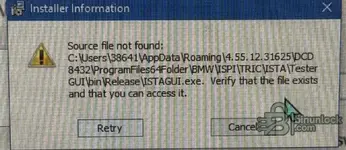
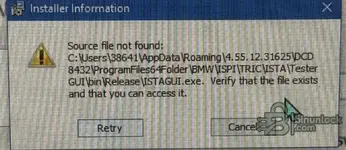
Did You resolved this ? I have identical situation with 4.57.21 installed on fresh win10 used with ICOM.the program starts normally, but as soon as it tries to connect to the vin, the error message appears.


serg_keeper
Watchlisted
Follow the instructions to install and everything will work.I like your site
I hope uou can give me some advice or steps .. what is going on ..
Thanks ✌
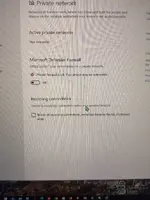
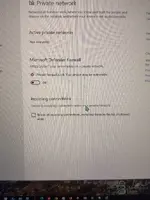
Sorri but is not working , you se the pictures up i reinstal ista 3x again , turn of virus and protection on laptop and this warning still pop in up.. if someone can put pictures or some video and steps for instaling Ista + …, me and probbobly others will apricieted for this .. thanks to all

Have you added the file/folderSorri but is not working , you se the pictures up i reinstal ista 3x again , turn of virus and protection on laptop and this warning still pop in up.. if someone can put pictures or some video and steps for instaling Ista + …, me and probbobly others will apricieted for this .. thanks to all
to the Allow list in the security settings?
Thanks
BMW ISTA+ Standalone 4.57.21
Configurazione pronta per il flusso di lavoro di diagnostica e programmazione • EN/DE
Un pratico pacchetto ISTA+ Standalone 4.57.21 predisposto per l'uso quotidiano in officina.
Se stai costruendo un laptop diagnostico BMW stabile o desideri una base pulita per la risoluzione dei problemi, questa versione semplifica le cose: archivio ISTA + configurazione + note di installazione, più un puntatore per la corrispondenza dei dati di programmazione.
Contenuto della confezione
- ISTA.rar — archivio principale del pacchetto ISTA+
- ISTA+Standalone-4.57.21 config — cartella di configurazione per l'installazione autonoma
- instal.txt — note di installazione / istruzioni rapide
- 4.57.21_PSdZData.7z.tоrrеnt — puntatore di riferimento per la corrispondenza di PSdZData (dati di programmazione)
LingueTransfer.it
transfer.it
- tedesco
- Inglese
Funziona con
Perché 4.57.21?
Perché è una solida soluzione di compromesso, apprezzata dalle flotte miste:
- Buon equilibrio tra funzionalità e "nuove sorprese casuali"
- Comodo sia per la diagnostica che per i tipici flussi di lavoro di programmazione (con dati corrispondenti)
- Una versione di riferimento affidabile quando si confronta il comportamento tra le configurazioni
Attenzione prima di iniziare
- Utilizzare una macchina con spazio su disco sufficiente (i dati di programmazione sono grandi ).
- Esegui come amministratore quando necessario e mantieni semplice il percorso di installazione.
- Per una compatibilità ottimale, associare sempre ISTA+ alla versione corrispondente di PSdZData .
Disclaimer
Solo per uso autorizzato/legittimo. Assicurati di disporre dei diritti/licenze appropriati per BMW ISTA+ e PSdZData nella tua regione.
Hi Bin. Unfortunately, after a few seconds of starting Istagui, this window appears indicating a bug. I've reinstalled several times, following your instructions exactly, but every time Istagui stops starting. Why do you think this happens? Obviously, I'm asking for help, not just from you, but from everyone. Thanks.
BMW ISTA+ Standalone 4.57.21
Diagnostics + Programming workflow-ready setup • EN/DE
A practical ISTA+ Standalone 4.57.21 package prepared for everyday workshop-style use.
If you’re building a stable BMW diagnostic laptop or want a clean baseline for troubleshooting, this release keeps things simple: ISTA archive + config + install notes, plus a pointer for matching programming data.
Package contents
- ISTA.rar — main ISTA+ package archive
- ISTA+Standalone-4.57.21 config — configuration folder for the standalone setup
- instal.txt — install notes / quick instructions
- 4.57.21_PSdZData.7z.tоrrеnt — reference pointer for matching PSdZData (programming data)
LanguagesTransfer.it
- German
- English
Works with
Why 4.57.21?
Because it’s a solid middle-ground build that’s popular for mixed fleets:
- Good balance of features vs. “random new build surprises”
- Comfortable for both diagnostics and typical programming workflows (with matching data)
- A reliable reference version when comparing behavior across setups
Heads-up before you start
- Use a machine with enough disk space (programming data is large).
- Run as Admin where required and keep the install path simple.
- Always pair ISTA+ with the matching PSdZData version for best compatibility.
Disclaimer
For authorized/legitimate use only. Ensure you have the proper rights/licenses for BMW ISTA+ and PSdZData in your region.
Attachments
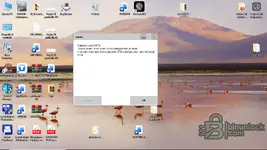
I have same issue.Hi Bin. Unfortunately, after a few seconds of starting Istagui, this window appears indicating a bug. I've reinstalled several times, following your instructions exactly, but every time Istagui stops starting. Why do you think this happens? Obviously, I'm asking for help, not just from you, but from everyone. Thanks.
Similar threads


- Replies
- 19
- Views
- 2K
- Reactions
- 37

- Replies
- 26
- Views
- 2K
- Reactions
- 31

- Replies
- 4
- Views
- 545
- Reactions
- 1

- Replies
- 5
- Views
- 531
- Reactions
- 3
- Replies
- 25
- Views
- 1K
- Reactions
- 8