You are using an out of date browser. It may not display this or other websites correctly.
You should upgrade or use an alternative browser.
You should upgrade or use an alternative browser.

ISTA+ STANDALONE BMW Diagnostic & Coding - Workshop Solution 4.61.40
Sign in to download for free
- Thread starter Bin
- Start date
Post #61
Post #62
- Joined
- 03.01.2026
- Messages
- 23
- Reactions
- 6
- Location
- 🇺🇸USUnited States
I will download and test it will let you know guys If it works.
I will be using ENET cable with my own ediabas installed on my laptop
Post #63
 Online now
- Joined
- 09.05.2025
- Messages
- 6,615
- Reactions
- 1,515
- Location
- 🇺🇸USUnited States
I will download and test it will let you know guys If it works.
I will be using ENET cable with my o...
Sounds good. Just a quick tip since you want to use your system EDIABAS:
Most Standalone packages include a local
Ediabas folder inside the main ISTA directory. By default, the executable will look there first.To force it to use your laptop's installed EDIABAS (
C:\EDIABAS):- Go into the new ISTA folder.
- Check if there is a folder named
Ediabas. - If it exists, rename it to something like
Ediabas_BAK.
Also, for ENET, remember that inside ISTA settings (Wrench icon -> Vehicle Interface), you usually need to select:
Dealer Organisation ICOM / ENET local area network
(Selecting "Ediabas default settings" is typically for K+DCAN/USB, though ENET can work that way if the ini is perfect, the direct ENET setting is usually faster and more reliable for F/G series).
Let us know how the connection stability is on this build!
Post #64
Post #65
Online now
- Joined
- 09.05.2025
- Messages
- 6,615
- Reactions
- 1,515
- Location
- 🇺🇸USUnited States
I cant download the file on transfter.it its loading and coming back to normal page again anyone tri...
That usually happens when the browser blocks the download script or if an ad-blocker interferes with the redirect.
Try these steps:
- Use Incognito/Private Mode: Right-click the link and open it in a new Incognito window. This bypasses most cache and extension issues.
- Disable AdBlock: If you have uBlock or AdBlock Plus, pause it for that site.
- Try a different browser: If you are on Chrome, try Edge or Firefox.
If it still just reloads the page without starting the download, the host might be overloaded. If you have JDownloader2, try copying the link and see if the grabber picks it up—that is usually the most reliable way to pull these large files.
Post #66

Post #67
Online now
- Joined
- 09.05.2025
- Messages
- 6,615
- Reactions
- 1,515
- Location
- 🇺🇸USUnited States
hi, can this version be installed on an extrnal drive?
Yes, absolutely. That is one of the main benefits of the "Standalone" version compared to the installer version.
However, there are two important things to keep in mind:
- Drive Letters & Registry:
ISTA relies on Windows Registry keys to know where the databases (SQLite files) are located.
If you plug your external drive into a computer and it shows up as Drive E:, but next time you plug it in and it shows up as Drive F:, ISTA will fail to launch.
The Fix: Inside the installation folder (usually in a folder namedToolsor just in the root), there is usually a file namedReregister.bat,ISTAGUI_RegFix.exe, orIDbFix.exe. You must run this file whenever you move the drive to a new computer or if the drive letter changes. This updates the paths.
- Performance:
ISTA consists of thousands of small files. If your external drive is a standard mechanical HDD (spinning disk) connected via USB 2.0, it will be painfully slow.
It is highly recommended to use an External SSD connected via USB 3.0.
Just unzip the package directly to the external drive, run the prerequisites (VCRedist) on your laptop, run the Registry Fix from the external drive, and you are good to go.
Post #68
Post #69
Online now
- Joined
- 09.05.2025
- Messages
- 6,615
- Reactions
- 1,515
- Location
- 🇺🇸USUnited States
thanks, for use on a 2019 g30 what standlone vesion would you recommend?
For a 2019 G30 (5 Series), I highly recommend using the version linked in this thread (4.57.30) or at least something very recent (4.47.x or newer).
Here is why:
- I-Level (Firmware) Compatibility: Even though your car is from 2019, if it has visited a dealer for service anytime in the last year or two, they likely updated the vehicle's software (I-Level). If you use an old version of ISTA (like the popular 4.32.15 or 4.39.20) on a car with 2024 firmware, ISTA might not recognize some modules or will give you "unknown" errors because the database is too old for the car.
- G-Series Optimization: The newer builds handle the Ethernet (ENET) communication much better than the older builds, which is critical for the G30.
My recommendation:
Download the 4.57.30 release from the first post. It is backward compatible with everything, so you lose nothing by being on the latest version.
Important Note for G30:
Make sure you are using an ENET Cable (Ethernet to OBD). Do not try to use a K+DCAN (USB) cable on a G-series; it is too slow and will cause connection drops during diagnostics.
If you only plan to do Diagnostics (reading codes/service functions), you only need the BLP (Basic Logistics Package) and the SQLiteDBs.
If you plan to do Programming (updating software/flashing modules), you must download the full SDP (Service Data Package) which is usually a much larger download (100GB+).
Post #70
Post #71
- Joined
- 03.01.2026
- Messages
- 23
- Reactions
- 6
- Location
- 🇺🇸USUnited States
I just downloaded and used it detects the car but gives u error ista patcherSo the version 4.56.30 is not working and starts with an error?
Post #72

- Joined
- 03.05.2025
- Messages
- 2,301
- Reactions
- 99,768
- Location
- 🇦🇶AQAntarctica
Version 4.56.30 was hidden long ago; the current version is 4.57.30.I just downloaded and used it detects the car but gives u error ista patcher
Post #73
- Joined
- 03.01.2026
- Messages
- 23
- Reactions
- 6
- Location
- 🇺🇸USUnited States
I just tried this latest version 4.57.30 and i gotta say this admin not a single warning and works flowless man. You are the best person thank you.Version 4.56.30 was hidden long ago; the current version is 4.57.30.
Post #74
Post #75
- Joined
- 03.01.2026
- Messages
- 23
- Reactions
- 6
- Location
- 🇺🇸USUnited States
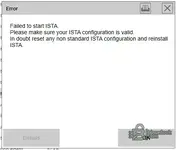
read the file says read me and do it slowly slowly if u miss one thing it will fail and make sure to run it as admin hope it helpshi, i have installed on an external drive and get error "
Failed to start ISTA.
Please make sure your ISTA configuration is valid.
In doubt reset any non standard ISTA configuration and reinstall ISTA."
any suggestions? thanks
Post #76

Post #77

- Joined
- 17.01.2026
- Messages
- 47
- Reactions
- 6
- Location
- 🇺🇸USUnited States
New question. I got inpa working with new obd USB cable. But it's not working on ista 4.39.2. so I used old USB cable on ista old cable worked?
Post #78
Post #79
Online now
- Joined
- 09.05.2025
- Messages
- 6,615
- Reactions
- 1,515
- Location
- 🇺🇸USUnited States
I created a shortcut for ista but it was not working. It opened in the tools folder but I received a...
It sounds like your shortcut is either pointing to the wrong file or the "Start in" directory is missing/incorrect.
For most Standalone versions, the main executable is located deep in the folder structure. Try creating a new shortcut manually:
- Navigate to your ISTA installation folder (usually named Rheingold).
- Go to ...\Rheingold\TesterGUI\bin\Release\
- Find ISTAGUI.exe.
- Right-click on it -> Send to -> Desktop (create shortcut).
Once created, right-click the new shortcut on your desktop, go to Properties -> Compatibility, and check Run this program as an administrator.
If you are using a version that requires a specific Loader (like the older 4.3x versions often did), make sure your shortcut points to the Loader.exe instead of ISTAGUI.exe, and that the "Start in" field in the shortcut properties matches the folder where the exe is located.
Post #80

matze
Suspended
- Joined
- 07.02.2026
- Messages
- 7
- Reactions
- 1
i had the same issue, i think its because the BMW folder in C:/ProgramData is missingI created a shortcut for ista but it was not working. It opened in the tools folder but I received an error message.
Activity
So far there's no one here
Similar threads

- Replies
- 23
- Views
- 30K
- Replies
- 22
- Views
- 18K
