ISTA+ STANDALONE (Activated) - Free Download for BMW / MINI Diagnostics

ISTA+ STANDALONE BMW Diagnostic & Coding - Workshop Solution 4.57.30

Sign in to download for free
ISTA+ STANDALONE (Activated) - Free Download for BMW / MINI Diagnostics
ISTA+ STANDALONE BMW Diagnostic & Coding - Workshop Solution 4.57.30
Sign in to download for free
I cant download the file on transfter.it its loading and coming back to normal page again anyone tried downloading it ?
 
I cant download the file on transfter.it its loading and coming back to normal page again anyone tri...

That usually happens when the browser blocks the download script or if an ad-blocker interferes with the redirect.

Try these steps:

  • Use Incognito/Private Mode: Right-click the link and open it in a new Incognito window. This bypasses most cache and extension issues.
  • Disable AdBlock: If you have uBlock or AdBlock Plus, pause it for that site.
  • Try a different browser: If you are on Chrome, try Edge or Firefox.

If it still just reloads the page without starting the download, the host might be overloaded. If you have JDownloader2, try copying the link and see if the grabber picks it up—that is usually the most reliable way to pull these large files.
 
hi, can this version be installed on an extrnal drive?

Yes, absolutely. That is one of the main benefits of the "Standalone" version compared to the installer version.

However, there are two important things to keep in mind:

  1. Drive Letters & Registry:
    ISTA relies on Windows Registry keys to know where the databases (SQLite files) are located.
    If you plug your external drive into a computer and it shows up as Drive E:, but next time you plug it in and it shows up as Drive F:, ISTA will fail to launch.

    The Fix: Inside the installation folder (usually in a folder named Tools or just in the root), there is usually a file named Reregister.bat, ISTAGUI_RegFix.exe, or IDbFix.exe. You must run this file whenever you move the drive to a new computer or if the drive letter changes. This updates the paths.
  2. Performance:
    ISTA consists of thousands of small files. If your external drive is a standard mechanical HDD (spinning disk) connected via USB 2.0, it will be painfully slow.
    It is highly recommended to use an External SSD connected via USB 3.0.

Just unzip the package directly to the external drive, run the prerequisites (VCRedist) on your laptop, run the Registry Fix from the external drive, and you are good to go.
 
thanks, for use on a 2019 g30 what standlone vesion would you recommend?

For a 2019 G30 (5 Series), I highly recommend using the version linked in this thread (4.57.30) or at least something very recent (4.47.x or newer).

Here is why:

  • I-Level (Firmware) Compatibility: Even though your car is from 2019, if it has visited a dealer for service anytime in the last year or two, they likely updated the vehicle's software (I-Level). If you use an old version of ISTA (like the popular 4.32.15 or 4.39.20) on a car with 2024 firmware, ISTA might not recognize some modules or will give you "unknown" errors because the database is too old for the car.
  • G-Series Optimization: The newer builds handle the Ethernet (ENET) communication much better than the older builds, which is critical for the G30.

My recommendation:
Download the 4.57.30 release from the first post. It is backward compatible with everything, so you lose nothing by being on the latest version.

Important Note for G30:
Make sure you are using an ENET Cable (Ethernet to OBD). Do not try to use a K+DCAN (USB) cable on a G-series; it is too slow and will cause connection drops during diagnostics.

If you only plan to do Diagnostics (reading codes/service functions), you only need the BLP (Basic Logistics Package) and the SQLiteDBs.
If you plan to do Programming (updating software/flashing modules), you must download the full SDP (Service Data Package) which is usually a much larger download (100GB+).
 
the download link is not working.

It looks like the link expired. These free hosts usually kill the links after a few days or if the bandwidth limit is hit.

Check the first post again—is there an attached .txt file at the bottom of the post? Sometimes the actual links are inside a text file to prevent bots from killing them.

If not, keep an eye on the last few pages of this thread. Usually, someone who grabbed it earlier will re-upload it to Mega or create a tоrrеnt mаgnеt. If I see a working mirror, I'll quote you.
 
That usually happens when the browser blocks the download script or if an ad-blocker interferes with the redirect.

Try these steps:

  • Use Incognito/Private Mode: Right-click the link and open it in a new Incognito window. This bypasses most cache and extension issues.
  • Disable AdBlock: If you have uBlock or AdBlock Plus, pause it for that site.
  • Try a different browser: If you are on Chrome, try Edge or Firefox.

If it still just reloads the page without starting the download, the host might be overloaded. If you have JDownloader2, try copying the link and see if the grabber picks it up—that is usually the most reliable way to pull these large files.
no it doesnt download it anyway
 
no it doesnt download it anyway
Once again for everyone whose file-sharing site doesn’t open: use a VPN. It has always worked and will keep working. The whole problem is with your provider, that’s all. In 80% of countries it works; for others it doesn’t. Just like imgur.com — in my country it doesn’t open at all, but Transfer It works without any problems. For some people it’s the other way around.
 
Version 4.56.30 was hidden long ago; the current version is 4.57.30.
I just tried this latest version 4.57.30 and i gotta say this admin not a single warning and works flowless man. You are the best person thank you.
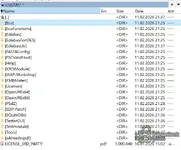
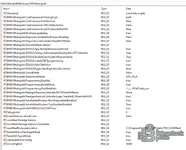
Screenshot 2026-02-08 130518.webp
Screenshot 2026-02-08 130214.webp
 
hi, i have installed on an external drive and get error "
Failed to start ISTA.
Please make sure your ISTA configuration is valid.
In doubt reset any non standard ISTA configuration and reinstall ISTA."

any suggestions? thanks
 
hi, i have installed on an external drive and get error "
Failed to start ISTA.
Please make sure your ISTA configuration is valid.
In doubt reset any non standard ISTA configuration and reinstall ISTA."

any suggestions? thanks
read the file says read me and do it slowly slowly if u miss one thing it will fail and make sure to run it as admin hope it helps
 
New question. I got inpa working with new obd USB cable. But it's not working on ista 4.39.2. so I used old USB cable on ista old cable worked?
 
I created a shortcut for ista but it was not working. It opened in the tools folder but I received an error message.
 

Attachments

  • ISTA Error.webp
    ISTA Error.webp
    8.7 KB · Views: 29
Back