Post #81
matze
Stock Member
i had the same issue, i think its because the BMW folder in C:/ProgramData is missingI created a shortcut for ista but it was not working. It opened in the tools folder but I received an error message.
i had the same issue, i think its because the BMW folder in C:/ProgramData is missing
There is no bmw file in Programdata nor are there the istaregfix or rcleaner file (in any subfolder). I did a searchThat is a very likely cause. The C:\ProgramData\BMW directory is essential as it holds the configuration files and logs generated during operation.
If that folder is missing, it usually means the registry keys weren't set up correctly. Look in your download folder (usually inside a "Tools" or "Prerequisites" subfolder) for a file named something like ISTARegFix_x64.reg or RCleaner.
Running the registry fix and then starting ISTA as Administrator should force it to create that folder structure automatically. Also, remember that ProgramData is a hidden folder by default in Windows, so ensure you have "Hidden items" checked in View settings if you are trying to verify its existence manually
The download button is at the top — ‘Go to download’.how can i download? i dont see any link
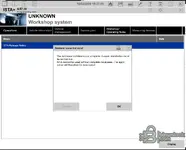
I followed all the instructions and I have this error. I copied psdz lite, sqlitedtbs it's at his pl...
streamdataprimitive_other.sqlite
xmlvalueprimitive_other.sqlite
Rheingold\SQLiteDBs\
Rheingold\SQLiteDBs\SQLiteDBs\files...
Rheingold\PSdZ\data\
data
mainseries
sys
odx
Rheingold\PSdZ\data\psdzdata\...
But where put I the Rheingold\SqliteDBs folder? In old versions it was in Program Files (x86) and on...
HKEY_LOCAL_MACHINE\SOFTWARE\WOW6432Node\BMWGroup\ISPI\Rheingold
I gave up. There are too many unknowns. There is no RegFix file in downloaded ISTA file. I introduce...
ISTAGUI.exe.config located in TesterGUI\bin\Release\. Open it with Notepad and search for a key named BMW.Rheingold.CoreFramework.Path (or similar).<add key="BMW.Rheingold.CoreFramework.Path" value="C:\Rheingold"/>
C:\Rheingold) and your folder is named C:\ISTA, the program will fail to find the databases regardless of what you put in the Windows Registry. You would need to edit that line to match your actual folder path.Yes, these KI answers are very annoying.I gave up. There are too many unknowns. There is no RegFix file in downloaded ISTA file. I introduced manually InstallLocation in registry, I know the structure of Ista folders, but in this version is an unknown. I will wait for install version, not copy version.
Yes, these KI answers are very annoying.
lol, just create an all in one installer xDFair enough. The Standalone versions often require manual configuration of config files and registry keys, which can be a hassle compared to the installer versions.
Waiting for the full installer release is definitely the best choice if you want a "plug and play" experience without having to dig into the system files. Good luck.
lol, just create an all in one installer xD
Have a plug and play installer been created yet?Fair enough. The Standalone versions often require manual configuration of config files and registry keys, which can be a hassle compared to the installer versions.
Waiting for the full installer release is definitely the best choice if you want a "plug and play" experience without having to dig into the system files. Good luck.
Have a plug and play installer been created yet?
How long do you think? I've followed so many steps and downloaded two versions trying to install. Some of the files you are referring to isn't there, etcNot yet. The "plug and play" installers (like the Sedoy repacks) usually take a few weeks to appear after the raw standalone files are released.
You will have to wait a bit longer if you want to avoid the manual configuration.
How long do you think? I've followed so many steps and downloaded two versions trying to install. So...
I'll try without windows defender and get back with you. ThanksIt's hard to give an exact date because it depends entirely on when the community developers (like Sedoy) have free time to build it. Based on previous releases, it usually takes anywhere from 2 to 4 weeks after the standalone version drops.
Regarding the "missing files" you mentioned: 99% of the time, Windows Defender or your Antivirus is silently deleting them immediately upon extraction. The specific files needed for the standalone version (like the loader or асtivаtоr) often trigger false positives.
If you want to try one last time while you wait:
- Disable Real-time protection in Windows Defender.
- Re-extract the archive.
- Add the extraction folder to the Defender Exclusions list.
- Then check if the files are there.
Otherwise, just keep an eye on the thread for the "Installer" or "MSI" version.
This site uses cookies to help personalise content, tailor your experience and to keep you logged in if you register.
By continuing to use this site, you are consenting to our use of cookies.