LiekoProf Firmware Vault — Firmware Storage, Analysis and Combination

Post #21

Through the “Open firmware” button (bin), I tried different ones, but it only opens the one I opened in the previous version.
I created a ticket to address your issue in the program. Please open the program and go to the Support section.
 

Post #22

🚀 LiekoProf Firmware Vault — Update 1.1.24​#


2026-11-11_125858.webp


✅ A new way to register and activate your account!

Users can now choose between two activation methods:

📧 Email confirmation — the standard method using a confirmation code.

🔐 Manual activation by an administrator — if the email does not arrive or you cannot confirm your email address.

When you select manual activation, the application displays a request number. An administrator can review the request and grant access without email confirmation.

Once approved, simply sign in with your password.

✅ Improved registration and access management.

✅ Existing account security measures remain in place.

✅ Support is available directly in the application.

📥 Version 1.1.24 is now available!

Update through LFV's built-in update system or download the installer using the existing link.

LiekoProf Firmware Vault — professional capabilities without unnecessary complexity!
 
Last edited by a moderator:

Post #23

🚀 LiekoProf Firmware Vault — update 1.1.26!​#


2026-11-11_194832.webp


The latest updates fix identified issues, improve stability, and add useful enhancements.

🌍 Switch languages without restarting
Change the program language instantly, regardless of your Windows language.

🔄 Automatic updates
The program checks for new versions and downloads them in the background. Installation only takes place with your consent.

🖥 Improved device management
More accurate display of the program version, selected language, and data status on connected computers.

🛠 Fixes and optimization
Changes have been made to improve stability, reliability, and ease of everyday use.

✅ We recommend that ALL users update to the latest version, 1.1.26!

This will give you the latest fixes, security and stability improvements, and new program features.

How do I update?

Open LiekoProf Firmware Vault → Settings → Updates → Check now.

For a fresh installation, use the download link in the first post.

LiekoProf Firmware Vault — your firmware, your decisions, your control!
 
Last edited by a moderator:

Post #24

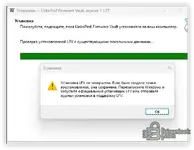
The program doesn’t install; it displays an update‑recovery message, and when installing a new version, it deletes almost all files from the installation folder.
sshot-2.webp
 

Post #25

The program doesn’t install; it displays an update‑recovery message, and when installing a new version, it deletes almost all files from the installation folder.View attachment 12281
Hello!

Thank you for reporting the installation issue.

I have tested LFV on two different computers, where the installation works correctly.

However, during further investigation, we identified and fixed an issue in the LFV installer that could cause installation recovery to fail under certain conditions.

A corrected installer is currently being tested.

To help us confirm whether this is the same issue on your computer, could you please tell me:

  1. Is this your first LFV installation, or were you updating an existing installation?
  2. Are you using Windows 10 or Windows 11? Is your system 32-bit or 64-bit?
  3. If possible, could you send screenshots of the first error or recovery message that appears before the final installation error?
For now, please avoid repeatedly reinstalling LFV or manually deleting its files, especially if you have existing data.

Once the corrected installer is verified, I will provide further instructions.

Thank you for your patience and assistance!
 

Post #26

🚀 LiekoProf Firmware Vault — Update 1.1.27!​#


2026-11-12_093635.webp


An important update has been released to improve the program's stability and reliability.

🛠 Installation and update issues fixed
Fixed known issues that could cause the program to fail during updates, including issues caused by locked files.

🛡 Improved update protection
The program now additionally checks whether the new version starts successfully. If an error is detected, a safe rollback to the previous version is available.

💾 Preserving your data
The improved update process preserves your firmware library, projects, settings, and secure storage.

⚙️ Improved installer reliability
The installation, verification, and temporary file cleanup mechanisms have been improved.

✅ ALL users are encouraged to update to version 1.1.27!

This update includes important fixes that improve the program's reliability going forward.

How to update

Open LFV → Settings → Updates → Check now.

For a fresh installation, use the download link in the first post.

🔐 LiekoProf Firmware Vault — your firmware, your decisions, your control!
 
Last edited by a moderator:

Post #27

The program doesn’t install; it displays an update‑recovery message, and when installing a new version, it deletes almost all files from the installation folder.View attachment 12281
Hello again!
I have some good news regarding the LFV installation issue you reported.
During our investigation, we identified and fixed an issue in the installer that could cause installation recovery to fail and leave some application files missing.
The corrected version, LFV 1.1.27, has now been officially released and is available to all users.
This update may resolve the problem you experienced.
If this is your first installation, please restart Windows, download the small LFV installer again from the official download link, and try installing the program. Please use a freshly downloaded installer rather than an older copy.
If you already had LFV installed with saved data, please let me know before trying again so we can make sure your data is protected.
Please let me know whether the installation completes successfully.
If the problem persists, please send me your Windows version (including whether it is 32-bit or 64-bit) and, if possible, screenshots of the first error messages.

Thank you for your patience and cooperation!
 

Post #28

Hello!

Thank you for reporting the installation issue.

I have tested LFV on two different computers, where the installation works correctly.

However, during further investigation, we identified and fixed an issue in the LFV installer that could cause installation recovery to fail under certain conditions.

A corrected installer is currently being tested.

To help us confirm whether this is the same issue on your computer, could you please tell me:

  1. Is this your first LFV installation, or were you updating an existing installation?
  2. Are you using Windows 10 or Windows 11? Is your system 32-bit or 64-bit?
  3. If possible, could you send screenshots of the first error or recovery message that appears before the final installation error?
For now, please avoid repeatedly reinstalling LFV or manually deleting its files, especially if you have existing data.

Once the corrected installer is verified, I will provide further instructions.

Thank you for your patience and assistance!

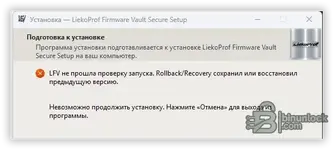
This is my first installation. My system is Windows 11 x64, and it won't install with the new installer.
 

Attachments

  • sshot-3.webp
    sshot-3.webp
    17.3 KB · Views: 40
  • sshot-4.webp
    sshot-4.webp
    13.8 KB · Views: 37

Post #29

This is my first installation. My system is Windows 11 x64, and it won't install with the new installer.
I sent you a possible solution in a private message
 

Post #30

is possible to upload winols database on the app
 

Post #31

Is it possible to upload the winols database to the app?
Hello! Yes, LiekoProf Firmware Vault supports storing and analyzing WinOLS projects (.ols), as well as other files.

Could you please clarify what exactly you mean by the WinOLS database—a collection of .ols projects or a database in another format?
 

Post #32

Hello
I have installed the software.
If I understand correctly, I can store both my original and modified files for each client.
My files are in .bin format.
I see the term "firmware" mentioned here.
I don't know exactly how it works.
Could someone tell me what steps to follow?
 

Post #33

Hello
I have installed the software.
If I understand correctly, I can store both my original and modified files for each client.
My files are in .bin format.
I see the term "firmware" mentioned here.
I don't know exactly how it works.
Could someone tell me what steps to follow?
Hello!

Yes, you understood correctly! 😊

LiekoProf Firmware Vault is designed to store and organize your original and modified ECU firmware files (.bin), as well as manage your customers and their vehicles.

Here's how to get started:

  1. Open LFV and click "Open Firmware".
  2. Select your original .bin file.
  3. Click "Add to Library", fill in the available ECU and vehicle information, and select "Original" as the firmware type.
  4. Save the file.
  5. Repeat the process with the modified file, select "Modified", specify the modification (Stage 1, EGR OFF, etc.), and link it to the corresponding Original.
  6. In the "Customers" section, add your customer and vehicle, then link the relevant firmware files.
This way, you can keep each customer's original and modified files organized and easily find them later.

An additional feature: If you have compatible Original and Modified files, LFV can also create certain combined configurations, such as Stage 1 + EGR OFF, when the necessary compatibility checks are satisfied.

All stored firmware files are protected in an encrypted Vault and can be exported whenever you need them, without changing the original file contents.

If you have any questions while adding your first files, feel free to ask. I'll be happy to help! 🤝
 

Post #34

🚀 LiekoProf Firmware Vault — Update 1.1.36​#


2026-11-16_194638.webp


Recent versions include significant improvements to the program's speed, stability, and reliability. Some interim updates were not announced separately.

⚡ Faster firmware handling
Opening the editor and library and switching between sections are now significantly faster, especially with large collections of files.

🛠 Improved stability
Data processing has been optimized, interface delays have been reduced, and the program is more responsive.

🔐 Reliability and security
Protection mechanisms, data integrity, and the preservation of settings during updates have been checked.

✅ We recommend that all users upgrade to the latest version, 1.1.36!

The update is available in the program settings.


📂 An additional firmware database is planned!

We are considering providing access to a collection acquired in Germany that contains more than 19,000 files.

Most files are for vehicles made before 2013, with some covering models up to 2015.

⚠️ This collection has not been personally tested in practice, so the accuracy and functionality of each file cannot be guaranteed.

Whether access will be offered and on what terms will be announced separately. Interested users can get in touch via private message.

LiekoProf Firmware Vault — your firmware, your solutions, your control!
 
Last edited by a moderator:

Post #35

Hello! Yes, LiekoProf Firmware Vault supports storing and analyzing WinOLS projects (.ols), as well as other files.

Could you please clarify what exactly you mean by the WinOLS database—a collection of .ols projects or a database in another format?
collection of ols project
 

Post #36

collection of ols project
Understood, you mean a collection of WinOLS (.ols) projects.

Yes, LiekoProf Firmware Vault lets you save these files in the “Projects” section, view the technical information extracted from them, and link projects to their corresponding firmware.

Could you clarify whether you want to add individual .ols projects or import an entire collection from folders at once? These are different scenarios, and I want to make sure I understand what you need.
 

Post #37

Hello
I tried using it, but it doesn't work for me,
whether it's the open firmware, download, or save function.

If you can help me, thank you.
 

Post #38

Hello
I tried using it, but it doesn't work for me,
whether it's the open firmware, download, or save function.

If you can help me, thank you.
Hello!

First, please make sure LFV is updated to the latest available version.

If you're still experiencing problems, please note the exact date and time when the issue occurs.

Then go to Settings and use the option to save the diagnostic file.

After that, open the Support section, create a ticket, describe the problem, include the exact date and time, and attach the diagnostic file.

This information is important for identifying the cause of the issue. I've tested LFV on several computers and haven't been able to reproduce the problems you described.

Thank you for your cooperation!
 

Post #39

Understood, you mean a collection of WinOLS (.ols) projects.

Yes, LiekoProf Firmware Vault lets you save these files in the “Projects” section, view the technical information extracted from them, and link projects to their corresponding firmware.

Could you clarify whether you want to add individual .ols projects or import an entire collection from folders at once? These are different scenarios, and I want to make sure I understand what you need.
just want to import an entire ols collection from folders at once
 

Post #40

just want to import an entire ols collection from folders at once
I understand! You want to import an entire collection of WinOLS (.ols) projects from folders at once.

At the moment, LFV supports adding and storing these projects, but automatic bulk import of entire folders, including nested directories, has not yet been implemented in the public version.

That’s a useful suggestion for future development of the program. Thanks for the feedback!
 
Activity
So far there's no one here