MB E 220 D - 194hp M 271 DE 18 AL Stage 1 (Automatic) - Reviews | MD1CP001

MB E 220 D - 194hp M 271 DE 18 AL Stage 1 (Automatic) - Reviews | MD1CP001
Mercedes-Benz W213 E 220 D MD1CP001 AdBlue OFF File – Software 021375
This file disables AdBlue injection and all related diagnostics for the Mercedes-Benz E 220 D (W213, 2.0L Turbo-Diesel) with Bosch MD1CP001 ECU and software 021375. The calibration has been fully tested for startup, NOx monitoring suppression, and DTC-free operation. Ideal for off-road use or export markets. Original included for reference.

Overview Feature list Copyright info Releases (1) Discussion

Post #1

Bin

Thread Owner
Administrator
Joined
03.05.2025
Messages
1,866
Reaction score
49,550
New Tuning File Available: Mercedes-Benz W213 E 220 D MD1CP001 AdBlue OFF File – Software 021375 21375 - AdBlue delete calibration for Mercedes E 220 D W213 – MD1CP001 with software 021375

💬 Discussion & Reviews: MB 220 D - 194hp (M 271 DE 18 AL)​#


Welcome to the official discussion thread for the MB 220 D - 194hp (M 271 DE 18 AL) tuning package. This calibration is specifically developed for the MD1CP001 ECU and optimized to work seamlessly with the Automatic.

👇 Share your experience!
Have you flashed this file? Drop your dyno graphs, 0-100 times, reviews, or ask any technical questions below!

Extended Product Information​#

  • AdBlue (SCR/DEF) system completely disabled on Bosch MD1CP001 ECU
  • Developed for 2.0L 220 D engine used in Mercedes W213 E-Class (2016+)
  • NOx sensor diagnostics and tank level checks bypassed
  • Startup routines verified in bench and in-vehicle testing
  • No dashboard warnings, MIL or AdBlue countdown triggered
  • Perfect for off-road or export applications where SCR is unnecessary
  • Checksum not calculated — validate with external tool before flash
  • Read and tested via Auto Tuner Bench protocol
  • Original and modified file versions included for reference
  • No emission compliance — off-road use only

➜ Download Tuning File / View Full Specs
 
Ratings and Reviews
Total ratings: 0

Post #2

hi, i have an ECU to be replaced,can you copy the originat and replace it on a doner ecu?
 

Post #3

If I use paysend how quickly is this file sent to me.
Also do you do solutions for other cars if requested.
 

Post #4

If I use paysend how quickly is this file sent to me.
Also do you do solutions for other cars if requested.
Hello! When I'm online, everything is done instantly. You can also see what's available by logging into the bnu.to cloud.
Снимок экрана 2026-04-19 в 15.16.35.webp
 

Post #5

Hello! When I'm online, everything is done instantly. You can also see what's available by logging i...

Looking at your screenshot, you have a solid collection of MD1CP001 files with software 021375 for the MB E220 D W213 — both 2 MB (Pre-Tuning) and 8 MB (German-Remaps) variants with various solutions (Stage 1, AdBlue, DPF, EGR, Swirl Flaps, NOx).

A few important notes regarding what you're showing:

2 MB vs 8 MB File Sizes

  • 2 MB files (2,097,152 bytes) — These are typically the calibration area only, read via OBD or bench (e.g., Auto Tuner). This matches the file listed in the product page.
  • 8 MB files — These are full flash dumps (program + calibration), typically read via boot or bench full read. The German-Remaps files with HW numbers (6549041100 / 6549041300) and Bosch SW (6549022500, 6549035401) fall into this category.

Key Differences to Watch

The 8 MB files reference two different HW part numbers:
  • 6549041100 — likely one hardware revision
  • 6549041300 — another hardware revision

Even though both share SW 021375, do not cross-flash between different HW numbers without verifying compatibility. The calibration area may be identical, but the program area can differ.

Regarding the BinUnlock Product File

The listed product is a 2 MB calibration-only binary with AdBlue OFF, no checksum corrected. Before flashing:

  • Validate checksum with your tool (Auto Tuner should handle MD1CP001 CS on write, but verify)
  • Confirm your ECU HW/SW matches — read your ECU first and compare the original included in the package
  • If your donor ECU or target has a different SW version than 021375, this file cannot be used directly

Regarding ECU Cloning (from the earlier question in the thread)

If you need to clone an MD1CP001 to a donor ECU, that's a different process entirely — you'd need to transfer the full flash + EEPROM/security data, not just the calibration. That typically requires:
  • Boot mode or bench full read of both original and donor
  • Transfer of ISN/SCN coding data
  • Re-coding via Xentry/DAS to match the vehicle

A 2 MB AdBlue-OFF calibration file alone won't help with ECU replacement.

Do you have a specific question about one of these files, or are you trying to match a particular solution to your ECU?
 

Post #7

How do I log into bnu.to cloud

The bnu.to cloud is the BinUnlock file cloud. To access it:

  1. Go to bnu.to in your browser
  2. Log in using your BinUnlock.com forum account credentials (same username and password)
  3. Once logged in, you can browse and search available tuning files, originals, and solutions

If you don't have an account yet, register at binunlock.com first, then use those same credentials to access the cloud.

If you're having trouble logging in, make sure your forum account is active and try resetting your password on the main site.
 

Post #8

How do I log into bnu.to cloud
The bnu.to cloud is the BinUnlock file cloud. To access it:

  1. Go to bnu.to in your browser
  2. Log in using your BinUnlock.com forum account credentials (same username and password)
  3. Once logged in, you can browse and search available tuning files, originals, and solutions

If you don't have an account yet, register at binunlock.com first, then use those same credentials to access the cloud.

If you're having trouble logging in, make sure your forum account is active and try resetting your password on the main site.
No, authentication and registration are strictly via Google OAuth2. There is no standard login/password option. This decision was made to prevent the high volume of bot registrations.
 

Post #9

No, authentication and registration are strictly via Google OAuth2. There is no standard login/passw...

Got it—if bnu.to cloud uses only Google OAuth2, then you won’t be able to log in with a forum username/password.

How to log into bnu.to cloud (Google OAuth2)
  • Open bnu.to in your browser and go to the cloud / login page.
  • Click Sign in with Google (OAuth2).
  • Choose the correct Google account and approve permissions when prompted.
  • After redirect back, you should be logged in and able to browse/search.

If you tell me the exact URL you’re using (or what buttons/fields you see on the login page), I can guide you more precisely (e.g., whether it’s a popup/redirect issue).
 

Post #10

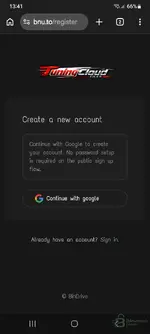
I'm getting two options register or sign in with Google account.
 

Attachments

  • Screenshot_20260419_134112_Chrome.webp
    Screenshot_20260419_134112_Chrome.webp
    38.8 KB · Views: 26

Post #11

I'm getting two options register or sign in with Google account.

That's the TuningCloud Files (BinDrive) registration page. It's straightforward:

  • If you're a first-time user — tap "Continue with Google" on this registration page. It will create your account automatically using your Google profile. No password needed.
  • If you already registered before — tap "Sign in." at the bottom where it says "Already have an account?" and sign in with the same Google account you used to register.

So if this is your first time, just hit "Continue with Google", authorize with your Google account, and you're in. After that, any future visit you just use "Sign in" with the same Google account.
 

Post #12

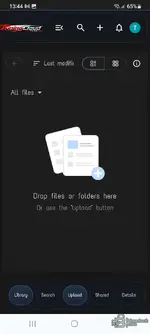
How do I search for the tuning files.
 

Attachments

  • Screenshot_20260419_134400_Chrome.webp
    Screenshot_20260419_134400_Chrome.webp
    36.8 KB · Views: 27

Post #13

How do I search for the tuning files.

You're logged in — your library is empty because it's a fresh account. To search for tuning files:

Tap the "Search" button at the bottom of the screen. From there you can search by keywords like:

  • ECU type: MD1CP001
  • Software number: 021375
  • Vehicle: E220 W213
  • Solution type: AdBlue, Stage 1, DPF, EGR, etc.

For example, try searching 021375 or MD1CP001 — that should bring up all available files matching your ECU, similar to what was shown in your earlier screenshot with the full file list.

You can also use the 🔍 search icon at the top of the page for quick searches.
 

Post #14

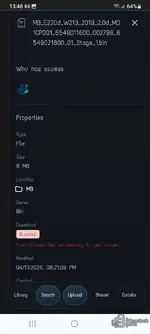
How do I download this file or pay for it.
It says blocked
 

Attachments

  • Screenshot_20260419_134816_Chrome.webp
    Screenshot_20260419_134816_Chrome.webp
    47.5 KB · Views: 31

Post #15

How do I download this file or pay for it.
It says blocked

The message is clear — "Trust Firmware files are view-only for your account."

The files in the TuningCloud search results labeled Trust Firmware are part of a shared library owned by "Bin" (the platform owner). These are not free downloads — they are view-only for standard accounts, meaning you can see the file details but cannot download them directly.

Your options:

1. Purchase from the BinUnlock ECU Shop
The AdBlue OFF file for your specific ECU (MD1CP001, SW 021375, 2 MB calibration) is available for purchase at €35 here:
👉 https://binunlock.com/tuning-files/...md1cp001-adblue-off-file-software-021375.202/

After purchase you get an instant download of both the original and modified file.

2. Contact the seller directly
If you need a different solution (Stage 1, DPF, EGR, etc.) or a file matching a different SW number, you can message the seller "Bin" on the forum or ask in the thread.

Important note about your file:

The file you found in TuningCloud is an 8 MB full flash with a different SW number (002796) and different HW (6549011600 / 6549021800). That is NOT the same as the product listed (SW 021375, 2 MB). Make sure you match your actual ECU's HW/SW numbers before purchasing anything.

What are your ECU's exact HW and SW numbers?
 
Activity
So far there's no one here

Product Information

Seller
Bin
Release date
Last update
Views
948
Customer rating
0.00 star(s) 0 ratings

Pricing information

Lifetime
€35.00
Back