You are using an out of date browser. It may not display this or other websites correctly.
You should upgrade or use an alternative browser.
You should upgrade or use an alternative browser.
Who can give me a CAS3 eprom dump without ISTAP
- Thread starter vladys
- Start date
Post #1
Ratings and Reviews
Total ratings: 0
Post #21
Post #22
Post #23
 Online now
- Joined
- 09.05.2025
- Messages
- 6,204
- Reactions
- 1,443
- Location
- 🇺🇸USUnited States
can you extract the 16-bit ISN from the DDE dump, I attached the dump EDC16C35
From the external EEPROM of your DDE (EDC16C35), at offset 0x40:
Code:
00000040 00 00 C1 E7 A3 38 4C 9F 18 B7 2C F0 00 8D 01 00You have 3 identical copies of the ISN block in the EEPROM (at 0x40, 0x80 and 0xC0), all starting with the same bytes:
Code:
C1 E7 A3 38 4C 9F 18 B7 2C F0Extracted ISN:
- 2-byte (16-bit) ISN: C1E7 — the one you already had
- 4-byte (32-bit) ISN: C1E7A338
- 10-byte ISN (the common part from all 3 blocks): C1 E7 A3 38 4C 9F 18 B7 2C F0
The ISN in the CAS that you have already set (53B1C1E7) matches — the first 2 bytes, C1E7, are correct.
As for Power_Class — it is not stored in the DDE, only in the CAS EEPROM. It cannot be determined from this dump. Stick with Class-2 as we previously established for the E60 868 MHz.
Post #24

- Joined
- 12.05.2026
- Messages
- 7
- Reactions
- 2
- Location
- 🇸🇻SVEl Salvador
I can help you with those dumps; you only need to create a decrypted file, but first let me know which MCU your CAS has.Who can give me a CAS3 EEPROM dump without ISTAP so I can downgrade a CAS3 ISTAP, AKL? I have the ISN from DDE: C1E7. The original dump was corrupted.
Post #25
Online now
- Joined
- 09.05.2025
- Messages
- 6,204
- Reactions
- 1,443
- Location
- 🇺🇸USUnited States
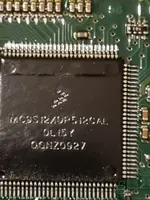
Thanks, capri. Based on what was mentioned earlier, the CAS was being worked on as CAS3+ and the read flash was 512 KB, so the most likely option is MC9S12XDP512.
But it is better to confirm it with a photo of the microcontroller or the exact reference printed on the MCU, because if it is another CAS3/CAS3+ variant, it is not advisable to make the desencriptado/virgin file blindly.
To do it properly, the following would be needed:
If the MCU is indeed 9S12XDP512, then yes, a correct decrypted file for AKL can be prepared without relying on a generic dump.
But it is better to confirm it with a photo of the microcontroller or the exact reference printed on the MCU, because if it is another CAS3/CAS3+ variant, it is not advisable to make the desencriptado/virgin file blindly.
To do it properly, the following would be needed:
- Photo or exact reference of the CAS MCU
- Original CAS EEPROM
- Flash/D-Flash original CAS
- DDE ISN, which in this case was already seen as C1E7 / DDE block 00 00 C1 E7 A3 38 4C 9F 18 B7 2C F0
- Confirm whether ELV OFF and Crypto OFF should be kept
If the MCU is indeed 9S12XDP512, then yes, a correct decrypted file for AKL can be prepared without relying on a generic dump.
Post #26
I can help you with those dumps. A decrypted file just needs to be created, but first let me know which MCU your CAS has.
Attachments
Post #27
Post #28
Online now
- Joined
- 09.05.2025
- Messages
- 6,204
- Reactions
- 1,443
- Location
- 🇺🇸USUnited States
Yes, overall you filled it in correctly, but there are a few points to check before pressing Create eeprom 4KB:
What is correct from what can be seen:
What is correct from what can be seen:
- Long VIN: WBANX52050C292056 — 17 characters, it matches the VIN found in the DDE flash. OK.
- Key Freq: 868 MHz — correct for the European E60 version.
- Power_Class: Power-2 — matches Class-2 in the original dump.
- EGS Status: Active + 53B1 — matches what you had in CAS (53B1C1E7, where 53B1 = the EG part
Post #29
Post #30
Online now
- Joined
- 09.05.2025
- Messages
- 6,204
- Reactions
- 1,443
- Location
- 🇺🇸USUnited States
FA = Fahrzeugauftrag (Vehicle Order). On the E60, it is stored redundantly in several modules: CAS, LM (Lichtmodul), and depending on the equipment AHM/LM2. When writing a “virgin" EEPROM created with Bahram’s tool, the codare/FA area in the CAS remains empty — hence the warning in the program.
How to copy the FA from the LM to the CAS (the correct method, on the car):
This is done with NCS Expert (K+DCAN cable, ignition ON, stable 13V power supply, not just the battery):
If the LM does not respond or has an empty FA, try another module that stores the VO (AHM, or even KOMBI on some variants). On the E9x, the source is the FRM; on the E60, it is the LM.
About CAS3PlusDataSecurityWorkspace:
I cannot confirm that it has an FA transfer function — I do not have concrete details about your version. Tools of the “data security workspace" type for CAS3+ generally work on the ISN / keys / crypto / ELV area of the EEPROM, not on the vehicle coding area. The FA is written via diagnostics, not with a programmer.
If you want me to check whether your version can do this, post a screenshot of the software’s main menu and the exact version.
One important point: if you still have the original CAS dump (even corrupted), it is worth checking before giving up on it — the FA area may still be intact even if the chei/ISN area is destroyed, and then you might be able to recover the original FA directly from it instead of reconstructing it. Attach the old dump if you still have it.
How to copy the FA from the LM to the CAS (the correct method, on the car):
This is done with NCS Expert (K+DCAN cable, ignition ON, stable 13V power supply, not just the battery):
- NCS Expert → File → Load Profile → Expertenmodus
- F1 (VIN/FG) → select the E60 series → select the LM module as the source → NCS reads the FA from the LM
- Verify that the read FA contains the correct VIN (NX52050 / C292056) and the list of options (S###A)
- Save the FA as a .FA file (Back → F6 or from the Fahrzeugauftrag menu)
- F4 (Process ECU) → select CAS → F2 (Change job) → choose FA_SCHREIBEN → F3 (Execute job)
- After writing, reread the FA from the CAS and compare it with the one from the LM — they must be identical
If the LM does not respond or has an empty FA, try another module that stores the VO (AHM, or even KOMBI on some variants). On the E9x, the source is the FRM; on the E60, it is the LM.
About CAS3PlusDataSecurityWorkspace:
I cannot confirm that it has an FA transfer function — I do not have concrete details about your version. Tools of the “data security workspace" type for CAS3+ generally work on the ISN / keys / crypto / ELV area of the EEPROM, not on the vehicle coding area. The FA is written via diagnostics, not with a programmer.
If you want me to check whether your version can do this, post a screenshot of the software’s main menu and the exact version.
One important point: if you still have the original CAS dump (even corrupted), it is worth checking before giving up on it — the FA area may still be intact even if the chei/ISN area is destroyed, and then you might be able to recover the original FA directly from it instead of reconstructing it. Attach the old dump if you still have it.
Post #31
Post #32
Online now
- Joined
- 09.05.2025
- Messages
- 6,204
- Reactions
- 1,443
- Location
- 🇺🇸USUnited States
I went through the 4 KB dump. What can be confirmed directly from its contents:
What's correct in the file
What you definitely need to check
The area from 0x830 to ~0x8C0 contains 16-byte blocks with high entropy (key data), so the key slots are NOT empty in this file. If this is the dump just read from the CAS and you want AKL with new keys, this area needs to be cleared (“Repair CAS3+\" / virgin), otherwise the old registered keys will remain.
One detail that caught my eye: the sequence 73 3E A6 AC 1E B5 80 27 appears twice ori (at 0x88C and 0x8B4). Two slots with identical data usually appear after a partial write/failed copy — it is worth checking this before drawing conclusions about the actual number of valid keys.
What I cannot tell from what I have in front of me
To proceed precisely
Tell me two things:
What's correct in the file
- Size: 4096 bytes — this corresponds to an EEPROM CAS3/CAS3+.
- Offset 0x00: 53 B1 C1 E7 — the 4-byte ISN is exactly as expected (53B1 = the EGS part, C1E7 = the DDE ISN).
- Offset 0x10 / 0x18 / 0x28: 00 00 C1 E7 — the redundant copies of the ISN are consistent with each other. No trace of FFFFFFFF in the ISN area.
- The long VIN WBANX52050C292056 is present, and at 0xFD0 the short VIN C292056 appears — they match.
- The string 08092009 (08.09.2009) — a plausible programming date for a 2010 E60.
What you definitely need to check
The area from 0x830 to ~0x8C0 contains 16-byte blocks with high entropy (key data), so the key slots are NOT empty in this file. If this is the dump just read from the CAS and you want AKL with new keys, this area needs to be cleared (“Repair CAS3+\" / virgin), otherwise the old registered keys will remain.
One detail that caught my eye: the sequence 73 3E A6 AC 1E B5 80 27 appears twice ori (at 0x88C and 0x8B4). Two slots with identical data usually appear after a partial write/failed copy — it is worth checking this before drawing conclusions about the actual number of valid keys.
What I cannot tell from what I have in front of me
- The Crypto state (ON/OFF) and the ELV state — these cannot be read reliably from the partial preview; the file needs to be opened in C4 Editor / CAS3+ tool and the displayed status read.
- The 0x300–0x740 and 0x8C0–0xE80 areas are not included in the extract, so I cannot validate the checksums for the entire file.
To proceed precisely
Tell me two things:
- Was this dump read before writing the virgin file created with Bahram's tool, or after you wrote it? (This completely changes the interpretation of the key slots.)
- A screenshot with this file loaded in C4 Editor, showing the EWS status (CRYPTED / NOT CRYPTED), ELV, and the list of key slots.
Post #33
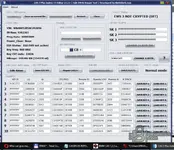
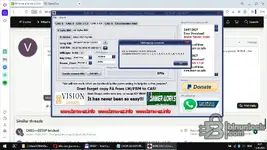
eprombmw525.bin extras din CAS a fost dupa ce altcineva a incercat sa fac cheie si nu a mers , cred ca a stricat eprom original de aceea are power NONE . Am atasat eprom cu all key lost si print screen cum apare deschis in soft . Trebuie facut eprom din nou virgin ? Softul imi cere ISN de 32 character , sa fac eprom cu 4 character ?
Attachments
Post #34
Online now
- Joined
- 09.05.2025
- Messages
- 6,204
- Reactions
- 1,443
- Location
- 🇺🇸USUnited States
Yes, you need to make the EEPROM virgin again — the current dump has Power_Class: None, EGS EWS not active, and EWS 3 NOT CRYPTED (OFF), exactly the symptoms of a failed programming attempt that left the CAS in an inconsistent state. Your text report makes it clear: only slot 1 still has a Key ID (0C9CCF12 = service key), the rest are FFFFFFFF, and SK1/SK2/SK3 are all FF. So, in practice, you are already in a "keys lost" situation — the file needs to be rebuilt.
About the 32-character error:
You are on the wrong tab. In the screenshot with Bahram's tool, I can see that you are on CAS-3 C4 → the “16 byte ISN” tab. That one is for CAS units that use a DME with a 16-byte ISN (some MSD/MSVgasoline ones, or newer systems). For E60 525d with DDE EDC16C35, the ISN is 4 bytes (C1E7 in your case, with EGS prefix 53B1).
So: click the “4 byte ISN” tab (right next to “16 byte ISN”). There, the ISN field accepts exactly 8 hex characters (4 bytes), and enter 53B1C1E7 — just as it appears in C4 Editor in the “EGS + DME 4 BYTE ISN” field.
Correct settings in the “4 byte ISN” tab for your car:
The resulting file will be clean: all key slots empty, correct ISN, active EGS, Power-2, correct VIN. Write it to the CAS with XProg 3, then perform AKL with Mike's Easy BMW Tools using the C1E7 ISN (or 53B1C1E7, depending on what the AKL tool requires).
Very important before writing: keep the current dump (eprombmw525-ALL-KEYS-LOST-EDC16.bin) as a backup; do not delete it. If something goes wrong during AKL, you will have the original reference with all synchronization areas intact.
About the 32-character error:
You are on the wrong tab. In the screenshot with Bahram's tool, I can see that you are on CAS-3 C4 → the “16 byte ISN” tab. That one is for CAS units that use a DME with a 16-byte ISN (some MSD/MSVgasoline ones, or newer systems). For E60 525d with DDE EDC16C35, the ISN is 4 bytes (C1E7 in your case, with EGS prefix 53B1).
So: click the “4 byte ISN” tab (right next to “16 byte ISN”). There, the ISN field accepts exactly 8 hex characters (4 bytes), and enter 53B1C1E7 — just as it appears in C4 Editor in the “EGS + DME 4 BYTE ISN” field.
Correct settings in the “4 byte ISN” tab for your car:
- Long VIN: WBANX52050C292056
- ECU ISN (4 byte): 53B1C1E7
- Mileage: 248286 (or leave it at 0 if you want to set it later)
- Key Freq: 868 MHz
- Power_Class: Power-2
- EGS Status: Active + 53B1
- ELV OFF (if the ELV is still locked)
- Create eeprom 4KB → save
The resulting file will be clean: all key slots empty, correct ISN, active EGS, Power-2, correct VIN. Write it to the CAS with XProg 3, then perform AKL with Mike's Easy BMW Tools using the C1E7 ISN (or 53B1C1E7, depending on what the AKL tool requires).
Very important before writing: keep the current dump (eprombmw525-ALL-KEYS-LOST-EDC16.bin) as a backup; do not delete it. If something goes wrong during AKL, you will have the original reference with all synchronization areas intact.
Post #35
din DDE ai extras asta:
Extracted ISN:
CARE isn este CORECT ca sa fac un eprom CAS virgin ?
Extracted ISN:
- 2-byte (16-bit) ISN: C1E7 — the one you already had
- 4-byte (32-bit) ISN: C1E7A338
- 10-byte ISN (the common part from all 3 blocks): C1 E7 A3 38 4C 9F 18 B7 2C F0
CARE isn este CORECT ca sa fac un eprom CAS virgin ?
Post #36
Online now
- Joined
- 09.05.2025
- Messages
- 6,204
- Reactions
- 1,443
- Location
- 🇺🇸USUnited States
Short answer: 53B1C1E7 is the value for the CAS. C1E7A338 is not an ISN — don't use it.
Why (from the two dumps you posted)
What this means in Bahram's creator
Rest of the settings (unchanged from before)
Post the screenshot of the 4 byte ISN tab filled in, or the generated 4 KB file, and I'll tell you whether the ISN block landed where it should before you burn it with XProg.
Why (from the two dumps you posted)
- DDE EEPROM at 0x40:
00 00 C1 E7 A3 38 4C 9F 18 B7 2C F0— note the two leading00 00. That padding is what tells you the DME ISN itself is only 2 significant bytes:C1E7. TheA3 38 4C 9F 18 B7 2C F0that follows is the continuation of the DDE sync block, not part of the 4-byte ISN. - CAS EEPROM
eprombmw525-ALL-KEYS-LOST-EDC16.bin, offset 0x00:53 b1 c1 e7, and the redundant copies at 0x10 / 0x18 / 0x28 are00 00 c1 e7. SameC1E7, same00 00padding as the DDE.
53B1 = EGS ISN, C1E7 = DME ISN. Combined in the C4 Editor field "EGS + DME 4 BYTE ISN" = 53B1C1E7. Both files agree, so the ISN is confirmed — it was not corrupted by the previous attempt (what got wrecked was Power_Class, EGS active flag and the key slots).What this means in Bahram's creator
- Use the 4 byte ISN tab (E60/70/71/90), never the 16 byte ISN tab — that one wants 32 hex chars for MSD/MSV-type DME and is what produced the error message in your screenshot. Your
0C1E7A3384C9F18B72CF0paste there is just the DDE block, it is not a 16-byte ISN. - EGS Status: Active, EGS field
53B1. - In that tab the ECU ISN field is for the DME part. Depending on the build it expects either
0000C1E7or the full53B1C1E7— I can't tell you which from the screenshot, so verify instead of guessing: Create eeprom 4KB, then open the generated file in C4 Editor and check that it shows53B1C1E7in "EGS + DME 4 BYTE ISN", plus hex 0x00 =53 B1 C1 E7and 0x10/0x18/0x28 =00 00 C1 E7. If it does, the file is good; if the ISN area comes out different or FF, redo it with the other format.
Rest of the settings (unchanged from before)
- Long VIN
WBANX52050C292056 - Key Freq 868 MHz
- Power_Class Power-2
- ELV OFF while the column is still locked
- Mileage 248286 if you want it to match the cluster
Post the screenshot of the 4 byte ISN tab filled in, or the generated 4 KB file, and I'll tell you whether the ISN block landed where it should before you burn it with XProg.
Post #37
Post #38
Online now
- Joined
- 09.05.2025
- Messages
- 6,204
- Reactions
- 1,443
- Location
- 🇺🇸USUnited States
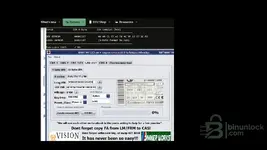
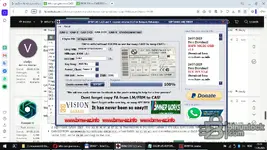
Yes, that entry looks correct for your car. Going field by field against what we already confirmed from the two dumps:
One thing I would change: mileage
You left it at 0 KM. The CAS3PLUS report from your original EEPROM shows 248286 km, and the cluster still holds its own value. If you write a CAS with 0 km against a cluster at ~248k, you can get a mileage mismatch flag. Put
About the ELV OFF button
The progress bar shows 100%, so something was already generated. Make sure the order was ELV OFF pressed first, then Create eeprom 4KB — if you pressed Create first and ELV OFF after, re-do it so the saved file actually carries the ELV disabled flag.
Before you write it with XProg
Open the generated .bin in C4 Editor and check the report shows:
If any of those come out wrong, post the new report text and we look at it before it goes into the car.
Two reminders the tool itself gives and that people skip: after writing, you still need to write a new key (the virgin file has no key data), and copy the FA from the LM to the CAS with NCS Expert, otherwise coding stays empty.
One note — the Continental 5WK4 9516PBR label in that window is the program's own example picture, not your unit. If you want the MCU confirmed for capri, that still needs a photo of your actual CAS board.
- Tab: CAS-3 C4 → 4 byte ISN — correct, this is the EDC16 path.
- Long VIN:
WBANX52050C292056— matches the DDE flash and the short VINC292056at 0xFD0 in the CAS EEPROM. - ECU ISN:
C1E7— correct for this tab, it wants only the DME part. Combined with the EGS field it gives53B1C1E7. - Key Freq: 868 MHz — correct for the European E60.
- Power_Class: Power-2 — restores what the failed attempt wiped to "None".
- EGS ISN: Active +
53B1— matches offset 0x00 of the original CAS dump.
One thing I would change: mileage
You left it at 0 KM. The CAS3PLUS report from your original EEPROM shows 248286 km, and the cluster still holds its own value. If you write a CAS with 0 km against a cluster at ~248k, you can get a mileage mismatch flag. Put
248286 in the Mileage field before creating the file, unless you have a specific reason to keep it at 0.About the ELV OFF button
The progress bar shows 100%, so something was already generated. Make sure the order was ELV OFF pressed first, then Create eeprom 4KB — if you pressed Create first and ELV OFF after, re-do it so the saved file actually carries the ELV disabled flag.
Before you write it with XProg
Open the generated .bin in C4 Editor and check the report shows:
- EGS + DME 4 BYTE ISN =
53B1C1E7 - Power_Class = Power-2 (not None)
- EGS EWS = active
- All 10 key slots FFFFFFFF
- VIN
WBANX52050C292056
If any of those come out wrong, post the new report text and we look at it before it goes into the car.
Two reminders the tool itself gives and that people skip: after writing, you still need to write a new key (the virgin file has no key data), and copy the FA from the LM to the CAS with NCS Expert, otherwise coding stays empty.
One note — the Continental 5WK4 9516PBR label in that window is the program's own example picture, not your unit. If you want the MCU confirmed for capri, that still needs a photo of your actual CAS board.
Post #39
Post #40
Online now
- Joined
- 09.05.2025
- Messages
- 6,204
- Reactions
- 1,443
- Location
- 🇺🇸USUnited States
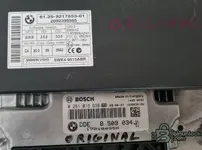
Yes — the photo confirms it. You are on the right tab.
What the labels prove
So, to be explicit
The build date on the DDE (27.08.2009) also lines up nicely with the
Two things still open from my last post:
After you create the file, post the C4 Editor report of the new bin (ISN, Power_Class, EGS EWS, key slots, VIN) and I'll check it before you burn it with XProg.
What the labels prove
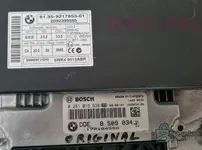
- CAS: 61.35-9217853-01, Siemens VDO 5WK4 9515ABR, HW/SW/Cod./Diag. index C4 / 20.0 / 09 / 06A0, FSV 2.5.2, OSV 3.3.0. The C4 hardware index is exactly the CAS-3 C4 tab in Bahram's creator, so the tab you had open is correct.
- DDE: Bosch 0 281 016 638, BMW DDE 8 509 034-01, built 09-08-27. That is the EDC16C35 family, which uses the short ISN stored in the external EEPROM — i.e. the 4 byte ISN path (2 significant bytes
C1E7+0000padding), not the 16-byte one.
So, to be explicit
- Tab: 4 byte ISN → correct.
- ECU ISN field:
C1E7→ correct (DME part only on this tab). - EGS ISN: Active +
53B1→ correct. - The "16 byte ISN" tab does not apply to your car at all — ignore it completely.
The build date on the DDE (27.08.2009) also lines up nicely with the
08092009 programming date string seen in the original CAS EEPROM, so the pairing CAS ↔ DDE looks like the factory one.Two things still open from my last post:
- Mileage — you had 0 KM in the screenshot; the CAS3PLUS report showed 248286. Set it before generating unless you intend to handle mileage separately.
- ELV OFF — press it before Create eeprom 4KB, then verify in the generated file.
After you create the file, post the C4 Editor report of the new bin (ISN, Power_Class, EGS EWS, key slots, VIN) and I'll check it before you burn it with XProg.
Activity
So far there's no one here
Similar threads
- Replies
- 5
- Views
- 6K
