Key points
- OBD, Bench and Boot are access methods, not brand names.
- OBD flashing works through the vehicle diagnostic socket and is fastest when the ECU, vehicle network and official protocol support it.
- Bench flashing means direct connection at the ECU or TCU connector, usually outside the vehicle and often without opening the case.
- Boot mode requires opening the unit and accessing the PCB, processor path, boot pins, BDM or JTAG area.
- KESS V2 is historically tied to diagnostic-port work, K-TAG to Bench/Boot/BDM/JTAG work, and KESS3 combines OBD, Bench and Boot in one platform.
- Flex and AutoTuner can work across OBD, Bench and Boot, but only where the official protocol supports that method.
- J2534 is not the same as OBD flashing, it is a pass-thru communication layer used by compatible software.
- Stable power, original backups and a recovery plan matter as much as the tool name.
- Coverage must be verified in the official protocol list for the exact ECU, SW version and vehicle.
- Clone-market claims should never be treated as proof of safe ECU writing.
The first thing a tuner should understand is not a brand name. It is the access method. OBD, Bench and Boot describe how you reach the ECU or TCU. They are not product names, and they are not fixed to one brand. Modern platforms such as KESS3, Flex and AutoTuner can overlap across more than one method when the official protocol allows it.
That is exactly why beginners get confused by phrases like “KESS is OBD,” “K-TAG is Boot,” or “J2534 can flash everything.” Those shortcuts are sometimes useful as historical memory, but they are not technical rules.
This article is the next method-focused guide in the BinUnlock Tuning Tools & Interfaces cluster and should be read alongside the published pillar article, ECU Flashing Tools Explained. The pillar article frames the bigger ecosystem: flashers, interfaces, editors, OEM tools and clone-market confusion. This article goes deeper into the practical difference between OBD vs Bench vs Boot ECU flashing, when each method makes sense and why the safest method depends on the exact ECU, protocol and recovery path.
If you want the plain-language version, it is this:
That is the core difference. OBD is in-car access. Bench is direct connector access. Boot is opened-module access. Bench and Boot are deeper workflows than OBD, but they also require better handling, better power control and better workflow discipline.
OBD ECU flashing means the software talks to the ECU or TCU through the vehicle diagnostic socket while the module stays installed in the vehicle. Official method pages from major tool manufacturers describe OBD or serial communication as access through the OBD diagnostic socket, diagnostic connector or vehicle OBDII port.
The reason OBD ECU flashing is popular is simple: it is convenient. You usually do not remove the ECU, do not open the case and do not set up a bench harness. On older or well-supported ECUs, that makes OBD the fastest route for stock reads, calibration writes or controlled customer-flasher workflows.
That is why legacy KESS branding became strongly associated with serial or diagnostic-port work, why New Genius is framed around serial communication through OBDII or dedicated diagnostic connectors, and why handheld or customer-side tools such as Powergate, MyGenius, HP Tuners and EFILive AutoCal are commonly discussed in OBD-centered workflows.
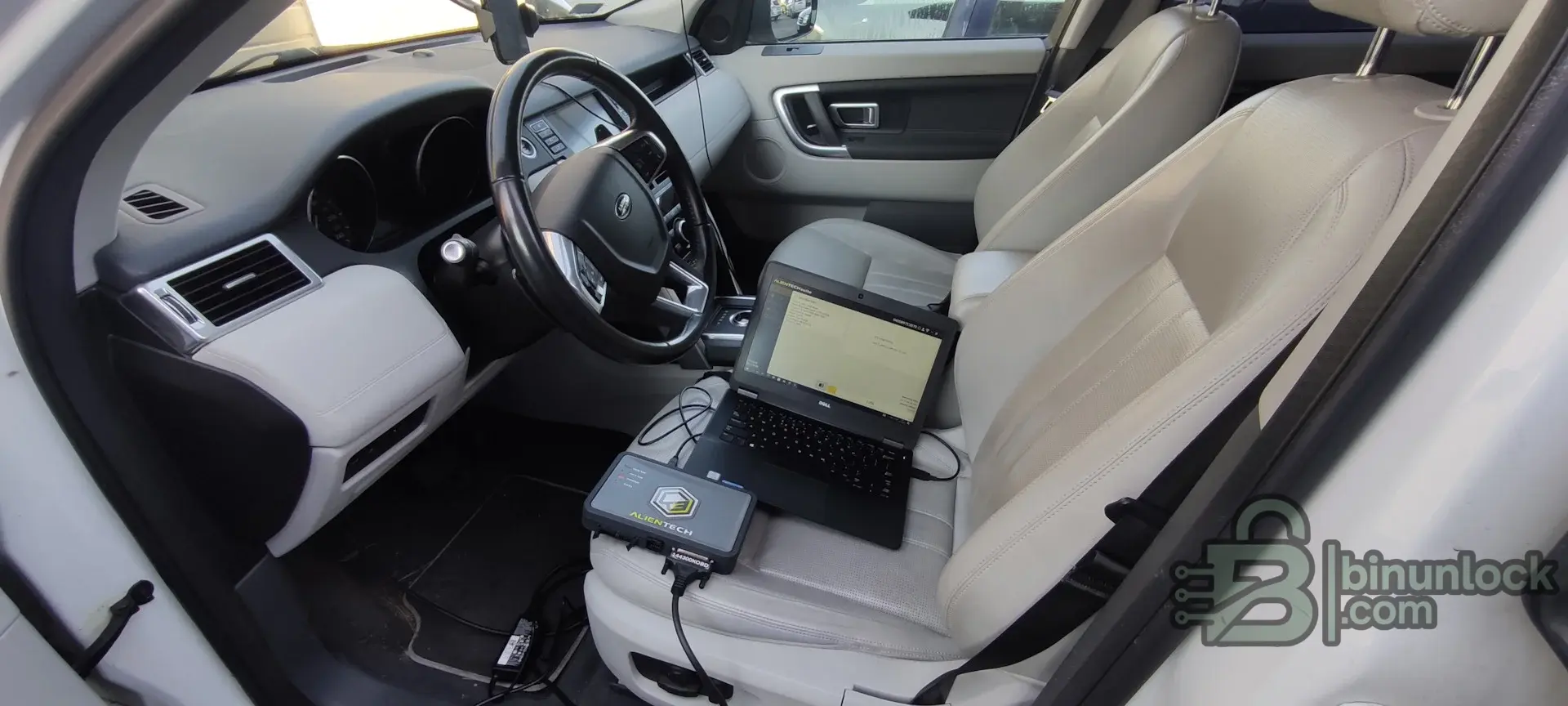
Real OBD flashing setup with a supported interface connected to the vehicle diagnostic socket.
But OBD is not automatically the safest method. During an in-car write, the session depends on the vehicle battery, ignition state, network stability, gateway behavior and the exact protocol implementation. If voltage drops, the laptop sleeps, the USB connection fails or another module interrupts communication, a simple OBD write can become a recovery job.
That is why OBD can be the right method on one ECU and the wrong method on another. If the official protocol says OBD write is supported and stable, use that fact. If the official method list points you to Bench or Boot first, do not assume diagnostic-port access is safer just because it feels easier.
Coverage must be verified in the official protocol list for the exact ECU, SW version and vehicle.
Examples commonly associated with OBD workflows include KESS V2 legacy serial programming, KESS3, New Genius, Powergate, MyGenius, AutoTuner, Flex, and platform-specific ecosystems such as HP Tuners, EFILive and EcuTek. Module-based software such as PCMflash or BitBox can also do OBD jobs where the correct module and compatible interface are used.
Bench ECU flashing means the module is accessed directly at its connector, usually outside the vehicle, using a bench harness, breakout lead or dedicated adapter. In many supported Bench methods, the ECU or TCU case does not need to be opened. The tool connects through the external ECU connector pins rather than through the vehicle diagnostic port.
That direct connection is the biggest practical advantage of Bench ECU programming. You are no longer dependent on the vehicle body network, gateway behavior, accessories waking up mid-session or ignition-state quirks inside the car. On many modern ECUs, that makes Bench a cleaner workflow than OBD because the power and communication path are more controlled.
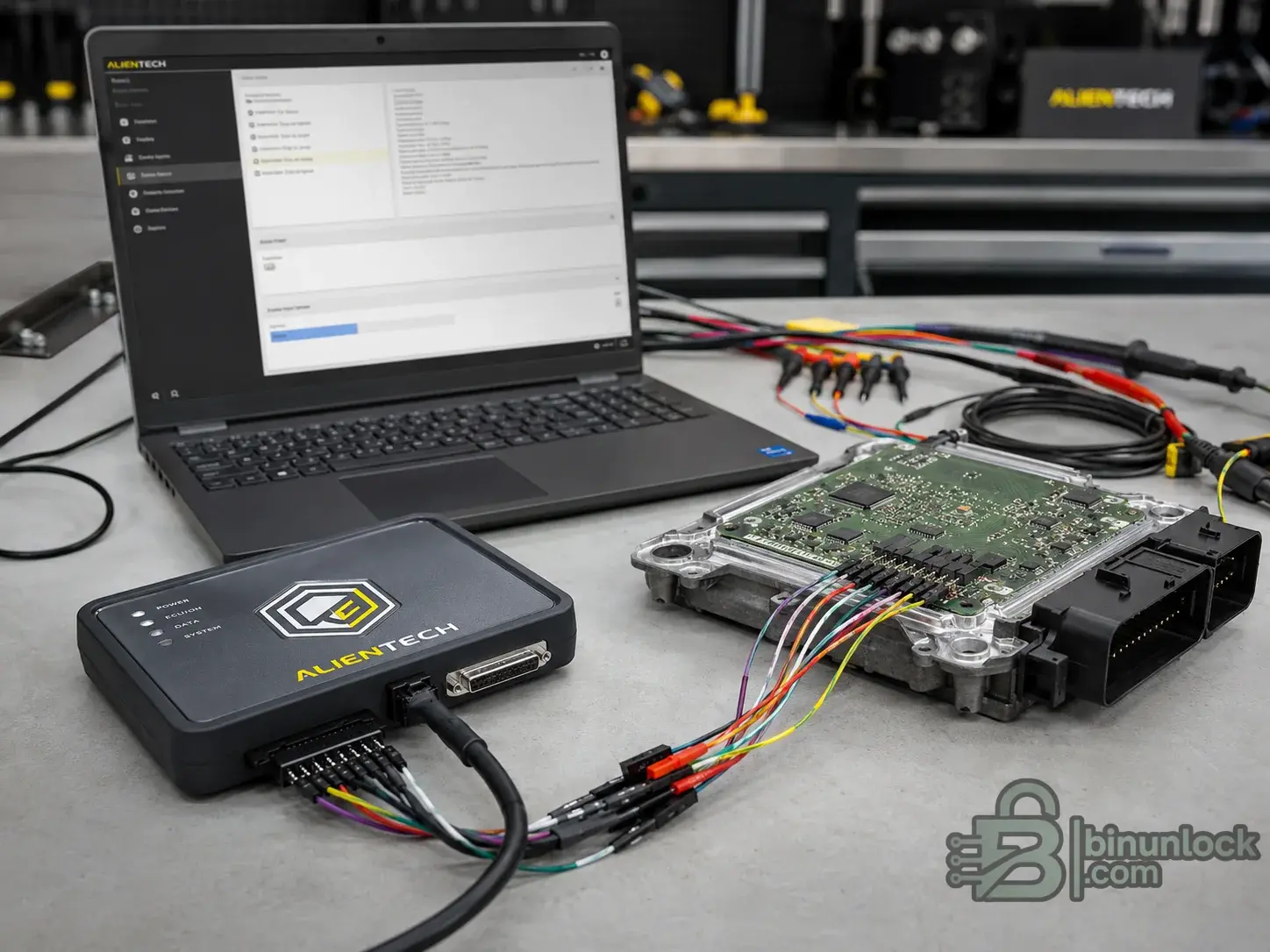
Bench flashing setup with ECU, harness, interface and regulated power on the workbench.
Bench is also where professional workflow discipline becomes obvious. A solid bench setup usually means a regulated power source, correct pinout, stable harness, known connection diagram and software that officially supports that exact bench method. If one of those pieces is wrong, Bench is not “automatically safe” anymore. A wrong pinout, reversed polarity, weak supply or improvised cable can fail just as hard as a bad OBD write.
This is where beginners often ask, “Is Scanmatik a Bench tool?” The correct answer is no. A Scanmatik adapter is a communication interface.
The interface can be used by compatible software. ECU/TCU coverage depends on the software, license, protocol module, firmware, driver, cable and vehicle. Coverage must be verified in the official protocol list for the exact ECU, SW version and vehicle.
The same logic applies to OpenPort, CarDAQ, DiaLink and CHIPSOFT J2534. PCMflash and BitBox show this clearly: the software modules and connection diagrams define the job, while the interface is only the communication path.
Examples of Bench workflows include KESS3 Bench, Flex Bench, AutoTuner Bench, CMDFlash Bench, bFlash Bench, DFOX Bench, New Trasdata, and module-based stacks such as PCMflash, BitBox or CombiLoader when paired with the correct module and interface.
Boot mode ECU programming means opening the ECU or TCU and reaching a deeper service path on the PCB. Tool vendors use the term Boot for workflows where the programmer accesses the processor, boot pin, pad, pad array, board-level service area or low-level communication path.
That is why Boot mode is typically used when a tuner needs more than a normal calibration write. Common reasons include full backup, recovery after a failed write, cloning workflows, protected ECUs, older board-level systems, or tasks where the official tool requires processor-level access instead of a normal external session.
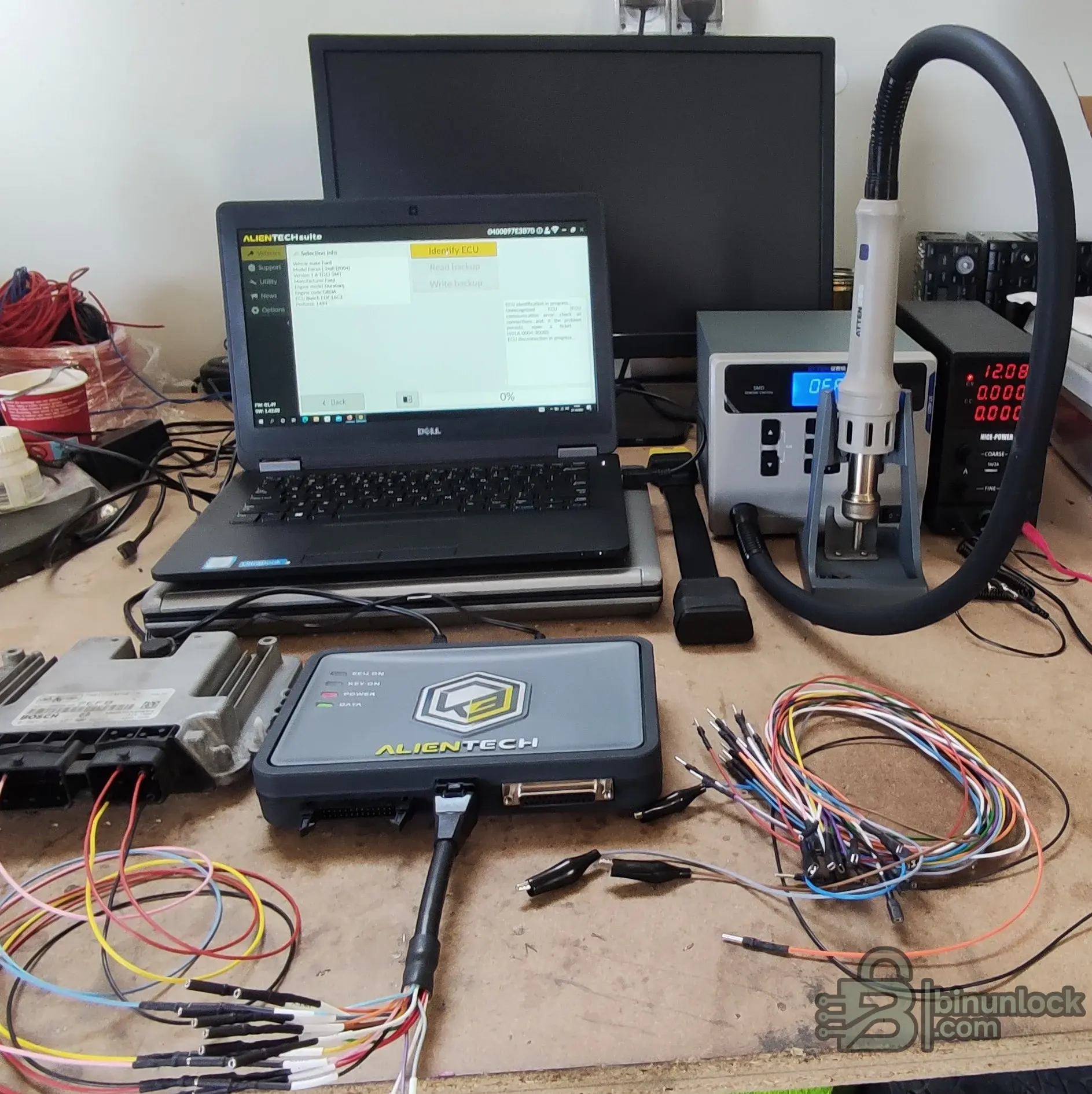
Opened ECU showing the difference between normal connector access and Boot-level board access.
Boot mode is powerful, but it is also physically riskier than OBD or Bench. You are now handling the opened control unit, board coatings, seals, probes, pads and processor-adjacent areas. The flasher may be able to recover a software problem, but it cannot magically undo board damage, torn pads, moisture risk, broken seals or careless probe handling.
That is why professional tools describe Boot as a deeper workflow, not as the default method for every beginner job.
Examples commonly associated with Boot mode include K-TAG legacy, New Trasdata, Flex Boot, KESS3 Boot, CMDFlash, DFOX Boot and other board-level tools that use BDM, JTAG or related processor/debug paths where officially supported.
This is the part that sounds advanced but becomes much simpler once you separate access concepts from marketing labels.
BDM usually refers to Background Debug Mode-style access on older Motorola or Freescale families and similar ECU generations. In tuning-tool language, BDM is commonly tied to older MPC5xx, MC68xxx or HC12-era work. It belongs to the board-level access category and should not be treated as normal OBD flashing.
JTAG is a board-level debug and access interface. In ECU and TCU work, “JTAG mode” is tuning shorthand for a low-level board access path on certain processors or mechatronic modules. It is not a promise that every JTAG-labeled workflow is interchangeable from one tool to the next.
In tuning, GPT is not a universal programming standard like JTAG. It is more often a tool-vendor-specific connector-side access concept. Some workflows use GPT or e-GPT-style connections to handle specific modern protocols from the ECU connector without opening the ECU. That makes GPT a protocol- and tool-specific accessory or connection concept, not a generic synonym for Boot.
Tricore Boot usually means low-level access on an ECU built around an Infineon TriCore processor. Tool vendors often separate these families in their protocol tables. Modern Bosch MEDC17, MD1/MG1-related discussions and other protected ECU families often lead beginners into this terminology.
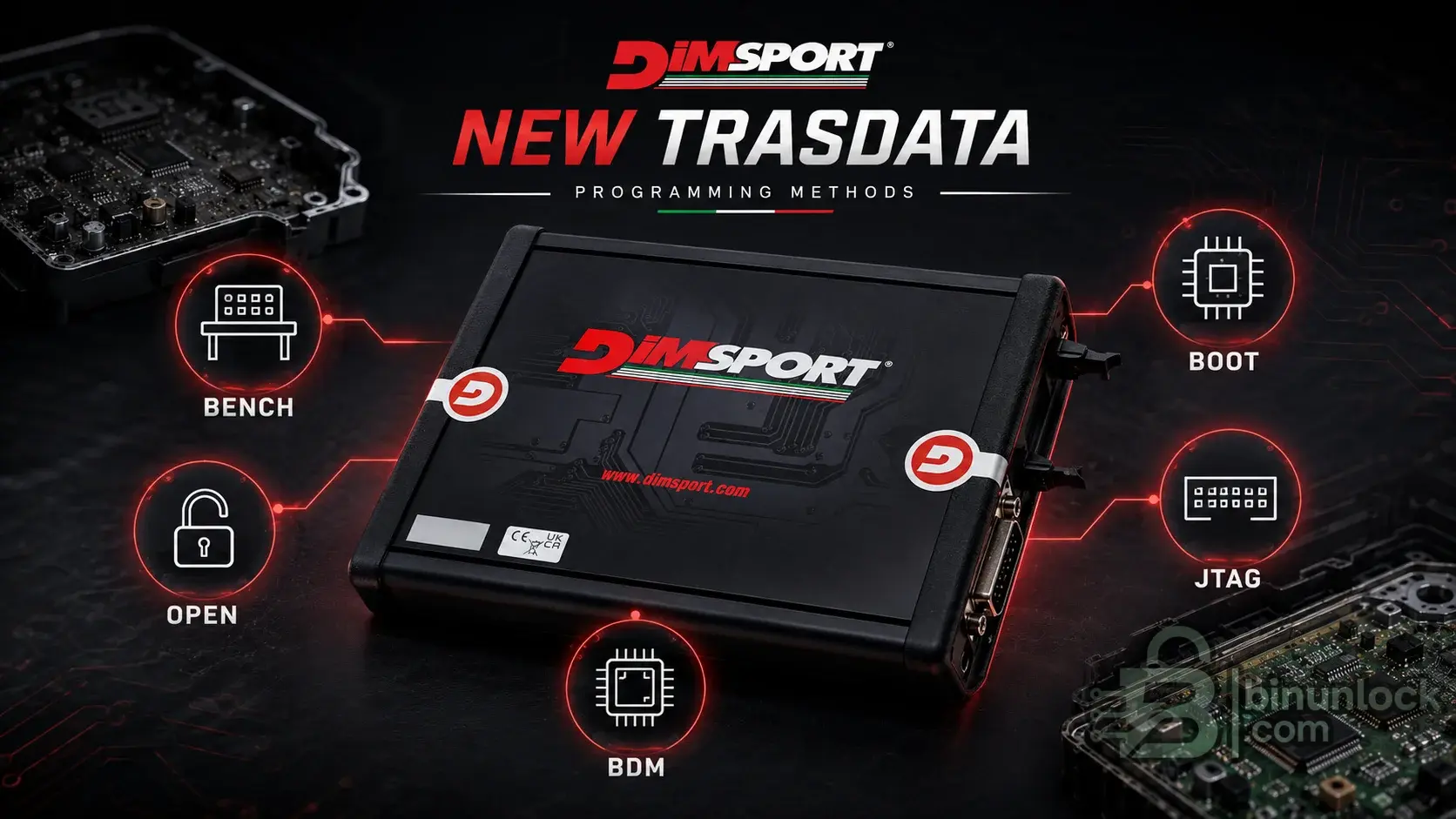
New Trasdata illustrates why Bench, Open, BDM, Boot and JTAG should be treated as different ECU access methods, not as interchangeable names.
Most of the confusion comes from timing. KESS and K-TAG were separate legacy identities at the exact moment many forums, clone listings and YouTube videos taught people their first tuning vocabulary.
The historical shortcut is:
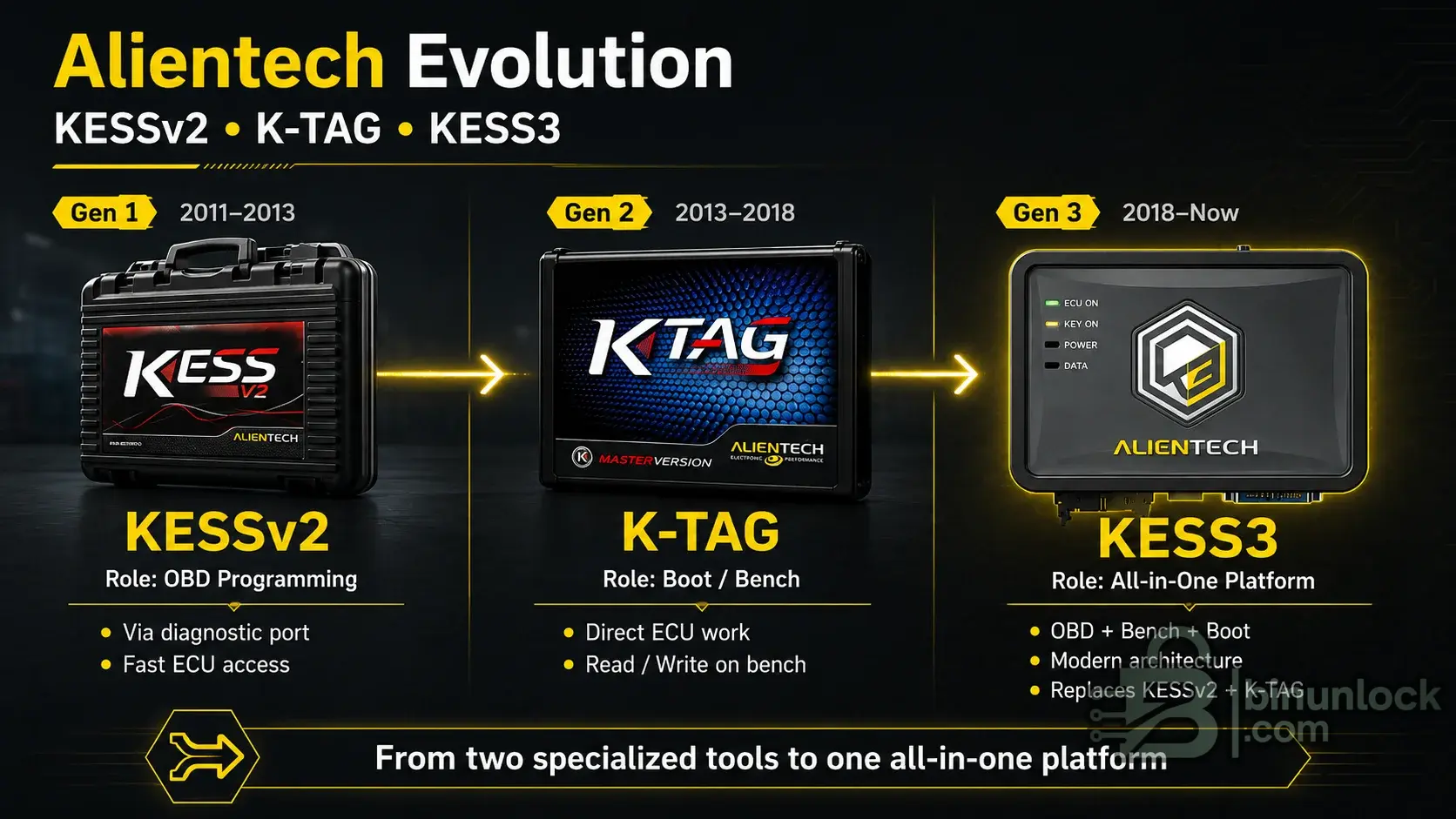
KESS V2, K-TAG and KESS3 side by side: names changed over time, but access-method logic matters more than branding.
The same logic applies to Flex and AutoTuner. Both official platforms present OBD, Bench and Boot as supported flash methods. That does not mean every ECU has all three methods available. It means the platform can cover all three categories where the official protocol exists.
Clone-market naming makes the problem worse because sellers often present a tool name as if it were proof of protocol support. A badge is not protocol validation. Official method lists, manuals and support channels matter more than screenshots or seller titles.
There is no honest one-line answer such as “OBD is safest” or “Bench is safest.” In practice, the safest method depends on the exact ECU, software version, official protocol, power quality, vehicle state, file quality and recovery plan.
OBD is safer when the write path is mature, officially supported and stable. But it is also exposed to in-car variables such as battery voltage, module wake-ups, gateway issues and network faults.
Bench removes some of those variables and gives the tuner tighter control over power and communication, but it introduces wiring and pinout risk.
Boot gives the deepest access and the strongest recovery potential, but it also adds physical board risk because the module must be opened and handled directly.
So the real answer is this: the safest method is the one officially supported for that exact controller, with stable power, verified files and a known recovery path already planned before the first write starts.
OBD is often enough when these conditions are true:
In other words, OBD is enough when you are doing a supported OBD job, not when you are guessing.
Bench is often the better choice when the ECU is modern, protected, sensitive to vehicle-network instability or already removed from the car.
Typical cases where Bench is safer include:
Bench is also the method that makes sense when the job is too sensitive for “plug in and hope” but does not yet justify full Boot-mode disassembly.
Boot is usually required when normal external access is no longer enough. That may be because the ECU is dead, because a full backup is required, because the official protocol for that family is Boot-only, or because the recovery path after a failed write lives at processor level instead of the normal external connection path.
Typical Boot cases include:
Boot should be treated as deeper access, not as a beginner shortcut. If the only reason to open an ECU is “someone online said Boot is safer,” that is not a good enough reason.
Common OBD-associated flashers include KESS V2 legacy, KESS3, New Genius, Powergate, MyGenius, AutoTuner, Flex, CMDFlash, bFlash, DFOX, plus platform-specific ecosystems such as HP Tuners, EFILive and EcuTek on supported platforms. Module-based software such as PCMflash and BitBox also uses OBD where the module and interface support it.
Common Bench-capable tools include KESS3, Flex, AutoTuner, CMDFlash, bFlash, DFOX, New Trasdata, and module-driven software such as PCMflash, BitBox and CombiLoader when the official module and interface support Bench wiring.
Deep-access tools in this category include K-TAG legacy, New Trasdata, Flex, KESS3 Boot, CMDFlash, DFOX, BDM100 legacy-style workflows, and broader EEPROM/MCU programmers where the job moves from standard flashing into memory or electronics service.
This is the most important correction for beginners: interfaces are not methods by themselves. Scanmatik, Tactrix OpenPort, DiaLink, CHIPSOFT J2534, CarDAQ and similar pass-thru devices are communication hardware.
The interface can be used by compatible software. ECU/TCU coverage depends on the software, license, protocol module, firmware, driver, cable and vehicle. Coverage must be verified in the official protocol list for the exact ECU, SW version and vehicle.
Most flashing failures do not start with a bad logo on the tool. They start with weak process control. A flashing session needs stable voltage, stable communication, stable software, stable USB connection and a recovery plan before the first write starts.
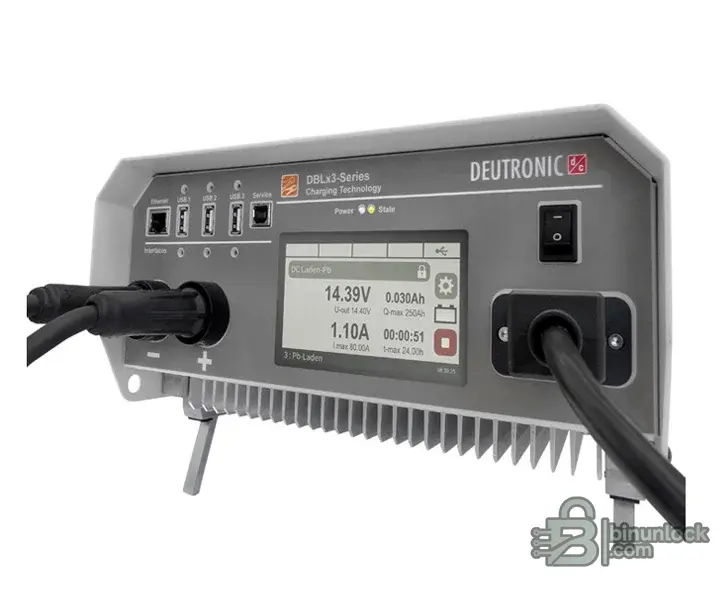
Stable power supply or battery support unit used during flashing to prevent voltage sag and interrupted sessions.
Good power planning means:
Safe ECU flashing is a process, not a button click.
The mistakes below show up again and again in failed-flash stories:
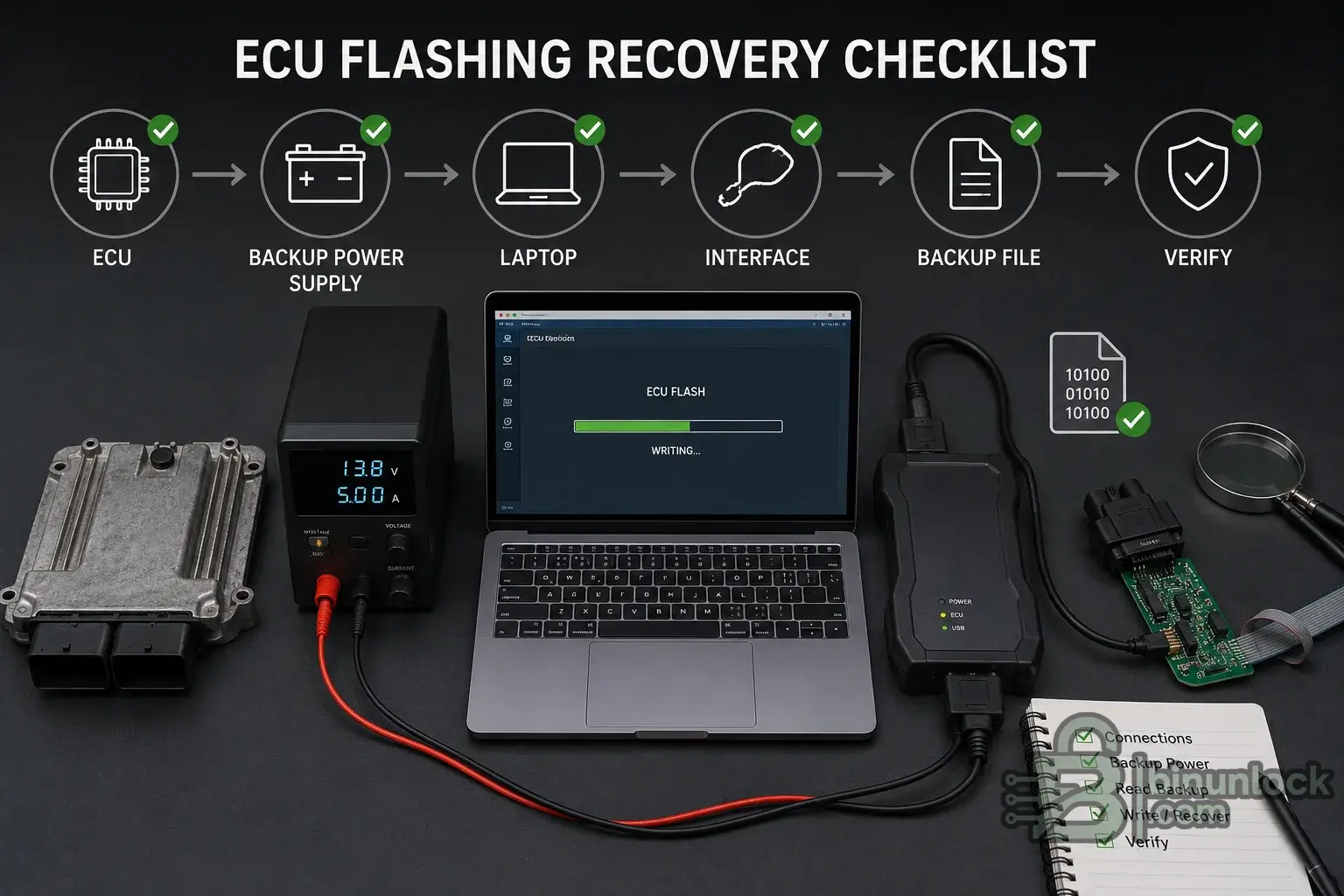
A recovery-ready flashing bench with stable power, backups and verified workflow tools in place before the write begins.
Every one of those mistakes connects back to the same basic rule: protocol lists must be checked first, interfaces depend on compatible software, clone claims are not proof, and voltage or interrupted communication can stop a write or destroy the recovery path.
If you reduce the entire topic to one professional rule, use this one: identify the ECU first, then choose the access method.
Start with the exact control unit, the exact software version, the official method list, the required cables, the power requirement and the recovery path. Only after that should you decide whether the right workflow is OBD, Bench or Boot.
So the real recommendation is:
That is how professionals keep safe ECU flashing boring in the best possible way.
That is exactly why beginners get confused by phrases like “KESS is OBD,” “K-TAG is Boot,” or “J2534 can flash everything.” Those shortcuts are sometimes useful as historical memory, but they are not technical rules.
This article is the next method-focused guide in the BinUnlock Tuning Tools & Interfaces cluster and should be read alongside the published pillar article, ECU Flashing Tools Explained. The pillar article frames the bigger ecosystem: flashers, interfaces, editors, OEM tools and clone-market confusion. This article goes deeper into the practical difference between OBD vs Bench vs Boot ECU flashing, when each method makes sense and why the safest method depends on the exact ECU, protocol and recovery path.
Quick answer: OBD vs Bench vs Boot#
If you want the plain-language version, it is this:
- OBD = reading or writing through the vehicle diagnostic port.
- Bench = reading or writing by connecting directly to the ECU or TCU connector on the bench, usually without opening the case on supported units.
- Boot = reading or writing with the ECU or TCU opened so the tool can access the PCB, processor or board-level service path.
That is the core difference. OBD is in-car access. Bench is direct connector access. Boot is opened-module access. Bench and Boot are deeper workflows than OBD, but they also require better handling, better power control and better workflow discipline.
What is OBD flashing?#
OBD ECU flashing means the software talks to the ECU or TCU through the vehicle diagnostic socket while the module stays installed in the vehicle. Official method pages from major tool manufacturers describe OBD or serial communication as access through the OBD diagnostic socket, diagnostic connector or vehicle OBDII port.
The reason OBD ECU flashing is popular is simple: it is convenient. You usually do not remove the ECU, do not open the case and do not set up a bench harness. On older or well-supported ECUs, that makes OBD the fastest route for stock reads, calibration writes or controlled customer-flasher workflows.
That is why legacy KESS branding became strongly associated with serial or diagnostic-port work, why New Genius is framed around serial communication through OBDII or dedicated diagnostic connectors, and why handheld or customer-side tools such as Powergate, MyGenius, HP Tuners and EFILive AutoCal are commonly discussed in OBD-centered workflows.
Real OBD flashing setup with a supported interface connected to the vehicle diagnostic socket.
But OBD is not automatically the safest method. During an in-car write, the session depends on the vehicle battery, ignition state, network stability, gateway behavior and the exact protocol implementation. If voltage drops, the laptop sleeps, the USB connection fails or another module interrupts communication, a simple OBD write can become a recovery job.
That is why OBD can be the right method on one ECU and the wrong method on another. If the official protocol says OBD write is supported and stable, use that fact. If the official method list points you to Bench or Boot first, do not assume diagnostic-port access is safer just because it feels easier.
Coverage must be verified in the official protocol list for the exact ECU, SW version and vehicle.
Examples commonly associated with OBD workflows include KESS V2 legacy serial programming, KESS3, New Genius, Powergate, MyGenius, AutoTuner, Flex, and platform-specific ecosystems such as HP Tuners, EFILive and EcuTek. Module-based software such as PCMflash or BitBox can also do OBD jobs where the correct module and compatible interface are used.
What is Bench flashing?#
Bench ECU flashing means the module is accessed directly at its connector, usually outside the vehicle, using a bench harness, breakout lead or dedicated adapter. In many supported Bench methods, the ECU or TCU case does not need to be opened. The tool connects through the external ECU connector pins rather than through the vehicle diagnostic port.
That direct connection is the biggest practical advantage of Bench ECU programming. You are no longer dependent on the vehicle body network, gateway behavior, accessories waking up mid-session or ignition-state quirks inside the car. On many modern ECUs, that makes Bench a cleaner workflow than OBD because the power and communication path are more controlled.
Bench flashing setup with ECU, harness, interface and regulated power on the workbench.
Bench is also where professional workflow discipline becomes obvious. A solid bench setup usually means a regulated power source, correct pinout, stable harness, known connection diagram and software that officially supports that exact bench method. If one of those pieces is wrong, Bench is not “automatically safe” anymore. A wrong pinout, reversed polarity, weak supply or improvised cable can fail just as hard as a bad OBD write.
This is where beginners often ask, “Is Scanmatik a Bench tool?” The correct answer is no. A Scanmatik adapter is a communication interface.
The interface can be used by compatible software. ECU/TCU coverage depends on the software, license, protocol module, firmware, driver, cable and vehicle. Coverage must be verified in the official protocol list for the exact ECU, SW version and vehicle.
The same logic applies to OpenPort, CarDAQ, DiaLink and CHIPSOFT J2534. PCMflash and BitBox show this clearly: the software modules and connection diagrams define the job, while the interface is only the communication path.
Examples of Bench workflows include KESS3 Bench, Flex Bench, AutoTuner Bench, CMDFlash Bench, bFlash Bench, DFOX Bench, New Trasdata, and module-based stacks such as PCMflash, BitBox or CombiLoader when paired with the correct module and interface.
What is Boot mode flashing?#
Boot mode ECU programming means opening the ECU or TCU and reaching a deeper service path on the PCB. Tool vendors use the term Boot for workflows where the programmer accesses the processor, boot pin, pad, pad array, board-level service area or low-level communication path.
That is why Boot mode is typically used when a tuner needs more than a normal calibration write. Common reasons include full backup, recovery after a failed write, cloning workflows, protected ECUs, older board-level systems, or tasks where the official tool requires processor-level access instead of a normal external session.
Opened ECU showing the difference between normal connector access and Boot-level board access.
Boot mode is powerful, but it is also physically riskier than OBD or Bench. You are now handling the opened control unit, board coatings, seals, probes, pads and processor-adjacent areas. The flasher may be able to recover a software problem, but it cannot magically undo board damage, torn pads, moisture risk, broken seals or careless probe handling.
That is why professional tools describe Boot as a deeper workflow, not as the default method for every beginner job.
Examples commonly associated with Boot mode include K-TAG legacy, New Trasdata, Flex Boot, KESS3 Boot, CMDFlash, DFOX Boot and other board-level tools that use BDM, JTAG or related processor/debug paths where officially supported.
Where BDM, JTAG, GPT and Tricore Boot fit#
This is the part that sounds advanced but becomes much simpler once you separate access concepts from marketing labels.
BDM#
BDM usually refers to Background Debug Mode-style access on older Motorola or Freescale families and similar ECU generations. In tuning-tool language, BDM is commonly tied to older MPC5xx, MC68xxx or HC12-era work. It belongs to the board-level access category and should not be treated as normal OBD flashing.
JTAG#
JTAG is a board-level debug and access interface. In ECU and TCU work, “JTAG mode” is tuning shorthand for a low-level board access path on certain processors or mechatronic modules. It is not a promise that every JTAG-labeled workflow is interchangeable from one tool to the next.
GPT#
In tuning, GPT is not a universal programming standard like JTAG. It is more often a tool-vendor-specific connector-side access concept. Some workflows use GPT or e-GPT-style connections to handle specific modern protocols from the ECU connector without opening the ECU. That makes GPT a protocol- and tool-specific accessory or connection concept, not a generic synonym for Boot.
Tricore Boot#
Tricore Boot usually means low-level access on an ECU built around an Infineon TriCore processor. Tool vendors often separate these families in their protocol tables. Modern Bosch MEDC17, MD1/MG1-related discussions and other protected ECU families often lead beginners into this terminology.
New Trasdata illustrates why Bench, Open, BDM, Boot and JTAG should be treated as different ECU access methods, not as interchangeable names.
Why beginners confuse KESS, KTAG and KESS3#
Most of the confusion comes from timing. KESS and K-TAG were separate legacy identities at the exact moment many forums, clone listings and YouTube videos taught people their first tuning vocabulary.
The historical shortcut is:
- KESS V2 is commonly associated with serial/OBD diagnostic-port work.
- K-TAG is commonly associated with Bench, Boot, BDM and JTAG-style ECU work.
- KESS3 is a newer platform that can combine OBD, Bench and Boot depending on protocol support.
KESS V2, K-TAG and KESS3 side by side: names changed over time, but access-method logic matters more than branding.
The same logic applies to Flex and AutoTuner. Both official platforms present OBD, Bench and Boot as supported flash methods. That does not mean every ECU has all three methods available. It means the platform can cover all three categories where the official protocol exists.
Clone-market naming makes the problem worse because sellers often present a tool name as if it were proof of protocol support. A badge is not protocol validation. Official method lists, manuals and support channels matter more than screenshots or seller titles.
Which method is safest?#
There is no honest one-line answer such as “OBD is safest” or “Bench is safest.” In practice, the safest method depends on the exact ECU, software version, official protocol, power quality, vehicle state, file quality and recovery plan.
OBD is safer when the write path is mature, officially supported and stable. But it is also exposed to in-car variables such as battery voltage, module wake-ups, gateway issues and network faults.
Bench removes some of those variables and gives the tuner tighter control over power and communication, but it introduces wiring and pinout risk.
Boot gives the deepest access and the strongest recovery potential, but it also adds physical board risk because the module must be opened and handled directly.
So the real answer is this: the safest method is the one officially supported for that exact controller, with stable power, verified files and a known recovery path already planned before the first write starts.
When OBD is enough#
OBD is often enough when these conditions are true:
- The ECU or TCU is officially listed for OBD read/write.
- The file is known-good and correctly prepared.
- The vehicle has stable voltage and proper battery support.
- There is no gateway or communication issue affecting the programming path.
- The official tool confirms OBD write support for that exact ECU and software version.
- The job does not require full-content recovery access or board-level backup.
In other words, OBD is enough when you are doing a supported OBD job, not when you are guessing.
When Bench is safer#
Bench is often the better choice when the ECU is modern, protected, sensitive to vehicle-network instability or already removed from the car.
Typical cases where Bench is safer include:
- The official protocol recommends Bench instead of OBD.
- The ECU is already out of the car.
- OBD write support is blocked, limited or known to be risky on that family.
- You want direct power and communication control outside the vehicle network.
- You need a more controlled cloning, recovery or validation workflow without yet opening the ECU.
Bench is also the method that makes sense when the job is too sensitive for “plug in and hope” but does not yet justify full Boot-mode disassembly.
When Boot is required#
Boot is usually required when normal external access is no longer enough. That may be because the ECU is dead, because a full backup is required, because the official protocol for that family is Boot-only, or because the recovery path after a failed write lives at processor level instead of the normal external connection path.
Typical Boot cases include:
- A failed write recovery on a supported Boot-capable unit.
- A full backup workflow where the official tool reads deeper areas than OBD.
- Specific cloning workflows.
- Protected controllers where the official method is Boot rather than OBD.
- Older or board-level ECUs where BDM, JTAG or processor boot access is the normal service path.
Boot should be treated as deeper access, not as a beginner shortcut. If the only reason to open an ECU is “someone online said Boot is safer,” that is not a good enough reason.
What tools are used for each method?#
OBD#
Common OBD-associated flashers include KESS V2 legacy, KESS3, New Genius, Powergate, MyGenius, AutoTuner, Flex, CMDFlash, bFlash, DFOX, plus platform-specific ecosystems such as HP Tuners, EFILive and EcuTek on supported platforms. Module-based software such as PCMflash and BitBox also uses OBD where the module and interface support it.
Bench#
Common Bench-capable tools include KESS3, Flex, AutoTuner, CMDFlash, bFlash, DFOX, New Trasdata, and module-driven software such as PCMflash, BitBox and CombiLoader when the official module and interface support Bench wiring.
Boot / BDM / JTAG#
Deep-access tools in this category include K-TAG legacy, New Trasdata, Flex, KESS3 Boot, CMDFlash, DFOX, BDM100 legacy-style workflows, and broader EEPROM/MCU programmers where the job moves from standard flashing into memory or electronics service.
Interfaces#
This is the most important correction for beginners: interfaces are not methods by themselves. Scanmatik, Tactrix OpenPort, DiaLink, CHIPSOFT J2534, CarDAQ and similar pass-thru devices are communication hardware.
The interface can be used by compatible software. ECU/TCU coverage depends on the software, license, protocol module, firmware, driver, cable and vehicle. Coverage must be verified in the official protocol list for the exact ECU, SW version and vehicle.
Power supply and recovery planning#
Most flashing failures do not start with a bad logo on the tool. They start with weak process control. A flashing session needs stable voltage, stable communication, stable software, stable USB connection and a recovery plan before the first write starts.
Stable power supply or battery support unit used during flashing to prevent voltage sag and interrupted sessions.
Good power planning means:
- Battery support for in-car OBD jobs.
- A regulated bench power supply for off-car work.
- A stable USB connection and a laptop that will not sleep mid-session.
- Original file backup before writing.
- Full backup where the official method allows it.
- A known recovery path before the first write starts.
Safe ECU flashing is a process, not a button click.
Common beginner mistakes#
The mistakes below show up again and again in failed-flash stories:
- Choosing a tool before identifying the exact ECU or TCU.
- Assuming OBD is always safer because it is easier.
- Assuming Bench means automatic success.
- Opening an ECU without board-level skill or sealing discipline.
- Trusting clone-market seller claims as proof of protocol support.
- Using weak or unstable power during a write.
- Writing unknown or unverified files.
- Skipping the original backup.
- Starting a write with no recovery path.
- Confusing an interface with a flasher.
A recovery-ready flashing bench with stable power, backups and verified workflow tools in place before the write begins.
Every one of those mistakes connects back to the same basic rule: protocol lists must be checked first, interfaces depend on compatible software, clone claims are not proof, and voltage or interrupted communication can stop a write or destroy the recovery path.
Final recommendation#
If you reduce the entire topic to one professional rule, use this one: identify the ECU first, then choose the access method.
Start with the exact control unit, the exact software version, the official method list, the required cables, the power requirement and the recovery path. Only after that should you decide whether the right workflow is OBD, Bench or Boot.
So the real recommendation is:
- Identify the exact ECU or TCU.
- Verify the official protocol and method.
- Choose OBD, Bench or Boot based on that official support.
- Use stable power.
- Back up first.
- Know the recovery path before writing.
- Do not treat clone-market claims as engineering evidence.
- Treat interfaces, flashers and editors as different tools with different roles.
That is how professionals keep safe ECU flashing boring in the best possible way.
Sources and further reading#
- BinUnlock pillar article: ECU Flashing Tools Explained
- Alientech KESS3 official page
- Alientech history page covering KESS, KESSv2, K-TAG and KESS3
- Magicmotorsport Flex official page
- Magicmotorsport Flex vehicle list
- Dimsport New Genius official page
- Dimsport New Trasdata official page
- Dimsport e-GPT official overview
- AutoTuner flash methods
- AutoTuner compatibility list
- CMDFlash official product page
- bFlash official features
- bFlash compatibility by control unit
- DFOX by DFB Technology official page
- PCMflash official downloads and connection diagrams
- BitBox official overview
- BitBox official docs
- Scanmatik J2534/RP1210 guide
- Tactrix OpenPort 2.0 official page
- Tactrix explanation of J2534
- CarDAQ J2534 official page
- HP Tuners read/write/recovery guidance
