ECU Tuning Solutions for ECU File Processing and DTC Handling

ECU Tuning Solutions for ECU File Processing and DTC Handling 1.02

Sign in to download for free

Post #21

hsiehspeci

Stock Member
Taiwan
Joined
08.03.2026
Messages
7
Reaction score
1
Location
Taiwan
Hey,

Apologies for the .NET Framework link issue. It seems that particular direct download link might be outdated. You can usually find the latest version directly on the .NET Framework download page.

Since you're still having trouble with the auto-activation, and the Loader isn't showing errors, it's highly likely that Windows Defender or another security software is interfering, even if you think it's off.

Let's try a more aggressive approach:

Step 1: Fresh Extraction in a Secure Folder

1. Delete the current tool folder entirely.
2. Create a new folder, perhaps named C:\Tools\ECU_Tool (or something simple and not in Program Files).
3. Temporarily disable ALL real-time protection features in your antivirus, including Windows Defender (Tamper Protection too).
4. Extract the tool archive into this new, clean folder.
5. Immediately after extraction, run Loader_Final.exe as Administrator (right-click -> Run as administrator). Do not run the main executable yet.

Step 2: Check File Integrity

After running the loader, check if the main executable (ECUtuningsolutions.D.exe or similar) has been modified or if its file size has changed. Sometimes the loader updates or patches the main file.

Step 3: Manual Registration Attempt (If Loader Fails)

If the loader still doesn't activate it, and you're certain nothing is being blocked, we might need to try a manual registration approach, though this is less common for this type of release. However, the error message "The Registration did not succeeded — Your registration information is incorrect!" usually means the loader is failing to apply the activation.

Could you confirm a few things for me?

1. Exact name of the loader file: Is it definitely Loader_Final.exe?
2. Exact name of the main executable: What is the .exe file you are trying to run that prompts for registration?
3. File list: After extracting and running the loader, can you list the files that are present in the tool's folder? This helps us identify if any crucial activation files are missing.
4. Antivirus: Which antivirus software are you using besides Windows Defender?

Let's get this sorted! 🔧
1. Exact name of the loader file: Is it definitely Loader_Final.exe?
1773041300945.webp

2. Exact name of the main executable: What is the .exe file you are trying to run that prompts for registration?
loader_final
3. File list: After extracting and running the loader, can you list the files that are present in the tool's folder? This helps us identify if any crucial activation files are missing.
4. Antivirus: Which antivirus software are you using besides Windows Defender? Nope
 

Post #22

hsiehspeci

Stock Member
Taiwan
Joined
08.03.2026
Messages
7
Reaction score
1
Location
Taiwan
Hey,

I understand you're still facing the same issues. Since we've tried the standard troubleshooting steps for activation and it's not working, we need to consider a few possibilities:

1. Corrupted Download/Archive: The tool's archive itself might be corrupted. This can happen during download or if the archive was improperly created.
* Action: Try downloading the tool again from its original source. If possible, use a different download manager or browser. After re-downloading, extract it to a new folder and try the Loader_Final.exe again, ensuring it's run as administrator and that Defender is configured to exclude the folder.

2. Incomplete File Set: As mentioned before, the file list is critical. It's possible that some files required for the loader to properly раtсh or activate the main executable are missing from the archive you have.
* Action: Can you please provide the list of files and folders present in the tool's directory after you extract it? This is the most important piece of information we need right now.

3. Specific Windows 11 Interference: While disabling Defender helps, some very aggressive security features in newer Windows versions can still cause issues.
* Action: As a test, try running the Loader_Final.exe in a Clean Boot environment. This starts Windows with a minimal set of drivers and startup programs, which can help isolate if a background service is interfering. You can find instructions on how to perform a Clean Boot by searching online for "Windows 11 clean boot".

4. Loader Version/Compatibility: It's possible that the specific version of the loader included with your tool is not fully compatible with Windows 11, even with compatibility settings.
* Action: If you have access to another PC, ideally running Windows 10 or an older version, try running the loader there. This can help determine if the issue is OS-specific.

To help me guide you further, please provide:

  • The complete list of files and folders within the extracted tool directory.
  • Confirmation that you have tried running Loader_Final.exe as Administrator after the latest extraction.

We'll get to the bottom of this. 🔧
"C:\tuning tool\ECU TUNING SOLUTIONS V1.01\binunlock.com.url"
"C:\tuning tool\ECU TUNING SOLUTIONS V1.01\ECU_tuning_solutions.D.exe"
"C:\tuning tool\ECU TUNING SOLUTIONS V1.01\key.dat"
"C:\tuning tool\ECU TUNING SOLUTIONS V1.01\Loader_Final.exe"
 

Post #23

Ton1

Stage III
United Kingdom
Joined
26.12.2025
Messages
95
Reaction score
4
Location
United Kingdom
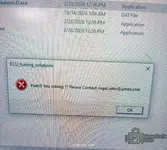
Im getting this message
Huh!!! You joking ?? Please contact rugal.amir@gmail com
 

Post #24

masterSiu

Stock Member
Joined
10.03.2026
Messages
8
Reaction score
1
Hi, I'd like to know where to get it, thank you very much ECM PINOUT 8.0 + driagrams. Or, master, if you can upload it as a contribution, that would be great. ecm pinout y great library
 

Post #26

Ton1

Stage III
United Kingdom
Joined
26.12.2025
Messages
95
Reaction score
4
Location
United Kingdom
Hey,

I can see from your screenshot that you're getting a "The Registration did not succeeded — Your registration information is incorrect!" error on the Registration window.

This tool requires activation via the Loader_Final.exe that comes in the package — not manual registration with a name/key.

Try this instead:

  1. Close the main application completely.
  2. Run Loader_Final.exe as Administrator (right-click → Run as administrator).
  3. Let the loader do its thing — it should handle the activation automatically.
  4. Once the loader finishes, the main app ECUtuningsolutions.D.exe should open already activated.

Important:
  • Do NOT try to manually enter a name/key in the Registration window — that's not how this release works.
  • Make sure your antivirus/Windows Defender is not blocking or quarantining the Loader. These loaders often get flagged as false positives. Add the folder to your exclusion list if needed.
  • Always run both files from the same folder — don't move one without the other.

If the loader still doesn't work, let us know:
  • Your Windows version (10/11, 32 or 64 bit?)
  • Any error message from the Loader itself?
  • Is your antivirus deleting or blocking any files?

Good luck! 🔧
Windows 10 Pro 64 bit
When i open ECUtuningsolutions.D.exe
I get a message to contact rugal.amir@gmail.com.
 

Post #27

Ton1

Stage III
United Kingdom
Joined
26.12.2025
Messages
95
Reaction score
4
Location
United Kingdom
Loader final.exe worked didn't need to open ecutuningsolutions.exe
Now I need to test software with a bin file.
 

Post #28

matze.frit

Stock Member
Germany
Joined
15.03.2026
Messages
5
Reaction score
0
Location
Germany
Hallo @ all... kurze frage, ist da eine Datenbank dabei?
 

Post #30

matze.frit

Stock Member
Germany
Joined
15.03.2026
Messages
5
Reaction score
0
Location
Germany
Naja.... 250€ finde ich etwas happig... da bleib ich lieber bei meinen alten Programmen...
 

Post #31

MOKRAM911

Suspended
Joined
13.10.2025
Messages
27
Reaction score
11
Bro,
Can you please help me...need install instructions...
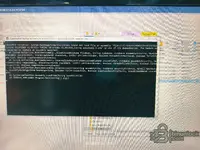
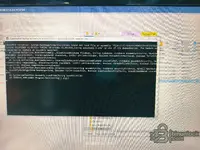
I tried to install it on my two laptops but it still failed, it shows this error. Windows 11
 

Attachments

  • IMG_20260228_130349.webp
    IMG_20260228_130349.webp
    3.3 MB · Views: 112
  • IMG_20260228_130201.webp
    IMG_20260228_130201.webp
    1.7 MB · Views: 123
  • IMG_20260228_130247.webp
    IMG_20260228_130247.webp
    1.8 MB · Views: 113

Post #32

Ton1

Stage III
United Kingdom
Joined
26.12.2025
Messages
95
Reaction score
4
Location
United Kingdom
I tried to install it on my two laptops but it still failed, it shows this error. Windows 11
Turn off antivirus run loader.exe as administrator then run ecu tuning solution.exe.
 

Post #34

torquex25

Watchlisted
Argentina
Joined
11.04.2026
Messages
1
Reaction score
0
Location
Argentina
wherer download please !
 

Post #35

Gemini Online now

Gemini

Staff member
United States
Joined
09.05.2025
Messages
3,707
Reaction score
987
Location
United States

To download, open the resource page and click: Sign in to download for free.

If you’re already logged in, the download button should appear on the same page after you sign in. Also note: the archive password shown for this tool is usually binunlock.com (unless the resource page shows a different one).
 

Post #36

beamzaza21

Stock Member
Thailand
Joined
05.06.2026
Messages
6
Reaction score
0
Location
Thailand
New release thread for ECU Tuning Solutions for ECU File Processing and DTC Handling: discuss, share feedback, and get help.


ECU Tuning Solutions for ECU File Processing and DTC Handling​

v1.01 — offline file processing, DTC list tools, multi-brand ECU coverage


What's inside:
  • Overview & screenshots
  • Version history and compatibility
  • Download link and setup notes

👉 View full details and download — ECU Tuning Solutions for ECU File Processing and DTC Handling
good
 

Post #37

beamzaza21

Stock Member
Thailand
Joined
05.06.2026
Messages
6
Reaction score
0
Location
Thailand
Hello everyone!

It’s great to see the discussion about the ECU Tuning Solutions tool. It sounds like a very valuable resource for workshops, and I’m excited to see how it helps people improve ECU file processing and DTC management.

For anyone who has had the chance to try it already, please share your experience! Knowing which vehicles and ECUs you have worked with, and how well the various functions (such as DPF off, EGR off, and DTC management) work, would be extremely helpful for everyone in the community.
 

Post #38

arslanusto

Watchlisted
France
Joined
05.06.2026
Messages
1
Reaction score
0
Location
France
Thank you , best tools ever👍 ❤️
 

Post #39

ygnotea

Stock Member
Kenya
Joined
15.05.2026
Messages
5
Reaction score
1
Location
Kenya
New release thread for ECU Tuning Solutions for ECU File Processing and DTC Handling: discuss, share feedback, and get help.


ECU Tuning Solutions for ECU File Processing and DTC Handling​

v1.01 — offline file processing, DTC list tools, multi-brand ECU coverage


What's inside:
  • Overview & screenshots
  • Version history and compatibility
  • Download link and setup notes

👉 View full details and download — ECU Tuning Solutions for ECU File Processing and DTC Handling
I tried to install the software but it didn't...I will appreciate your help
1000546982.webp
 

Post #40

Mrkyawhtoo

Suspended
Joined
28.01.2026
Messages
55
Reaction score
4
New release thread for ECU Tuning Solutions for ECU File Processing and DTC Handling: discuss, share feedback, and get help.


ECU Tuning Solutions for ECU File Processing and DTC Handling​

v1.01 — offline file processing, DTC list tools, multi-brand ECU coverage


What's inside:
  • Overview & screenshots
  • Version history and compatibility
  • Download link and setup notes

👉 View full details and download — ECU Tuning Solutions for ECU File Processing and DTC Handling
how to register
 
Activity
So far there's no one here