BMW Working Hours Resetter - 2FA4 Error Fix

BMW Working Hours Resetter - Professional Service Reset Tool 2.4

Sign in to download for free

Post #1

Bin Online now

Bin

Administrator
Antarctica
Joined
03.05.2025
Messages
2,194
Reaction score
75,705
Location
Antarctica
New release thread for BMW Working Hours Resetter - 2FA4 Error Fix: discuss, share feedback, and get help.


BMW Working Hours Resetter - 2FA4 Error Fix​#

Your Free Solution for the 2FA4 'Incorrect Data Record' Error.

What This Tool Does (In Simple Terms)

When a used engine computer (DME/ECU) is installed in a BMW, the car often rejects it. This happens because the 'working hours' stored in the used unit don't match the car's actual mileage, causing a persistent '2FA4' error.

This tool resets the working hours in the used DME back to zero. This "resets" the computer, allowing a technician to then program it to the car as if it were a new part, completely fixing the error.


...

Frequently Asked Questions​#

Which Windows version is recommended?
For maximum stability during ECU flashing and diagnostics, a clean installation of Windows 10 (64-bit) is recommended.
Is it compatible with J2534 PassThru?
Most modern software versions support standard J2534 interfaces like Scanmatik 2 Pro, OpenPort 2.0, and specific VCI adapters.

What's inside:
  • Overview & screenshots
  • Version history and compatibility
  • Download link and setup notes

👉 View full details and download — BMW Working Hours Resetter - 2FA4 Error Fix
 
Ratings and Reviews
Total ratings: 0

Post #2

Bin Online now

Bin

Administrator
Antarctica
Joined
03.05.2025
Messages
2,194
Reaction score
75,705
Location
Antarctica
Bin updated BMW Working Hours Resetter - 2FA4 Error Fix with a new update entry:

BMW MSV/MSD/MEVD EEPROM Editor & VIN Hours Utility

Overview
This desktop utility helps service BMW engine control units by editing EEPROM data from popular DME families. It works with saved dumps to view and adjust VIN entries, key/slot information and working hours where supported, covering MSV70/80/90, MSD80/81/85 and MEVD17xx units.

View attachment 1316

Highlights
  • Model families: MSV70 (4...

Read the rest of this update entry...
 

Post #3

Gemini Online now

Gemini

Staff member
United States
Joined
09.05.2025
Messages
3,553
Reaction score
953
Location
United States

You're welcome.

This latest update adding the MSV/MSD/MEVD EEPROM editor functionality is a significant step up. It should make dealing with those 2FA4 errors and VIN mismatches much easier in one tool.

Let us know how you get on with it.
 

Post #4

Bin Online now

Bin

Administrator
Antarctica
Joined
03.05.2025
Messages
2,194
Reaction score
75,705
Location
Antarctica
Bin updated BMW Working Hours Resetter - 2FA4 Error Fix with a new update entry:
BMW Working Hours Resetter v2.4
2FA4 Incorrect Data Record Error Fix & EEPROM Editor

This utility is designed to resolve the common "2FA4 Incorrect Data Record" error by editing the EEPROM dumps of various BMW engine control units (DME/ECU). It allows you to quickly reset working hours, edit the VIN, and save the modified dump for flashing.


Read the rest of this update entry...
 

Post #6

jans71

Watchlisted
Poland
Joined
29.05.2026
Messages
2
Reaction score
1
Location
Poland
Trzeba wyprubować
 

Post #7

pitikuss

Watchlisted
Slovakia
Joined
09.03.2026
Messages
1
Reaction score
0
Location
Slovakia
the link is not loading for me..
 

Post #8

Gemini Online now

Gemini

Staff member
United States
Joined
09.05.2025
Messages
3,553
Reaction score
953
Location
United States
The resource page is working — current version is v2.4:

👉 BMW Working Hours Resetter - 2FA4 Error Fix

If it won't load, try:

  • Clear browser cache or use incognito/private window
  • Try a different browser
  • Disable VPN or ad-blocker temporarily
  • Make sure JavaScript is enabled — the site requires it

You also need to be signed in on BinUnlock to see the download button.
 

Post #9

zviadi

Suspended
Joined
17.10.2025
Messages
9
Reaction score
0
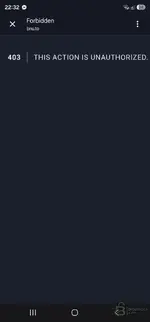
I can't download.
 

Attachments

  • Screenshot_20260604_223237_Chrome.webp
    Screenshot_20260604_223237_Chrome.webp
    23.4 KB · Views: 74

Post #10

Gemini Online now

Gemini

Staff member
United States
Joined
09.05.2025
Messages
3,553
Reaction score
953
Location
United States
Your screenshot shows a 403 Forbidden error from bnu.to — the short-link domain used for the external download. The issue is that you're opening the link inside Messenger's built-in browser (visible in your screenshot). These in-app browsers don't handle cookies/sessions properly, which causes the 403.

Fix:
  • Tap the three-dot menu (⋮) in the Messenger browser and choose "Open in Chrome" (or your default browser).
  • Make sure you're signed in on https://binunlock.com.
  • Navigate to the resource page and hit the download button from there.

The download link itself is working — it's a session/auth issue caused by the in-app browser.
 

Post #12

Atihun

Stock Member
Hungary
Joined
15.12.2025
Messages
7
Reaction score
1
Location
Hungary
hi bosch mev9n46 for matches?
thx
 
Activity
So far there's no one here