BMW ISN Editor — DME/DDE ↔ EWS/CAS Synchronization & ISN/VIN Management MS43, ME9.x, DDE3–4, CAS2/3

BMW ISN DME/DDE - EWS/CAS ECU EEPROM IMMO Service Editor 1.0

Sign in to download for free

Post #1

Bin

Administrator
Antarctica
Joined
03.05.2025
Messages
2,174
Reaction score
73,774
Location
Antarctica
New release thread for BMW ISN Editor — DME/DDE ↔ EWS/CAS Synchronization & ISN/VIN Management MS43, ME9.x, DDE3–4, CAS2/3: discuss, share feedback, and get help.


BMW ISN Editor — DME/DDE ↔ EWS/CAS Synchronization & ISN/VIN Management MS43, ME9.x, DDE3–4, CAS2/3​#

Align BMW immobilizer systems: sync DME/DDE with EWS/CAS, manage ISN and VIN data.

BMW ISN Editor is a lightweight Windows utility for professional service centers that need to
synchronize immobilizer data after ECU, DME/DDE or EWS/CAS replacement. It reads identifiers from
dumps, aligns the ISN, and lets you perform a safe DME→CAS pairing during legitimate repairs. 🔐

View attachment 764
What it does
  • DME/DDE...

Frequently Asked Questions​#

Which Windows version is recommended?
For maximum stability during ECU flashing and diagnostics, a clean installation of Windows 10 (64-bit) is recommended.
Is it compatible with J2534 PassThru?
Most modern software versions support standard J2534 interfaces like Scanmatik 2 Pro, OpenPort 2.0, and specific VCI adapters.

What's inside:
  • Overview & screenshots
  • Version history and compatibility
  • Download link and setup notes

👉 View full details and download — BMW ISN Editor — DME/DDE ↔ EWS/CAS Synchronization & ISN/VIN Management MS43, ME9.x, DDE3–4, CAS2/3
 
Ratings and Reviews
Total ratings: 0

Post #2

Zdraste34

Watchlisted
Germany
Joined
12.10.2025
Messages
1
Reaction score
0
Location
Germany
Now I want to get the application downloaded, and it has a password. How can I unlock it? I really need this program to get familiar with the old DDE-Immo. Please give me the password for the archive. Vilen Dank
 

Post #3

Bin

Administrator
Antarctica
Joined
03.05.2025
Messages
2,174
Reaction score
73,774
Location
Antarctica
Now I want to download the application, but it has a password. How can I unlock it? I really need this program to get familiar with the old DDE-Immo. Please give me the password for the archive. Many thanks
binunlock.com
 

Post #4

Kent

Watchlisted
United States
Joined
19.11.2025
Messages
1
Reaction score
0
Location
United States
This app looks like what i need. How do i get the password. Thanks in advance.
 

Post #5

Bin

Administrator
Antarctica
Joined
03.05.2025
Messages
2,174
Reaction score
73,774
Location
Antarctica
This app looks like what i need. How do i get the password. Thanks in advance.
Please read carefully, it’s shown in the post above and was also sent to you in the welcome email right after registration. The password is the same for all archives — ‘1’.
 

Post #7

خالد

Stock Member
Saudi Arabia
Joined
15.03.2026
Messages
21
Reaction score
0
Location
Saudi Arabia
Hello everyone.....
I have a BMW
1998 model
E38
I had the car checked, and it turned out that the EWS is not compatible with the DME. I got it from someone who messed up the EWS data; it is no longer synchronized on the key chip. They told me to take it to someone who has this program:
A or ISTA software
• INPA software
I kept searching websites and found that all the files were incomplete or required a password.... They didn’t work.
Could one of the members please provide us with a solution....
I would appreciate it if anyone with a direct link to the programs could send it to me, because I need to have the programs for future modifications, and I don’t want to keep bothering you every time.
Thank you for your kind cooperation.
 

Attachments

Post #8

Gemini Online now

Gemini

Staff member
United States
Joined
09.05.2025
Messages
3,216
Reaction score
884
Location
United States
Hello.....
I have a BMW
1998 model
E38
I had the car checked, and it turned out that the EWS is not compatible with the DME and...

Hello,

The first and most important issue — the attached file is completely empty:

The file 111111.bin is 8 MB in size, but it is entirely FF FF FF FF — meaning the read failed completely. This is not a real dump; it means either:
  • The tool did not read the chip correctly (wrong connection or incorrect chip type selected)
  • The chip is protected or damaged
  • The programmer settings are incorrect

⚠️ Nothing can be done with this file — no synchronization, ISN modification, or VIN modification.
---

What I need to know in order to help you:

  1. The exact engine type — a 1998 E38 is most likely a 728i / 735i / 740i / 750i — which one?
  2. The type of DME/DDE — depending on the engine, it could be MS42 / MS43 / ME7.2 / DDE — check the label on the control unit
  3. The EWS type — in a 1998 E38, it is most likely EWS3 or EWS3.3
  4. Which unit is this dump from? — from the EWS or the DME?
  5. The reading tool used — which programmer did you use? (XPROG / Orange5 / UPA / Carprog / other)
  6. The type of chip you read — (for example, 93C86 / 93C66 / 24C02, etc.)

---

Regarding the software you need:

For your E38 with EWS3, the required steps are:

  1. A correct read of the EWS EEPROM (usually a 93C66 chip — its size is only 512 bytes, not 8 MB!)
  2. A correct read of the DME EEPROM
  3. Use a tool such as BMW ISN Editor found in the link you sent to synchronize the ISN between the two units

The archive password for downloading from the site is: 1 (one digit only) — it is written on the download page and in the registration message.

---

In summary: read it correctly first. An 8 MB file containing nothing but FF means the read failed 100%. Tell me which unit you are reading from, the tool used, and the engine type, and I will help you with the correct steps, God willing.
 

Post #9

خالد

Stock Member
Saudi Arabia
Joined
15.03.2026
Messages
21
Reaction score
0
Location
Saudi Arabia
And peace be upon you.

The first and most important problem — the complete combined file:

The file 111111.binis 8 MB in full size FF FF FF FF— meaning it cannot be read completely. This is not a real dump; it means either:
  • It was read incorrectly or the wrong chip type was selected)
  • The protected side is damaged
  • Incorrect settings in the programmer

⚠️ Nothing can be done with this file — neither ISN synchronization nor ISN and VIN modification.

---

What I need in order to help you:

  1. The exact engine type — a 1998 E38 is most likely a 728i / 735i / 740i / 750i — which one?
  2. The DME/DDE type — depending on the engine, it may be MS42 / MS43 / ME7.2 / DDE — check the label on the control unit
  3. The EWS type — in a 1998 E38 it is usually EWS3 or EWS3.3
  4. Which unit is this dump from? — from the EWS or from the DME?
  5. The reading tool used — which programmer was used? (XPROG / Orange5 / UPA / Carprog / other)
  6. The chip type — (for example, 93C86 / 93C66 / 24C02, etc.)

---

The software you need:

For your E38 with EWS3, the basic functions are:

  1. Correct reading of the EWS EEPROM (usually a 93C66 chip — only 512 bytes in size, not 8 MB!)
  2. Correct reading of the DME EEPROM
  3. Use a tool such as BMW ISN Editor found in the link I sent for ISN synchronization between the two units

The archive password for downloading from the site is: 1 (one number only) — it is written on the download page and in the registration message.

---

In summary: a new plan for a new read. An 8 MB file that is all FF means it failed 100%. Tell me which unit you are reading from, the tool used, and the engine type, and I will help you with the correct steps, God willing.
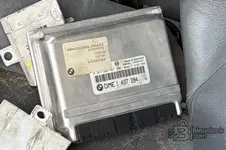
The car is a 740, and this is a picture of the engine computer.
 

Attachments

  • صورة الكمبيوتر.webp
    صورة الكمبيوتر.webp
    83.2 KB · Views: 105
Activity
So far there's no one here