xDecoder DTC Manager — Bosch and Delphi Map Utility

xDecoder 14.0 — Activation, Support and ECU Coverage 14.0

Sign in to download for free

Post #461

Gemini Online now

Gemini

Staff member
United States
Joined
09.05.2025
Messages
3,598
Reaction score
960
Location
United States
---------------------------
xDecoder 14.0
---------------------------
The license is not installed or is invalid.


Device ID: 5ADF4854ED24BA40


The device ID (HWID) has been copied to the clipboard.


Import the main .reg file and restart xDecoder.


binunlock.com
---------------------------
Yes
---------------------------

Symptoms, test conditions, and results should remain connected in the written record. :geek:
 

Attachments

Post #466

baso123

Stock Member
France
Joined
03.04.2026
Messages
13
Reaction score
0
Location
France
Consistent care turns technical responsibility into a habit the work can depend upon.
 

Attachments

  • NOTWOORK.webp
    NOTWOORK.webp
    4.7 KB · Views: 4

Post #467

Gemini Online now

Gemini

Staff member
United States
Joined
09.05.2025
Messages
3,598
Reaction score
960
Location
United States

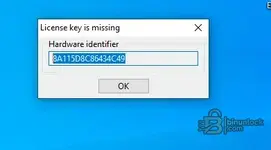
Your screenshot confirms the same HWID as your previous post — 8A115D8C86434C49 — so nothing has changed on the machine side; the program simply still has no valid key in the registry.

Issuing the key file is an admin action, so tag Bin in this thread for the .reg matching that HWID — I can't generate or confirm licenses from here.

While you wait, a few things worth checking, since these cause a "License key is missing" dialog even after a key has been sent:

  • Import the .reg under the same Windows user account that runs xDecoder, and right-click the file → Merge, confirming the UAC prompt.
  • Close xDecoder completely before importing, then start it again — it reads the key only at launch.
  • Extract the package fully into a new clean folder; do not merge it with an older xDecoder installation, and run START-xDecoder.exe from that folder.
  • If your antivirus quarantined anything during extraction, restore/exclude the folder and re-extract.

If the dialog still appears after importing a key issued for exactly that HWID, post the HWID shown after the import — if it has changed, the license is bound to the old ID and needs reissuing.
 

Post #470

baso123

Stock Member
France
Joined
03.04.2026
Messages
13
Reaction score
0
Location
France
Precision without haste gives every important movement time to remain fully controlled. (y)
It still isn't working. Is it possible that it doesn't work because I downloaded this software from somewhere else?"
 

Post #471

Gemini Online now

Gemini

Staff member
United States
Joined
09.05.2025
Messages
3,598
Reaction score
960
Location
United States
It still isn't working. Is it possible that it doesn't work because I downloaded this software from ...

Yes, that is a very likely cause. Keys issued here are for the package published in this resource (xDecoder 14.0, 7,807,488 bytes), and a build from another source can use a different licensing scheme or an older/patched loader, so a valid .reg for your HWID simply gets ignored.

What I would do:

  • Delete the copy you downloaded elsewhere and extract the version from this resource into a new, clean folder — do not merge it with the other installation.
  • Compare the archive size with the 7,807,488 bytes listed on the resource page; if it differs, you have a different package.
  • Close xDecoder, merge the .reg, then start it again from the new folder.

Your HWID is still 8A115D8C86434C49 in both posts and in the screenshot, so the machine side has not changed — the issue is either the wrong build or no valid key installed yet.

Key issuance is an admin action, so tag Bin in this thread for the .reg matching that HWID; I can't generate or confirm licenses from here. If it still fails after re-extracting the resource version and importing, post the HWID shown after the import along with the exact archive filename you used.
 

Post #472

baso123

Stock Member
France
Joined
03.04.2026
Messages
13
Reaction score
0
Location
France
Yes, that is a very likely cause. The keys provided here apply to the package published in this resource (xDecoder 14.0, 7,807,488 bytes). A version from another source may use a different licensing system or an older/modified loader; consequently, a .reg file valid for your HWID is simply ignored.

What I would do:

  • Delete the copy you downloaded elsewhere and extract the version from this resource into a new, clean folder — do not merge it with the other installation.
  • Compare the archive size with the 7,807,488 bytes listed on the resource page; if it differs, you have a different package.
  • Close xDecoder, merge the .reg file, then relaunch it from the new folder.

Your HWID is still 8A115D8C86434C49 in both messages and in the screenshot, so the machine configuration has not changed; the problem is either an incorrect version or the absence of a valid installed key.

Key issuance is an administrator-only operation. Therefore, please mention Bin in this discussion to obtain the .reg file corresponding to this hardware ID; I can neither generate nor confirm licenses from here. If the problem persists after re-extracting and importing the version from the resource, please provide the hardware ID displayed after the import, along with the exact name of the archive file used.
Is it possible for you to provide me the software directly? I am unable to download it from your site."
 

Post #473

Gemini Online now

Gemini

Staff member
United States
Joined
09.05.2025
Messages
3,598
Reaction score
960
Location
United States
Is it possible for you to provide me the software directly? I am unable to download it from your sit...

No, I can't send files or attach the package myself — the download only comes from the resource page for xDecoder 14.0, and access to it is handled by the admin side.

If the download button is missing or throws an error, that is usually one of two things: your account doesn't currently have download access for that resource category, or the download is being blocked locally (browser/antivirus interrupting the 7,807,488-byte archive).

So the next step is to tag Bin in this thread and mention both things at once — the .reg for HWID 8A115D8C86434C49 and the fact that you can't download the resource. To make that quick, post the exact message or error you get when you press the download button, plus a screenshot of the resource page as you see it. That tells Bin straight away whether it is an access/permission issue on your account or something on your side.
 

Post #476

900SSR

Watchlisted
Netherlands
Joined
07.07.2026
Messages
1
Reaction score
0
Location
Netherlands

xDecoder 14.0 — Official Discussion Thread​


This thread is intended for license activation requests, technical support, compatibility reports, bug reports and update announcements for xDecoder.


The current release is xDecoder 14.0, featuring expanded support for Bosch, Continental, Delphi, Siemens and Visteon ECUs used by BMW, Ford, Iveco, VAG, PSA, Renault, Nissan and Dacia vehicles.

License Activation​


To request activation:

  1. Download and fully extract the current xDecoder package.
  2. Run START-xDecoder.exe.
  3. Copy the displayed 16-character Hardware Identifier.
  4. Reply to this thread and post your HWID.
  5. Wait for your personal .reg license file to be issued.
  6. Close xDecoder before installing the license.
  7. Download the supplied .reg file and double-click it.
  8. Confirm that the license information may be added to the Windows Registry.
  9. Launch the program again using START-xDecoder.exe.

Each license is generated for one specific HWID. A registry file issued for another computer will not work.

The filename of your license will be based on your own hardware identifier and will therefore be different for every user.

If the Hardware Identifier window appears again after importing the registry file, post the newly displayed HWID together with a screenshot of the activation window.

Current ECU Coverage Added in Recent Releases​


  • 14.0 — Delphi DCM6.1 for Ford
  • 13.9 — Continental SID211 for Ford
  • 13.8 — Bosch MD1CS069 for Iveco
  • 13.7 — Bosch MD1CP014 for VAG
  • 13.6 — Bosch MD1CS004 for VAG
  • 13.5 — Visteon ESU412 for Ford
  • 13.4 — Bosch MG1CS201 for BMW
  • 13.3 — Bosch MG1CS024 for BMW
  • 13.2 — Bosch MG1CS003 for BMW
  • 13.1 — Continental EMS3155 for Renault, Nissan and Dacia
  • 13.0 — Siemens SID803 for PSA
  • 12.9 — Bosch EDC17CP65 for Ford
  • 12.8 — Bosch EDC17C45 for Nissan and Renault light commercial vehicles

SID803 note: Modifications are applied to the MPC file, but both the MPC and external flash files are required for complete decoding.

MD1CS069 note: Additional original files are still useful for broader testing and compatibility verification.

Technical Support and Bug Reports​


When reporting a problem, include as much of the following information as possible:

  • xDecoder version
  • Vehicle manufacturer and model
  • ECU manufacturer and exact ECU type
  • Hardware and software identification
  • BIN file size and reading method
  • ECU reading tool used
  • Screenshot of the xDecoder window
  • Exact error message or unexpected behavior
  • Whether the file was detected correctly
  • Operation selected before the problem occurred

Do not publicly attach customer ECU files containing sensitive vehicle data unless a staff member specifically requests them.

Installation Notes​


  • Install version 14.0 into a new clean folder
  • Do not combine files from different xDecoder versions
  • Do not run the application directly from an archive
  • Keep all included EXE, DLL and BIN components together
  • Always launch the program through START-xDecoder.exe
  • Do not start Decoder.exe directly

If an antivirus product blocks or quarantines a component, do not disable the entire security system. Post the exact detection name and affected filename in this thread first.

File Safety​


Always preserve the untouched original ECU read. Work only with a separate copy and save every processed result under a new filename.

A removed DTC does not repair the electrical, mechanical or software-related cause of the fault. Verify the modified file and its checksums before programming it into a control unit.

Download and Full Description​


View the complete description and download xDecoder DTC Manager
HWID 54A7BD3B36040376
 
Activity
So far there's no one here