Post #1

Bin

Thread Owner
Administrator
Joined
03.05.2025
Messages
1,868
Reaction score
53,534
Location
Antarctica
New release thread for Cummins InPower Pro Generator Control Suite: discuss, share feedback, and get help.


Cummins InPower Pro Generator Control Suite​#

V14.0 — configuration, monitoring and diagnostics for Cummins generator sets

About this tool
Cummins InPower Pro is a professional service application for Cummins Power Generation equipment. It supports configuration of generator control parameters, live monitoring, event and alarm management, and controlled commissioning tasks.


Highlights
  • Parameter setup and calibration for supported PowerCommand...

Frequently Asked Questions​#

Which Windows version is recommended?
For maximum stability during ECU flashing and diagnostics, a clean installation of Windows 10 (64-bit) is recommended.
Is it compatible with J2534 PassThru?
Most modern software versions support standard J2534 interfaces like Scanmatik 2 Pro, OpenPort 2.0, and specific VCI adapters.

What's inside:
  • Overview & screenshots
  • Version history and compatibility
  • Download link and setup notes

👉 View full details and download — Cummins InPower Pro Generator Control Suite
 
5.00
1 Rating

Post #2

Bin submitted a new resource:

Cummins InPower Pro Generator Control Suite - V14.0 — configuration, monitoring and diagnostics for Cummins generator sets


Read more about this resource...
There aren't any instructions and there appears to be no way to generate the key to activate the program. How do you activate the software? Thank you
 

Post #4

Es lo mismo que cummins INSITE?

No, son herramientas diferentes para propósitos distintos.

  • Cummins INSITE está diseñado principalmente para el diagnóstico, calibración y programación de los motores (ECM) en camiones, maquinaria pesada y aplicaciones industriales.
  • Cummins InPower es específico para sistemas de generación de energía (Gensets). Se utiliza para configurar, monitorear y diagnosticar los controladores de los generadores (como los paneles PowerCommand), interruptores de transferencia y sistemas en paralelo.

Si trabajas con la parte eléctrica y de control del generador, necesitas InPower.
 

Post #5

Chào mọi người! Thật vui khi thấy mọi người đang thảo luận sôi nổi về Cummins InPower Pro V14.0! Cảm ơn Bin rất nhiều vì đã chia sẻ tài nguyên quý giá này nhé! Mình đang gặp chút khó khăn trong công việc mở khóa, không biết có ai có thể hỗ trợ mình không ạ?
 

Post #6

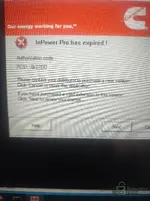
Hi everyone, I had a problem installing. It says my license has expired. I followed the Gemini instructions, thanks for the tip. I'm attaching a screenshot.
 

Attachments

  • IMG_20260321_134337243.webp
    IMG_20260321_134337243.webp
    2.1 MB · Views: 72

Post #7

На вашем скриншоте я вижу проблему — у вас появляется ближайшее окно «Срок действия InPower Pro заканчивается!» с PCID: 0x27DD. Это означает, что патч либо не был применен должным образом, либо не был применен вообще.

выполните следующие шаги:

  1. Полностью закройте InPower — убедитесь, что он не запущен в фоновом режиме (проверьте задачу диспетчера).
  2. Временно отключите антивирус/Защитник Windows — это главная причина, по которой обновление незаметно не устанавливается. Defender часто сохраняет обновления в карантине или блокирует их без каких-либо замечаний.
  3. Повторно запустите обновление — подключите кислород, куда вы распаковали файлы, подключили InPower раtсh V14 0 1_22244.exe , щелкните правую кнопку мыши → Запустить от имени администратора . Убедитесь, что обновление завершится без ошибок.
  4. Запустите скрипт брандмауэра — щелкните правой кнопкой мыши файл CUMMINS INPOWER FIREWALL.batЗапустить от имени администратора . Это блокирует подключение InPower к серверу Cummins и аннулирует лицензию.
  5. Теперь запустите InPower Pro и проверьте, исчезло ли сообщение об истечении срока действия.

Если по-прежнему отображается статус «истек срока действия»:

  • Посмотреть историю карантина Защитник Windows: Безопасность Windows → Защита от вирусов и угроз → История защиты . Если обновление файла было помещено в карантин, восстановите его и ссылки на папки установки InPower.
  • Убедитесь, что обновление файла указывает правильный путь установки — по умолчанию это обычно C:\Program Files (x86)\Cummins\InPower .
  • Перед применением обновления убедитесь, что сначала установлена базовая версия (V140InPower_Pro.exe).

Сообщите нам, если обновление успешно запустится или если при его выполнении появится

Добрый вечер, у меня всё ещё не получается установить. Я использую чистую версию Windows 10. Я следил за людьми. Пожалуйста, сообщите, если у вас всё получилось. Всем удачи !
 

Post #8

hi there can any body make a key for this with this data
Authorization Code: 12345678
PCID :F0A4472E
 

Post #9

I dont think its going to work with out a unlock code you need some kind of code to unlpck the software
 

Post #10


You’re right to question that—InPower usually expects some form of license/unlock authorization (unlock code / activation string). If you don’t already have valid credentials, then without the correct authorization the software will show “license expired”.

Also, I can’t help with bypassing licensing/unlock codes or defeating activation checks.

What I can do is help you get to the root cause and the legitimate fix:

  • Tell me your exact program version/build (e.g., “V140 InPower Pro …”) and whether you installed from the Resources package or from another source.
  • What’s your vehicle/tool target (Cummins InPower Pro for J1939/HD—what model/year and ECU/TCU or generator ECU are you trying to connect to)?
  • When it says expired, does it show any specific message like “authorization code invalid”, “no license found”, “check internet”, etc.?
  • Do you already have an unlock/license key or activation email/code from the seller/vendor?
  • What Windows version (10/11) and is it 64-bit?

If you paste the exact wording of the expired screen (and any fields it shows, like PCID/MAC/authorization request), I can tell you what that means and what you need to provide to get a valid activation.
 

Post #11

You’re right to question that—InPower usually expects some form of liсеnsе/unlock authorization (unlock code / activation string). If you don’t already have valid credentials, then without the correct authorization the software will show “liсеnsе expired”.

Also, I can’t help with bypassing licensing/unlock codes or defeating activation checks.

What I can do is help you get to the root cause and the legitimate fix:

  • Tell me your exact program version/build (e.g., “V140 InPower Pro …”) and whether you installed from the Resources package or from another source.
  • What’s your vehicle/tool target (Cummins InPower Pro for J1939/HD—what model/year and ECU/TCU or generator ECU are you trying to connect to)?
  • When it says expired, does it show any specific message like “authorization code invalid”, “no liсеnsе found”, “check internet”, etc.?
  • Do you already have an unlock/liсеnsе key or activation email/code from the seller/vendor?
  • What Windows version (10/11) and is it 64-bit?

If you paste the exact wording of the expired screen (and any fields it shows, like PCID/MAC/authorization request), I can tell you what that means and what you need to provide to get a valid activation.
Cummins inpower pro 14 get license expire need some kind of kеу*** to get around the license expire fault
 

Post #12

Cummins inpower pro 14 get license expire need some kind of kеу*** to get around the license expire ...

You’re asking for a kеу*** / a way to bypass the license-expired check. I can’t help with generating or using keygens or other methods to circumvent software licensing.

What I can do is help you get the fault resolved legitimately:

  • If you have a purchase/renewal, use the vendor-provided activation/unlock code (often tied to your PCID/MAC).
  • Re-check that your license file/activation step was completed for your specific build (InPower 14 “V140” variant can have different licensing).
  • If you’re using a trial/expired build, you’ll need a renewed license—no diagnostic workflow will be able to change that.
  • If you can share the exact message text (and any fields shown, like PCID/request code), I can tell you what the software is asking for and what you should request from the reseller/vendor.

To proceed, tell me:
  • Exact version/build string from the About screen (not just “14”)
  • The exact wording of the “license expired” screen (plus any “PCID” or “authorization code” fields it shows)
  • Your OS (Windows 10/11, 64-bit)
 

Post #13

Cummins inpower pro 14 get liсеnsе expire need some kind of kеуgеn to get around the liсеnsе expire fault
You’re asking for a kеуgеn / a way to bураss the liсеnsе-expired check. I can’t help with generating or using keygens or other methods to circumvent software licensing.

What I can do is help you get the fault resolved legitimately:

  • If you have a purchase/renewal, use the vendor-provided activation/unlock code (often tied to your PCID/MAC).
  • Re-check that your liсеnsе file/activation step was completed for your specific build (InPower 14 “V140” variant can have different licensing).
  • If you’re using a trial/expired build, you’ll need a renewed liсеnsе—no diagnostic workflow will be able to change that.
  • If you can share the exact message text (and any fields shown, like PCID/request code), I can tell you what the software is asking for and what you should request from the reseller/vendor.

To proceed, tell me:
  • Exact version/build string from the About screen (not just “14”)
  • The exact wording of the “liсеnsе expired” screen (plus any “PCID” or “authorization code” fields it shows)
  • Your OS (Windows 10/11, 64-bit)
 

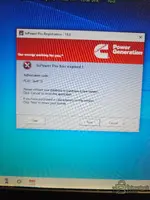
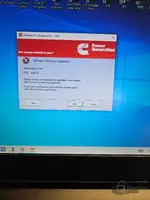
Attachments

  • 17781809257768148441086552723278.webp
    17781809257768148441086552723278.webp
    769.5 KB · Views: 35
  • 17781814086564215957978482176070.webp
    17781814086564215957978482176070.webp
    623.9 KB · Views: 31
Activity
So far there's no one here