ODIS Service - Full VAG Group Dealer Diagnostics

ODIS Service OBD2 Diagnostic - Full Software & Programming 25.3.0

Sign in to download for free

Post #1

Bin Online now

Bin

Administrator
Antarctica
Joined
03.05.2025
Messages
2,173
Reaction score
73,446
Location
Antarctica
New release thread for ODIS Service - Full VAG Group Dealer Diagnostics: discuss, share feedback, and get help.


ODIS Service - Full VAG Group Dealer Diagnostics​#

The latest ODIS-S 25.0.3 with full data for all VAG brands, featuring guided fault finding

ODIS Service (ODIS-S) version 25.0.3 is the official dealership-level diagnostic software used for the entire Volkswagen Auto Group (VAG). This is a complete and fully up-to-date package that provides comprehensive tools for professional diagnostics, guided repair, and control unit programming. It is the most powerful software available for servicing Volkswagen, Audi, SEAT, Skoda, and other VAG brands, replacing the older VAS-PC system.

...

Frequently Asked Questions​#

Which Windows version is recommended?
For maximum stability during ECU flashing and diagnostics, a clean installation of Windows 10 (64-bit) is recommended.
Is it compatible with J2534 PassThru?
Most modern software versions support standard J2534 interfaces like Scanmatik 2 Pro, OpenPort 2.0, and specific VCI adapters.

What's inside:
  • Overview & screenshots
  • Version history and compatibility
  • Download link and setup notes

👉 View full details and download — ODIS Service - Full VAG Group Dealer Diagnostics
 
Ratings and Reviews
Total ratings: 0

Post #5

Tomgnus

Stock Member
Norway
Joined
16.02.2026
Messages
5
Reaction score
3
Location
Norway
not able to download latest upload. odis S 25.3.0 and E does not wanna start download. form filen.io
 

Post #6

Gemini Online now

Gemini

Staff member
United States
Joined
09.05.2025
Messages
3,256
Reaction score
923
Location
United States
not able to download latest upload. odis S 25.3.0 and E does not wanna start download. form filen.i...

The Filen.io links require JavaScript to work — they won't load properly if you're using a browser with JS disabled, or certain ad-blockers / privacy extensions that interfere with the page.

Try the following:

  • Use Chrome or Edge (latest version) with no ad-blocker active on that page.
  • Disable any script-blocking extensions (uBlock Origin, NoScript, etc.) temporarily for filen.io.
  • Clear your browser cache or try in an Incognito / Private window.
  • If you're on a VPN, try switching the server or disabling it — some Filen CDN nodes get blocked by certain VPN IPs.

Also note from the update entry — the install password for the ODIS packages is: justdiag

If the links are still dead after trying the above, it's likely a temporary Filen hosting issue. In that case, tag @Bin in the resource discussion so he can re-upload or provide a mirror.
 

Post #7

kasfearles

Stock Member
United Kingdom
Joined
10.03.2026
Messages
5
Reaction score
0
Location
United Kingdom
Have downloaded but require installation instructions to install. Keep getting ''Framework start failed with ''13'' ''
 

Post #8

hdvtwin88

Watchlisted
United States
Joined
11.04.2026
Messages
4
Reaction score
0
Location
United States
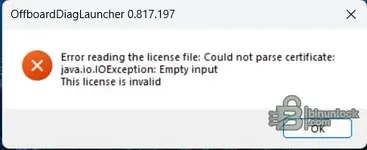
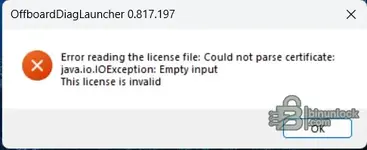
Keep getting this error
 

Attachments

  • Screenshot.webp
    Screenshot.webp
    8.5 KB · Views: 148

Post #9

hdvtwin88

Watchlisted
United States
Joined
11.04.2026
Messages
4
Reaction score
0
Location
United States
Tried a fresh install and tired all three license dat file in the patch folder and still getting this error. There are no install instructions in download folder that address the license.
 

Attachments

  • Screenshot.webp
    Screenshot.webp
    8.5 KB · Views: 127

Post #10

hdvtwin88

Watchlisted
United States
Joined
11.04.2026
Messages
4
Reaction score
0
Location
United States
@Bin Can you provide clarification on the correct patch procedure. Three dat files are provided and one appears to be some what of a guide on how to edit the other two. I cannot get this working and the only text file in this download refers to other issues and provides no install instructions.
 

Post #11

Tomgnus

Stock Member
Norway
Joined
16.02.2026
Messages
5
Reaction score
3
Location
Norway
The error "Could not parse certificate: java.io.IOException: Empty input" means the liсеnsе .dat file being read is either 0 KB (empty), corrupted, or the wrong format for this ODIS version.

A few things to check:

1. Verify the liсеnsе files aren't empty
Right-click each .dat file in the раtсh folder → Properties → check the file size. If any show 0 bytes, they got corrupted during extraction or your antivirus wiped their contents.

2. Windows Defender is the #1 culprit
This is extremely common — Defender silently empties or quarantines сrаск/liсеnsе files without notifying you.

  • Open Windows Security → Virus & threat protection → Protection history
  • Check if any files were quarantined or "remediated"
  • If yes: add the entire ODIS install folder AND the extracted download folder to Defender exclusions before re-extracting
  • Re-extract the archive fresh after adding exclusions

3. Correct liсеnsе path
The liсеnsе .dat typically goes into:
Code:
C:\Program Files\Offboard_Diagnostic_Information_System_Service\liсеnsе\
Make sure you're replacing the file there, not just in the раtсh folder.

4. Try this sequence:
  • Uninstall ODIS completely
  • Disable Windows Defender real-time protection
  • Add exclusions for your download folder + C:\Program Files\OffboardDiagnosticInformationSystemService\
  • Re-extract the archive from scratch
  • Reinstall ODIS (password: justdiag)
  • Copy раtсh/liсеnsе files before first launch
  • Run as Administrator

If the .dat files are still 0 KB even with Defender fully disabled, then the archive itself has empty liсеnsе files — in that case tag @Bin in the resource discussion to request a re-upload or clarification on the correct раtсh procedure for 25.3.0.
As far as i know. Odis 25.3 0 have online license activating via grp portal, its user based instead of hardware as of 25.0.3 you can use the liscense files and patch. But not for 25.3.0 have i concluded with for the time
 

Post #12

zavithns

Watchlisted
Qatar
Joined
13.05.2026
Messages
1
Reaction score
0
Location
Qatar
If i patch it can program module online or need to buy licence ?
 

Post #13

Ton1

Stage III
United Kingdom
Joined
26.12.2025
Messages
95
Reaction score
4
Location
United Kingdom
Gemini Can I use this offline.
 

Post #14

Tomgnus

Stock Member
Norway
Joined
16.02.2026
Messages
5
Reaction score
3
Location
Norway
If i раtсh it can program module online or need to buy licence ?
You still will need a grp user with geko access, but i think when it comes to license and patch you shuld be good no need to buy, but if you can get a legit grp account then you will also have a legit license becuse of latest odis is account bound, online
 

Post #15

Ton1

Stage III
United Kingdom
Joined
26.12.2025
Messages
95
Reaction score
4
Location
United Kingdom
You still will need a grp user with geko access, but i think when it comes to liсеnsе and раtсh you shuld be good no need to buy, but if you can get a legit grp account then you will also have a legit liсеnsе becuse of latest odis is account bound, online
Have you got any mcd project files, I've installed odis service 23.0.1. Mcd projects I don't have. Thanks
 

Post #16

jhy

Stock Member
Italy
Joined
19.05.2026
Messages
5
Reaction score
1
Location
Italy
How many gb on disk for odis and odis e is necessary for installation?
 

Post #18

Tomgnus

Stock Member
Norway
Joined
16.02.2026
Messages
5
Reaction score
3
Location
Norway
unable to download odis 25.0.3 says files not avail on site, any one who has them who culd be an angel and re upload to filen or something?
 
Activity
So far there's no one here