
Description
Autotuner Filesize Converter is a small offline Windows utility for expanding an ECU read to one of several controller-specific target sizes. It is useful when a programming tool has saved only the populated region of flash but a comparison, calibration or downstream tool expects the physical memory size.
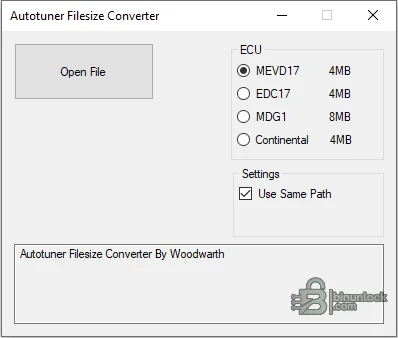
Supported vehicles, ECUs and files#
The visible presets cover MEVD17 and EDC17 outputs at 4 MB, MDG1 outputs at 8 MB and a Continental 4 MB option. These are size presets, not a vehicle compatibility database. The operator must already know the ECU family, original read type and required final layout before converting.- Binary files from supported Bosch MEVD17 and EDC17 workflows requiring the displayed 4 MB target.
- Supported Bosch MDG1 workflows requiring the displayed 8 MB target.
- Supported Continental reads requiring the displayed 4 MB target.
- Files whose missing region can legitimately be reconstructed by the utility’s preset; partial or corrupt reads are not automatically repaired.
Functions#
- Open one ECU binary from the desktop interface.
- Choose the controller-family target rather than padding or trimming bytes manually.
- Save beside the input or select another working location.
- Produce a consistently sized file for comparison, map editing or a compatible programming workflow.
System and hardware requirements#
- A Windows PC; the package is a single portable x86 executable with no installer.
- A verified original read and reliable ECU identification from the programming tool or module label.
- Enough free disk space for both the original and expanded file.
- A hex/hash comparison tool and any checksum solution required by the next stage.
Recommended workflow#
- Record the source file size and SHA-256 before conversion.
- Confirm the ECU family and expected physical size from trusted tool documentation.
- Convert a copy, then verify the exact output byte count and inspect where data was added.
- Reopen the result in the intended calibration or flashing tool and reject it if identification or checksums are inconsistent.


