Description
The Essential All-in-One Utility for E-Series Coding with NCS-Expert.

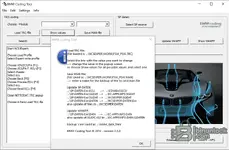
The BMW Coding Tool v2.3.0 is a classic, must-have helper application for anyone working with the BMW Standard Tools suite (NCS-Expert, WinKFP, etc.) on E-Series vehicles. This lightweight tool simplifies several of the most common and often confusing tasks, saving you time and reducing the chance of errors.
What Problem Does This Tool Solve?
Coding E-series vehicles with NCS-Expert involves manually editing text-based
.TRC and .MAN files, which can be tedious and difficult for beginners. Furthermore, updating your SP-Daten or WinKFP installation requires manually copying hundreds of files into many different directories.This tool provides a simple graphical interface (GUI) to solve both problems. It allows you to easily edit coding files and automates the entire update process for your diagnostic data.
Key Features
- Graphic TRC/MAN File Editor: Load a
.TRCtrace file from an ECU read, change coding values fromnicht_aktivtoaktivusing simple dropdown menus, and save it as a.MANfile ready to be written back to the car. No more manual text editing. - Automatic SP-Daten Updater: Simply select the source SP-Daten folder, and the tool will automatically copy all necessary data to the correct locations within your EDIABAS and NCSEXPER folders.
- Automatic WinKFP Updater: Similarly, this function allows you to easily update your WinKFP software and data folders with one click.
- Integrated NCS-Expert Guide: The main window includes a handy text guide with the basic steps for performing a coding sequence in NCS Expert, perfect for quick reference.
- Translation Support: Utilizes a
Translations.csvfile to help translate German coding values into English.
Installation & Requirements
- Required Software: A working installation of BMW Standard Tools (NCS-Expert, WinKFP, etc.).
- Installation: This is a portable application. Simply place the
BMW Coding Tool.exeand the two.ocxfiles (comdlg32.ocx,mscomctl.ocx) in the same folder. - Troubleshooting: This is an older application. If it fails to start on a modern Windows system, you may need to register the
.ocxfiles. To do this, open Command Prompt (CMD) as an Administrator and run the following commands:
Code:regsvr32 comdlg32.ocx regsvr32 mscomctl.ocx
System Requirements & Testing
- Operating System: This tool is highly compatible and works on most Windows versions. It has been fully tested and confirmed to be stable on Windows 10 LTSC 2019.
Disclaimer
This software is intended for professional and educational purposes. Incorrect coding or data updates can cause issues with your vehicle. Always back up your original files and settings before making changes. Use at your own risk.
VirusTotal Check: https://www.virustotal.com/gui/file/af08f24c03756e271ffc110ea83c81b4204b1f3de800e3d5202a1bd1b1a230a7