
Description
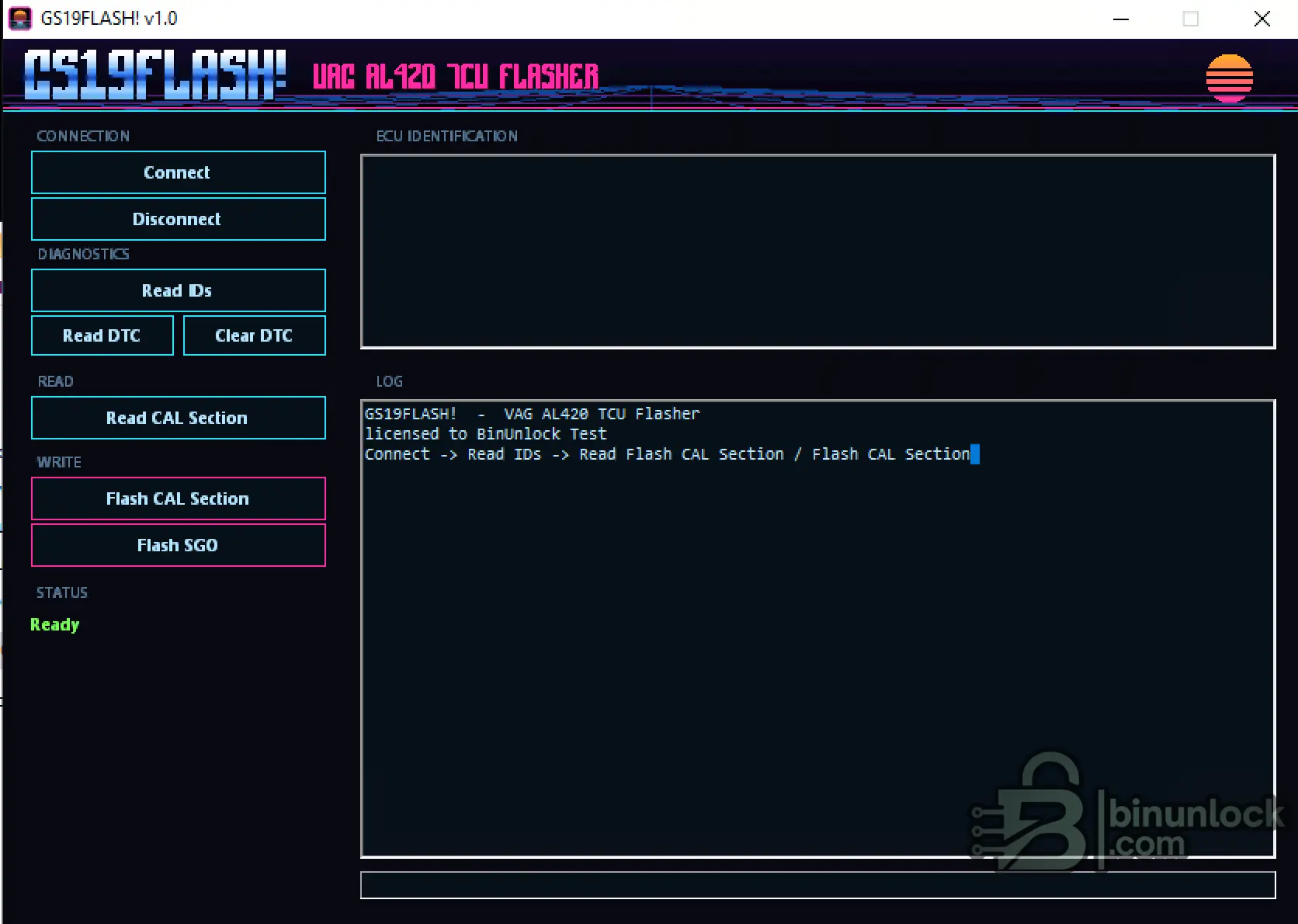
GS19FLASH! is a Windows OBD flashing and service utility developed for the Bosch GS19.11 transmission control unit used with the VAG 09L / AL420 / ZF 6HP19 automatic transmission.
The current release targets the supported 09L 1 MB firmware variant and provides TCU identification, fault-memory service, calibration reading, fast CAL writing and complete SGO flashing through a compatible J2534 pass-thru interface.
No manual checksum correction is required for supported CAL operations.
Current Support
This version is intended specifically for the supported 09L 1 MB variant. Compatibility with other GS19, AL420 or ZF 6HP controller versions should not be assumed unless they are explicitly recognized by the software.
Main Functions
Calibration Reading
The Read CAL Section function reads the calibration data from the supported GS19.11 controller through OBD.
This provides a calibration file that can be archived, compared or modified using suitable transmission-calibration software.
Approximate CAL read time:
The actual operation time can vary depending on the vehicle, J2534 interface, computer and communication conditions.
Fast CAL Flashing
The Flash CAL Section function writes only the supported calibration section instead of programming the complete firmware package.
This considerably reduces programming time when only calibration data needs to be updated.
Approximate CAL-only flash time:
For supported files, GS19FLASH! automatically handles the required CAL checksum calculation and writes the corrected data during the operation.
Full SGO Flashing
The Flash SGO function programs a complete supported VAG SGO firmware package to the GS19.11 transmission controller.
The tool understands the expected block structure and handles the supported CAL, SGO and boot-related areas according to the selected operation.
Approximate complete SGO flash time:
The SGO file must match the actual controller and transmission application. Do not program an SGO package selected only by filename or transmission family.
Always verify the original TCU identification and the intended target software before starting a complete flash.
Automatic Checksum Handling
GS19FLASH! automatically calculates and writes the required checksum information for supported CAL files.
This removes the need to locate or correct the calibration checksum manually before flashing.
The software also performs verification after writing to confirm that the programmed data was transferred correctly.
Important: Automatic checksum handling applies to the operations and file formats supported by this release. It should not be interpreted as universal checksum support for every GS19.11 firmware or external file format.
Diagnostic Functions
The program includes basic service functions for the connected transmission controller.
These functions are useful for checking communication before reading or flashing and for reviewing the controller state after programming.
Typical Workflow
Requirements
GS19FLASH! is a native Windows application and does not require a large external .NET runtime installation.
Programming Safety
Transmission-controller programming is voltage-sensitive. A weak vehicle battery or unstable power source can interrupt communication and leave the TCU unable to operate normally.
Automatic checksums and write verification reduce the risk of invalid file programming, but they cannot protect against incorrect firmware selection, unstable power, faulty wiring or interrupted communication.
Supported Variant and Development Roadmap
Available now:
Additional transmission-controller variants may be added based on available test vehicles, original reads and user feedback.
A possible future target is the ZF 6HP26 family, but it is not advertised as supported in the current release.
Users interested in testing another variant should provide the exact TCU identification, original file information and hardware details.
Important Compatibility Note
The terms GS19.11, 09L, AL420 and 6HP19 can cover different vehicle, hardware and software combinations.
A matching transmission family name alone does not guarantee compatibility.
Before using the program, confirm:
GS19FLASH! provides a focused OBD workflow for reading, servicing and flashing the currently supported VAG Bosch GS19.11 09L 1 MB transmission controller.
The current release targets the supported 09L 1 MB firmware variant and provides TCU identification, fault-memory service, calibration reading, fast CAL writing and complete SGO flashing through a compatible J2534 pass-thru interface.
No manual checksum correction is required for supported CAL operations.
Current Support
- TCU family: Bosch GS19.11
- Transmission: VAG 09L / AL420 / ZF 6HP19
- Firmware size: 1 MB
- Connection method: OBD through the vehicle diagnostic port
- Communication interface: J2534 pass-thru
- Tested interface: Tactrix OpenPort 2.0
This version is intended specifically for the supported 09L 1 MB variant. Compatibility with other GS19, AL420 or ZF 6HP controller versions should not be assumed unless they are explicitly recognized by the software.
Main Functions
- Connect / Disconnect — establish and close communication with the supported TCU.
- Read IDs — retrieve available transmission-controller identification information.
- Read DTC — read diagnostic trouble codes stored in the TCU fault memory.
- Clear DTC — clear supported TCU diagnostic trouble codes.
- Read CAL Section — read and save the calibration section from the controller.
- Flash CAL Section — perform a fast calibration-only write.
- Flash SGO — program a complete supported SGO firmware package.
- Automatic CAL checksums — calculate and write the required calibration checksums automatically.
- Write verification — verify the programmed data after writing.
- Block-aware processing — recognize CAL, SGO and boot-related areas during supported operations.
Calibration Reading
The Read CAL Section function reads the calibration data from the supported GS19.11 controller through OBD.
This provides a calibration file that can be archived, compared or modified using suitable transmission-calibration software.
Approximate CAL read time:
Code:
6 minutesThe actual operation time can vary depending on the vehicle, J2534 interface, computer and communication conditions.
Fast CAL Flashing
The Flash CAL Section function writes only the supported calibration section instead of programming the complete firmware package.
This considerably reduces programming time when only calibration data needs to be updated.
Approximate CAL-only flash time:
Code:
35 secondsFor supported files, GS19FLASH! automatically handles the required CAL checksum calculation and writes the corrected data during the operation.
Full SGO Flashing
The Flash SGO function programs a complete supported VAG SGO firmware package to the GS19.11 transmission controller.
The tool understands the expected block structure and handles the supported CAL, SGO and boot-related areas according to the selected operation.
Approximate complete SGO flash time:
Code:
2 minutes 53 secondsThe SGO file must match the actual controller and transmission application. Do not program an SGO package selected only by filename or transmission family.
Always verify the original TCU identification and the intended target software before starting a complete flash.
Automatic Checksum Handling
GS19FLASH! automatically calculates and writes the required checksum information for supported CAL files.
This removes the need to locate or correct the calibration checksum manually before flashing.
The software also performs verification after writing to confirm that the programmed data was transferred correctly.
Important: Automatic checksum handling applies to the operations and file formats supported by this release. It should not be interpreted as universal checksum support for every GS19.11 firmware or external file format.
Diagnostic Functions
The program includes basic service functions for the connected transmission controller.
- Read TCU identification data.
- Read stored diagnostic trouble codes.
- Clear supported diagnostic trouble codes.
- Display communication and operation messages in the log.
These functions are useful for checking communication before reading or flashing and for reviewing the controller state after programming.
Typical Workflow
- Connect a compatible J2534 interface to the vehicle and Windows computer.
- Connect a stable regulated power supply to the vehicle.
- Switch the ignition on.
- Launch GS19FLASH!.
- Click Connect.
- Click Read IDs and confirm the detected controller.
- Read and save the original CAL section before making any changes.
- Choose Flash CAL Section for a calibration-only update or Flash SGO for a complete supported SGO package.
- Keep the ignition, interface and power supply connected until writing and verification are complete.
- Read and clear DTCs if required after programming.
- Disconnect from the TCU normally.
Requirements
- 64-bit Windows computer
- Compatible J2534 pass-thru interface
- Tested with Tactrix OpenPort 2.0
- Supported Bosch GS19.11 / VAG 09L 1 MB controller
- Correct CAL or SGO file for the target TCU
- Stable regulated vehicle power supply
- Reliable USB connection to the J2534 interface
GS19FLASH! is a native Windows application and does not require a large external .NET runtime installation.
Programming Safety
Transmission-controller programming is voltage-sensitive. A weak vehicle battery or unstable power source can interrupt communication and leave the TCU unable to operate normally.
- Use a suitable stabilized workshop power supply.
- Do not rely only on an old or partially discharged vehicle battery.
- Do not disconnect the J2534 interface during reading or writing.
- Do not switch the ignition off unless the program instructs you to do so.
- Do not allow Windows to enter sleep mode during an operation.
- Do not flash a file intended for another controller or software version.
- Always save the original calibration before modification.
Automatic checksums and write verification reduce the risk of invalid file programming, but they cannot protect against incorrect firmware selection, unstable power, faulty wiring or interrupted communication.
Supported Variant and Development Roadmap
Available now:
- Bosch GS19.11
- VAG 09L / AL420 / ZF 6HP19
- 1 MB firmware variant
- OBD communication
- CAL reading
- Fast CAL flashing
- Complete SGO flashing
- DTC service
Additional transmission-controller variants may be added based on available test vehicles, original reads and user feedback.
A possible future target is the ZF 6HP26 family, but it is not advertised as supported in the current release.
Users interested in testing another variant should provide the exact TCU identification, original file information and hardware details.
Important Compatibility Note
The terms GS19.11, 09L, AL420 and 6HP19 can cover different vehicle, hardware and software combinations.
A matching transmission family name alone does not guarantee compatibility.
Before using the program, confirm:
- TCU identification
- Firmware size
- Hardware number
- Software number
- Transmission application
- File type and intended programming method
GS19FLASH! provides a focused OBD workflow for reading, servicing and flashing the currently supported VAG Bosch GS19.11 09L 1 MB transmission controller.


