
BMW M57 DDE4 Android Flasher - EDC15C4 K+DCAN Full & CAL Read/Write
DDE4 Flasher 1.0 is an Android ECU programming and diagnostic application for BMW M57 DDE4 / Bosch EDC15C4 control units from the DDE40 family.
It reads and writes FULL and calibration BIN files directly over K-Line through a wired FTDI K+DCAN cable, without requiring a Windows laptop or an Internet connection during vehicle service.
The application combines control-unit identification, native Bosch CR2 checksum handling, DDE4 diagnostics, protected-area backup, flash history, complete backup creation and interrupted-write recovery in one mobile workspace.
Supported BMW Applications
DDE4 Flasher is intended for vehicles equipped with a compatible BMW DDE4 / Bosch EDC15C4 / DDE40 control unit and a first-generation M57 diesel engine.
Typical applications include:
Compatibility is determined by the installed ECU and its identification, not by chassis or model year alone.
Before programming, the application verifies the connected control unit and the structure of the selected file.
Main Features
FULL & Calibration Read/Write
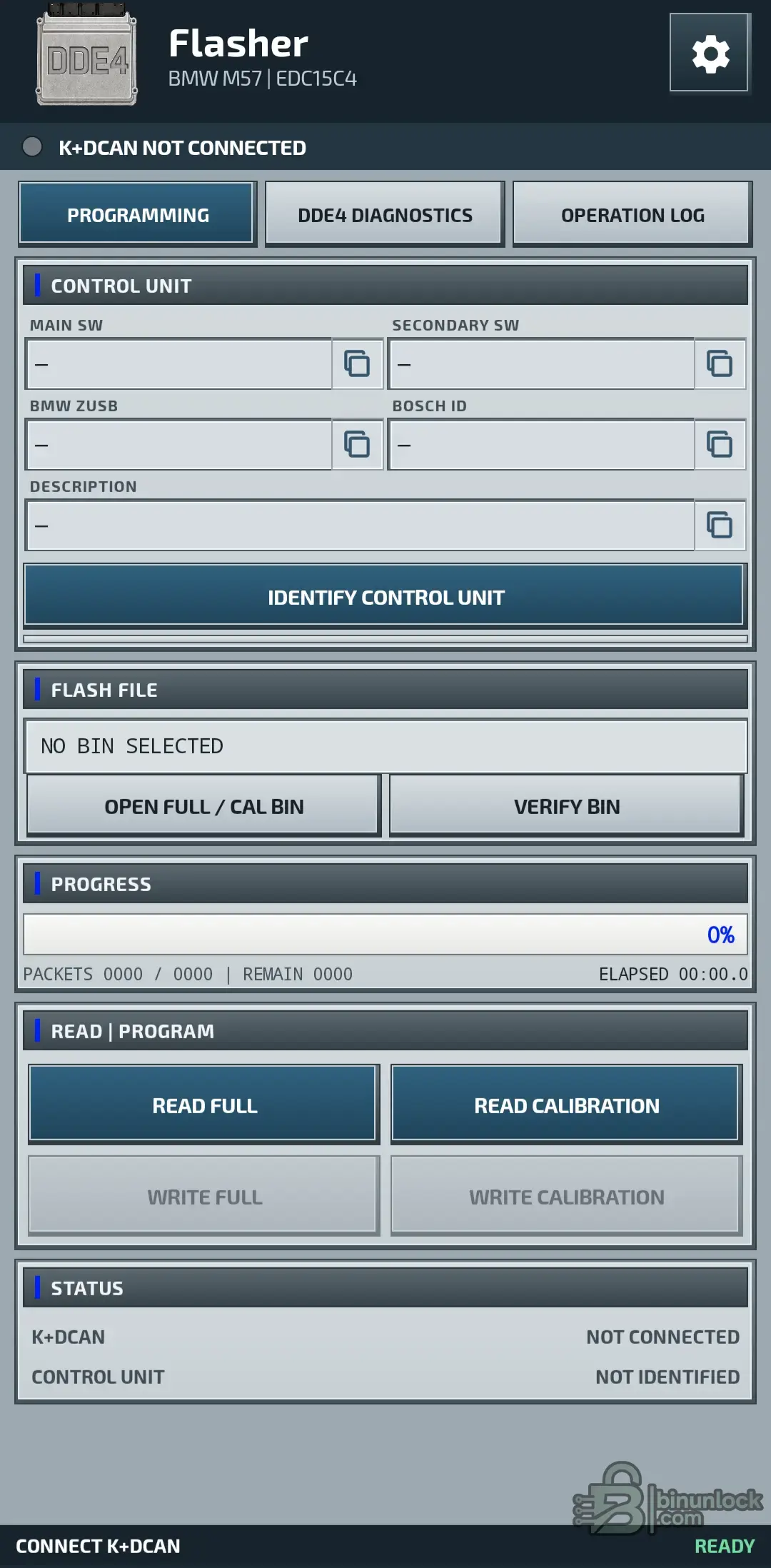
The Programming workspace provides four separate operations:
Supported file sizes:
Supported files may use:
File validation is based on the actual binary structure rather than its filename or extension.
The tool can normalize supported dump variants automatically before programming. Any required checksum correction is applied to an internal working copy; the original file stored on the Android device remains unchanged.
Write functions become available only after the connected ECU and selected BIN have passed the required identification and verification checks.
Video Demonstration
The included video demonstrates the Android interface, K+DCAN workflow and primary DDE4 programming functions.
Bosch CR2 Checksum Handling
DDE4 Flasher supports the native Bosch CR2 BMW checksum used by compatible DDE4 files.
The application can:
The source BIN on the phone or tablet is not overwritten during checksum preparation.
Protected Area & Write Recovery
The application preserves and verifies the protected ECU area during supported programming operations.
The protected region can be saved with the backup package and compared before and after programming.
If a write is interrupted, DDE4 Flasher provides a recovery workflow using the same verified BIN.
DDE4 Diagnostics
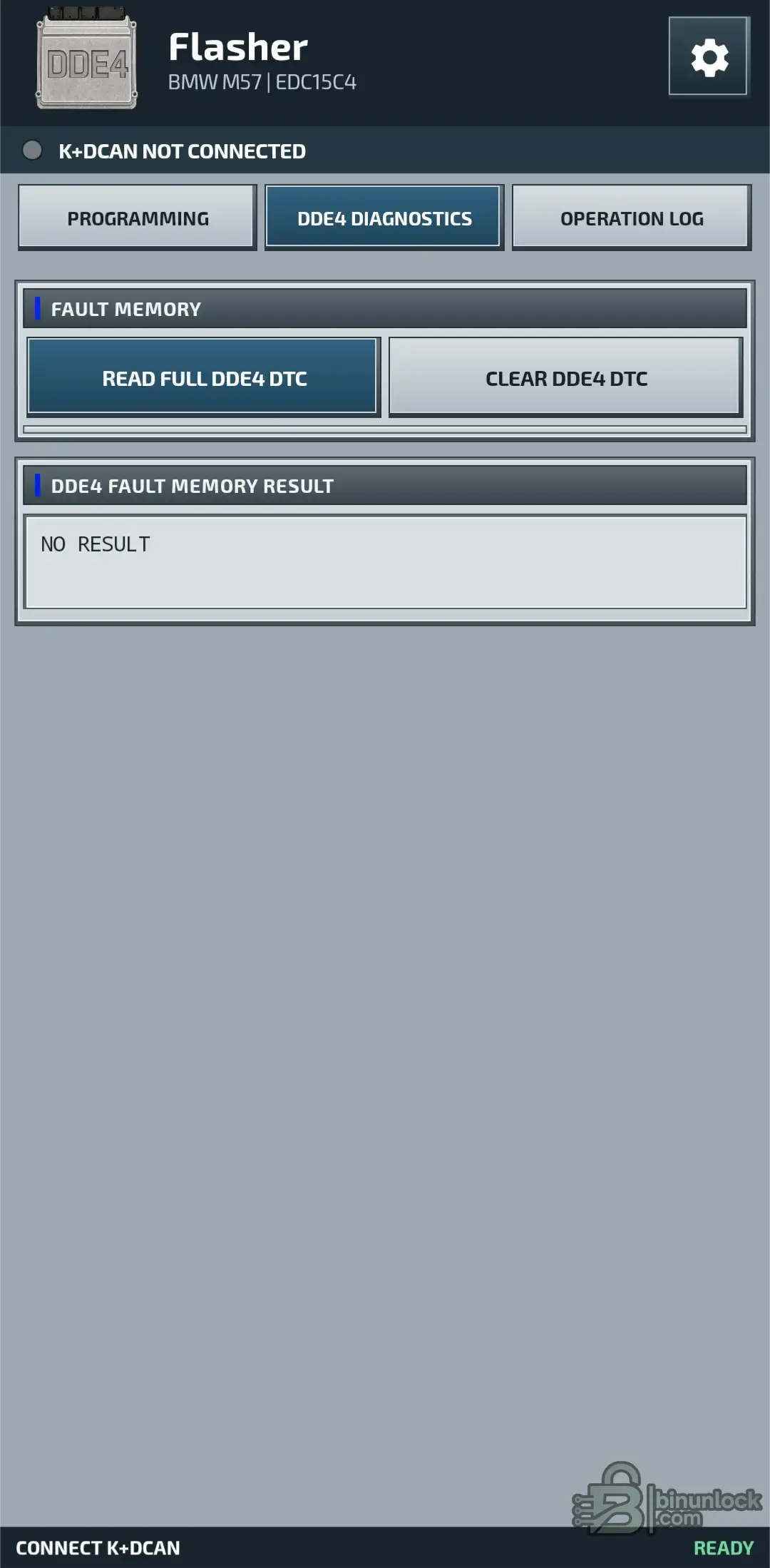
The integrated diagnostic workspace reads both the main DDE4 fault memory and Shadow Memory.
Available functions include:
Depending on the information stored by the ECU, fault details may include:
After clearing fault memory, the application performs another read to verify the result.
Complete Backup Package
Before programming, DDE4 Flasher can create one ZIP package containing the available ECU and diagnostic data.
The package can include:
Creating and preserving a Complete Backup Package before the first write is strongly recommended.
K+DCAN Connection & Programming Speed
The application communicates through a wired K+DCAN interface based on an FTDI FT232 USB controller.
Required USB identification:
The normal programming profile uses:
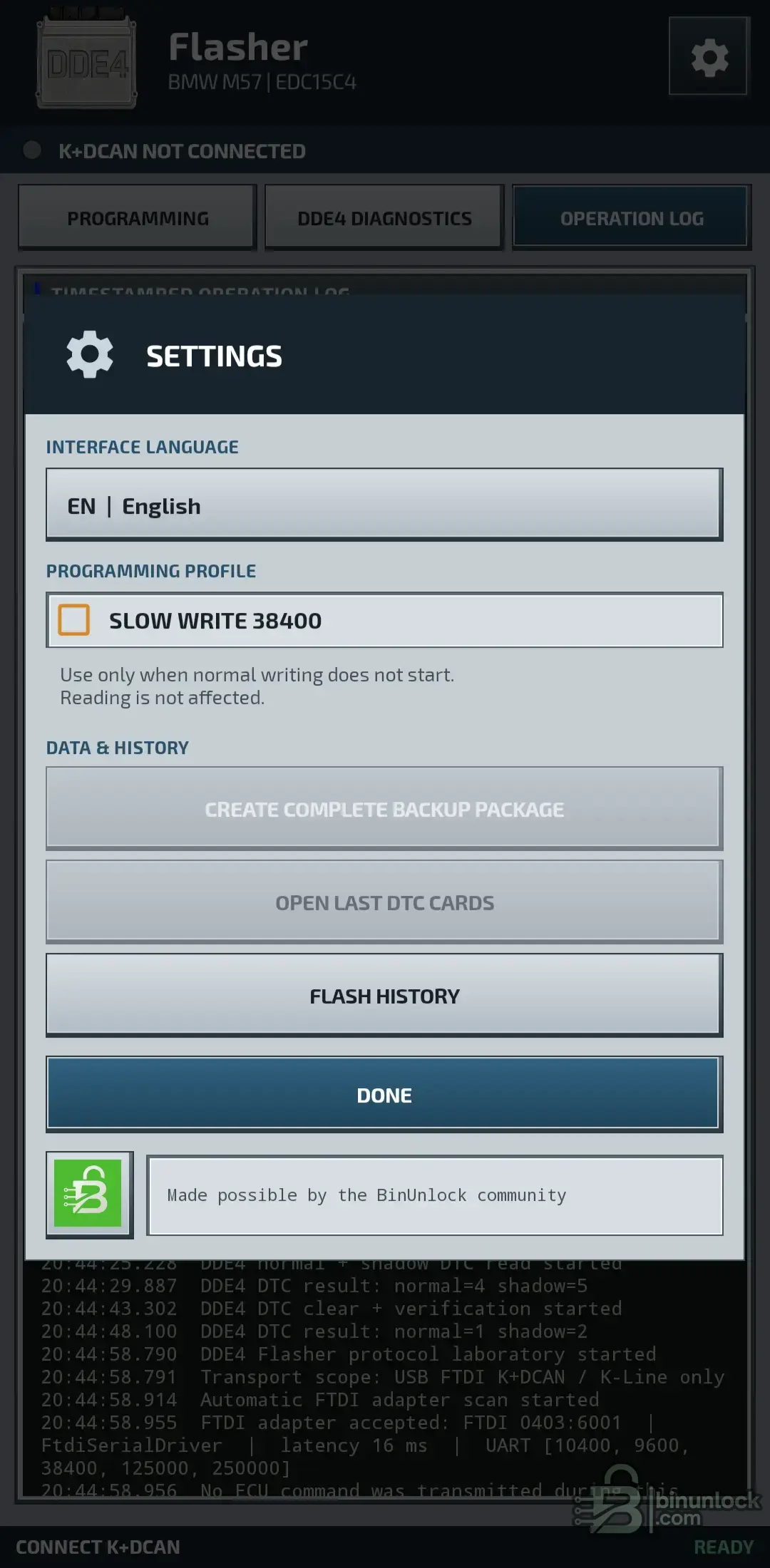
For an ECU or cable that does not begin writing reliably at the normal rate, the Settings window provides:
Use the slow profile only when normal writing does not start. Reading is not affected by this setting.
Requirements
For early BMW vehicles with the round under-hood diagnostic connector, use a reliable:
A wireless adapter is not a substitute for the required wired FTDI K+DCAN connection.
Recommended Workflow
Important
DDE4 Flasher 1.0 is an Android ECU programming and diagnostic application for BMW M57 DDE4 / Bosch EDC15C4 control units from the DDE40 family.
It reads and writes FULL and calibration BIN files directly over K-Line through a wired FTDI K+DCAN cable, without requiring a Windows laptop or an Internet connection during vehicle service.
The application combines control-unit identification, native Bosch CR2 checksum handling, DDE4 diagnostics, protected-area backup, flash history, complete backup creation and interrupted-write recovery in one mobile workspace.
Supported BMW Applications
DDE4 Flasher is intended for vehicles equipped with a compatible BMW DDE4 / Bosch EDC15C4 / DDE40 control unit and a first-generation M57 diesel engine.
Typical applications include:
- BMW E38 730d
- BMW E39 525d
- BMW E39 530d
- BMW E46 330d
- BMW E46 330xd
- BMW E53 X5 3.0d
- Compatible conversions and swaps using a supported DDE40 / DDE4 ECU
Compatibility is determined by the installed ECU and its identification, not by chassis or model year alone.
Before programming, the application verifies the connected control unit and the structure of the selected file.
Main Features
- Native Android DDE4 flashing workspace
- BMW M57 / Bosch EDC15C4 support
- Direct K-Line communication
- Automatic FTDI K+DCAN adapter detection
- Main SW and Secondary SW identification
- BMW ZUSB identification
- Bosch ID and control-unit description
- Read complete FULL BIN
- Read calibration area
- Write complete FULL BIN
- Write calibration area separately
- Automatic Bosch CR2 checksum verification and correction
- Supported dump-format normalization
- Post-write verification by reading programmed data back
- 16 KiB protected-area backup and comparison
- Interrupted-write recovery using the same verified BIN
- Normal and Shadow DDE4 fault-memory diagnostics
- Complete Backup Package creation
- Local programming history
- Timestamped operation log
FULL & Calibration Read/Write
The Programming workspace provides four separate operations:
Code:
READ FULL
READ CALIBRATION
WRITE FULL
WRITE CALIBRATION
Supported file sizes:
Code:
FULL BIN          524,288 bytes / 512 KiB
FULL + over-read  524,290 bytes
CAL BIN            49,152 bytes / 48 KiB
Supported files may use:
Code:
.bin
.ori
.mod
or no extension
File validation is based on the actual binary structure rather than its filename or extension.
The tool can normalize supported dump variants automatically before programming. Any required checksum correction is applied to an internal working copy; the original file stored on the Android device remains unchanged.
Write functions become available only after the connected ECU and selected BIN have passed the required identification and verification checks.
Video Demonstration
The included video demonstrates the Android interface, K+DCAN workflow and primary DDE4 programming functions.
Bosch CR2 Checksum Handling
DDE4 Flasher supports the native Bosch CR2 BMW checksum used by compatible DDE4 files.
The application can:
- Verify both supported Bosch CR2 checksum areas
- Correct the checksum before programming
- Rebuild a calibration checksum using the required program-area data from the connected ECU
- Verify the prepared working data before writing
- Confirm the programmed result through readback
The source BIN on the phone or tablet is not overwritten during checksum preparation.
Protected Area & Write Recovery
The application preserves and verifies the protected ECU area during supported programming operations.
Code:
Protected area: 16 KiBThe protected region can be saved with the backup package and compared before and after programming.
If a write is interrupted, DDE4 Flasher provides a recovery workflow using the same verified BIN.
DDE4 Diagnostics
The integrated diagnostic workspace reads both the main DDE4 fault memory and Shadow Memory.
Available functions include:
- READ FULL DDE4 DTC
- CLEAR DDE4 DTC
- Normal fault-memory reading
- Shadow fault-memory reading
- Localized fault-code descriptions
- Active, inactive, historical and sporadic fault states
- Occurrence count
- Detailed fault-environment data
- Verification read after fault clearing
- Individual diagnostic cards
- Copy and share diagnostic reports
Depending on the information stored by the ECU, fault details may include:
- Engine speed
- Coolant temperature
- Rail pressure
- Injection quantity
- Boost pressure
- Vehicle speed
- Mileage
- Other available operating conditions
After clearing fault memory, the application performs another read to verify the result.
Complete Backup Package
Before programming, DDE4 Flasher can create one ZIP package containing the available ECU and diagnostic data.
The package can include:
- Original FULL BIN
- Separately extracted calibration
- Protected 16 KiB ECU area
- Complete DDE4 identification
- Normal fault memory
- Shadow fault memory
- Flash history
- Operation log
Creating and preserving a Complete Backup Package before the first write is strongly recommended.
K+DCAN Connection & Programming Speed
The application communicates through a wired K+DCAN interface based on an FTDI FT232 USB controller.
Required USB identification:
Code:
VID:PID 0403:6001The normal programming profile uses:
Code:
125000 baudFor an ECU or cable that does not begin writing reliably at the normal rate, the Settings window provides:
Code:
SLOW WRITE 38400Use the slow profile only when normal writing does not start. Reading is not affected by this setting.
Requirements
- Android 6.0 or newer
- Android phone or tablet with USB Host / OTG support
- Wired K+DCAN cable using FTDI FT232
- USB VID
 ID 0403:6001
 - Stable regulated vehicle programming supply
- Charged Android phone or tablet
For early BMW vehicles with the round under-hood diagnostic connector, use a reliable:
Code:
BMW 20-pin to OBD adapterA wireless adapter is not a substitute for the required wired FTDI K+DCAN connection.
Recommended Workflow
- Connect a stable programming power supply
- Connect the wired FTDI K+DCAN cable through USB OTG
- Identify the DDE4 control unit
- Verify Main SW, Secondary SW, BMW ZUSB and Bosch ID
- Create the Complete Backup Package
- Read and preserve the original FULL BIN
- Open and verify the exact file intended for programming
- Use FULL or CAL writing as required by the repair workflow
- Do not interrupt the active erase or write sequence
- After success, switch ignition OFF for approximately 5 seconds
- Switch ignition ON and identify the ECU again
- Read DTC and verify normal engine operation
Important


