
BMW DDE4 Fan Calibration Studio - M57 PWM Electric Fan Conversion Tool
DDE4 Fan Calibration Studio is a specialized Windows calibration utility for BMW M57 DDE4 / Bosch EDC15C4 cooling-fan control.
Its main purpose is to support conversions where the original early-M57 cooling arrangement — viscous fan clutch plus the front auxiliary electric fan — is replaced by one powerful 3-wire PWM electric fan mounted behind the coolant radiator, similar in concept to later BMW M57N cooling layouts.
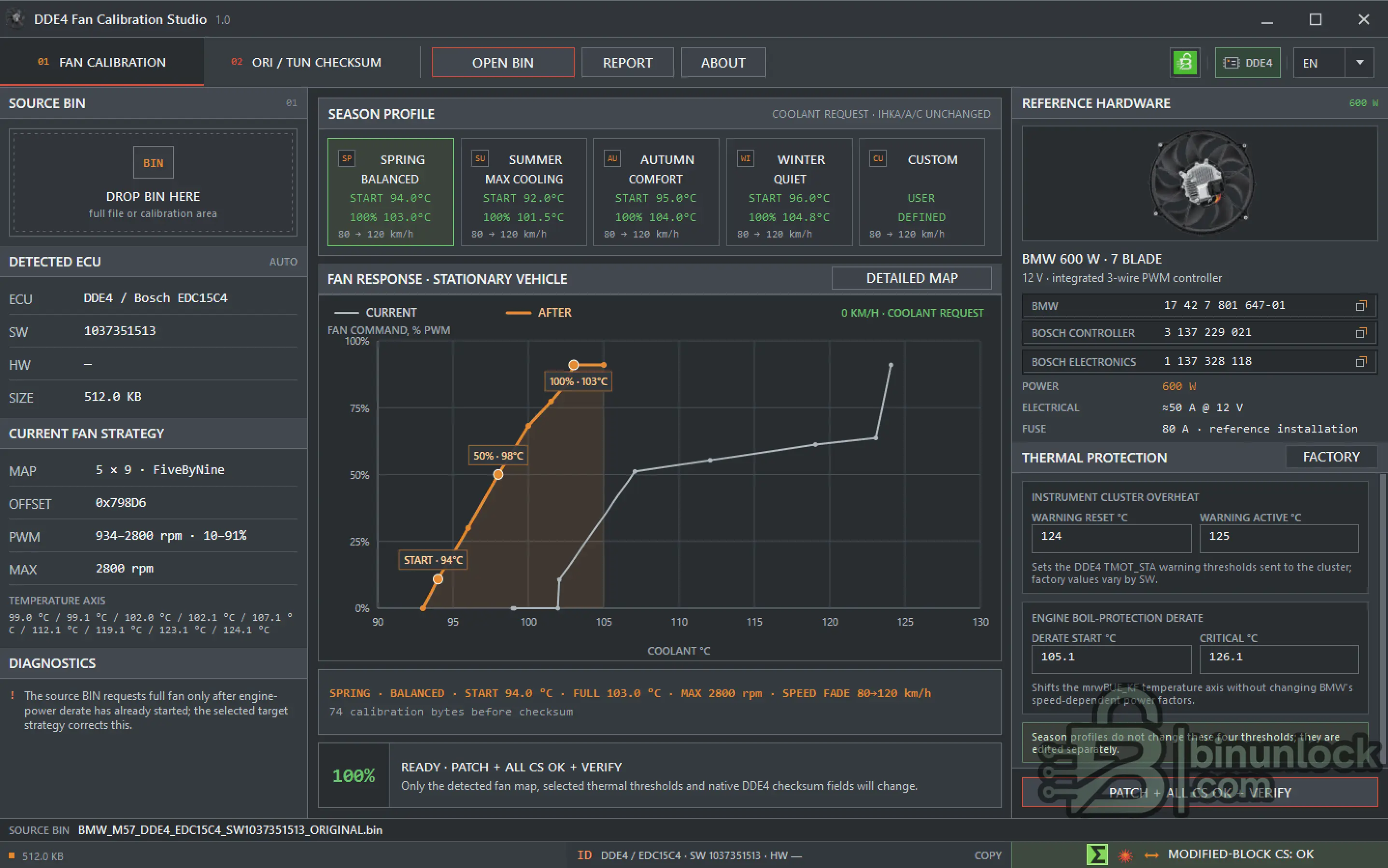
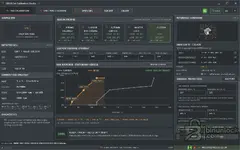
The software automatically identifies the supported DDE4 fan-control structures, displays the existing strategy, provides ready seasonal profiles or a fully custom thermal strategy, recalculates the native checksum and saves a separately verified BIN.
Main Purpose
Early BMW M57 applications commonly use two separate cooling devices:
DDE4 Fan Calibration Studio is intended for retrofit projects where this arrangement is replaced with one high-power PWM-controlled electric fan behind the main radiator.
The software modifies the DDE4 electric-fan request strategy so the replacement fan can be commanded according to coolant temperature and vehicle speed.
IHKA / air-conditioning fan request logic is not silently rewritten by the seasonal profiles.
The physical installation, fan capacity, wiring, fuse protection and PWM-controller compatibility remain the responsibility of the installer.
Supported ECU
Fan calibration editing is specifically intended for:
Supported factory structures include:
Fan calibration editing is DDE4 only.
The separate checksum workspace can recognize additional supported checksum structures, but this does not extend fan-map editing to DDE5 or DDE6.
Automatic BIN Detection
After opening a supported BIN, the software determines:
Detection is based on the expected data structure and surrounding calibration context rather than blindly applying one fixed address.
If the fan map, electrical characteristic or checksum domain cannot be identified unambiguously, saving remains blocked.
Seasonal Fan Profiles
The application includes four prepared thermal strategies for the reference PWM fan conversion.
SPRING - Balanced
SUMMER - Max Cooling
AUTUMN - Comfort
WINTER - Quiet
The emergency thermal branch still reaches full fan request at high coolant temperature independently of the normal vehicle-speed fade.
Custom Thermal Strategy
A fully custom mode is also available.
The user can define:
Instrument-cluster warning thresholds and engine thermal-protection thresholds are edited separately.
Selecting a seasonal profile does not silently modify those protection values.
Visual Fan Response
The main graph compares the CURRENT and AFTER fan strategies.
For a stationary vehicle it displays:
Important points such as:
are marked directly on the graph.
The Detailed Map view provides the complete current and resulting temperature / vehicle-speed map.
Reference Fan Hardware
The interface includes a known reference for a BMW 600 W 7-blade PWM fan assembly:
These numbers are provided as a known reference, not as a guarantee that the same assembly is correct for every vehicle.
The installer must verify the exact fan, wiring gauge, fuse protection, charging system, rotation direction and PWM-controller behavior on the actual car.
Thermal Protection
DDE4 Fan Calibration Studio also displays and allows controlled editing of relevant thermal-protection thresholds.
These include:
Instrument Cluster Overheat
Engine Boil-Protection Derate
The software checks the relationship between the fan strategy and the thermal-protection points before allowing a result to be saved.
For example:
Safe BIN Modification
For a supported BIN, the application:
The original source file is never overwritten.
Normal successful status:
ORI / TUN Checksum
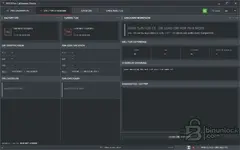
A separate workspace is provided for checksum servicing.
It can operate in two modes:
The ORI / TUN workflow can:
The auxiliary checksum workspace can also recognize known ADD32 structures for:
This checksum functionality does not mean that DDE5 or DDE6 fan calibration is supported.
What the Software Does Not Do
DDE4 Fan Calibration Studio does not:
The software handles the supported DDE4 calibration side of the conversion. Physical installation and vehicle validation remain separate workshop procedures.
Recommended Workflow
Interface Languages
DDE4 Fan Calibration Studio supports 35 interface languages:
English (EN), العربية (AR), Български (BG), Čeština (CS), Dansk (DA), Deutsch (DE), Ελληνικά (EL), Español (ES), Eesti (ET), Suomi (FI), Français (FR), Hrvatski (HR), Magyar (HU), Bahasa Indonesia (ID), Italiano (IT), 日本語 (JA), 한국어 (KO), Lietuvių (LT), Latviešu (LV), Norsk Bokmål (NO), Nederlands (NL), Polski (PL), Português Europeu (PT), Română (RO), Русский (RU), Slovenčina (SK), Slovenščina (SL), Srpski — Latinica (SR), Svenska (SV), ไทย (TH), Türkçe (TR), Українська (UK), 简体中文 (ZH-CN), 繁體中文 (ZH-TW), ქართული (KA).
The application can automatically select the Windows system language or use the manual language selector.
System Requirements
File Integrity
Release: DDE4 Fan Calibration Studio 1.0
SHA-256:
VirusTotal:
View VirusTotal report
The VirusTotal report above corresponds to the executable identified by the exact SHA-256 hash shown above.
Always compare the downloaded executable with this SHA-256 before running the application.
Important
DDE4 Fan Calibration Studio is a specialized Windows calibration utility for BMW M57 DDE4 / Bosch EDC15C4 cooling-fan control.
Its main purpose is to support conversions where the original early-M57 cooling arrangement — viscous fan clutch plus the front auxiliary electric fan — is replaced by one powerful 3-wire PWM electric fan mounted behind the coolant radiator, similar in concept to later BMW M57N cooling layouts.
The software automatically identifies the supported DDE4 fan-control structures, displays the existing strategy, provides ready seasonal profiles or a fully custom thermal strategy, recalculates the native checksum and saves a separately verified BIN.
Main Purpose
Early BMW M57 applications commonly use two separate cooling devices:
- Mechanical viscous-clutch engine fan
- Front auxiliary electric fan
DDE4 Fan Calibration Studio is intended for retrofit projects where this arrangement is replaced with one high-power PWM-controlled electric fan behind the main radiator.
The software modifies the DDE4 electric-fan request strategy so the replacement fan can be commanded according to coolant temperature and vehicle speed.
IHKA / air-conditioning fan request logic is not silently rewritten by the seasonal profiles.
The physical installation, fan capacity, wiring, fuse protection and PWM-controller compatibility remain the responsibility of the installer.
Supported ECU
Fan calibration editing is specifically intended for:
Code:
BMW M57 2.5d / 3.0d
DDE4
Bosch EDC15C4
Full BIN: 524,288 bytes / 512 KiB
Supported factory structures include:
- agwMLSKF fan-request maps
- 5 × 9 layouts
- 12 × 12 layouts
- SW-specific RPM-to-PWM conversion tables
- agwMLS_TV tables with 4, 8 or 20 points
- Factory overheat-warning thresholds
- mrwBUE_KF engine thermal-protection axis
- Bosch CR2 BMW native checksum
Fan calibration editing is DDE4 only.
The separate checksum workspace can recognize additional supported checksum structures, but this does not extend fan-map editing to DDE5 or DDE6.
Automatic BIN Detection
After opening a supported BIN, the software determines:
- ECU family
- SW number
- Available HW identification
- BIN size and layout
- Fan-control map location
- Temperature axis
- Vehicle-speed zones
- RPM-to-PWM conversion table
- Maximum fan RPM
- Instrument-cluster overheat thresholds
- Engine thermal-protection thresholds
- Native checksum regions
Detection is based on the expected data structure and surrounding calibration context rather than blindly applying one fixed address.
If the fan map, electrical characteristic or checksum domain cannot be identified unambiguously, saving remains blocked.
Seasonal Fan Profiles
The application includes four prepared thermal strategies for the reference PWM fan conversion.
SPRING - Balanced
Code:
Fan start:       94.0 °C
Full request:   103.0 °C
Speed fade:      80 -> 120 km/h
SUMMER - Max Cooling
Code:
Fan start:       92.0 °C
Full request:   101.5 °C
Speed fade:      80 -> 120 km/h
AUTUMN - Comfort
Code:
Fan start:       95.0 °C
Full request:   104.0 °C
Speed fade:      80 -> 120 km/h
WINTER - Quiet
Code:
Fan start:       96.0 °C
Full request:   104.8 °C
Speed fade:      80 -> 120 km/h
The emergency thermal branch still reaches full fan request at high coolant temperature independently of the normal vehicle-speed fade.
Custom Thermal Strategy
A fully custom mode is also available.
The user can define:
- Fan start temperature
- 50% request temperature
- Full-request temperature
- Emergency branch start
- Emergency full-request temperature
- Vehicle speed where normal fade begins
- Vehicle speed where normal request reaches zero
Instrument-cluster warning thresholds and engine thermal-protection thresholds are edited separately.
Selecting a seasonal profile does not silently modify those protection values.
Visual Fan Response
The main graph compares the CURRENT and AFTER fan strategies.
For a stationary vehicle it displays:
Code:
X axis: Coolant temperature °C
Y axis: Actual fan command % PWM
Important points such as:
Code:
START
50%
100%
are marked directly on the graph.
The Detailed Map view provides the complete current and resulting temperature / vehicle-speed map.
Reference Fan Hardware
The interface includes a known reference for a BMW 600 W 7-blade PWM fan assembly:
Code:
BMW:              17 42 7 801 647-01
Bosch Controller: 3 137 229 021
Bosch Electronics:1 137 328 118

Rated power:      600 W
Supply:           12 V
Approx. current:  ~50 A
Reference fuse:   80 A
These numbers are provided as a known reference, not as a guarantee that the same assembly is correct for every vehicle.
The installer must verify the exact fan, wiring gauge, fuse protection, charging system, rotation direction and PWM-controller behavior on the actual car.
Thermal Protection
DDE4 Fan Calibration Studio also displays and allows controlled editing of relevant thermal-protection thresholds.
These include:
Instrument Cluster Overheat
Code:
Warning reset °C
Warning active °C
Engine Boil-Protection Derate
Code:
Derate start °C
Critical °C
The software checks the relationship between the fan strategy and the thermal-protection points before allowing a result to be saved.
For example:
- Emergency full fan must be reached before the critical engine derate point
- Cluster warning must not be configured later than the applicable critical protection point
Safe BIN Modification
For a supported BIN, the application:
- Identifies DDE4 and the exact SW
- Locates the supported fan-control structures
- Displays the current fan strategy
- Builds the requested seasonal or custom strategy
- Creates an exact byte-change plan
- Restricts modification to the detected fan map, selected thermal thresholds and checksum storage
- Recalculates the native Bosch CR2 BMW checksum
- Writes the result to a temporary file
- Reads the completed file back
- Re-identifies ECU / SW and verifies all intended changes
- Publishes a new BIN only after verification
The original source file is never overwritten.
Normal successful status:
Code:
PATCH + ALL CS OK + VERIFYORI / TUN Checksum
A separate workspace is provided for checksum servicing.
It can operate in two modes:
- ORI + TUN pair verification
- Standalone TUN checksum recalculation where the checksum structure is positively identified
The ORI / TUN workflow can:
- Identify ORI and TUN ECU / SW / HW
- Check the original checksum
- Check the tuning checksum
- Count all modified bytes
- Separate CAL changes from checksum bytes
- Detect changes outside the supported domain
- Recalculate only checksum-storage bytes
- Save a separately verified result
The auxiliary checksum workspace can also recognize known ADD32 structures for:
Code:
DDE5 / Bosch EDC16C31
DDE6 / Bosch EDC16C35
This checksum functionality does not mean that DDE5 or DDE6 fan calibration is supported.
What the Software Does Not Do
DDE4 Fan Calibration Studio does not:
- Automatically redesign the physical cooling system
- Verify fan airflow or rotation direction
- Verify wire gauge or fuse capacity
- Repair an incompatible PWM controller
- Automatically disable all factory fan diagnostics
- Modify every unknown fan-related calibration in every SW
- Change the IHKA / A/C request strategy through the seasonal profiles
- Turn DDE5 / DDE6 into supported fan-calibration targets
The software handles the supported DDE4 calibration side of the conversion. Physical installation and vehicle validation remain separate workshop procedures.
Recommended Workflow
- Read and preserve the complete original DDE4 BIN
- Keep an untouched backup
- Open the BIN in DDE4 Fan Calibration Studio
- Verify ECU, SW, file size, detected fan map and checksum state
- Choose a seasonal profile or configure a Custom strategy
- Review the CURRENT / AFTER response
- Review the detailed temperature / speed map
- Verify cluster-warning and engine-protection thresholds
- Save a new BIN under a separate filename
- Program it with the appropriate ECU tool
- Verify actual fan operation, voltage, current, rotation direction and coolant temperature on the vehicle
Interface Languages
DDE4 Fan Calibration Studio supports 35 interface languages:
English (EN), العربية (AR), Български (BG), Čeština (CS), Dansk (DA), Deutsch (DE), Ελληνικά (EL), Español (ES), Eesti (ET), Suomi (FI), Français (FR), Hrvatski (HR), Magyar (HU), Bahasa Indonesia (ID), Italiano (IT), 日本語 (JA), 한국어 (KO), Lietuvių (LT), Latviešu (LV), Norsk Bokmål (NO), Nederlands (NL), Polski (PL), Português Europeu (PT), Română (RO), Русский (RU), Slovenčina (SK), Slovenščina (SL), Srpski — Latinica (SR), Svenska (SV), ไทย (TH), Türkçe (TR), Українська (UK), 简体中文 (ZH-CN), 繁體中文 (ZH-TW), ქართული (KA).
The application can automatically select the Windows system language or use the manual language selector.
System Requirements
- Windows x64
- Supported BMW DDE4 / EDC15C4 BIN for fan calibration
- Appropriate ECU reading / programming equipment
File Integrity
Release: DDE4 Fan Calibration Studio 1.0
SHA-256:
Code:
a98d1dbee7df50e55553b39ed1b06766d56988a3438ee013fe0735f37c444f6dVirusTotal:
View VirusTotal report
The VirusTotal report above corresponds to the executable identified by the exact SHA-256 hash shown above.
Always compare the downloaded executable with this SHA-256 before running the application.
Important


