
HPT-MMOQRY - HPT/BIN Converter, Hex Editor & HPT File Analysis Tool
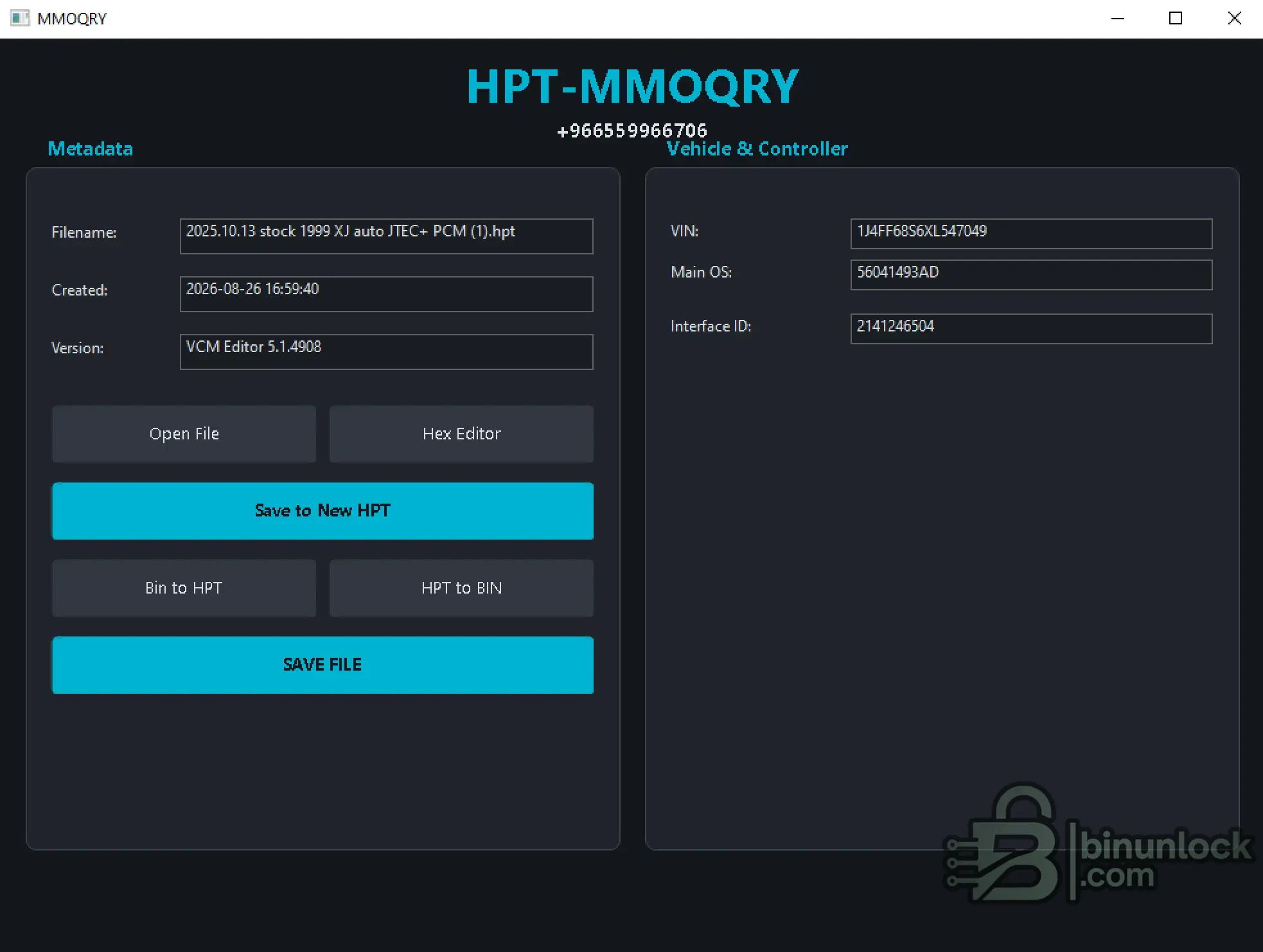
HPT-MMOQRY is a Windows workspace for opening, inspecting, editing and converting supported HPT files.
The application provides HPT metadata and vehicle identifiers, an integrated Advanced Hex Editor, HPT ↔ BIN conversion, HPT rebuilding and file-saving functions in a compact interface.
Key Features
HPT File Inspection
After opening a supported HPT file, HPT-MMOQRY extracts and displays useful file and controller information including:
This provides a quick way to identify and inspect HPT files before conversion or editing.
Advanced Hex Editor
The integrated Advanced Hex Editor provides direct access to the loaded file data.
Available functions include:
HPT / BIN Conversion
The main workspace provides dedicated conversion functions:
These functions allow supported HPT and BIN data to be moved between the required file formats without manually rebuilding the file structure.
The Save to New HPT function can be used to create a new HPT output while preserving the original source file for comparison and recovery.
Quick Video Guide
A short video walkthrough is included with this resource showing the basic HPT-MMOQRY workflow and main application functions.
Activation
HPT-MMOQRY uses the same offline device-bound activation workflow as HPT File Editor 2026.
Important: The LICENSE NAME submitted with the request must exactly match the name used when creating activation.req.
Do not modify the request file or the issued license.lic.
Package Contents
The current archive contains:
Extract both files into the same folder before starting the application.
File Integrity
File: HPT-MMOQRY.exe
Version: 1.0.0
SHA-256:
VirusTotal:
View VirusTotal report
The VirusTotal report above corresponds to the executable identified by the exact SHA-256 hash shown above.
Important

HPT-MMOQRY is a Windows workspace for opening, inspecting, editing and converting supported HPT files.
The application provides HPT metadata and vehicle identifiers, an integrated Advanced Hex Editor, HPT ↔ BIN conversion, HPT rebuilding and file-saving functions in a compact interface.
Key Features
- Open and analyze supported HPT files
- Display HPT filename and creation date
- Display source VCM Editor version
- Read VIN from the loaded HPT file
- Display Main OS
- Display Interface ID
- HPT to BIN conversion
- BIN to HPT conversion
- Save rebuilt data to a new HPT file
- Advanced Hex Editor
- Hexadecimal and ANSI search
- Direct byte-level editing
- Segment information display
- File information panel
HPT File Inspection
After opening a supported HPT file, HPT-MMOQRY extracts and displays useful file and controller information including:
Code:
Filename
Created
VCM Editor Version
VIN
Main OS
Interface ID
This provides a quick way to identify and inspect HPT files before conversion or editing.
Advanced Hex Editor
The integrated Advanced Hex Editor provides direct access to the loaded file data.
Available functions include:
- Hexadecimal data view
- ASCII / ANSI representation
- Hex search
- ANSI search
- Find Next
- Direct data editing
- Save Changes
- File information
- Segment address and size information
HPT / BIN Conversion
The main workspace provides dedicated conversion functions:
Code:
BIN to HPT
HPT to BIN
These functions allow supported HPT and BIN data to be moved between the required file formats without manually rebuilding the file structure.
The Save to New HPT function can be used to create a new HPT output while preserving the original source file for comparison and recovery.
Quick Video Guide
A short video walkthrough is included with this resource showing the basic HPT-MMOQRY workflow and main application functions.
Activation
HPT-MMOQRY uses the same offline device-bound activation workflow as HPT File Editor 2026.
Important: The LICENSE NAME submitted with the request must exactly match the name used when creating activation.req.
Do not modify the request file or the issued license.lic.
Package Contents
The current archive contains:
Code:
HPT-MMOQRY.exe
HPT-MMOQRY.exe.config
Extract both files into the same folder before starting the application.
File Integrity
File: HPT-MMOQRY.exe
Version: 1.0.0
SHA-256:
Code:
13197eccd29b1e4cefa55ac999616414480f0341eba2643b628c38da6b660505VirusTotal:
View VirusTotal report
The VirusTotal report above corresponds to the executable identified by the exact SHA-256 hash shown above.
Important


