
SID212 / SID212 EVO ECU Flasher - VBF/BIN Flash, J2534 & Map Tool
SID 212 / 212 EVO ECU Flasher is a Windows programming utility for supported SID212 and SID212 EVO ECU service workflows through a compatible SAE J2534 interface.
The application provides VBF and BIN flashing modes, BootLoader / App / Map / RSA file handling, ECU reset with DTC clearing and Map file export in one compact workspace.
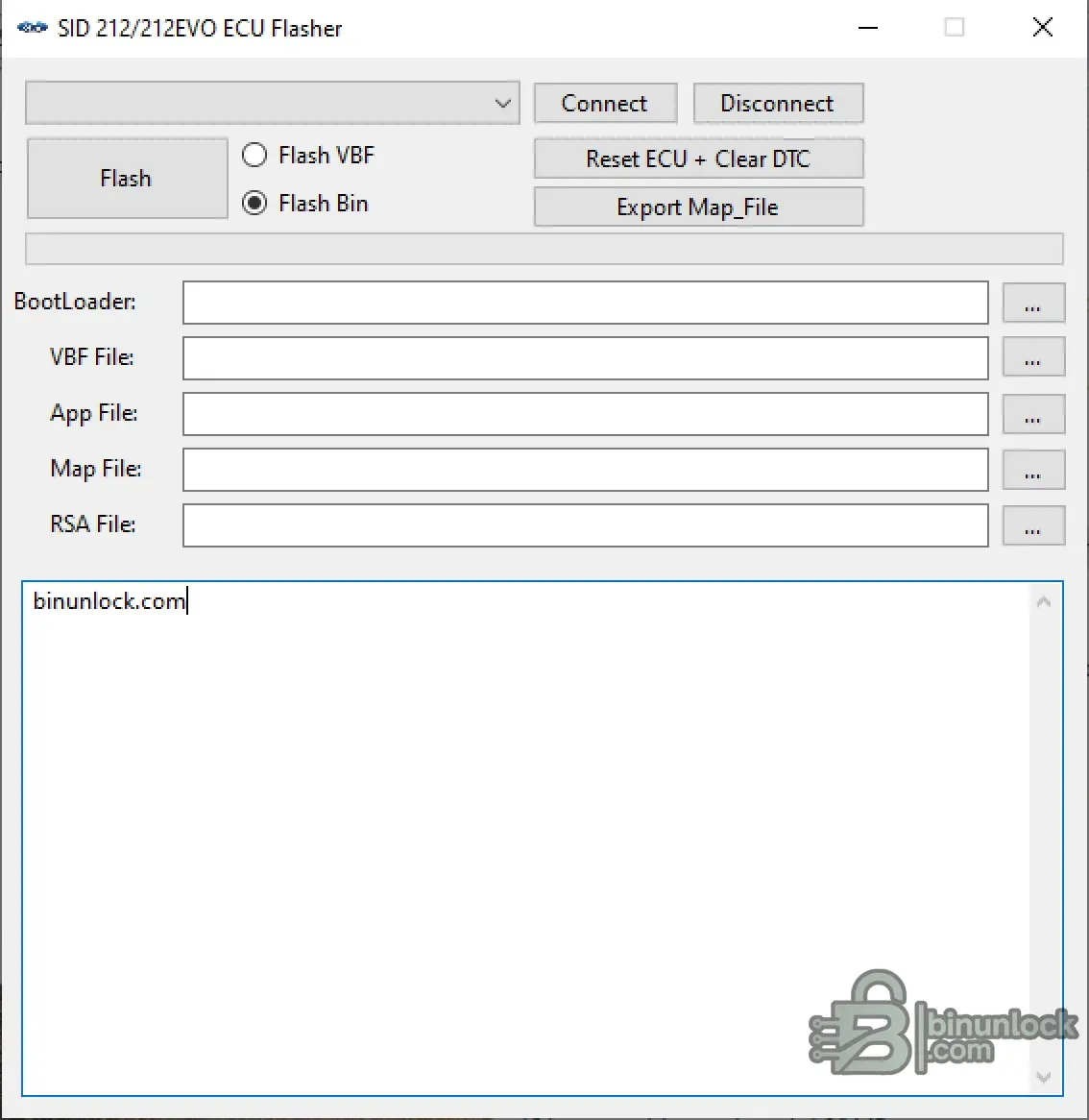
Key Features
Flash Workflows
The application provides two selectable programming modes:
Depending on the selected workflow, the workspace provides dedicated fields for:
Always verify the ECU, selected programming mode and all required files before starting a flash operation.
Additional Service Functions
The workspace also includes:
J2534 Interfaces
SID212 communication uses:
Recommended interface:
Other interfaces may also work when a correct 32-bit J2534 driver is installed.
Expected / possible compatibility includes:
Compatibility of third-party interfaces should be confirmed before performing a write operation.
System Requirements
.NET Desktop Runtime 9.0 x86:
Download Microsoft .NET Desktop Runtime 9.0.9 x86
Activation
Activation is handled automatically through the Discussion thread of this resource.
Package Contents
The archive includes the main executable together with the required application libraries and runtime configuration files, including:
Extract the complete archive before starting the application. Do not run only the EXE while leaving the required DLL files behind.
File Integrity
File: SID 212_212 EVO Flasher.exe
SHA-256:
VirusTotal:
View VirusTotal report
The VirusTotal report above corresponds to the executable identified by the exact SHA-256 hash shown above.
Important
SID 212 / 212 EVO ECU Flasher is a Windows programming utility for supported SID212 and SID212 EVO ECU service workflows through a compatible SAE J2534 interface.
The application provides VBF and BIN flashing modes, BootLoader / App / Map / RSA file handling, ECU reset with DTC clearing and Map file export in one compact workspace.
Key Features
- SID212 / SID212 EVO ECU service workspace
- SAE J2534 interface support
- ISO15765 / CAN communication
- 500 kbit/s CAN operation for SID212
- Flash VBF mode
- Flash BIN mode
- BootLoader file selection
- VBF file selection
- App file selection
- Map file selection
- RSA file selection
- Reset ECU + Clear DTC
- Export Map_File
- Integrated operation / status output
Flash Workflows
The application provides two selectable programming modes:
Code:
Flash VBF
Flash BIN
Depending on the selected workflow, the workspace provides dedicated fields for:
Code:
BootLoader
VBF File
App File
Map File
RSA File
Always verify the ECU, selected programming mode and all required files before starting a flash operation.
Additional Service Functions
The workspace also includes:
- Reset ECU + Clear DTC - ECU restart and diagnostic trouble-code clear workflow
- Export Map_File - export the applicable Map file from the supported workflow
- Connect / Disconnect - explicit J2534 session control
J2534 Interfaces
SID212 communication uses:
Code:
ISO15765 / CAN
500 kbit/s
Recommended interface:
- Scanmatik 2
- Scanmatik 2 Pro
Other interfaces may also work when a correct 32-bit J2534 driver is installed.
Expected / possible compatibility includes:
- Scanmatik-compatible clones - detection is expected, but programming reliability depends on the driver and hardware
- OpenPort 2.0
- Mongoose
- VCX Nano / VCX SE
Compatibility of third-party interfaces should be confirmed before performing a write operation.
System Requirements
- Microsoft Windows
- Microsoft .NET Desktop Runtime 9.0 x86
- Compatible 32-bit SAE J2534 driver
- Supported J2534 interface
- Stable programming power supply
.NET Desktop Runtime 9.0 x86:
Download Microsoft .NET Desktop Runtime 9.0.9 x86
Activation
Activation is handled automatically through the Discussion thread of this resource.
- Start SID 212_212 EVO Flasher.exe.
- Copy the Hardware ID displayed by the application.
- Post the Hardware ID in the resource Discussion thread.
- Gemini will automatically issue the corresponding Name and Key.
- Enter the issued Name and Key exactly as provided.
- Select Register.
Package Contents
The archive includes the main executable together with the required application libraries and runtime configuration files, including:
Code:
SID 212_212 EVO Flasher.exe
Connection.dll
FontAwesome.Sharp.dll
OBCDJ2534.dll
Sid212ECU.dll
Sid212ECU.deps.json
Sid212ECU.runtimeconfig.json
sid212-kеуg**.dll
SuperSimpleTcp.dll
System.Management.dll
Version.dll
BinUnlock-LLC-CodeSigning.cer
Extract the complete archive before starting the application. Do not run only the EXE while leaving the required DLL files behind.
File Integrity
File: SID 212_212 EVO Flasher.exe
SHA-256:
Code:
682a9bc08ab088254a96a6bfb5d6191671e6fc878e06c2d2365e3d0087894d3dVirusTotal:
View VirusTotal report
The VirusTotal report above corresponds to the executable identified by the exact SHA-256 hash shown above.
Important


