
BMW DDE Rail Sensor Studio - M57/M57N/M57N2 Rail Pressure Sensor Tool
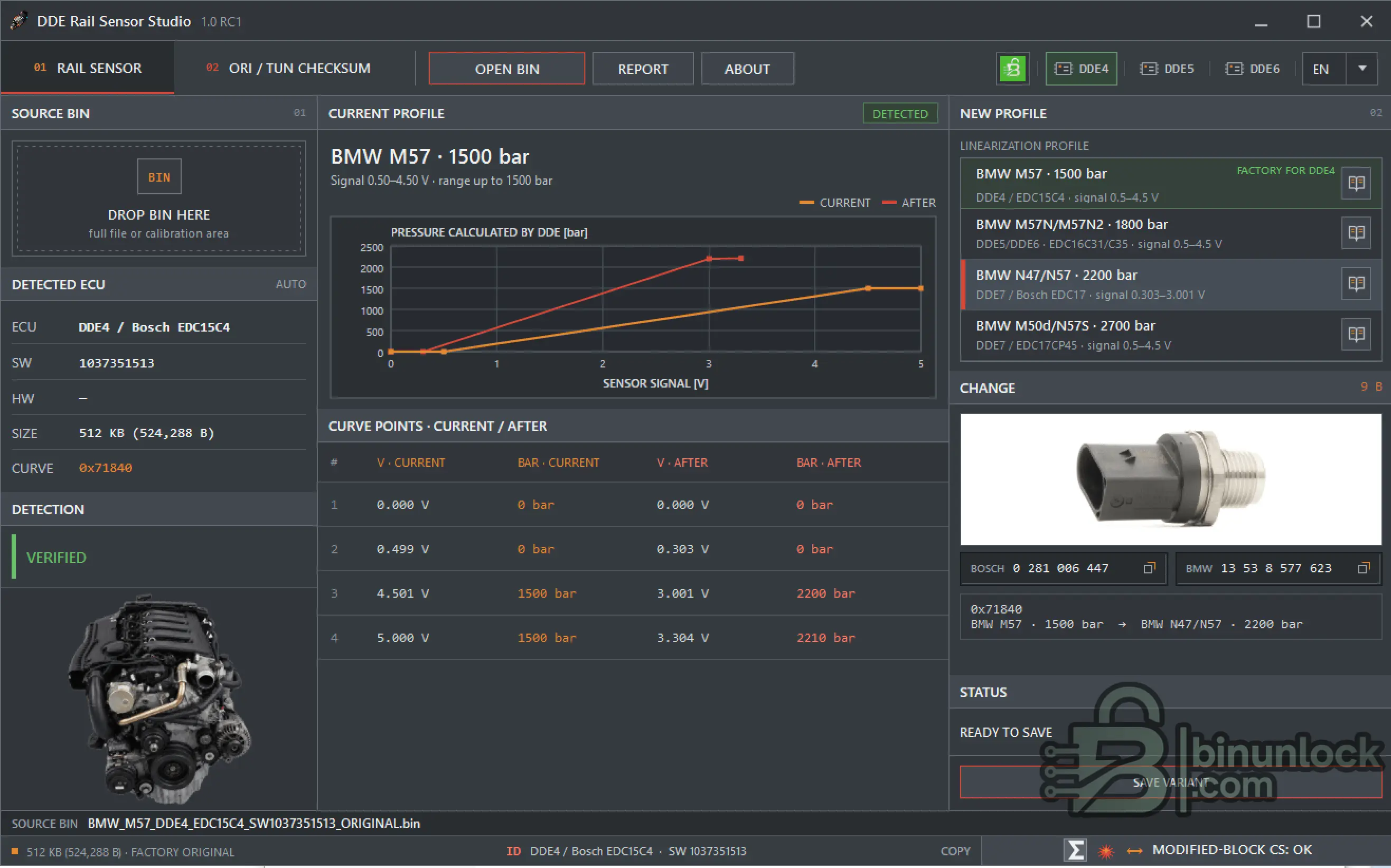
DDE Rail Sensor Studio is an offline Windows calibration utility for detecting, comparing and changing the fuel-rail pressure sensor linearization inside supported BMW DDE binary files.
It is designed primarily for BMW M57, M57N and M57N2 applications and supports conversion between 1500, 1800, 2200 and 2700 bar rail-pressure sensor profiles on confidently identified DDE4 / DDE5 / DDE6 files.
Checksum handling, ORI / TUN verification, sensor part-number references, wiring information and technical report export are included as supporting service functions.
Key Features
Supported BMW DDE Families
DDE4 / Bosch EDC15C4
DDE5 / Bosch EDC16C31
DDE6 / Bosch EDC16C35
DDE7 / EDC17
EDC17 files may be identified and displayed as UNSUPPORTED, but EDC17 rail editing and checksum correction are intentionally disabled.
The presence of N47 / N57 or M50d sensor profiles does not mean that EDC17 editing is supported.
These later-generation sensors are available as target hardware for confidently identified DDE4 / DDE5 / DDE6 BIN conversions.
Rail Pressure Sensor Profiles
BMW M57 - 1500 bar
BMW M57N / M57N2 - 1800 bar
BMW N47 / N57 - 2200 bar
This profile is intended as a target sensor conversion for a supported DDE4 / DDE5 / DDE6 BIN.
BMW M50d / N57S - 2700 bar
2700 bar is the sensor measurement range. It does not mean that the engine will automatically run 2700 bar rail pressure.
The currently detected profile is highlighted in the interface. Any of the four profiles can then be selected as the target sensor on a supported DDE4 / DDE5 / DDE6 BIN.
What Changes Inside the BIN
For a supported file, the software:
The original source BIN is never overwritten.
Normal verified output:
If DDE / SW and the rail curve are positively identified but native checksum correction is unavailable for the exact layout, the software clearly reports:
Such a result must only be programmed using a flashing tool that correctly recalculates the checksum for that ECU.
ORI / TUN Checksum
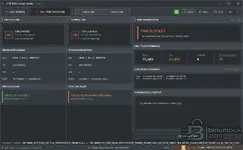
The second workspace is dedicated to checking a factory ORI file against its corresponding TUN.
It provides:
Differences are separated into:
Saving is blocked when an unknown modification exists outside the supported checksum domain.
This workspace is intended for checksum verification and correction only.
It does not evaluate tuning quality, modify calibration maps or transfer maps between different software versions.
Rail Sensor Pinout & ECU Routing
General 3-pin rail-pressure sensor assignment from the sensor-body side:
The harness-side connector view is mirrored. Always use the molded cavity numbers rather than relying only on wire colors.
For catalogued M57 software, the application can also display known ECU-side routing.
DDE4 / EDC15C4 - X2413, 52-pin
DDE5 / DDE6 M57 family - X2411, 96-pin
For unknown SW, M47 / M47N2 applications without confirmed routing and unsupported EDC17 files, the application intentionally does not guess ECU cavities.
Use ISTA / WDS or the correct BMW wiring documentation for the exact vehicle.
Recommended Workflow
Do not choose a sensor profile simply because you want higher fuel pressure.
The DDE linearization must correspond to the physical rail-pressure sensor installed on the engine.
Availability & Licensing
DDE Rail Sensor Studio is available for download and activation to eligible members of:
The Stage level does not matter - every eligible Stage 1 / Stage 2 / Stage 3 member receives a permanent license.
There is no timed expiration for eligible users.
The application uses a separate permanent HWID-bound license:
A DDE Rail Sensor Studio license does not activate DDE MAP Sensor Studio.
Interface Languages
DDE Rail Sensor Studio supports 35 interface languages:
English (EN), العربية (AR), Български (BG), Čeština (CS), Dansk (DA), Deutsch (DE), Ελληνικά (EL), Español (ES), Eesti (ET), Suomi (FI), Français (FR), Hrvatski (HR), Magyar (HU), Bahasa Indonesia (ID), Italiano (IT), 日本語 (JA), 한국어 (KO), Lietuvių (LT), Latviešu (LV), Norsk Bokmål (NO), Nederlands (NL), Polski (PL), Português Europeu (PT), Română (RO), Русский (RU), Slovenčina (SK), Slovenščina (SL), Srpski — Latinica (SR), Svenska (SV), ไทย (TH), Türkçe (TR), Українська (UK), 简体中文 (ZH-CN), 繁體中文 (ZH-TW), ქართული (KA).
The application can automatically select the interface language according to the Windows system language.
System Requirements
File Integrity
Release: DDE Rail Sensor Studio 1.0 RC1
SHA-256:
VirusTotal:
View VirusTotal report
The VirusTotal report above corresponds to the executable identified by the exact SHA-256 hash shown above.
Important
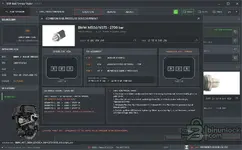
DDE Rail Sensor Studio is an offline Windows calibration utility for detecting, comparing and changing the fuel-rail pressure sensor linearization inside supported BMW DDE binary files.
It is designed primarily for BMW M57, M57N and M57N2 applications and supports conversion between 1500, 1800, 2200 and 2700 bar rail-pressure sensor profiles on confidently identified DDE4 / DDE5 / DDE6 files.
Checksum handling, ORI / TUN verification, sensor part-number references, wiring information and technical report export are included as supporting service functions.
Key Features
- Automatic BMW DDE / ECU identification
- Automatic SW and available HW detection
- Automatic rail-sensor curve discovery
- No manual curve offset required
- 1500 / 1800 / 2200 / 2700 bar sensor profiles
- Current vs After pressure graph
- Four-point rail linearization display
- Bosch and BMW sensor part-number reference
- Changes only the required rail-curve bytes
- Native Bosch checksum recalculation where supported
- Post-save checksum and file verification
- ORI / TUN checksum comparison workspace
- CAL / CS / Outside Domain difference analysis
- Rail sensor electrical pinout reference
- Known BMW ECU connector / cavity routing
- Technical report export
- 35 interface languages
- Automatic system-language selection
- Completely offline operation
Supported BMW DDE Families
DDE4 / Bosch EDC15C4
- BMW M57
- Common 2.5d / 3.0d applications
- Typical full BIN: 512 KiB
- Bosch CR2 BMW checksum
- Two verified calibration checksum blocks
DDE5 / Bosch EDC16C31
- BMW M47N
- BMW M57N
- Supported 1 MiB and 2 MiB layouts
- Compatible full / calibration / shifted reads when positively identified
- Bosch descriptor-based ADD32 checksum
DDE6 / Bosch EDC16C35
- BMW M47N2
- BMW M57N2
- Supported M57TOP layouts where positively identified
- Known sizes include 0x1F0000, 2 MiB and 0x210000
- Bosch descriptor-based ADD32 checksum
DDE7 / EDC17
EDC17 files may be identified and displayed as UNSUPPORTED, but EDC17 rail editing and checksum correction are intentionally disabled.
The presence of N47 / N57 or M50d sensor profiles does not mean that EDC17 editing is supported.
These later-generation sensors are available as target hardware for confidently identified DDE4 / DDE5 / DDE6 BIN conversions.
Rail Pressure Sensor Profiles
BMW M57 - 1500 bar
Code:
Bosch: 0 281 002 405
Bosch: 0 281 002 475
BMW:   13 53 7 781 486
Signal: approx. 0.50 - 4.50 V
Typical ECU: DDE4 / EDC15C4
BMW M57N / M57N2 - 1800 bar
Code:
Bosch: 0 281 002 497
BMW:   13 53 7 787 167
Signal: approx. 0.50 - 4.50 V
Typical ECU: DDE5 / DDE6
BMW N47 / N57 - 2200 bar
Code:
Bosch: 0 281 006 447
Bosch: 0 281 002 948
BMW:   13 53 8 577 623
BMW:   13 53 7 809 130

Approx. signal:
0 bar    - 0.303 V
2200 bar - 3.001 V
Upper reference point - approx. 3.304 V
This profile is intended as a target sensor conversion for a supported DDE4 / DDE5 / DDE6 BIN.
BMW M50d / N57S - 2700 bar
Code:
Bosch: 0 281 006 245
BMW:   13 53 8 508 156
Signal: approx. 0.50 - 4.50 V
2700 bar is the sensor measurement range. It does not mean that the engine will automatically run 2700 bar rail pressure.
The currently detected profile is highlighted in the interface. Any of the four profiles can then be selected as the target sensor on a supported DDE4 / DDE5 / DDE6 BIN.
What Changes Inside the BIN
For a supported file, the software:
- Identifies DDE, SW, available HW and file layout
- Finds the four-point rail-pressure linearization automatically
- Displays the currently detected sensor profile
- Shows CURRENT / AFTER pressure curves
- Builds an exact list of permitted changes
- Changes only the 16 rail-curve bytes
- Recalculates affected Bosch checksum blocks where supported
- Analyzes the completed file again
- Verifies DDE, SW, rail curve and checksum state
- Publishes the result as a separate BIN
The original source BIN is never overwritten.
Normal verified output:
Code:
PATCH + All_CS_ok + VERIFYIf DDE / SW and the rail curve are positively identified but native checksum correction is unavailable for the exact layout, the software clearly reports:
Code:
PATCH + VERIFY - CS BY FLASHER
CS_NOT_CORRECTED
Such a result must only be programmed using a flashing tool that correctly recalculates the checksum for that ECU.
ORI / TUN Checksum
The second workspace is dedicated to checking a factory ORI file against its corresponding TUN.
It provides:
- DDE / SW / HW pair verification
- ORI checksum verification
- Complete ORI / TUN byte-difference count
- CAL difference count
- Checksum-storage byte detection
- Outside Domain detection
- Native checksum recalculation where supported
- Post-save verification
Differences are separated into:
Code:
CAL
CS
OUTSIDE DOMAIN
Saving is blocked when an unknown modification exists outside the supported checksum domain.
This workspace is intended for checksum verification and correction only.
It does not evaluate tuning quality, modify calibration maps or transfer maps between different software versions.
Rail Sensor Pinout & ECU Routing
General 3-pin rail-pressure sensor assignment from the sensor-body side:
Code:
Pin 1 - GND
Pin 2 - Analog pressure signal
Pin 3 - +5 V reference
The harness-side connector view is mirrored. Always use the molded cavity numbers rather than relying only on wire colors.
For catalogued M57 software, the application can also display known ECU-side routing.
DDE4 / EDC15C4 - X2413, 52-pin
Code:
GND    - cavity 20
Signal - cavity 33
+5 V   - cavity 35
DDE5 / DDE6 M57 family - X2411, 96-pin
Code:
GND    - cavity 78
Signal - cavity 56
+5 V   - cavity 30
For unknown SW, M47 / M47N2 applications without confirmed routing and unsupported EDC17 files, the application intentionally does not guess ECU cavities.
Use ISTA / WDS or the correct BMW wiring documentation for the exact vehicle.
Recommended Workflow
- Keep an untouched backup of the original ECU read
- Load a raw uncompressed BIN, not a ZIP, OLS or editor project
- Verify the detected DDE, SW, file size and current sensor profile
- Select the physically installed sensor using its exact Bosch / BMW part number
- Verify sensor wiring and reference voltage where required
- Save the modified result under a new descriptive filename
- Confirm All_CS_ok or the explicit CS_NOT_CORRECTED status
- Program the result using the correct tool and method for the ECU
- After startup, read DTC and log actual rail pressure
Do not choose a sensor profile simply because you want higher fuel pressure.
The DDE linearization must correspond to the physical rail-pressure sensor installed on the engine.
Availability & Licensing
DDE Rail Sensor Studio is available for download and activation to eligible members of:
Code:
Stage 1
Stage 2
Stage 3
The Stage level does not matter - every eligible Stage 1 / Stage 2 / Stage 3 member receives a permanent license.
There is no timed expiration for eligible users.
The application uses a separate permanent HWID-bound license:
Code:
.drslicenseA DDE Rail Sensor Studio license does not activate DDE MAP Sensor Studio.
Interface Languages
DDE Rail Sensor Studio supports 35 interface languages:
English (EN), العربية (AR), Български (BG), Čeština (CS), Dansk (DA), Deutsch (DE), Ελληνικά (EL), Español (ES), Eesti (ET), Suomi (FI), Français (FR), Hrvatski (HR), Magyar (HU), Bahasa Indonesia (ID), Italiano (IT), 日本語 (JA), 한국어 (KO), Lietuvių (LT), Latviešu (LV), Norsk Bokmål (NO), Nederlands (NL), Polski (PL), Português Europeu (PT), Română (RO), Русский (RU), Slovenčina (SK), Slovenščina (SL), Srpski — Latinica (SR), Svenska (SV), ไทย (TH), Türkçe (TR), Українська (UK), 简体中文 (ZH-CN), 繁體中文 (ZH-TW), ქართული (KA).
The application can automatically select the interface language according to the Windows system language.
System Requirements
- Windows 10 / Windows 11 x64
- Self-contained application
- No separate .NET installation required
- Automatic system-language detection
- Technical report export
File Integrity
Release: DDE Rail Sensor Studio 1.0 RC1
SHA-256:
Code:
9cff77e678db71494624d495a672aaedfcfa33b13cad63a3cf875b418ba00b60VirusTotal:
View VirusTotal report
The VirusTotal report above corresponds to the executable identified by the exact SHA-256 hash shown above.
Important


