
Tesla 16V Battery Repair Tool - BMS EEPROM Dump Repair & Activation
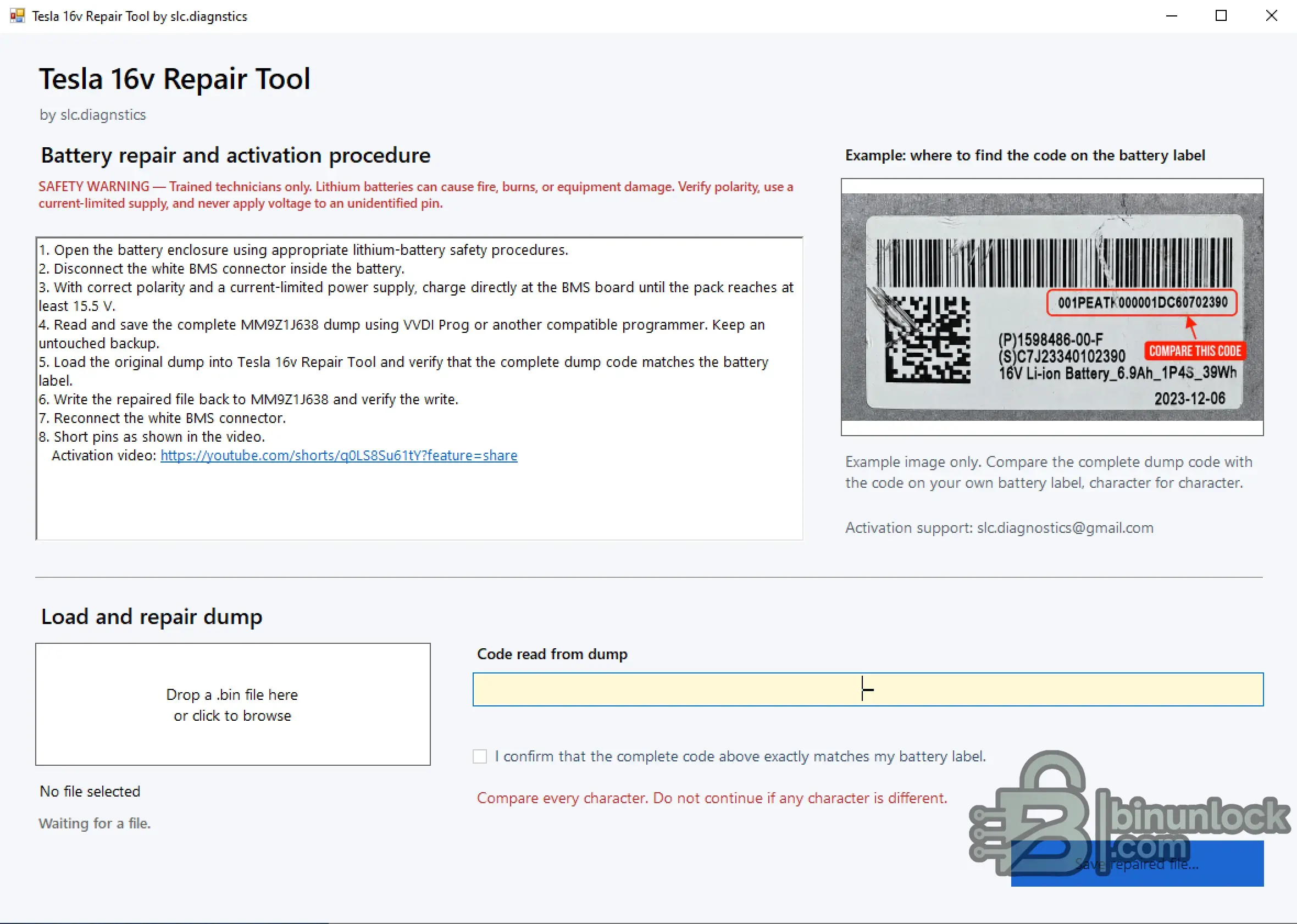
Tesla 16V Repair Tool by slc.diagnostics is a focused Windows utility for repairing supported Tesla 16V Li-ion battery BMS dump data.
The workflow uses a complete MM9Z1J638 dump, extracts the battery identification code and requires it to be matched character-for-character with the code printed on the physical battery label before a repaired file can be created.
Main Features
Repair Workflow
For an authorized repair:
Safety
File Integrity
SHA-256:
VirusTotal:
View VirusTotal report
The VirusTotal report above corresponds to the executable identified by the exact SHA-256 hash shown above.
Important
Always preserve the original BMS dump before creating or writing a repaired file.
Use only data read from the battery being serviced and verify the complete battery identification code against the physical label before proceeding.
Tesla 16V Repair Tool by slc.diagnostics is a focused Windows utility for repairing supported Tesla 16V Li-ion battery BMS dump data.
The workflow uses a complete MM9Z1J638 dump, extracts the battery identification code and requires it to be matched character-for-character with the code printed on the physical battery label before a repaired file can be created.
Main Features
- Tesla 16V Li-ion battery repair workflow
- MM9Z1J638 BMS dump support
- Local BIN file loading
- Automatic code extraction from the dump
- Battery-label code verification
- Character-by-character confirmation before repair
- Separate repaired output file
- Integrated repair / activation instructions
- Battery-label reference example
Repair Workflow
For an authorized repair:
- Read and preserve the complete original MM9Z1J638 dump using a compatible programmer
- Keep an untouched backup of the original file
- Load the original BIN into Tesla 16V Repair Tool
- Compare the complete code extracted from the dump with the code printed on the physical battery label
- Continue only when every character matches
- Create and save the repaired file
- Write and verify the repaired dump using the appropriate programmer
- Complete the required battery activation procedure using the documented service workflow
Safety
File Integrity
SHA-256:
Code:
36fadb5d441571b6d02e8cc443202299c7261b5f1dae5cd66b7c399f8ded5913VirusTotal:
View VirusTotal report
The VirusTotal report above corresponds to the executable identified by the exact SHA-256 hash shown above.
Important
Always preserve the original BMS dump before creating or writing a repaired file.
Use only data read from the battery being serviced and verify the complete battery identification code against the physical label before proceeding.


