
GM ECU Flasher is a Windows workshop utility for controlled reading and writing of supported General Motors engine-control memory through an installed J2534 pass-through device. The interface separates FLASH and EEPROM operations, provides ECU detection and selection, and exposes only the special options shown by the supplied build. It should be treated as a bench or vehicle programming tool that requires correct ECU identification, stable power and a verified backup—not as an automatic all-model solution.
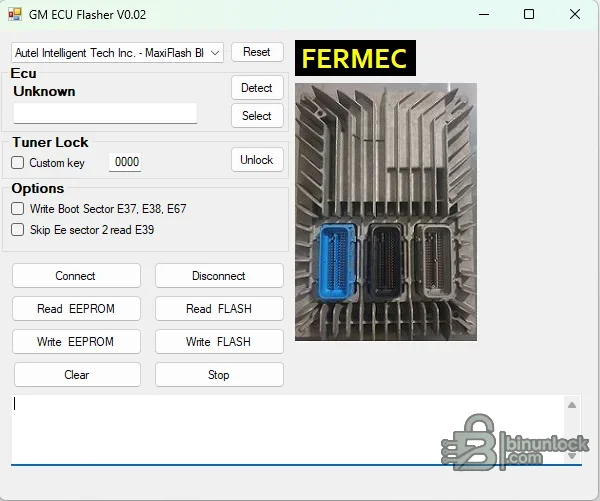
The interface also exposes two controller-specific options: writing the boot sector for E37, E38 and E67, plus skipping EEPROM sector two while reading E39. Those labels are the exact support evidence available in the supplied UI. They do not prove support for every hardware or software number within each family, so compare the ECU label, service number, calibration and communication method before connecting.
Do not infer universal support for all GM modules, transmission controllers or body modules. The package does not include a complete service-number matrix. Identify the ECU by its label and original diagnostic data, then verify that the selected family and intended memory operation match a trusted service or tuning reference.
GM service guidance stresses current interface firmware/software, secure cables and stable vehicle voltage during programming. A drop in voltage or communication can interrupt a write and leave the controller unable to start. Do not use an ordinary charger that introduces voltage spikes.
The executables are unsigned and do not expose useful product-version metadata. That is not a malware verdict. Scan the package in your own isolated environment and keep the programming laptop separated from customer data and unrelated credentials.
For support, provide the ECU family, label and service numbers, J2534 device, connection method, operation selected, exact file size and non-sensitive error text. Never post a customer VIN, complete immobilizer data or an unredacted proprietary binary publicly.
Supported ECU functions shown in the program#
- Connect and disconnect through a selected J2534 interface
- Detect an attached controller or select the ECU manually
- Read FLASH and write FLASH
- Read EEPROM and write EEPROM
- Clear the working session and stop an active operation
- Enter a custom tuner-lock key when that workflow is applicable
The interface also exposes two controller-specific options: writing the boot sector for E37, E38 and E67, plus skipping EEPROM sector two while reading E39. Those labels are the exact support evidence available in the supplied UI. They do not prove support for every hardware or software number within each family, so compare the ECU label, service number, calibration and communication method before connecting.
ECU and vehicle coverage#
The strongest confirmed coverage is the controller-family list visible in the application: E37, E38, E39 and E67. These General Motors engine controllers appear across multiple Chevrolet, GMC, Cadillac, Buick and other GM applications, but vehicle year and model alone are not sufficient for compatibility. A controller may use a different memory layout, boot strategy or security state even when the case and connector look similar.Do not infer universal support for all GM modules, transmission controllers or body modules. The package does not include a complete service-number matrix. Identify the ECU by its label and original diagnostic data, then verify that the selected family and intended memory operation match a trusted service or tuning reference.
Required hardware and system setup#
- A Windows computer with a working driver for the intended J2534 pass-through interface
- A stable USB connection; the screenshot shows an Autel MaxiFlash device choice, while other interfaces must be confirmed independently
- A regulated vehicle-support or bench power supply appropriate to the ECU and operation
- Correct bench pinout or an intact vehicle diagnostic connection
- Enough local disk space for original, duplicate and edited FLASH or EEPROM files
GM service guidance stresses current interface firmware/software, secure cables and stable vehicle voltage during programming. A drop in voltage or communication can interrupt a write and leave the controller unable to start. Do not use an ordinary charger that introduces voltage spikes.
Recommended read and write workflow#
- Record the vehicle VIN, ECU label, hardware number, software number and current diagnostic state.
- Install and test the J2534 driver before opening the programming utility.
- Connect regulated power and verify voltage under load.
- Detect or select the exact ECU family, then perform the least invasive read operation first.
- Read each available memory area twice and compare the files byte for byte.
- Keep the untouched originals in a separate location and work only on copies.
- Before writing, confirm file size, controller family, checksum strategy and whether the special boot or sector option is actually required.
- After writing, cycle power according to the ECU procedure and perform a diagnostic identification check before attempting to start the vehicle.
Package contents#
The cleaned publication contains the expanded application files, required runtime and licensing libraries, the activation utility, and the supplied installation video. The two nested source wrappers were expanded and independently tested, so the final archive does not force the user to unpack another archive before inspecting the program. All executable files were handled statically and were never launched during preparation.The executables are unsigned and do not expose useful product-version metadata. That is not a malware verdict. Scan the package in your own isolated environment and keep the programming laptop separated from customer data and unrelated credentials.
Troubleshooting#
If the ECU is not detected, first verify the J2534 device in its vendor utility, then check the selected driver, USB cable, ignition state, bench pinout and power supply. If a read completes with an unexpected size, do not edit or write it: repeat the read, compare hashes and confirm whether the selected function returns full flash, calibration-only data or EEPROM.For support, provide the ECU family, label and service numbers, J2534 device, connection method, operation selected, exact file size and non-sensitive error text. Never post a customer VIN, complete immobilizer data or an unredacted proprietary binary publicly.


