
Ico's Immo Cleaner is a multi-brand offline processor for supported ECU EEPROM and flash dumps. The left pane selects a manufacturer, the system list identifies a specific controller or memory case, and the information pane shows the expected solution before a file is loaded and cleaned.
The bundled database contains controller-specific templates and reference images rather than a universal algorithm. A solution must match the exact ECU family, memory device, file size and software layout; choosing only by vehicle badge can produce an unusable result.
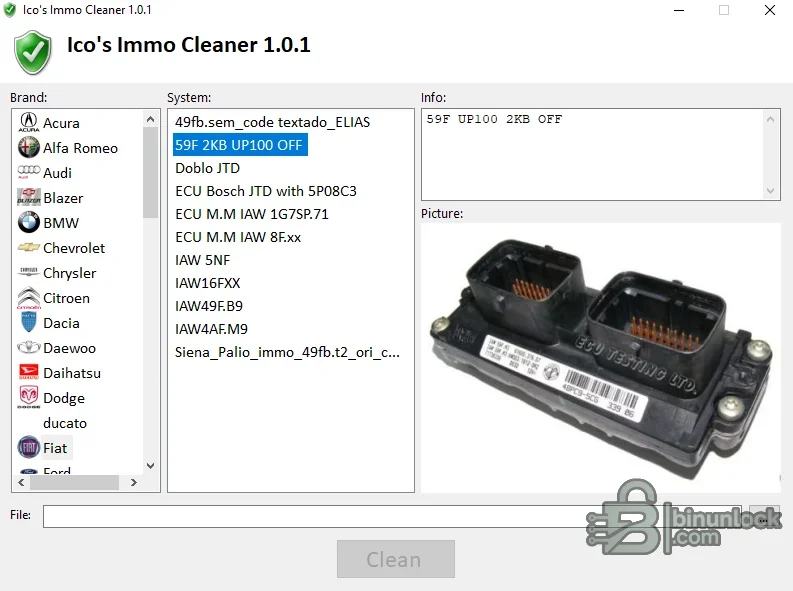
The bundled database contains controller-specific templates and reference images rather than a universal algorithm. A solution must match the exact ECU family, memory device, file size and software layout; choosing only by vehicle badge can produce an unusable result.
What this resource is for#
Use the application for authorized ECU replacement and immobilizer repair workflows after the module data has been read correctly. It can prepare clean, virgin or immobilizer-disabled data for supported legacy controllers while keeping the original binary available for recovery.Confirmed functions#
- Browse supported solutions by vehicle brand and ECU system
- Display memory type, controller notes and reference images
- Load a matching EEPROM or flash dump
- Apply the selected clean/virgin/off template to a working copy
- Save processed output for comparison and later programming
Supported controllers, files and vehicles#
- Database folders include Alfa Romeo, Audi, BMW, Citroen, Fiat, Hyundai, Lancia, Nissan, Opel, Peugeot, Renault, Rover, Seat, Skoda, Toyota and Volkswagen examples
- Referenced memories include 24C02, 24C04, 95040, 95160, 95P08, 27C256, 27C512, 28F200 and 29F400 families
- Examples cover Bosch Motronic and EDC, Magneti Marelli IAW, Siemens/Fenix/Sirius, Delco, Simtec and related legacy controllers
- Coverage is exact-template based; not every model or software number under a listed brand is supported
Package contents#
- Main application
- Controller template database with clean files and information records
- Reference ECU and PCB images
- Change log and functional data folders
- Installer-removal remnants and Windows thumbnail caches are excluded from the clean package
System and interface requirements#
- Windows PC or isolated virtual machine
- EEPROM/flash programmer and correct adapter for the listed memory
- Two matching reads plus an immutable original backup
- A bench test method and legal authorization for the vehicle security work
Recommended workshop workflow#
- Identify the ECU from label, hardware and memory device
- Read the memory twice and verify hashes and expected size
- Select the exact brand/system entry and compare its notes with the module
- Process only a copy, then compare every changed region with the original
- Program with stable power, verify the write and complete the manufacturer synchronization procedure if required
Compatibility limits and responsible use#
- A listed vehicle model may use several incompatible ECU families
- An immo-off file cannot repair wiring, key, antenna, body-module or CAN faults
- Some solutions require additional physical or coding work described by the controller-specific note
- Use only for owned or explicitly authorized vehicles and comply with local security law
Troubleshooting#
- Clean button inactive: select a supported system and load the exact expected file
- File-size error: repeat the read with the correct memory/device settings
- Vehicle does not start: restore the original and diagnose synchronization and hardware faults
- Repeated corruption: verify programmer voltage, chip orientation and soldering


