
BMW NBT/NBT EVO SSH & Storage Tool - HDD/SSD Preparation Workspace
NBT SSH & Storage Workspace is a focused Windows ENET service utility for supported BMW NBT and NBT EVO head units.
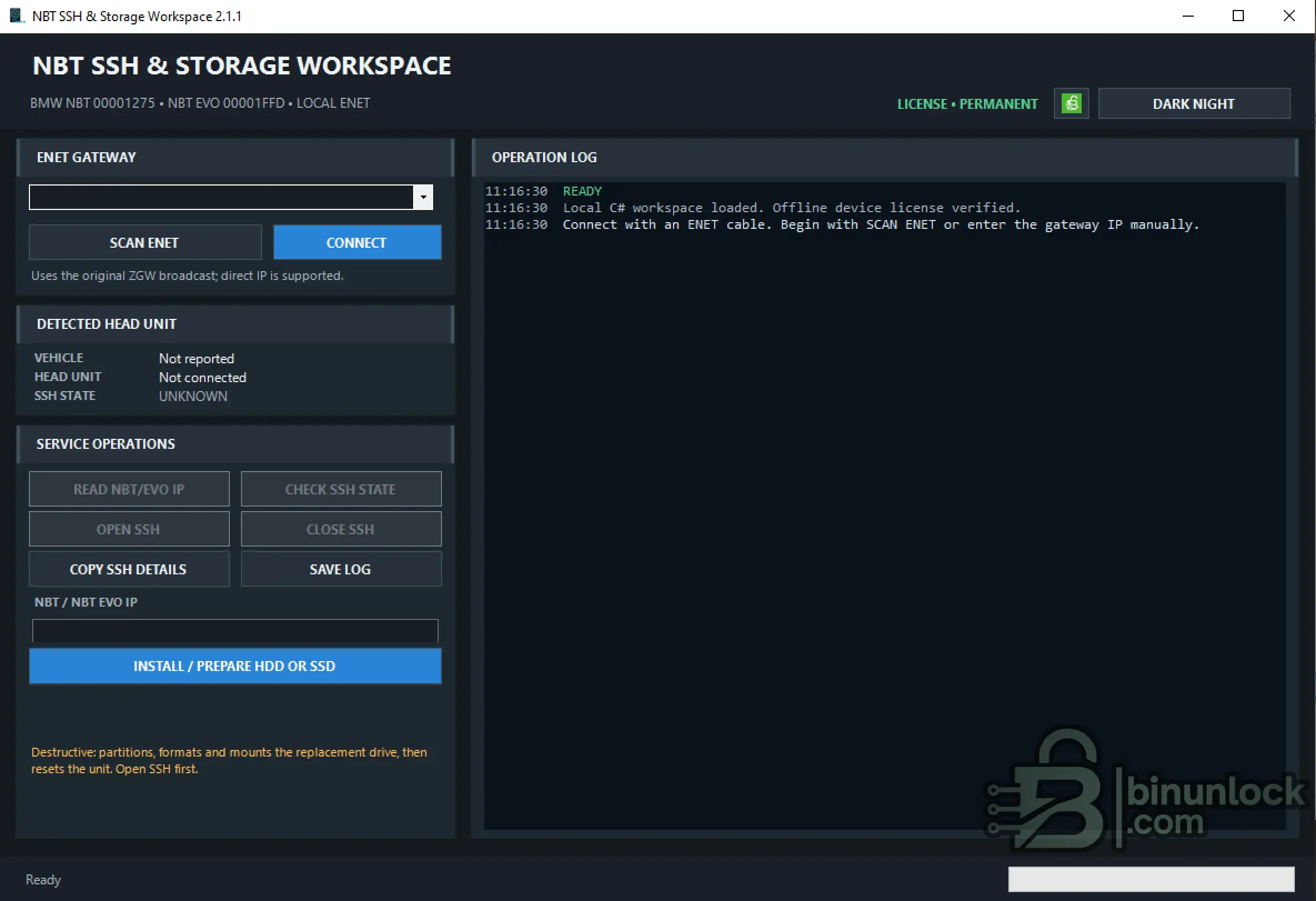
The application combines BMW gateway discovery, head-unit identification, NBT / NBT EVO IP reading, SSH state control, operation logging and controlled replacement HDD / SSD preparation in one workspace.
Supported BMW Head Units
The current release supports only the following detected head-unit targets:
MGU head units are not supported by this workspace.
The detected BTLD must match one of the supported values before SSH service controls become available.
Key Features
ENET Discovery & Identification
The SCAN ENET function searches the active local IPv4 network adapters for BMW ZGW gateway responses.
When available, discovery can provide:
A verified gateway IP can also be entered manually for a controlled bench or known workshop network.
Manual IP entry may not provide the vehicle VIN, so the target must be verified independently before using any state-changing function.
NBT / NBT EVO SSH Functions
The Service Operations panel provides:
The SSH state is displayed as:
The application keeps the detected vehicle, supported head unit, NBT / NBT EVO IP and current SSH state visible in the main workspace.
Replacement HDD / SSD Preparation
The INSTALL / PREPARE HDD OR SSD function is intended for controlled replacement-drive preparation on a supported NBT or NBT EVO unit.
The storage workflow runs four ordered stages:
All four stages run through one SSH session and are recorded in the Operation Log.
After successful preparation, the required NBT / NBT EVO recovery, E-Sys / IBAD programming, drive adaptation and map installation must be completed separately as applicable.
Operation Log
The integrated Operation Log records:
The visible log can be saved to a local TXT file for workshop records and support.
Interface & Licensing
The interface includes:
Licensing is bound to the computer Device ID and uses:
Available license terms may include 10 days, 30 days or Permanent. Previously issued valid version 1 licenses are treated as permanent.
System Requirements
Close E-Sys, ISTA and other active diagnostic sessions before connecting to the same head unit.
Validation Notice
Documentation
The complete English operating guide is attached directly to this resource:
Use the attached PDF for target verification, SSH procedures, storage preparation, recovery requirements, troubleshooting and post-operation checks.
File Integrity
File: NBT_SSH_Storage_Workspace_2.1.1.exe
Version: 2.1.1
SHA-256:
VirusTotal:
View VirusTotal report
The VirusTotal report above corresponds to the executable identified by the exact SHA-256 hash shown above.
Always compare the downloaded executable with this SHA-256 before running it.
Important
NBT SSH & Storage Workspace is a focused Windows ENET service utility for supported BMW NBT and NBT EVO head units.
The application combines BMW gateway discovery, head-unit identification, NBT / NBT EVO IP reading, SSH state control, operation logging and controlled replacement HDD / SSD preparation in one workspace.
Supported BMW Head Units
The current release supports only the following detected head-unit targets:
Code:
BMW NBT     - BTLD 00001275
BMW NBT EVO - BTLD 00001FFD
MGU head units are not supported by this workspace.
The detected BTLD must match one of the supported values before SSH service controls become available.
Key Features
- BMW NBT / NBT EVO ENET workspace
- BMW ZGW gateway discovery
- Manual gateway IP connection
- Vehicle VIN display when reported by discovery
- Automatic supported BTLD identification
- Read NBT / NBT EVO head-unit IPv4 address
- Check current SSH state
- Open SSH through the supported diagnostic workflow
- Close SSH after authorized service work
- Copy current SSH connection details
- Save chronological operation log
- Prepare replacement HDD or SSD
- Partition, format and mount replacement storage
- Automatic head-unit reset after storage preparation
- Manual-IP storage mode for controlled bench work
- HWID-bound offline licensing
- Dark Night and Day Light interface themes
ENET Discovery & Identification
The SCAN ENET function searches the active local IPv4 network adapters for BMW ZGW gateway responses.
When available, discovery can provide:
- ZGW gateway IP
- Complete vehicle VIN
- Detected head-unit family
- Detected BTLD
- Current SSH state
A verified gateway IP can also be entered manually for a controlled bench or known workshop network.
Manual IP entry may not provide the vehicle VIN, so the target must be verified independently before using any state-changing function.
NBT / NBT EVO SSH Functions
The Service Operations panel provides:
- READ NBT/EVO IP
- CHECK SSH STATE
- OPEN SSH
- CLOSE SSH
- COPY SSH DETAILS
- SAVE LOG
The SSH state is displayed as:
Code:
UNKNOWN
CLOSED
OPEN
The application keeps the detected vehicle, supported head unit, NBT / NBT EVO IP and current SSH state visible in the main workspace.
Replacement HDD / SSD Preparation
The INSTALL / PREPARE HDD OR SSD function is intended for controlled replacement-drive preparation on a supported NBT or NBT EVO unit.
The storage workflow runs four ordered stages:
- Partition the replacement drive
- Format the replacement drive
- Mount the prepared drive
- Reset the head unit
All four stages run through one SSH session and are recorded in the Operation Log.
After successful preparation, the required NBT / NBT EVO recovery, E-Sys / IBAD programming, drive adaptation and map installation must be completed separately as applicable.
Operation Log
The integrated Operation Log records:
- Gateway connection and identification
- Detected head unit and BTLD
- NBT / NBT EVO IP
- SSH state checks
- SSH open and close results
- Storage preparation stages
- Progress and error information
The visible log can be saved to a local TXT file for workshop records and support.
Interface & Licensing
The interface includes:
- Dark Night theme
- Day Light theme
- Current license state
- Current operation status
- Progress bar
Licensing is bound to the computer Device ID and uses:
Code:
nbt.licAvailable license terms may include 10 days, 30 days or Permanent. Previously issued valid version 1 licenses are treated as permanent.
System Requirements
- Windows 7 SP1, Windows 10 or Windows 11
- Microsoft .NET Framework 4.8
- Display resolution of at least 1024 × 768
- Known-good wired BMW ENET connection
- Active IPv4 Ethernet adapter
- Regulated workshop support power supply
- Stable computer power with sleep and hibernation disabled
Close E-Sys, ISTA and other active diagnostic sessions before connecting to the same head unit.
Validation Notice
Documentation
The complete English operating guide is attached directly to this resource:
Code:
NBT-SSH-Storage-Workspace-2.1.1-User-Guide-EN.pdfUse the attached PDF for target verification, SSH procedures, storage preparation, recovery requirements, troubleshooting and post-operation checks.
File Integrity
File: NBT_SSH_Storage_Workspace_2.1.1.exe
Version: 2.1.1
SHA-256:
Code:
871f25c185ad5b8c84fc7d42b269ddb8f14e8e1fb7bc0c45679b3551e28bd2ddVirusTotal:
View VirusTotal report
The VirusTotal report above corresponds to the executable identified by the exact SHA-256 hash shown above.
Always compare the downloaded executable with this SHA-256 before running it.
Important


