
BMW SME HVS 01/02 Cell Data Restore & EOS Bypass
This manual describes the procedure for restoring HVS 01/02 cell data in the BMW SME module and writing the required A50C SFA token using E-Sys.
The workflow includes reading the ECU UID, creating a backend token request, writing the received SFA token to the SME, restoring cell data through Transmitter, and clearing the statistics so the SME can recalculate the battery capacity.
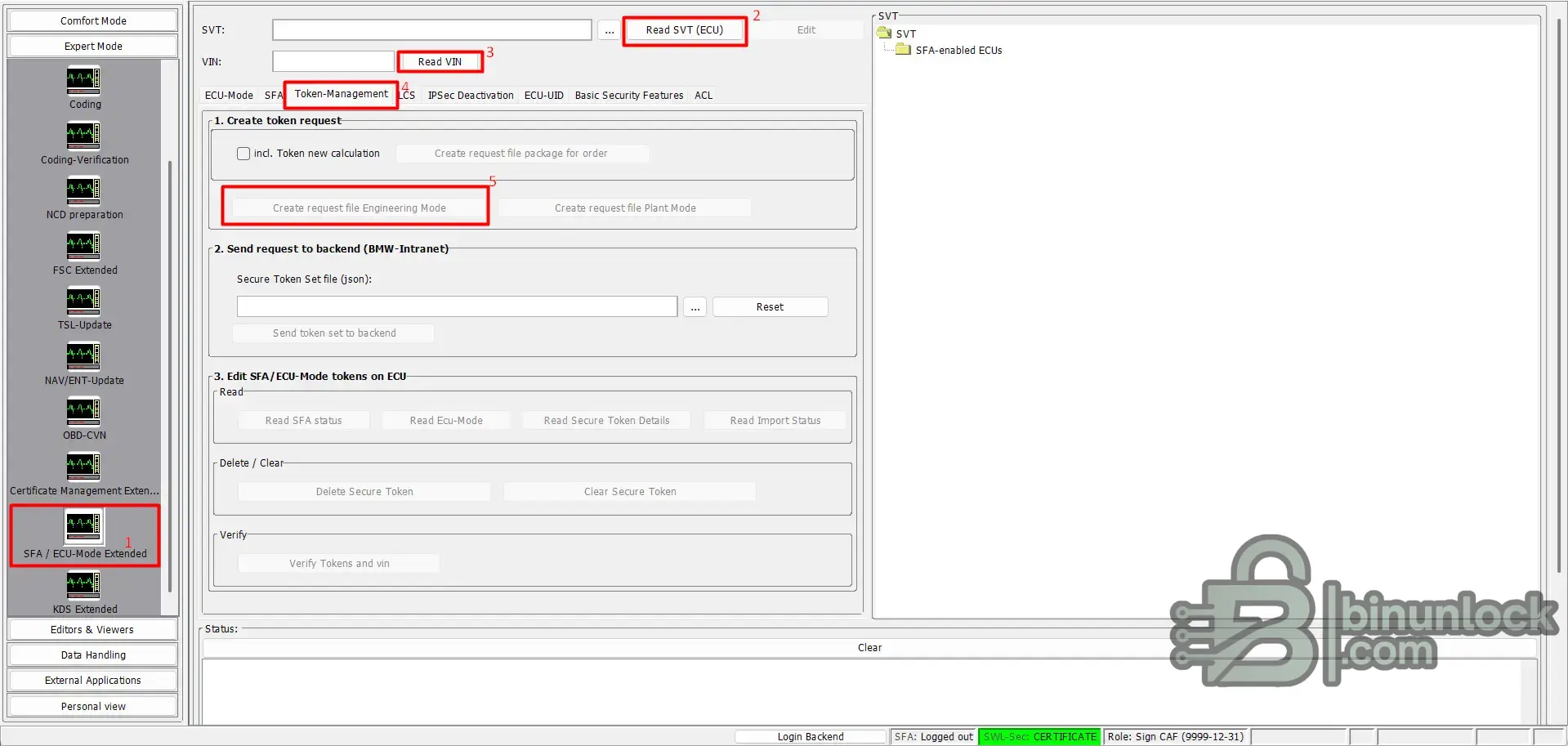
Open E-Sys and go to:
First, read the vehicle and ECU data:
This request file will contain the ECU UID required for generating the SFA token.
Open the generated request file in Notepad++.
For easier reading, format the file with the JSTool plugin:
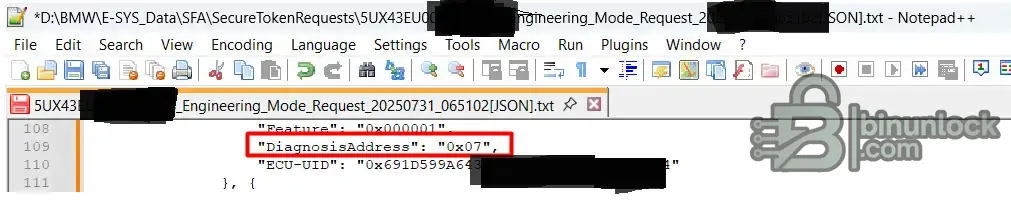
After formatting the file, find the entry with the SME / HVS diagnostic address:
Then copy the related ECU UID value:
This UID belongs to the SME / HVS module at diagnostic address 0x07.
Create a POST request to the backend using the VIN, SME diagnosis address, required feature ID, and ECU UID.
Use the following request structure:
Replace
Replace
Save the backend response as a Secure Token Set JSON file.
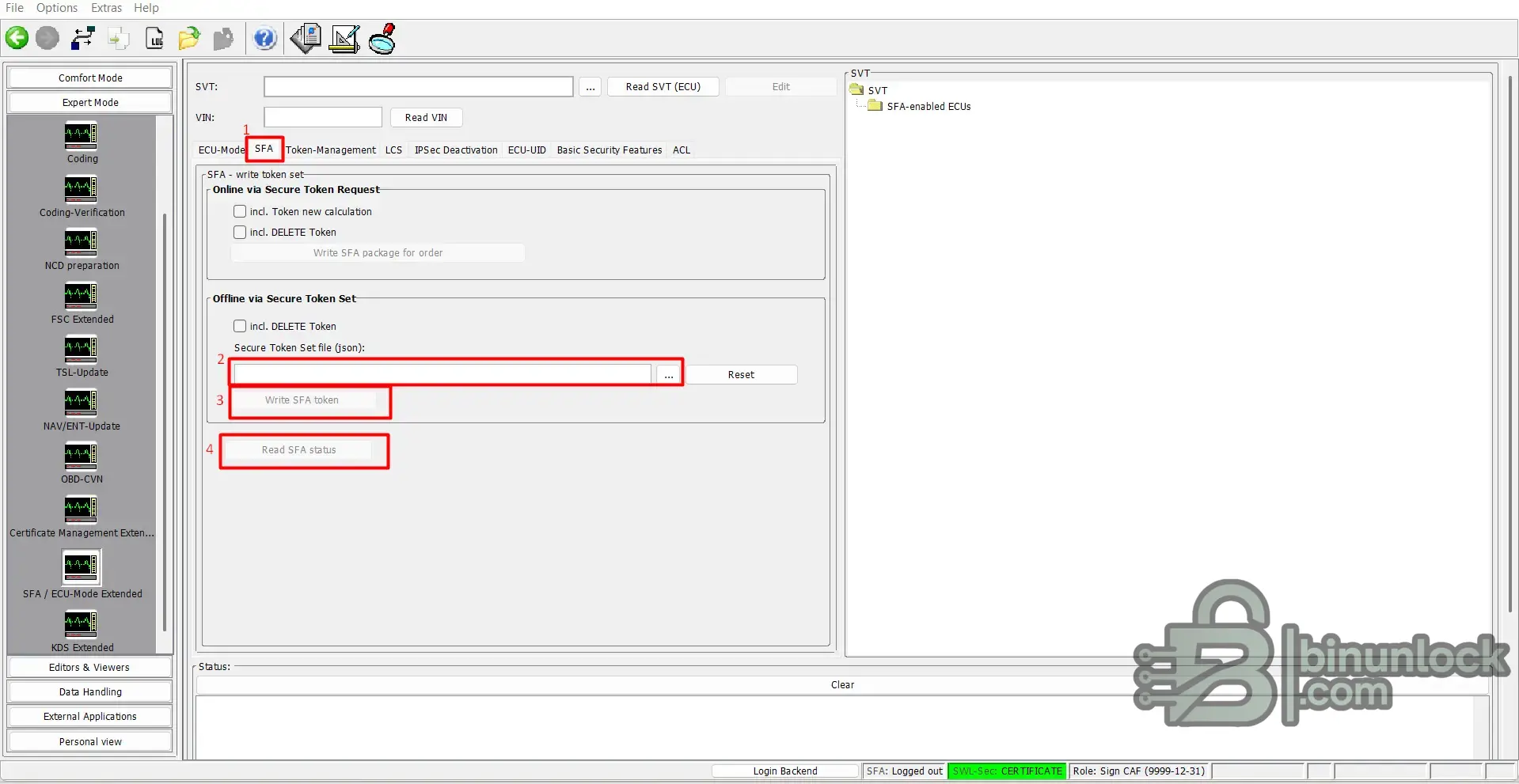
Return to E-Sys and open:
In the Offline via Secure Token Set section:
The token must be written to the SME at diagnostic address 0x07.
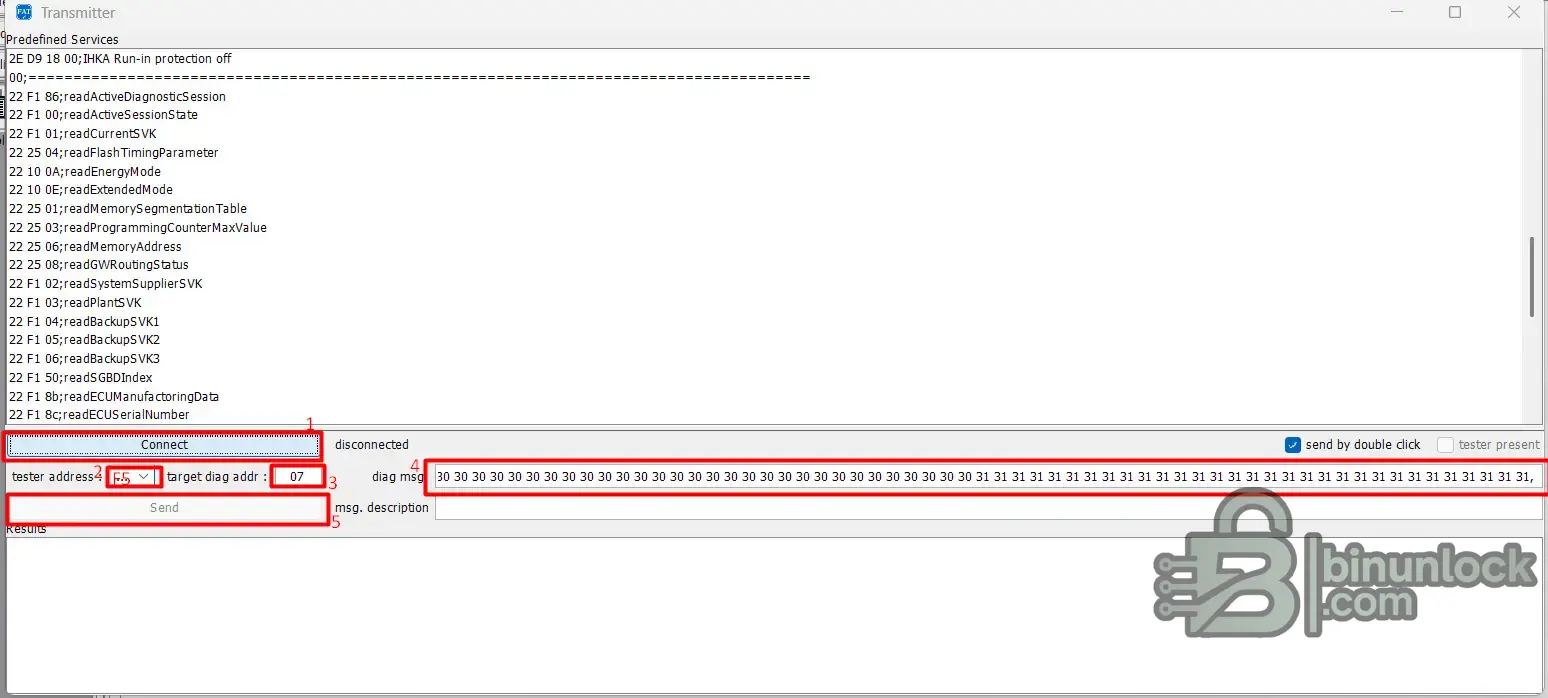
Open Transmitter and connect to the vehicle or module.
Use the following settings:
After connecting, send the prepared command batch for HVS 01/02 cell data restoration.
The command sequence consists of:
The first command switches the ECU into the required diagnostic session.
The
The final
You can send the full command set in one batch if Transmitter is configured for batch sending.
After sending the restore commands, wait a few seconds until the SME finishes rebooting.
Do not interrupt the diagnostic connection during this stage.
Once the SME is back online, send the statistics reset command set.
This clears the stored HVS statistics so the SME can calculate the battery capacity again based on the restored cell data.
The reset commands use the following format:
Send the prepared command set for all required HVS sections, from 01 02 through 01 0C.
After the statistics reset is complete:
If the token was written correctly and the restored cell data was accepted, the SME should become operational and the contactors should close.
The workflow includes reading the ECU UID, creating a backend token request, writing the received SFA token to the SME, restoring cell data through Transmitter, and clearing the statistics so the SME can recalculate the battery capacity.
1. Create the A50C token request in E-Sys
Open E-Sys and go to:
Code:
SFA / ECU-Mode Extended → Token-ManagementFirst, read the vehicle and ECU data:
- Click Read SVT (ECU).
- Click Read VIN.
- Open the Token-Management tab.
- Create an Engineering Mode request file.
This request file will contain the ECU UID required for generating the SFA token.
2. Find the SME ECU UID
Open the generated request file in Notepad++.
For easier reading, format the file with the JSTool plugin:
Code:
Plugins → JSTool → JSFormatAfter formatting the file, find the entry with the SME / HVS diagnostic address:
JSON:
"DiagnosisAddress": "0x07"Then copy the related ECU UID value:
JSON:
"ECU-UID": "0x..."This UID belongs to the SME / HVS module at diagnostic address 0x07.
3. Send the token request to the backend
Create a POST request to the backend using the VIN, SME diagnosis address, required feature ID, and ECU UID.
Use the following request structure:
JSON:
{
  "VIN17": "<VIN17>",
  "Host": "23",
  "System": "E-Sys",
  "TokenRequests": [
    {
      "Type": "ecu-uid",
      "Features": [
        {
          "Feature": "0x00A50C",
          "DiagnosisAddress": "0x07",
          "EnableType": 1,
          "ECU-UID": "<ECU_UID_FROM_REQUEST_FILE>"
        }
      ]
    }
  ],
  "MessageFormatVersion": 2,
  "Date": "20250529041811Z"
}
Replace
<VIN17> with the full 17-character VIN.Replace
<ECU_UID_FROM_REQUEST_FILE> with the ECU UID copied from the E-Sys request file.Save the backend response as a Secure Token Set JSON file.
4. Write the SFA token to the SME
Return to E-Sys and open:
Code:
SFA / ECU-Mode Extended → SFAIn the Offline via Secure Token Set section:
- Select the Secure Token Set JSON file received from the backend.
- Click Write SFA token.
- After writing, click Read SFA status to confirm that the token was accepted.
The token must be written to the SME at diagnostic address 0x07.
5. Restore HVS 01/02 cell data with Transmitter
Open Transmitter and connect to the vehicle or module.
Use the following settings:
Code:
Tester address: F5
Target diagnostic address: 07
After connecting, send the prepared command batch for HVS 01/02 cell data restoration.
The command sequence consists of:
Code:
10 03
2E A96E ...
2E A96F ...
11 01
The first command switches the ECU into the required diagnostic session.
The
2E A96E and 2E A96F payloads write the restored HVS cell data.The final
11 01 command resets the ECU.You can send the full command set in one batch if Transmitter is configured for batch sending.
Code:
1003,
2EA96E00000000000000000000000000000000000000000000000000000000000000000000000000000FFFFFFFFFFFFFFFFFFFFFFFFFFFFFFFFFFFFFFFFFFFFFFFFFFFFFFFFFFFFFFFFFFFFFFFFFFFFFFFFFFFFFFFF00000000000000000000000000000000000000000000000000000000000000000000000000000000000000000000000000000000000000000000000000000000000000000000000000000000000000000000000000000000000000000000000000000000000000000000000000000000000000000000000000000000000000000000000000000000000000000000000000000000000000000000000000000000000000000080000000000000000000000000000000000000000000000000000000000000000000000000000000000000000000000000000000000000000000000000000000000000000000000000000000000000000000000000AE1A7E0900000000000000000000000000000000000000000000000000000000000000000000000000000000000000000000000000000000000000000000000000000000000000000000000000000000000000000000000000000000000000000000000000000000000000000000000000000000000000000000000000000000000000000000000000000000000000000000000000000000000000000000000000000000000000000000000000000000000000000000000000000000000000000000000000000000000000000000000000000087000008060B0000000027000000040001000100000000000000000000000000000000000000000000000000000000000000000000000000000000000000000000000000000000000000000000000000000000000000000000000000000000000000000000000000000000000000000000000000000000000000000000000000000000000000000000000000000000000000000000000000000000000000000000000000000000000000000000000000000000000000000000000000000000000000000000000000000000000000000000000000000000000000000000000000000000000000000000000000000000000000000000000000000000000000000000000000000000000000000000000000000000000000000000000000000000000000000000000000000000000000000000000000000000000000000000000000000000000000000000000000000000000000000000000000000000000000000000000000000000000000000000000000000000000000000000000000000000000000000000000000000000000000000000000000000000000000000000000000000000000000000000000000000000000000000000000000000000000000967078FD,
2EA96F00000000000000000000000000000000000000000000000000000000000000000000000000000FFFFFFFFFFFFFFFFFFFFFFFFFFFFFFFFFFFFFFFFFFFFFFFFFFFFFFFFFFFFFFFFFFFFFFFFFFFFFFFFFFFFFFFF00000000000000000000000000000000000000000000000000000000000000000000000000000000000000000000000000000000000000000000000000000000000000000000000000000000000000000000000000000000000000000000000000000000000000000000000000000000000000000000000000000000000000000000000000000000000000000000000000000000000000000000000000000000000000000000000000000080000000000000000000000000000000000000000000000000000000000000000000000000000000000000000000000000000000000000000000000000000000000000000000000000000000000000000000000000AE1A7E0900000000000000000000000000000000000000000000000000000000000000000000000000000000000000000000000000000000000000000000000000000000000000000000000000000000000000000000000000000000000000000000000000000000000000000000000000000000000000000000000000000000000000000000000000000000000000000000000000000000000000000000000000000000000000000000000000000000000000000000000000000000000000000000000000000000000000000000000000000087000008060B0000000027000000040001000100000000000000000000000000000000000000000000000000000000000000000000000000000000000000000000000000000000000000000000000000000000000000000000000000000000000000000000000000000000000000000000000000000000000000000000000000000000000000000000000000000000000000000000000000000000000000000000000000000000000000000000000000000000000000000000000000000000000000000000000000000000000000000000000000000000000000000000000000000000000000000000000000000000000000000000000000000000000000000000000000000000000000000000000000000000000000000000000000000000000000000000000000000000000000000000000000000000000000000000000000000000000000000000000000000000000000000000000000000000000000000000000000000000000000000000000000000000000000000000000000000000000000000000000000000000000000000000000000000000000000000000000000000000000000000000000000000000000000000000000000000000000000967078FD,
11 01
6. Wait for the SME to reboot
After sending the restore commands, wait a few seconds until the SME finishes rebooting.
Do not interrupt the diagnostic connection during this stage.
7. Clear HVS statistics for capacity recalculation
Once the SME is back online, send the statistics reset command set.
This clears the stored HVS statistics so the SME can calculate the battery capacity again based on the restored cell data.
The reset commands use the following format:
Code:
31 01 A2 28 ...Send the prepared command set for all required HVS sections, from 01 02 through 01 0C.
Code:
31 01 A2 28 01 02 31 01 00 01 30 30 30 30 30 30 30 30 30 30 30 30 30 30 30 30 30 30 30 30 30 30 30 30 30 30 30 30 30 30 30 31 31 31 31 31 31 31 31 31 31 31 31 31 31 31 31 31 31 31 31 31 31 31 31 31 31 31 31 31 31 31,
31 01 A2 28 01 03 31 02 00 01 30 30 30 30 30 30 30 30 30 30 30 30 30 30 30 30 30 30 30 30 30 30 30 30 30 30 30 30 30 30 30 31 31 31 31 31 31 31 31 31 31 31 31 31 31 31 31 31 31 31 31 31 31 31 31 31 31 31 31 31 31 31,
31 01 A2 28 01 04 31 03 00 01 30 30 30 30 30 30 30 30 30 30 30 30 30 30 30 30 30 30 30 30 30 30 30 30 30 30 30 30 30 30 30 31 31 31 31 31 31 31 31 31 31 31 31 31 31 31 31 31 31 31 31 31 31 31 31 31 31 31 31 31 31 31,
31 01 A2 28 01 05 31 04 00 01 30 30 30 30 30 30 30 30 30 30 30 30 30 30 30 30 30 30 30 30 30 30 30 30 30 30 30 30 30 30 30 31 31 31 31 31 31 31 31 31 31 31 31 31 31 31 31 31 31 31 31 31 31 31 31 31 31 31 31 31 31 31,
31 01 A2 28 01 06 31 05 00 01 30 30 30 30 30 30 30 30 30 30 30 30 30 30 30 30 30 30 30 30 30 30 30 30 30 30 30 30 30 30 30 31 31 31 31 31 31 31 31 31 31 31 31 31 31 31 31 31 31 31 31 31 31 31 31 31 31 31 31 31 31 31,
31 01 A2 28 01 07 31 06 00 01 30 30 30 30 30 30 30 30 30 30 30 30 30 30 30 30 30 30 30 30 30 30 30 30 30 30 30 30 30 30 30 31 31 31 31 31 31 31 31 31 31 31 31 31 31 31 31 31 31 31 31 31 31 31 31 31 31 31 31 31 31 31,
31 01 A2 28 01 08 31 07 00 01 30 30 30 30 30 30 30 30 30 30 30 30 30 30 30 30 30 30 30 30 30 30 30 30 30 30 30 30 30 30 30 31 31 31 31 31 31 31 31 31 31 31 31 31 31 31 31 31 31 31 31 31 31 31 31 31 31 31 31 31 31 31,
31 01 A2 28 01 09 31 08 00 01 30 30 30 30 30 30 30 30 30 30 30 30 30 30 30 30 30 30 30 30 30 30 30 30 30 30 30 30 30 30 30 31 31 31 31 31 31 31 31 31 31 31 31 31 31 31 31 31 31 31 31 31 31 31 31 31 31 31 31 31 31 31,
31 01 A2 28 01 0A 31 09 00 01 30 30 30 30 30 30 30 30 30 30 30 30 30 30 30 30 30 30 30 30 30 30 30 30 30 30 30 30 30 30 30 31 31 31 31 31 31 31 31 31 31 31 31 31 31 31 31 31 31 31 31 31 31 31 31 31 31 31 31 31 31 31,
31 01 A2 28 01 0B 31 0A 00 01 30 30 30 30 30 30 30 30 30 30 30 30 30 30 30 30 30 30 30 30 30 30 30 30 30 30 30 30 30 30 30 31 31 31 31 31 31 31 31 31 31 31 31 31 31 31 31 31 31 31 31 31 31 31 31 31 31 31 31 31 31 31,
31 01 A2 28 01 0C 31 0B 00 01 30 30 30 30 30 30 30 30 30 30 30 30 30 30 30 30 30 30 30 30 30 30 30 30 30 30 30 30 30 30 30 31 31 31 31 31 31 31 31 31 31 31 31 31 31 31 31 31 31 31 31 31 31 31 31 31 31 31 31 31 31 31,
8. Clear faults and verify operation
After the statistics reset is complete:
- Clear SME fault codes.
- Read the SME fault memory again.
- Check the SFA status.
- Confirm that no token-related or cell-data-related faults remain.
- Verify that the SME closes the contactors.
If the token was written correctly and the restored cell data was accepted, the SME should become operational and the contactors should close.


