Description
The Professional's Tool for Repairing and Editing BMW CAS3+ EEPROM Dumps.

CAS3+ Editor is a powerful, professional-grade software utility designed for in-depth work with the EEPROM data of BMW Car Access System 3+ (CAS3+) modules. This tool is essential for technicians and advanced enthusiasts who perform key programming, module swaps, and advanced repairs.
What Problem Does This Tool Solve?
The CAS module is the heart of a BMW's security system. It stores vital information like the vehicle's VIN, key data, and the ISN (Individual Serial Number) that synchronizes the engine computer (DME/DDE) and gearbox (EGS). If a CAS module fails, keys are lost, or an engine is swapped, this data needs to be read, transferred, or repaired.
This tool provides a user-friendly graphical interface to read an EEPROM dump from a CAS3+ module, clearly display all critical data, and perform necessary repairs or modifications.
Key Features
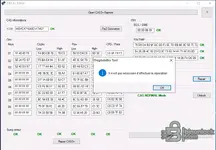
- Full CAS Information Display: Automatically parses and displays the vehicle's VIN, all 10 key slots with their Crypto, Psw, and CFG/Pass data.
- ISN Management: Clearly shows the stored ISN for both the EGS (gearbox) and DME (engine), which is critical for module swaps.
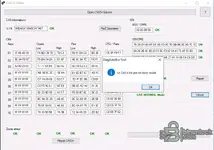
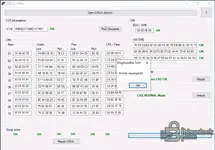
- EEPROM Dump Repair: Includes a "Repair CAS3+" function to fix common data corruption issues within the EEPROM file.
- Odometer Correction: Features a "RaZ Odometerie" function to reset or correct the mileage stored in the CAS module.
- Status Indicators: Provides clear "OK" status indicators for VIN, key data, and dump integrity, immediately showing if the data is valid.
- Boot Mode Status: Detects and displays if the CAS module is in "Boot Mode" or "Normal Mode".
How to Use
- Read the EEPROM: First, you must read the full EEPROM data from your CAS3+ module using a compatible programmer (e.g., a tool that can read Motorola MC9S12XDP512 chips).
- Load File in Editor: Open the CAS3+ Editor software and load your EEPROM file by clicking "Open CAS3+ Eeprom".
- Analyze Data: The tool will automatically populate all fields, showing you the VIN, key information, and ISN. Check all status indicators.
- Perform Actions: Use the "Repair CAS3+", "Unlock", or "RaZ Odometerie" buttons as needed for your specific task.
- Save New File: After making changes, click the "Save" button to save the new, modified EEPROM file.
- Write Back to CAS: Write the new, patched file back to your CAS3+ module using your programmer.
System Requirements & Testing
- Operating System: This software is Windows-based and has been tested on Windows 10 LTSC 2019.
- Required Hardware: An EEPROM programmer capable of reading the processor in the CAS3+ module is required.
Disclaimer
This software is a powerful tool intended for legitimate professional and educational purposes, such as repairing your own vehicle or creating spare keys. Modifying a vehicle's immobilizer system or odometer may have legal implications. It is your responsibility to use this tool in compliance with your local laws. Use at your own risk.