Ford IDS + FDRS - Complete Dealer Diagnostic Package Full Patched

Ford IDS FDRS - Official OBD2 Diagnostic & Programming 132.03

Sign in to download for free
Ford IDS + FDRS - Complete Dealer Diagnostic Package Full Patched
Ford IDS FDRS - Official OBD2 Diagnostic & Programming 132.03
Sign in to download for free

Bin

Thread Owner
Administrator
Joined
03.05.2025
Messages
1,786
Reaction score
21,877
New release thread for Ford IDS + FDRS - Complete Dealer Diagnostic Package Full Patched: discuss, share feedback, and get help.


Ford IDS + FDRS - Complete Dealer Diagnostic Package Full Patched​

The complete Ford dealer solution: IDS for older cars and FDRS for modern vehicles, all in a single

This is the complete and definitive professional-grade diagnostic solution for the full range of Ford, Lincoln, and Mercury vehicles. This unique package provides total dealership-level coverage by combining both the legendary legacy system, Ford IDS, and the next-generation Ford FDRS system. With this toolkit, you are equipped to service everything from older models to the very latest vehicles with the most advanced electronics.

...

Frequently Asked Questions​

Which Windows version is recommended?
For maximum stability during ECU flashing and diagnostics, a clean installation of Windows 10 (64-bit) is recommended.
Is it compatible with J2534 PassThru?
Most modern software versions support standard J2534 interfaces like Scanmatik 2 Pro, OpenPort 2.0, and specific VCI adapters.

What's inside:
  • Overview & screenshots
  • Version history and compatibility
  • Download link and setup notes

👉 View full details and download — Ford IDS + FDRS - Complete Dealer Diagnostic Package Full Patched
 
Bin updated Ford IDS 132.01 + FDRS 45.5.5 - Complete Dealer Diagnostic Package Full Patched with a new update entry:

Ford IDS — Extended VCI Compatibility & Offline Diagnostics (Full Package)

What’s new in Ford IDS 132.02
  • Improved compatibility with VCM II/VCM3 and selected J2534 pass-thru devices (per OEM support).
  • Refinements to PMI and module programming workflows with clearer status prompts.
  • Updated vehicle coverage and service information included with the 132.02 data set.
  • Stability fixes, faster launch, and better handling of offline sessions.

About this release
This package is intended for professional diagnostics and service on...

Read the rest of this update entry...
 
Bin updated Ford IDS + FDRS - Complete Dealer Diagnostic Package Full Patched with a new update entry:

Ford IDS 132.03 — Full Package + Setup Guide (with FDRS & VCI Tools)

Update contents & highlights​

  • Main installer: IDS-132.03.exe
  • Additional base: IDS-132.01_full.exe
  • Dealer tools: FDRS_45.6.5.exe
  • VCI drivers: VCI_Software_1.0.1.18.exe
  • Activation tool: IDS-Activation.exe
  • Guide: README.txt with step-by-step instructions

What’s new vs 132.01​

  • Updated ECU/vehicle coverage through late-2025...

Read the rest of this update entry...
 
Bin submitted a new resource:Bin提交了一项新资源:

Ford IDS 132.01 + FDRS 45.5.5 - Complete Dealer Diagnostic Package Full Patched - The complete Ford dealer solution: IDS for older cars and FDRS for modern vehicles, all in a single福特IDS 132.01 + FDRS 45.5.5 - 完整经销商诊断软件全套补丁版- 完整的福特经销商解决方案:适用于老款车的IDS与适用于现代车辆的FDRS,全部集成于一身


Read more about this resource...了解更多关于此资源的信息...
good好
 
Hi, what is the password please?
Are you saying that “binunlock.com”, which was sent to you in Direct immediately after registration and also shown at the bottom when the download link was generated, does not work as the archive password?:)
 
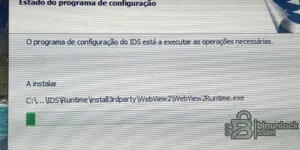
I have installed this 132.03 version but when I run the IDS and select Module programming the it says " ....module programming and configuration timed out due to out of date IDS scan tool software. Please update the IDS scan tool software to the latest level and retry " So did I do something wrong there ? Please help thanks.
 
Não instalar
Já tentei em 3 computadores e não instalei
Só até aqui como se vê na imagem
 

Attachments

  • IMG_20260125_155912_082.webp
    IMG_20260125_155912_082.webp
    685.3 KB · Views: 29
Não instalar
Já tentei em 3 computadores e não instalei
Só até aqui como se vê na imagem

A imagem não carregou aqui, mas se a instalação para no meio ou congela, geralmente é por causa do sistema de segurança do Windows.

Tente seguir estes passos:

  • Desabilite completamente o Windows Defender e qualquer outro antivírus antes de extrair os arquivos e durante a instalação. Eles costumam bloquear os scripts do раtсh silenciosamente.
  • Clique com o botão direito no instalador e selecione Executar como Administrador.
  • Certifique-se de que o VCI Software (VCI Manager) está instalado antes de tentar instalar o IDS/FDRS.
  • Verifique se a versão do Windows é compatível (Windows 10 64-bit é o ideal).

Se já tinha uma versão antiga instalada, certifique-se de limpar tudo antes de tentar novamente. O ideal é usar uma instalação limpa do Windows ou uma Máquina Virtual.
 
Obrigado pela ajuda
Desinstalei o Windows Defender antes e não tenho nenhum antivírus também não tinha nenhuma versão anterior
O Windows 10 Pro de 64 bits
Como posso apagar todos os arquivos
Para voltar a tentar
 
Back