FORD RANGER 2.2 THAILAND CRANK NO START

Post #1

D-MASS

Stock Member
Thread Owner
Joined
28.04.2026
Messages
10
Reaction score
0
Location
Mozambique
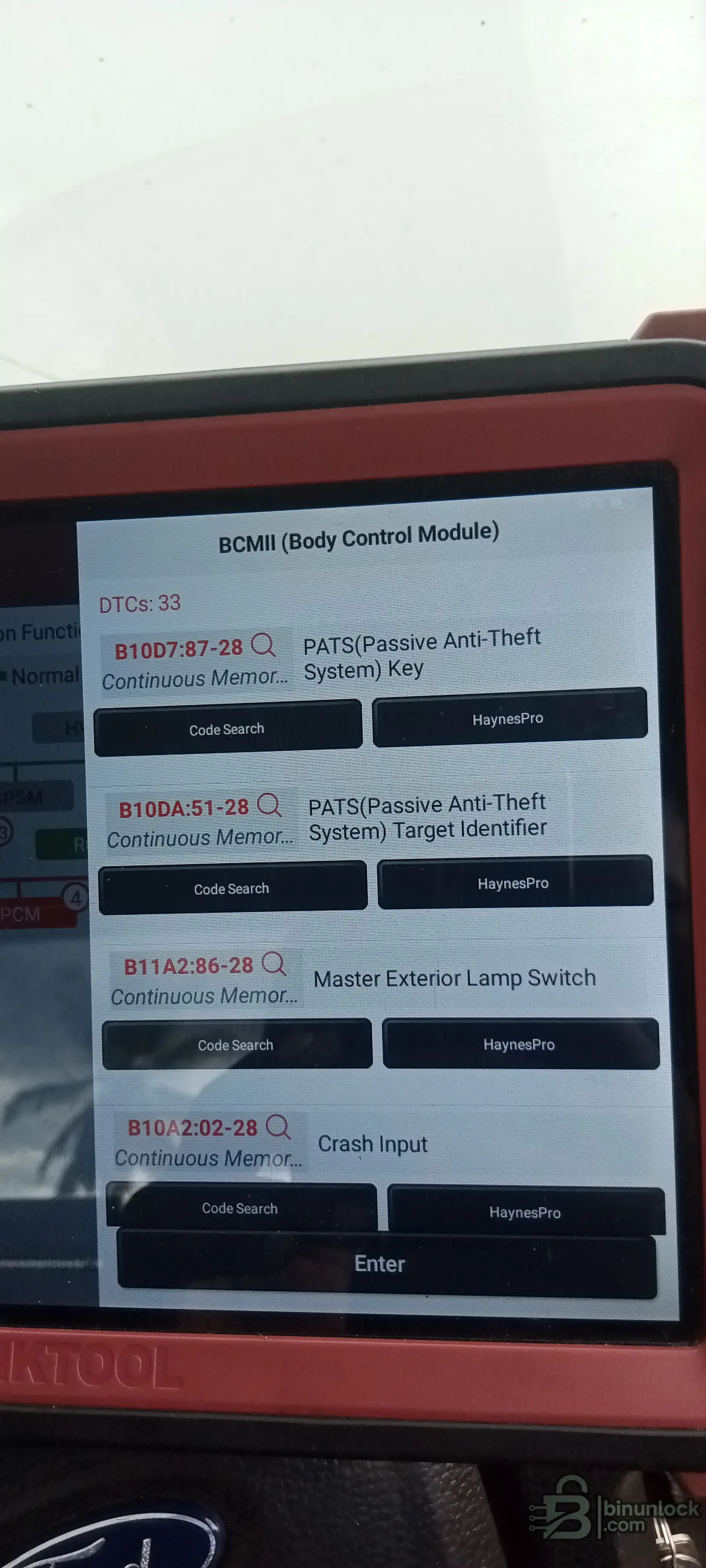
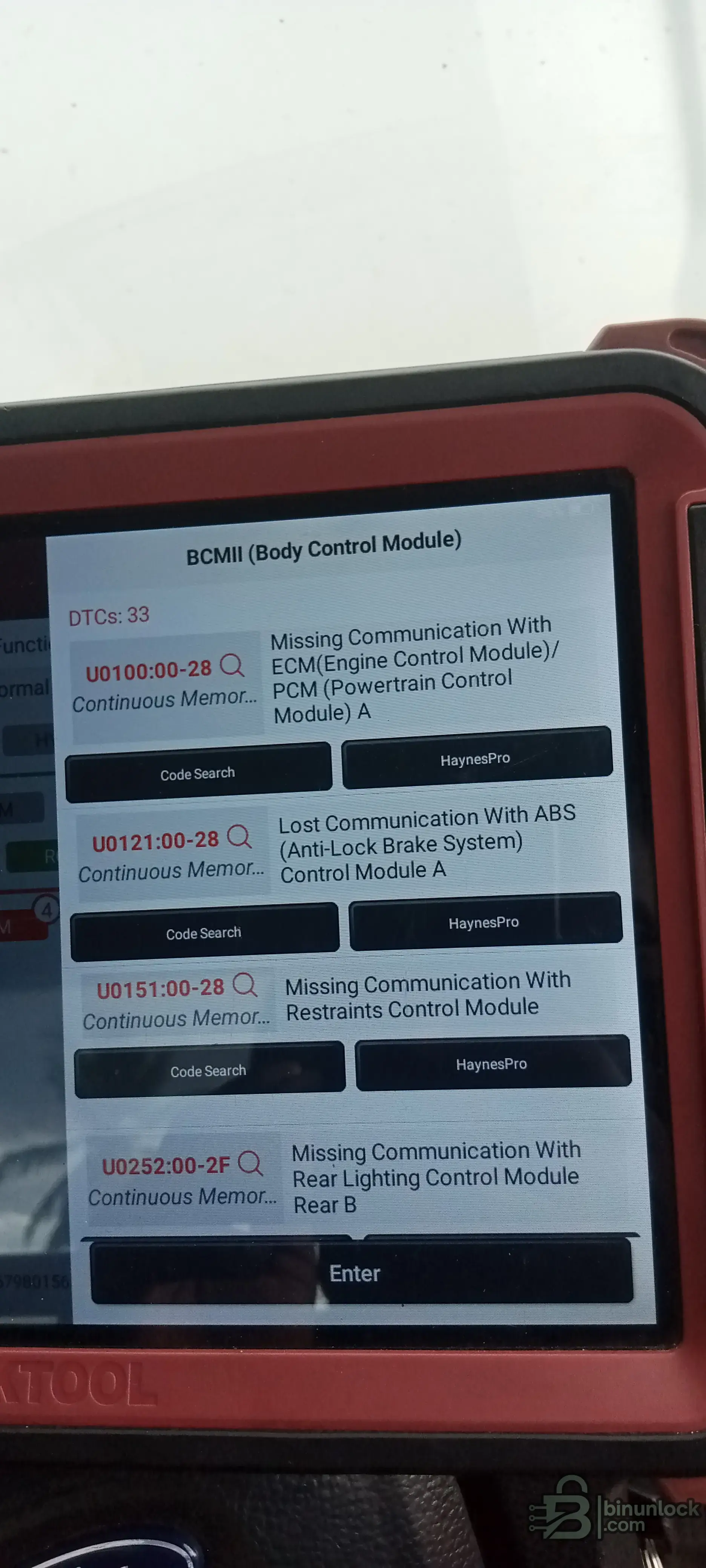
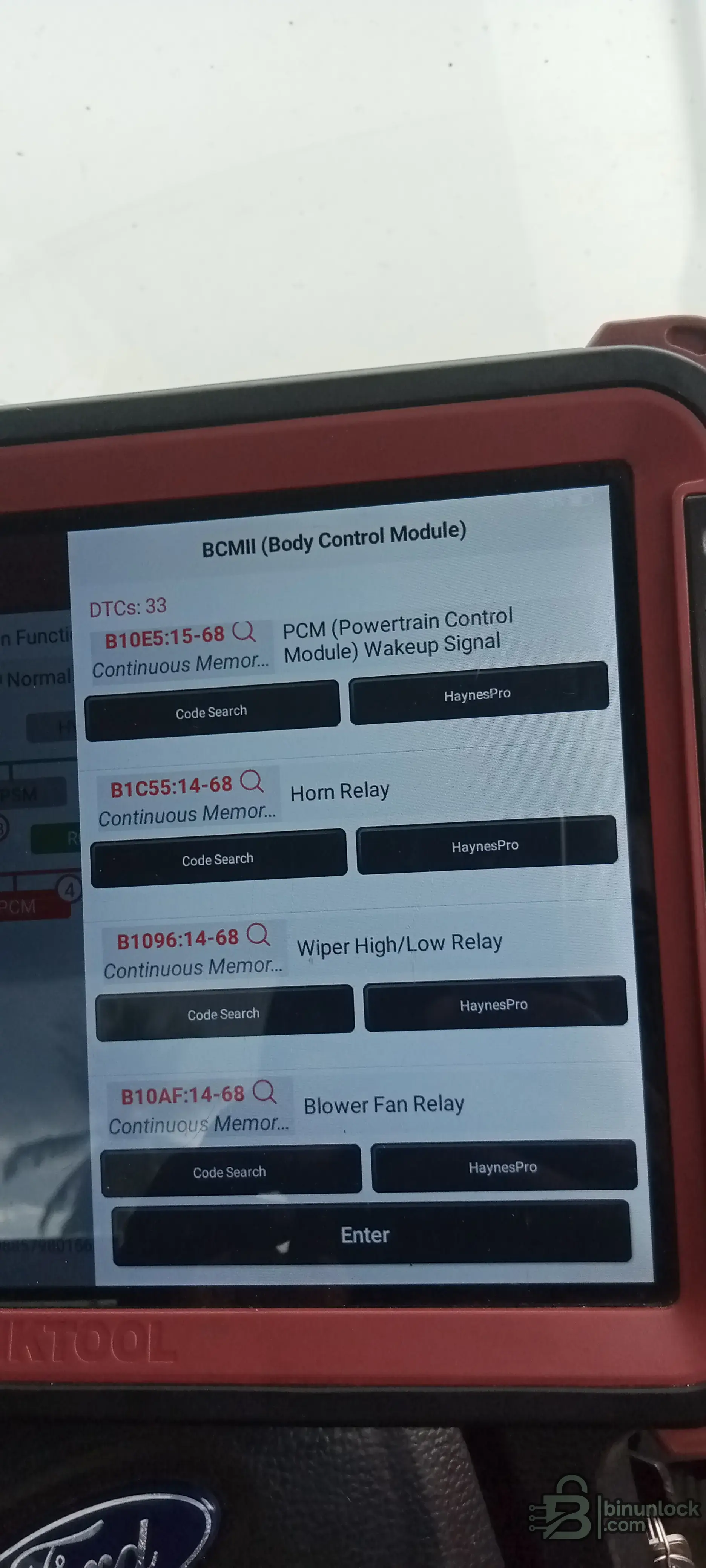
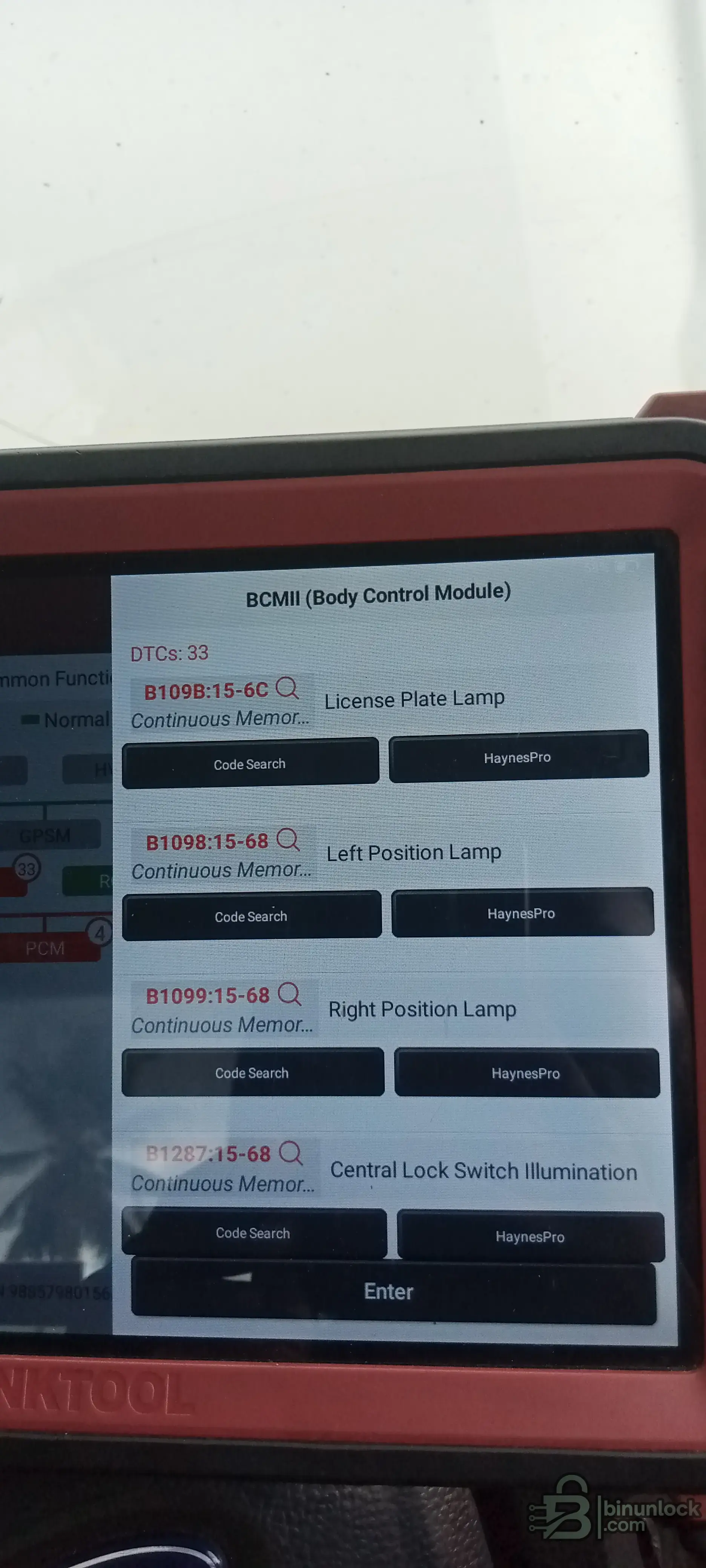
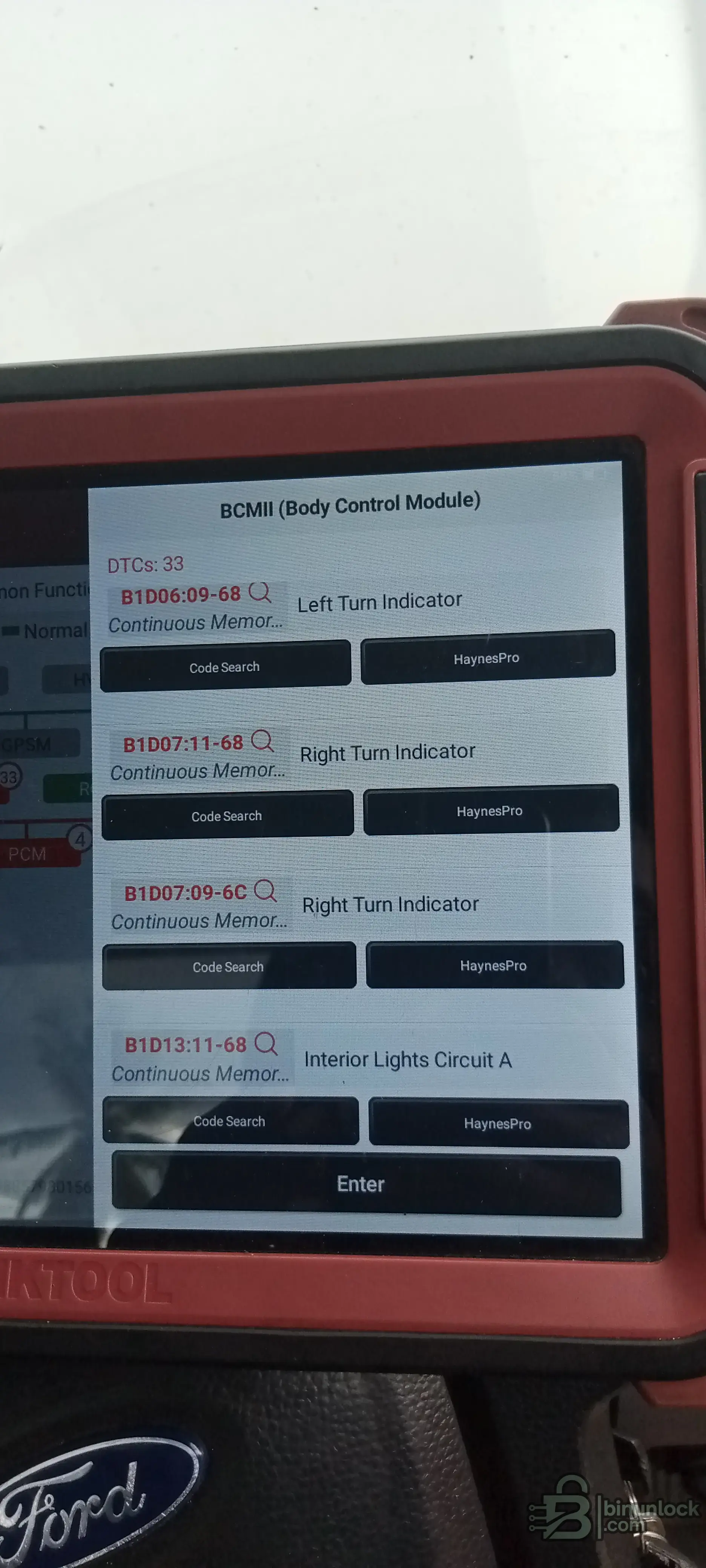
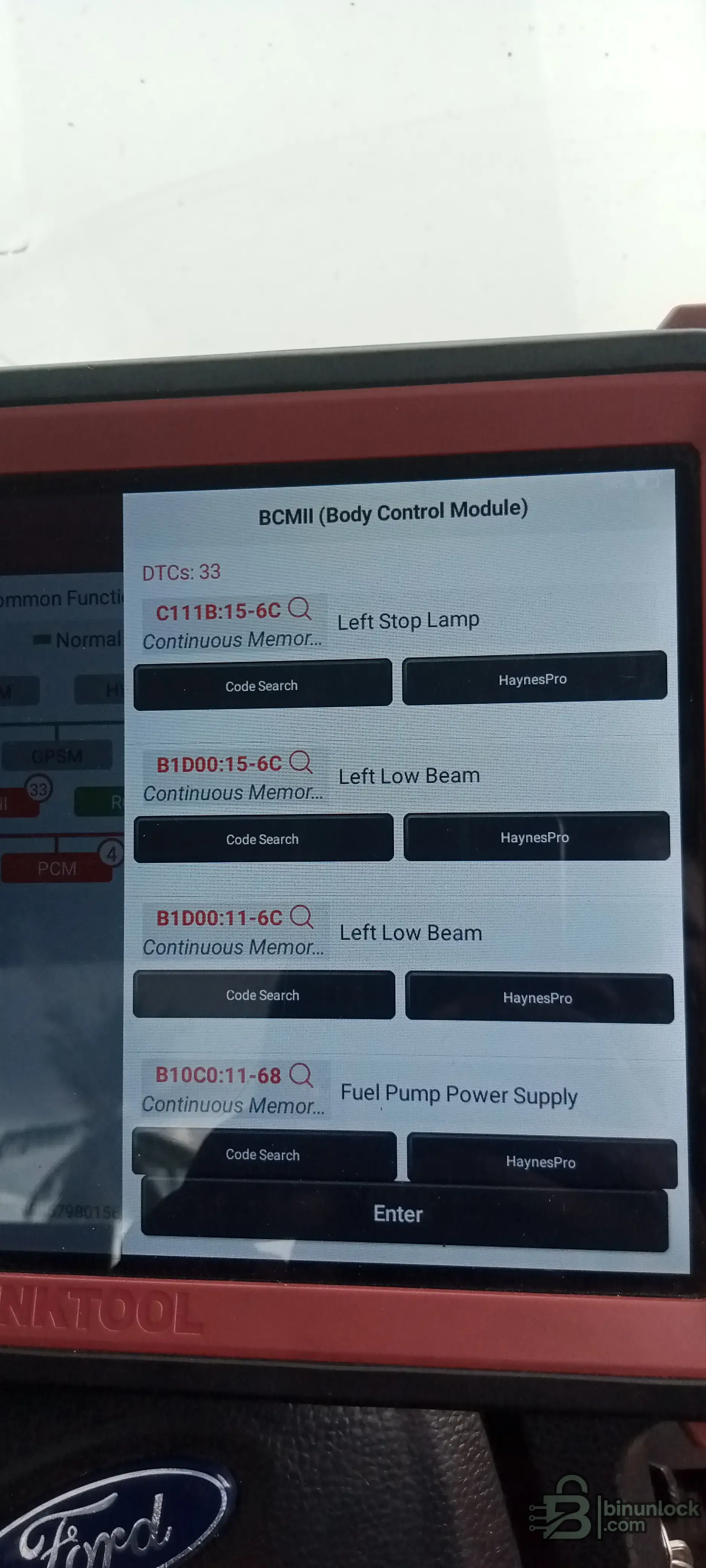
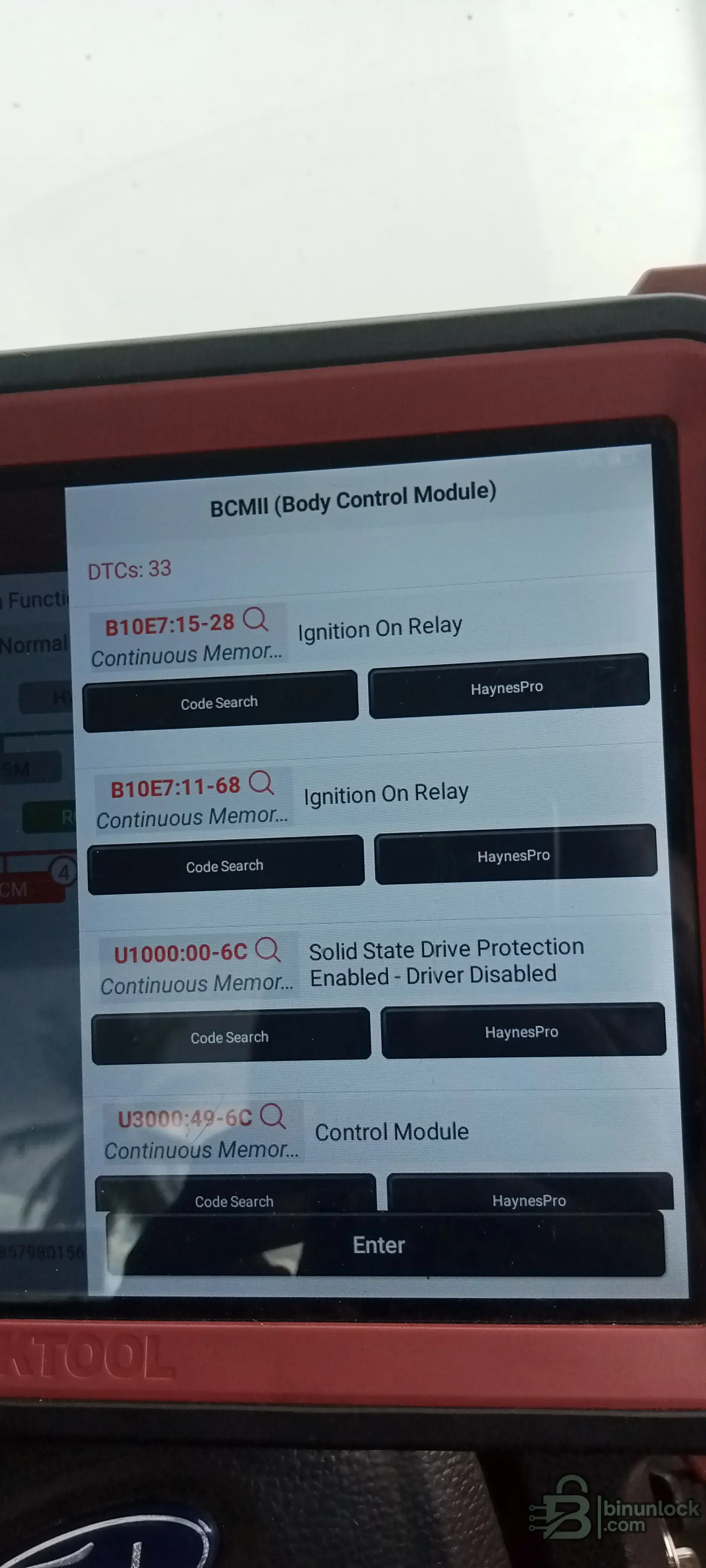
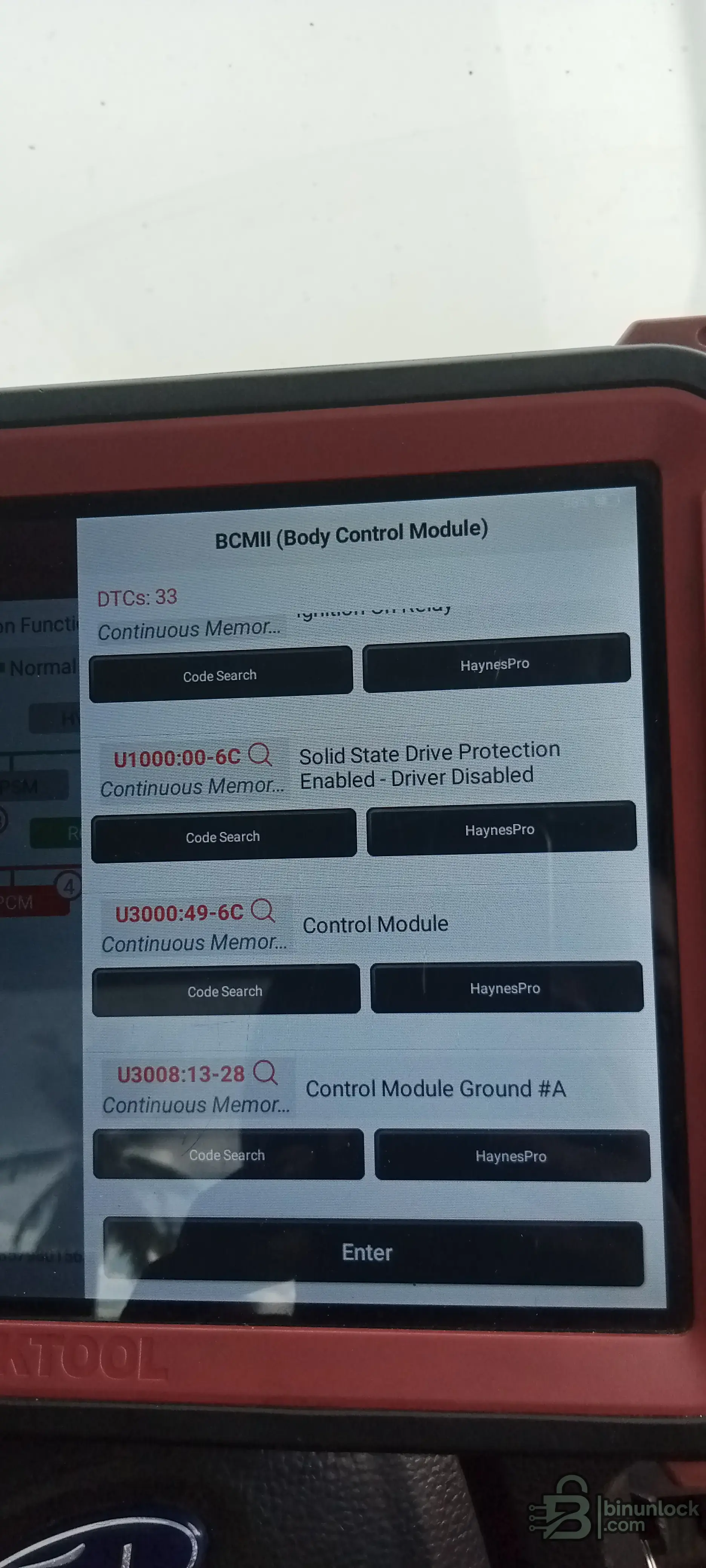
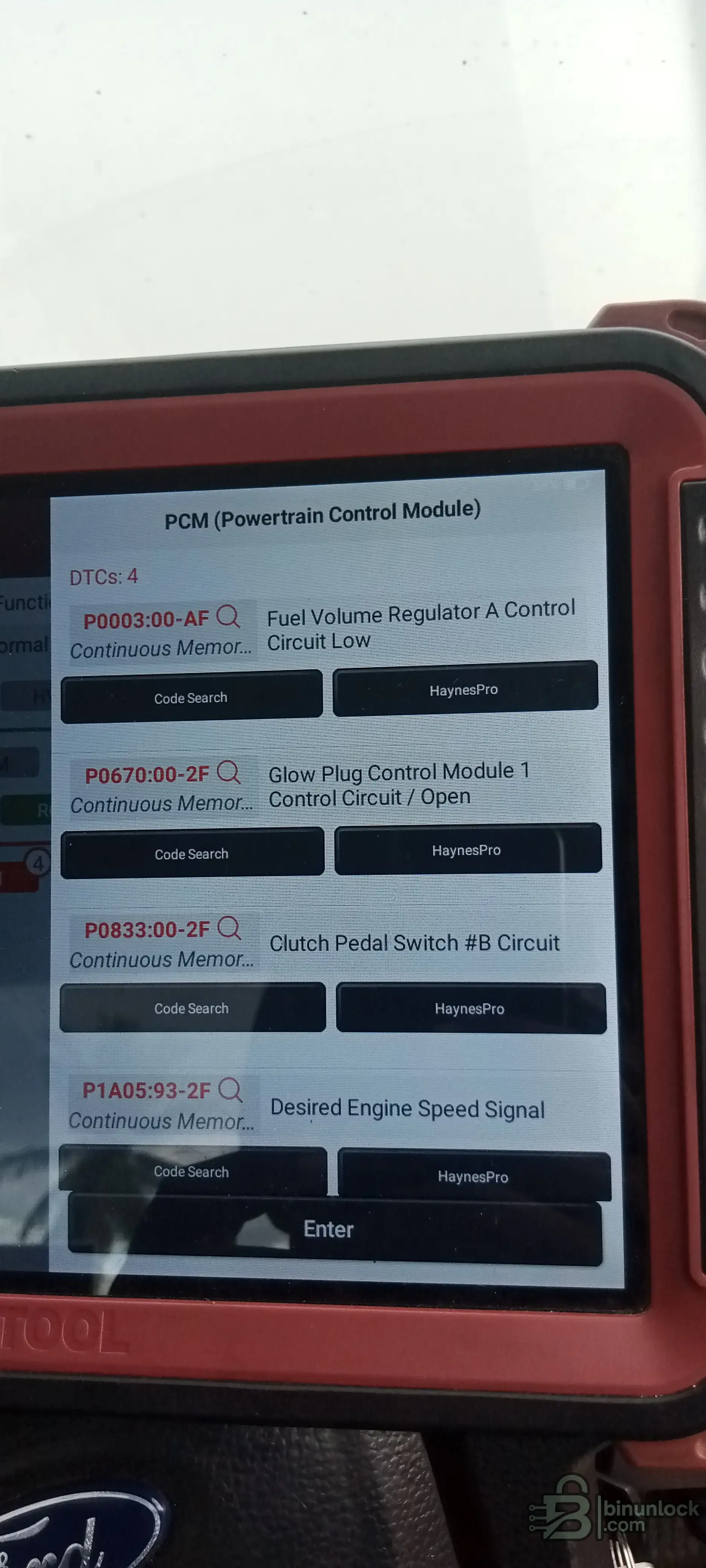
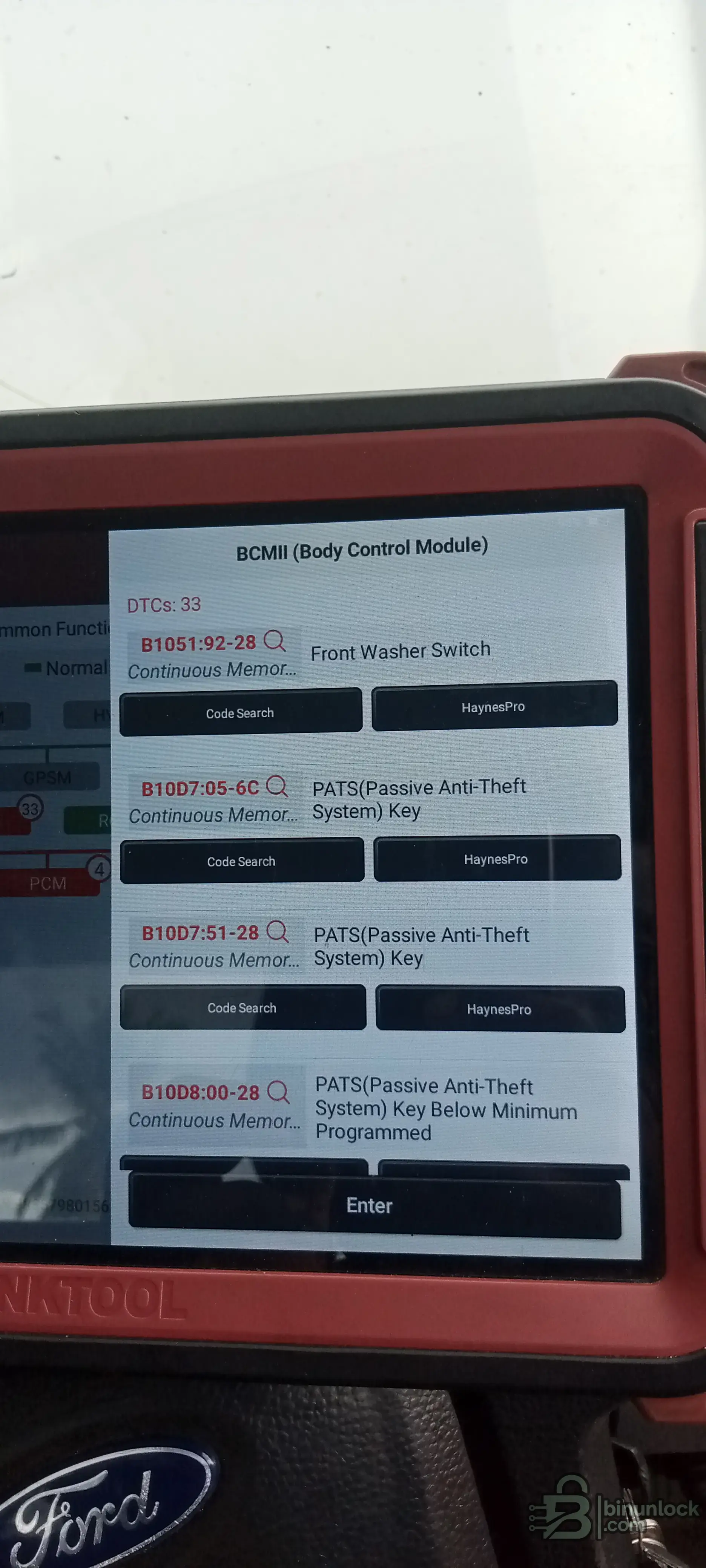
Hello I need your help, I have one Ford the client told me that his car stoped without no reason at road, and when I do diagnose I found DTC about key, I programmed the key and I made parameters reset but the car only crank and never start, I'll send the DTC pictures below.
IMG_20260519_144422_317.webp
IMG_20260519_144442_685.webp
IMG_20260519_144450_511.webp
IMG_20260519_144458_722.webp
IMG_20260519_144505_687.webp
IMG_20260519_144512_488.webp
IMG_20260519_144518_311.webp
IMG_20260519_144524_661.webp
IMG_20260519_144531_146.webp
IMG_20260519_144537_302.webp
 
Ratings and Reviews
Total ratings: 0

Post #2

Hello I need your help, I have one Ford the client told me that his car stoped without no reason at ...

You have a lot going on here. Let me break down the critical DTCs from your BCMII and PCM that are directly related to your crank-no-start condition:

Critical PATS / Immobilizer Codes (BCM)

  • B10D7:05-6C – PATS Key fault
  • B10D7:51-28 – PATS Key fault
  • B10D7:87-28 – PATS Key fault
  • B10D8:00-28 – PATS Key Below Minimum Programmed
  • B10DA:51-28 – PATS Target Identifier fault
  • U1000:00-6C – Solid State Drive Protection Enabled – Driver Disabled

The U1000 – Solid State Drive Protection Enabled / Driver Disabled is your smoking gun. This means the BCM has disabled the fuel pump driver because PATS authentication failed. The engine cranks but gets no fuel.

This is confirmed by:
  • B10C0:11-68 – Fuel Pump Power Supply fault
  • B10E5:15-68 – PCM Wakeup Signal fault
  • B10E7:15-28 / B10E7:11-68 – Ignition On Relay faults

PCM Codes

  • P0003:00-AF – Fuel Volume Regulator A Control Circuit Low
  • P0670:00-2F – Glow Plug Control Module Circuit Open
  • P0833:00-2F – Clutch Pedal Switch #B Circuit
  • P1A05:93-2F – Desired Engine Speed Signal

The P0003 is likely a consequence of no fuel rail pressure because the pump is disabled by PATS. The P1A05 also points to the PCM not receiving proper start authorization from the BCM.

What Happened

It looks like the PATS synchronization between the BCM and PCM is broken. You said you programmed a key and did a parameter reset — but the codes show:

  1. The BCM still does not recognize the key properly (B10D7 multiple faults)
  2. The BCM says keys are below minimum programmed (B10D8)
  3. The BCM has locked out the fuel system (U1000 – Driver Disabled)
  4. The BCM-to-PCM PATS handshake is failing (B10DA – Target Identifier)

What You Need To Do

  1. Check how many keys are programmed in the BCM — Ford PATS requires a minimum of 2 keys to be programmed. The B10D8 code says you are below minimum. If you only programmed 1 key, that's your problem.
  2. Re-do the key programming properly — program at least 2 valid transponder keys to the BCM using your XTOOL. Make sure the transponder type is correct for the Thailand-spec Ranger 2.2 (typically Texas Crypto 4D63 80-bit or 128-bit depending on year).
  3. Perform PATS Incode/Outcode procedure if needed — on some Ford Ranger Thailand models, after a parameter reset you need to re-sync the BCM and PCM using the PATS security access (incode/outcode). Your XTOOL should support this under the PATS function menu. If it doesn't, you may need Ford IDS/FDRS or a tool like UCDS/Forscan with the correct security access.
  4. Clear ALL DTCs after successful key programming, cycle ignition OFF for 30 seconds, then try to start.
  5. Verify fuel pump operation — after clearing PATS, you should hear the fuel pump prime for ~2 seconds when turning ignition ON. If you don't hear it, the BCM is still blocking it.

Questions for you:

  • What exact year is this Ranger?
  • How many keys did you program — 1 or 2?
  • What tool did you use for key programming — the XTOOL shown in the pictures?
  • Did you do the PATS incode/outcode sync between BCM and PCM, or only key learning?
  • Is the anti-theft light on the dashboard flashing, solid, or off when you turn the key to ON?

The most likely fix is: program 2 keys + re-sync PATS between BCM and PCM. The car will not start until the BCM lifts the fuel pump lockout.
 

Post #4

Ford ranger 2018, I programmed 2 keys, and the security light turn off when I put key to On position...

Good info. So if the security light turns OFF with key ON, that means the BCM has accepted the key transponder — the key itself is authenticated. But the car still won't start, which means the problem is likely the PATS sync between BCM and PCM is broken.

Here's the situation:

On the 2018 Ford Ranger Thailand (T6 facelift), the PATS system works like this:

  1. BCM reads the key transponder → OK (security light off confirms this)
  2. BCM sends encrypted authorization to PCM via CAN → THIS IS FAILING
  3. PCM enables fuel injection and start → NOT HAPPENING

Your DTCs confirm this:

  • B10DA:51-28 – PATS Target Identifier → the BCM-to-PCM PATS secret (password) is not matching
  • U1000:00-6C – Drive Protection Enabled, Driver Disabled → PCM is locked out
  • B10E5:15-68 – PCM Wakeup Signal → BCM cannot properly wake/authorize the PCM
  • P0003 – Fuel Volume Regulator Low → consequence of PCM not enabling fuel system

The Root Cause:

When you did the parameter reset, you likely reset the PATS secret/password stored in the BCM. But the PCM still has the old PATS secret. They no longer match, so the PCM refuses to enable the fuel system even though the key is valid.

What You Need To Do:

You need to perform a PCM PATS re-synchronization (also called "Parameter Reset" on PCM side or "PATS Key Secret Re-learn"). This requires writing the same PATS secret to both BCM and PCM so they match again.

Unfortunately, the Thinktool Master 2 may not fully support this function on the 2018 Ranger Thailand spec.

Tools that CAN do this:

  • Ford IDS / FDRS — official Ford tool, this is the safest option. It will do the full PATS module sync (BCM ↔ PCM). You need a valid dealer login or subscription.
  • UCDS (Universal CAN Diagnostic System) — with the Ford ELM327 modified adapter, you can read/write the PATS data in both BCM and PCM. This is the most common aftermarket solution.
  • FORScan — can perform PATS key programming and in some cases the incode/outcode procedure, but for full BCM-PCM sync on 2018 Ranger it may be limited.

Recommended Steps:

  1. Try with FORScan first (cheapest option) — connect with a good ELM327 adapter, go to Service Functions → PATS → check if it offers "Parameter Reset" or "PCM Re-learn" for both modules
  2. If FORScan can't do it, use UCDS — read the PATS secret from the BCM, then write the same secret to the PCM (or vice versa)
  3. If you have access to Ford IDS/FDRS — this is the cleanest solution, it will guide you through the full re-sync procedure automatically
  4. After sync, clear ALL DTCs in both BCM and PCM
  5. Cycle ignition OFF, wait 30 seconds, then start

Important Warning:

Do NOT do another parameter reset on the BCM until you have a tool that can sync both modules. Each reset generates a new PATS secret and will make the mismatch worse.

Quick question: Do you have access to FORScan, UCDS, or Ford IDS? That will determine the best next step for you.
 

Post #6

I only have, xhorse Key tool pro, AUTEL im508s, xtool 100, and Thinktool master 2

OK, with your available tools, here's your best option:

AUTEL IM508S — This is your best bet

The Autel IM508S with the XP400 Pro programmer should support Ford PATS functions including the BCM-PCM synchronization on the 2018 Ranger. Here's what to do:

Step-by-step:

  1. Open AUTEL IM508S → Select FordRanger2018Immobilizer / PATS
  2. Look for one of these functions:
    • "Parameter Reset" (this resets BOTH BCM and PCM together)
    • "PCM Re-learn" or "Module Re-sync"
    • "Incode/Outcode Calculation"
    • "All Keys Lost" procedure — this sometimes forces a full BCM+PCM re-sync
  3. If you see "All Keys Lost" — run this procedure. It will:
    • Reset the PATS secret in the BCM
    • Sync the new secret to the PCM
    • Program your 2 keys fresh
  4. After the procedure completes, clear ALL DTCs in every module (BCM, PCM, ABS, etc.)
  5. Turn ignition OFF, wait 60 seconds, then try to start

If Autel doesn't have the sync function:

Try the Xhorse Key Tool Plus (not the Pro — but check if yours supports Ford PATS). Some Xhorse units can read the PATS data from the BCM EEPROM directly via OBD or on bench, and then write it to the PCM.

If none of your tools can sync BCM ↔ PCM:

You have two remaining options:

  1. FORScan (laptop + ELM327 adapter) — very cheap solution, around $30-40 for a good OBD2 adapter. FORScan has PATS functions that may allow you to do the incode/outcode procedure and PCM re-learn on the 2018 Ranger. This is worth buying if you work on Fords regularly.
  2. Take it to a Ford dealer — they will use FDRS to re-sync the modules. This is the guaranteed fix but will cost more.

Important — before you try anything:

  • Check in the Autel IM508S under PATS menu if it shows how many keys are currently learned and if the PCM PATS status shows "Locked" or "unlосkеd"
  • Screenshot those screens and post them here — this will tell us exactly where the sync is broken
  • Also check if the Autel can read the BCM PATS ID and PCM PATS ID — if they don't match, that confirms the mismatch

Start with the Autel IM508S and let us know what PATS options it shows you for this vehicle.
 

Post #8

AUTEL doesn't give me nothing about key programming or BCM/PCM relearn

That's a common limitation with Autel on Thailand-spec Ford Rangers — the coverage is often incomplete for ASEAN market vehicles.

Let me re-evaluate with what you have:

Your Best Remaining Options

Option 1: Thinktool Master 2 (Try This First)

Since you already used this tool for the key programming and parameter reset, go back into it and check:

  • Go to Ford → Ranger → 2018 → Special Functions or Service Functions
  • Look for "PATS Module Sync", "PCM Configuration", or "As-Built Data"
  • Also check under PCM module (not BCM) → see if there is a PATS re-learn or security access option on the PCM side
  • Sometimes the function is hidden under PCM → Special Functions → "Theft Deterrent Re-learn"

The Thinktool caused this issue with its parameter reset, so it should have the function to complete the procedure — you may have just missed a step.

Option 2: Buy FORScan + ELM327 (Cheapest Fix)

This is seriously your best investment if you work on Fords:

  • Buy a FORScan compatible ELM327 adapter (OBDLink EX, Vgate vLinker FS, or modified ELM327 with HS/MS-CAN switch) — around $30-50
  • Download FORScan on a laptop
  • FORScan can perform Incode/Outcode procedure and PATS parameter reset that syncs both BCM and PCM together
  • This is the tool most independent shops use for Ford PATS issues worldwide

Option 3: UCDS (Most Powerful)

If you want full control over Ford modules:

  • UCDS with modified ELM327 adapter lets you read/write PATS data directly in both BCM and PCM EEPROMs
  • You can manually copy the PATS secret from one module to the other
  • Cost is around $50-80 for the adapter

Option 4: Ford Dealer (Guaranteed Fix)

If you need this car fixed today and can't wait for tools to arrive, a Ford dealer with FDRS will resolve this in 30 minutes.

My Recommendation:

  1. Today: Go back into Thinktool Master 2 and check EVERY menu under both BCM and PCM for any PATS/security/sync function — screenshot everything and post here
  2. Short term: Buy FORScan + compatible ELM327 adapter — you will use this on every Ford job going forward
  3. If urgent: Send the car to Ford dealer for FDRS sync

Which option works best for your situation?
 

Post #10

What I can do with upa? In this situation?

Good thinking! If you have a UPA USB programmer, you can potentially fix this by working directly on the EEPROM level.

What You Can Do With UPA

The idea is simple: read the PATS secret from the BCM EEPROM, then write the same secret into the PCM EEPROM so they match again.

Here's the process:

Step 1: Identify the EEPROM chips

On the 2018 Ford Ranger Thailand:

  • BCM (BCMII) — typically has a 93C86 or 95320 EEPROM (depends on exact BCM version)
  • PCM — this is a Delphi or Continental unit on the 2.2 TDCI. The PATS data is usually stored in an external EEPROM (95160 or similar) or in the main MCU flash

Step 2: Remove and read the BCM EEPROM

  • Remove the BCM from the vehicle
  • Open the BCM housing
  • Locate the EEPROM chip
  • Read it with UPA — save the dump as backup
  • Identify the PATS secret bytes in the BCM dump

Step 3: Remove and read the PCM EEPROM

  • Remove the PCM
  • Open it carefully
  • Locate the EEPROM
  • Read it with UPA — save the dump as backup
  • Identify the PATS secret bytes in the PCM dump

Step 4: Sync the PATS data

  • Copy the PATS secret bytes from the BCM dump into the correct location in the PCM dump
  • Write the modified PCM dump back to the PCM EEPROM
  • Reinstall both modules

⚠️ IMPORTANT WARNINGS

  • ALWAYS make backup copies of both EEPROM dumps before modifying anything
  • You need to know the exact byte locations for the PATS secret — this varies by BCM and PCM hardware version
  • If you write wrong data to the PCM EEPROM, you can brick the module
  • The PCM on some 2018 Rangers may have internal flash PATS data that UPA cannot access — in that case you need a BDM/JTAG programmer like KTAG, PCMFlash, or similar

What I Need From You

Before you start, I need the following to guide you properly:

  • BCM part number — printed on the BCM label (example: EB3T-15604-xx)
  • PCM part number — printed on the PCM label (example: EB3A-12A650-xx)
  • Photos of both BCM and PCM circuit boards — so I can identify the EEPROM chips for you
  • Do you also have KTAG, MPPS, PCMFlash, or any BDM/JTAG tool? — in case the PCM needs BDM access

If you can provide the part numbers and board photos, I can tell you exactly which chips to read and which byte locations contain the PATS data.

Also consider this easier alternative: If you can read both EEPROM dumps and post them here (or send privately), someone with experience in Ford PATS data can identify the mismatch and prepare corrected files for you.

What do you have available? Send the part numbers and photos and we'll go from there.
 

Post #12

And I noticed that the car doesn't light check engine, is it normal?

No, that is NOT normal and this is actually a very important clue!

What Should Happen Normally

When you turn the key to ON (before cranking), you should see:

  • Check Engine Light (MIL) — ON for a few seconds then OFF
  • Security/Theft Light — ON briefly then OFF
  • All other warning lights — ON briefly for bulb check

If the Check Engine Light does NOT come on at all, it means:

The PCM Is Not Powering Up Properly

This confirms what the DTCs are telling us:

  • B10E5:15-68 — PCM Wakeup Signal fault → the BCM is NOT sending the wake-up signal to the PCM
  • U0100:00-28 — Missing Communication with PCM → the BCM cannot talk to the PCM on CAN
  • U1000:00-6C — Drive Protection Enabled, Driver Disabled → the BCM has completely locked out the PCM

What This Means

The BCM controls the power relay to the PCM on the 2018 Ranger. When PATS lockout is active:

  • BCM refuses to energize the ignition relay / PCM power relay
  • PCM gets no power or no wake-up signal
  • No Check Engine Light
  • Engine cranks (starter is on a separate circuit) but PCM never activates fuel/injection
  • This is exactly your symptom — crank, no start, no CEL

But Wait — You Said Security Light Goes OFF

This is confusing because:
  • Security light OFF = BCM accepted the key ✓
  • No Check Engine Light = BCM is still blocking the PCM ✗

This tells me one of two things:

Possibility 1: The parameter reset you did broke the BCM-to-PCM PATS handshake. The BCM recognizes the key but still won't authorize the PCM because the PATS secret between BCM and PCM doesn't match.

Possibility 2: The ignition relay controlled by the BCM is physically damaged or the BCM relay driver is blown. Check DTC B10E7:15-28 / B10E7:11-68 — Ignition On Relay — this was in your codes!

CHECK THIS RIGHT NOW

Before going into EEPROM work with UPA, do this simple test first:

1. Check the ignition relay:
  • Locate the ignition relay in the fuse box (usually under the hood, relay position varies — check the fuse box cover diagram)
  • With key ON, check if the relay clicks
  • Swap it with another identical relay from the fuse box (horn relay, AC relay, etc.)
  • Try again — does the Check Engine Light come on now?

2. Check PCM power supply:
  • With key ON, use a multimeter to check if the PCM is receiving 12V on its power pins
  • If NO voltage at PCM → the BCM is not activating the power relay → PATS lockout confirmed
  • If YES voltage at PCM but still no CEL → the PCM itself may be damaged

3. Check PCM ground:
  • DTC U3008:13-28 — Control Module Ground #A was in your codes
  • Check the PCM ground wire/bolt — a bad ground can prevent the PCM from powering up

Do These Tests First

If the ignition relay is good and PCM has 12V + good ground but still no CEL, then the PATS lockout is confirmed and you need the EEPROM sync with UPA.

If the PCM has NO power, it could be a simple relay or wiring issue that is much easier to fix.

Let us know the results of these checks before opening any modules.
 
Activity
So far there's no one here
Back