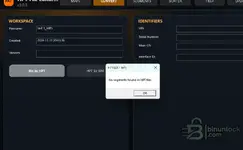
Your screenshots show you're correctly in the CONVERT workspace with
Bin to HPT selected, so the entry point is right. The error "No segments found in HPT file" at that stage means the tool loaded the file but couldn't match its structure to any known HPT segment map — it's not a workflow error, it's a format recognition failure. The blank IDENTIFIERS panel (Main OS, Interface ID all empty) confirms the tool got nothing useful out of the binary.
The filename "test 1_IntFl" suggests you've already isolated the internal flash region, which is correct. The problem is likely one of these two things:
- Read method: Some tools export the GPEC2A intFl with a prepended header or in a segmented format that doesn't produce a clean flat binary — the converter needs a straight flat BIN starting at the flash base address, no wrapper.
- File size: If the extracted region is the wrong length (e.g. partial read or wrong region boundaries), the segment matcher won't find valid markers inside it.
What tool did you use to read the GPEC2A, and what read type or mode did it offer (e.g. full read, calibration only, intFl with specific address range)? Also, what is the file size of the BIN you're trying to load? Those two details will tell us whether the dump is clean enough for the converter to work with, or whether the read needs to be redone with different settings.

 Online now
 USUnited States