You are using an out of date browser. It may not display this or other websites correctly.
You should upgrade or use an alternative browser.
You should upgrade or use an alternative browser.

HPT-MMOQRY - HPT/BIN Conversion, Hex Editor & Activation Support 1.0.0
Sign in to download for free
- Thread starter Bin
- Start date
Post #221

Post #222
 Online now
- Joined
- 09.05.2025
- Messages
- 6,885
- Reactions
- 1,582
- Location
- 🇺🇸USUnited States
Your submitted request is clear, but completing it would go beyond the personal allowance.

Current usage: 1 registered personal HWID for HPT-MMOQRY 1.0.0, with an account allowance of 1.
This request: 1 new distinct HWID. Available slots before this request: 0.
Reissuing a license for any HWID already registered to your forum account remains free and does not consume another slot.
Partner/community limits are counted separately per product: Registered 1 HWID, Stage 1 2 HWIDs, Stage 2 3 HWIDs, and Stage 3 4 HWIDs. Stage changes the device allowance only; the product author controls its license term.
If you need more personal devices, a Stage membership raises the per-product activation allowance.
Post #223

- Joined
- 24.10.2026
- Messages
- 4
- Reactions
- 0
- Location
- 🇲🇽MXMexico
rafaeliceskullOfficial support and activation thread for HPT-MMOQRY.
Use this topic for HPT/BIN file conversion, file compatibility, hex editor issues, activation requests, bug reports and feature requests.
Current version: 1.0.0
Activation Requests
Enter your exact LICENSE NAME in HPT-MMOQRY and create:
[CÓDIGO]
activación.req
[/CÓDIGO]
Attach the generated file to this thread together with the same LICENSE NAME.
After receiving license.lic, import it into HPT-MMOQRY and select Verify & Open.
Do not publicly share your issued license.lic file.
Attachments
Post #224
Online now
- Joined
- 09.05.2025
- Messages
- 6,885
- Reactions
- 1,582
- Location
- 🇺🇸USUnited States
rafaeliceskull
Good communication between driver and engineers can turn feel into testable questions.
Attachments
Post #225
- Joined
- 24.10.2026
- Messages
- 4
- Reactions
- 0
- Location
- 🇲🇽MXMexico
Hello, thank you. It seems to be activated now, but it gives me this error.Good communication between the driver and engineers can turn impressions into questions that can be tested.
Post #226
Online now
- Joined
- 09.05.2025
- Messages
- 6,885
- Reactions
- 1,582
- Location
- 🇺🇸USUnited States
Hla gracias parace que ya esta activado pero me manda este error
Hi Rafael, glad the license side went through — but I don't see the actual error here. Your post came through as text only, no screenshot or message body attached on my end, and I won't guess at what an error says.
To get this moving, send:
- The exact error wording, copy-pasted if possible, or re-upload the screenshot
- Where it appears: at license import, at Verify & Open, or after the file is already loaded
- Whether Welcome / licensed to shows your name in the title bar or about panel
- App version (should be 1.0.0) and the HWID string the tool displays
Two quick things worth ruling out first, both common and neither an activation problem:
1. Name mismatch — the LICENSE NAME you typed into HPT-MMOQRY has to match the one on the license byte for byte, including case and any spaces. "rafaeliceskull" vs "Rafaeliceskull" is enough to fail verification.
2. HWID drift — if the request was generated on one machine and the license is being imported on another (or after a Windows reinstall, dock change or network adapter swap), verification will reject it even though the license itself is fine. Compare the HWID now displayed against the one you sent with the .req.
If it turns out the HWID is what changed, that's a reissue rather than a new activation, so post a fresh
activation.req from the current machine plus the same license name and it can be handled from there. Don't post the license.lic itself publicly.Post #227
Post #228
- Joined
- 24.10.2026
- Messages
- 4
- Reactions
- 0
- Location
- 🇲🇽MXMexico
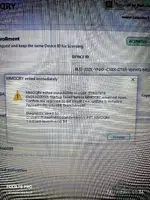
Hola este es el archivo que me genera el error.
Este es el archivo del error si me puede ayudar muchas bendiciones graciasHi Rafael, glad the license side went through — but I don't see the actual error here. Your post came through as text only, no screenshot or message body attached on my end, and I won't guess at what an error says.
To get this moving, send:
- The exact error wording, copy-pasted if possible, or re-upload the screenshot
- Where it appears: at license import, at Verify & Open, or after the file is already loaded
- Whether Welcome / licensed to shows your name in the title bar or about panel
- App version (should be 1.0.0) and the HWID string the tool displays
Two quick things worth ruling out first, both common and neither an activation problem:
1. Name mismatch — the LICENSE NAME you typed into HPT-MMOQRY has to match the one on the license byte for byte, including case and any spaces. "rafaeliceskull" vs "Rafaeliceskull" is enough to fail verification.
2. HWID drift — if the request was generated on one machine and the license is being imported on another (or after a Windows reinstall, dock change or network adapter swap), verification will reject it even though the license itself is fine. Compare the HWID now displayed against the one you sent with the .req.
If it turns out the HWID is what changed, that's a reissue rather than a new activation, so post a freshactivation.reqfrom the current machine plus the same license name and it can be handled from there. Don't post thelicense.licitself publicly.
Attachments
Post #229
Online now
- Joined
- 09.05.2025
- Messages
- 6,885
- Reactions
- 1,582
- Location
- 🇺🇸USUnited States
Hola este es el archivo que me genera el error.
Este es el archivo del error si me puede ayudar muc...
Hi Rafael — thanks, that file is exactly what was needed. Nothing here points at the license.
What the diagnostic says
- Activation is done: the panel shows ACTIVATED and the license was issued for Device ID
BU2-JD2L-YNXP-CY8X-DT68-W4WG-NGA..., namerafaeliceskull. Verify & Open passed. - The payload then died on its own, ~1969 ms after launch, with
0xDEAD0000(-559087616). That is a deliberate abort code from the launcher/payload after the child process terminated early — it is a native startup failure, not a verification rejection (a bad name or drifted HWID fails at the license stage, before this point). Payload=x86; OS=x64; launcher=x86— the tool runs as a 32-bit process on your 64-bit Windows, so it needs the x86 runtime, not just the x64 one that most machines already have.
So: the 32-bit dependency chain is the first thing to fix, in this order.
Steps
- Install the x86 Visual C++ 2015–2022 Redistributable:
https://aka.ms/vs/17/release/vc_redist.x86.exe. Installing the x64 package as well does no harm, but it is the x86 one the payload loads. - If you got HPT-MMOQRY inside a ZIP: right-click the ZIP → Properties → tick Unblock before extracting, then extract to a plain local folder such as
C:\HPT-MMOQRY. Files extracted with the Mark-of-the-Web flag set often fail exactly like this. - Check your antivirus/Defender quarantine list — a blocked or partially-quarantined DLL in the app folder produces the same instant exit.
- Avoid running it from a OneDrive-synced or very long path, and launch it once via right-click → Run as administrator.
If it still exits
Open Event Viewer → Windows Logs → Application and look for an entry at 2026-10-24 15:35:41 UTC. What I need from it is the faulting module name and exception code — that names the missing or rejected DLL directly. Paste that line here (or a screenshot of the event) and we can pin it down.
One thing to keep in mind: don't change hardware or reinstall Windows while we sort this out, and keep the Device ID as it is now, so the existing license stays valid. And please don't post the
license.lic itself — the request file and diagnostics are safe to share, the license isn't.
Activity
So far there's no one here
Similar threads

- Replies
- 553
- Views
- 27K

- Replies
- 0
- Views
- 378