Post #1

- Joined
- 03.05.2025
- Messages
- 1,873
- Reaction score
- 54,727
- Location
- 🇦🇶AQAntarctica
New release thread for OP-COM (VAUX-COM) All-in-One — Opel/Vauxhall Diagnostic Suite: discuss, share feedback, and get help.
For maximum stability during ECU flashing and diagnostics, a clean installation of Windows 10 (64-bit) is recommended.
Is it compatible with J2534 PassThru?
Most modern software versions support standard J2534 interfaces like Scanmatik 2 Pro, OpenPort 2.0, and specific VCI adapters.
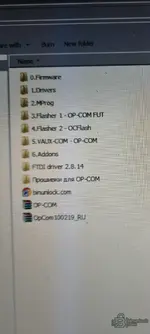
What's inside:
 View full details and download — OP-COM (VAUX-COM) All-in-One — Opel/Vauxhall Diagnostic Suite

All-in-one Opel/Vauxhall diagnostics with DTCs, live data, coding, adaptations, service tests.
- Bin
- diagnostics coding opel op-com diagnostic-software coding-tools obd-scanner opel-diagnostics
- 💾 ECU & EEPROM Tools
OP-COM (VAUX-COM) All-in-One — Opel/Vauxhall Diagnostic Suite#
All-in-one Opel/Vauxhall diagnostics with DTCs, live data, coding, adaptations, service tests.Overview
OP-COM (also known as VAUX-COM) is a Windows-based diagnostic suite for Opel/Vauxhall vehicles. It combines fault-code tools, live data with graphing, output/actuator tests, coding/adaptations, and immobiliser/key functions across a wide range of ECUs. Ideal for workshops and enthusiasts who want OEM-style visibility in a simple interface.
...

Frequently Asked Questions#
Which Windows version is recommended?For maximum stability during ECU flashing and diagnostics, a clean installation of Windows 10 (64-bit) is recommended.
Is it compatible with J2534 PassThru?
Most modern software versions support standard J2534 interfaces like Scanmatik 2 Pro, OpenPort 2.0, and specific VCI adapters.
What's inside:
- Overview & screenshots
- Version history and compatibility
- Download link and setup notes
View full details and download — OP-COM (VAUX-COM) All-in-One — Opel/Vauxhall Diagnostic Suite