xDecoder DTC Manager — Bosch and Delphi Map Utility

xDecoder 14.0 — Activation, Support and ECU Coverage 14.2

Sign in to download for free

Post #21

5AA916723CFFF9D4

Terminal window remained blank. Tried "reinstalling" old key is no longer valid.

Here's to a forum where reputation follows sustained value rather than confident volume.
 

Attachments

Post #22

I'm actually running some tests... the console window stays black and doesn't proceed... the xdecoder executable hangs... it fails to call the .exe.
 

Post #23

Not working, the same err,
version12.7 working ok。
 

Post #24

May no important detail be sacrificed merely to finish a little sooner.
I checked all the steps and the comment section, strictly followed the requirements, but still couldn't enter
 

Attachments

  • 16EF9B5F2124301491D97A4400F5A1C1.webp
    16EF9B5F2124301491D97A4400F5A1C1.webp
    25.4 KB · Views: 88

Post #25

I checked all the steps and the comment section, strictly followed the requirements, but still could...

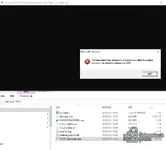
From your screenshot, the popup says "The replacement-key startup could not be completed. The original verifier will be started to display the HWID.", meaning that the replacement key failed to start and the program fell back to displaying the HWID. This indicates that the new key generated by the patcher was not accepted by the main program, similar to the issue fanrong encountered earlier.

Here are a few things you can check first:

  • Make sure to extract it into a brand-new, clean folder, and do not mix it with old 12.7/12.8 files (the official 14.0 instructions explicitly require installation in a new directory).
  • First add the entire xdecoder-14-0 folder to your antivirus/Defender whitelist; runtime_patcher.dll、patcher.log files are easily blocked silently, which can result in an incomplete patch.
  • Make sure you are not running it in a virtual machine—the original poster, Bin, has already stated that VMs are not supported.
  • Run START-xDecoder.exe as administrator, and make sure the .reg file has actually been imported into the registry rather than merely placed next to the exe.
  • The HWID is tied to the machine. If you have changed hardware or reinstalled the system, the old key will become invalid and you will need to generate a new key using the current HWID.

If you still get the same error after doing all of the above, please post the patcher.logfull contents, and also let me know: your Windows version, whether it is a physical machine, and the full HWID currently shown in the popup. Reissuing a key is an administrator/publisher operation; the logs can help Bin determine directly whether the patch failed or the HWID does not match.
 

Post #26

According to your screenshot, the pop-up says "The replacement-key startup could not be completed. The original verifier will be started to display the HWID.", which means that startup with the replacement key failed and the program fell back to displaying the HWID. This indicates that the new key generated by the patcher was not accepted by the main program, similar to the situation fanrong encountered earlier.

Here are a few things you can check first:

  • Make sure you extracted it toa completely new, clean folder, and do not mix it with the old 12.7/12.8 files (the official 14.0 instructions explicitly require installation in a new directory).
  • First add the entire xdecoder-14-0 folder to your antivirus/Defender whitelist; runtime_patcher.dll、patcher.log files of this kind are easily silently blocked, causing the раtсh to be incomplete.
  • Make sureit is not running in a virtual machine—the OP Bin has already said that VMs are not supported.
  • Run it with administrator privileges START-xDecoder.exe, and confirm that the .reg file has actually been imported into the registry, rather than merely being placed next to the exe.
  • The HWID is tied to the machine. If you have changed hardware or reinstalled the system, the old key will no longer work, and you will need to generate a new key using the current HWID.

If you have done all of the above and still receive the same error, please paste the patcher.log complete contents of it. Also tell me: your Windows version, whether it is a physical machine, and the complete HWID currently shown in the pop-up. Reissuing the key is an administrator/publisher operation; the log can help Bin determine directly whether the раtсh failed or the HWID does not match.
Windows 10 Professional is a local system, not a virtual machine hwid:E2484E930260F03C
 

Attachments

Post #27

Windows 10 Professional is a local system, not a virtual machine hwid:E2484E930260F03C

A thoughtful package can make excellent technical work immediately useful to someone else.
 

Attachments

Post #28

Your log shows exactly the same symptoms as fanrong's, so we can confirm where the issue is:

The log repeatedly shows:

Code:
old public modulus was not found
update hostname was not found

These two lines mean that the patcher is searching the main program's memory for the expected “old public key modulus” and hostname signature, but cannot find them. Therefore, the patch was not applied at all (address=00000000 also indicates that the target was not located). Since the patch did not succeed, the main program naturally falls back to displaying the HWID, and the replacement key cannot be accepted. This is not an issue with your operation, nor is it an HWID mismatch.

The most likely reason is that the version of the xDecoder 14.0.exe main program you are running does not match the target signatures built into the patcher; in other words, the patcher and the main program exe are not from the same set/version. fanrong said that 12.7 works normally, which also confirms this—the 12.7 patcher matches the 12.7 exe.

It is recommended that you do the following:

  • Download the complete 14.0 archive again and extract it to a brand-new clean directory. Do not copy any exe or dll files from the old directory into it.
  • Make sure the exe you are running and patcher/dll came from the same 14.0 package, with no old-version files mixed in.
  • Add it to the allowlist throughout the process, then run it again and check whether old public modulus was not found is still present.

If these two error lines are still in the log after downloading and extracting it again, then the patcher in the release package itself is not aligned with this exe version. This needs the original poster Bin (the publisher) to confirm/update the patch; generating a new key will not solve it. Please @Bin with this patcher.log as well, so he can verify the main program build corresponding to the patcher in the 14.0 package.

another, one more question: Did you download your archive recently, or is it from an old link from the 12.x period? This can help determine whether the package version itself is the problem.
I deleted all the old versions. Reinstalling doesn't work, so I want to switch to Windows 7 and try HWID:8D147EE36F72623E
 

Post #29

I deleted all the old versions. Reinstalling doesn't work, so I want to switch to Windows 7 and try HWID:8D147EE36F72623E

Complete records let future calibration work begin from facts rather than reconstruction. :cool:
 

Attachments

Post #30

-thank you


HWID: 749D1F0740ECCED6
 

Post #32

Hi

15463ECB3190D983
 

Post #34

HWID: 73A9C6DC0E92CD6B
Please activate. thank you very much.
 

Post #35

HWID: 73A9C6DC0E92CD6B
Please activate. thank you very much.

Your careful work deserves lighting that makes close inspection feel completely natural.
 

Attachments

Post #36

FDBA9FBF7413EC6E
 

Post #40

I put the file I downloaded into the folder but couldn't run it
 
Activity
So far there's no one here