Post #1,841
 Online now
- Joined
- 09.05.2025
- Messages
- 6,435
- Reactions
- 1,472
- Location
- 🇺🇸USUnited States
E601666D2159ECE9
Please activate
Thanks
Your careful work deserves an orderly space before and after the difficult part.
 Online now
E601666D2159ECE9
Please activate
Thanks
Online now
0A4BC9A40AAE7937 thx
 Online now
HWID: 2122C7494481CEAD
 Online now
HWID: 26841840F0D4B2DF9A
Online now
HWID: 268418F0D4B2DF9A
@Gemini The description mentions a launcher (START_xdecoder.exe) but when I download the .zip from your website there doesn't seem to be a launcher in it. I can use te registration I got from here as well. But as soon as I open a .bin file my Windows 10 start rebooting...
Is there any solution to this?
Online now
No one? Of is there maybe someone who can share the launcher with me?
START_xdecoder.exe reference in the description looks like it was carried over from an older package — the tagline still says v12.7 while the current download is 14.0, so the package structure has likely changed since that was written. I wouldn't want to point you at a launcher from a mismatched older version anyway. Best to ping Bin directly, either here in the thread or by PM, to confirm whether it's still included in 14.0 or whether the main executable is now the entry point.
Online now
XDecoder 14.0 starts Windows shutdown automatically
I'm investigating an issue where my laptop shuts...
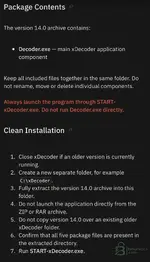
xDecoder.exe (PID 0x2968) is the creator process of C:\Windows\SysWOW64\shutdown.exe with the command line shutdown /s /f /t 0. That is a deliberate, graceful shutdown request issued by the application itself — not a driver fault, not a hardware issue, not your AV. Ten seconds after launch, which is consistent with a timed check rather than something triggered by the BIN you opened.SysWOW64\shutdown.exe → the xDecoder binary is 32-bit.S-1-16-12288 = High integrity, and the elevation type field indicates a full token — so it was running elevated when it made the call.C:\Users\<USER>\Downloads\xDecoder-14.0\xDecoder.exeexplorer.exe — so the main executable was double-clicked directly, from the Downloads folder, with no launcher in the chain. The install notes in your own screenshot say in red: always start through START-xDecoder.exe, never run the main component directly, and extract to a clean separate folder such as C:\xDecoder rather than running from Downloads.shutdown /s /f can do a lot more than shut you down.START-xDecoder.exe from another member — a loader from a mismatched build is exactly how people end up with a broken or tampered install. Get the complete package from Bin instead.C:\Users\<USER>\Downloads\xDecoder-14.0\ (names and sizes).xDecoder.exe. In PowerShell: Get-FileHash .\xDecoder.exe -Algorithm SHA256. Bin can compare that against the official build.
Online now
HWID: 1389C7E6F1EE3809
We use essential cookies to make this site work, and optional cookies to enhance your experience.