Post #1

Bin

Administrator
Antarctica
Joined
03.05.2025
Messages
2,178
Reaction score
74,368
Location
Antarctica
EGSFlash is an Android full flash tool for BMW transmission control units. It programs complete BIN files, including original stock firmware and compatible modified or tuned files.

Supported and detected gearbox families:

  • BMW ZF 6HP: 6HP19, 6HP19TU, 6HP26, 6HP26TU, 6HP32 and 6HP32TU — GKE191/MG, GKE211/MH, GKE194/2P, GKE214/2S, GKE195/SL and GKE215/SM controllers with MPC555 or MPC562.
  • BMW ZF 8HP: GKEB23 (SGBD 988336), GKEB3TU (988344), GKEHY23 (989328), GKEG3HY (991008), ZFB_CC (991696), ZFBHY (991712) and ZFB_CE (992720).
  • ZFB_CE: BTLD 00005F6D and 00005F6E — experimental first unlock and full flash programming. Only eligible controller states are currently accepted.
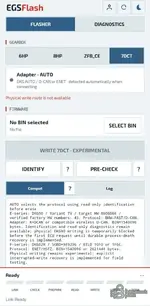
  • BMW 7DCT/DKG: DKG90 for E-series and DKG02R for F-series, including SGBD 989296 and BTLD 10E0/1F6C. Identification and diagnostics are available; physical writing is experimental or temporarily blocked depending on the variant.
  • MINI 7HP: F55, F56 and F57 through the separate UDS/ENET route. The controller is recognized, while physical programming is currently blocked.

Controllers marked as experimental or temporarily blocked are already recognized by EGSFlash and are intended to receive expanded programming support in future updates.

The application provides automatic EGS identification, compatibility pre-check, built-in write-protection bypasses, checksum correction, write verification and detailed programming logs.

EGSFlash is currently undergoing field testing, so results may depend on the EGS hardware and diagnostic adapter, especially on ZF 8HP units. If a write error occurs, post the complete log file for analysis. Application updates are installed automatically from within the flasher.

Testing challenge: The user who successfully flashes the highest number of different transmission types will receive a 2-year license. The next five users will each receive a 1-year license.
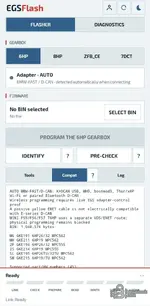
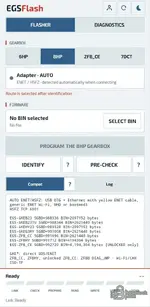
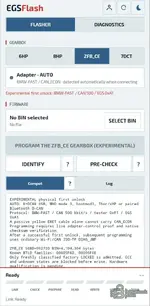
EGSFlash BMW ZF 6HP screen for selecting and programming stock or modified full-flash BIN firmwareEGSFlash BMW ZF 8HP gearbox flasher screen for writing stock or modified full-flash BIN filesEGSFlash experimental BMW ZFB_CE first-unlock and full-flash gearbox programming screenEGSFlash BMW 7DCT DKG identification and pre-check screen showing the experimental write status
 

Attachments

Last edited:
Ratings and Reviews
Total ratings: 0

Post #2

Bin

Administrator
Antarctica
Joined
03.05.2025
Messages
2,178
Reaction score
74,368
Location
Antarctica
Flasher Updated to Version 1.0.28
 

Post #3

Bin

Administrator
Antarctica
Joined
03.05.2025
Messages
2,178
Reaction score
74,368
Location
Antarctica
Flasher Updated to Version 1.0.29
  • ECU writing for the 6HP E-Series has now been thoroughly tested across nearly all transmission variants.
 

Post #4

xxxsawodxxx

Stock Member
Bulgaria
Joined
07.10.2025
Messages
6
Reaction score
15
Location
Bulgaria
Hi, how does the app connect to the car?
 

Post #6

TampaSans

Watchlisted
Estonia
Joined
17.04.2026
Messages
2
Reaction score
0
Location
Estonia
For flashing on a bench I guess you would also use K+DCAN via USB-OTG with some extra fiddling on the gearbox, so it has power and all that? I sent a DM as well with some ideas.
 

Post #7

core2extre

Stock Member
Serbia
Joined
02.05.2026
Messages
8
Reaction score
1
Location
Serbia
Hi, where to find bin files for flashing over this app, I know for psdzdata full for esys.
Is there any bin files for download here on forum, like xhp maps or other modified and original maps for gearbox
 

Post #8

awd4days

Watchlisted
United States
Joined
12.08.2026
Messages
3
Reaction score
0
Location
United States
Having issues with the newest MHD WiFi dongle it doesn’t automatically connect the first time you try it sometimes have to hit it multiple times. Is there a way to manually set the adapter?
 

Post #9

Bin

Administrator
Antarctica
Joined
03.05.2025
Messages
2,178
Reaction score
74,368
Location
Antarctica
Having issues with the newest MHD WiFi dongle it doesn’t automatically connect the first time you try it sometimes have to hit it multiple times. Is there a way to manually set the adapter?
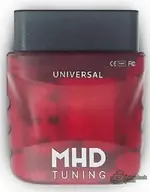
Not quite sure I understand your problem, what do you mean by newest? I have reading and writing through the red MHD adapter for the 6HP box working without any issues

Update within the app to OTA 1.0.33 I increased the detection timeouts for MHD, apparently detection is perceived differently on different Android devices.
 
Last edited:

Post #10

awd4days

Watchlisted
United States
Joined
12.08.2026
Messages
3
Reaction score
0
Location
United States
The update definitely made the connection better of course when I took the video it connected first try (ignore the error this is a 6MT i didn't have an auto car to test)
 

Attachments

  • 2491e9d9-cd23-4b0e-876f-09ea08113cee.mp4
    4 MB

Post #11

Bin

Administrator
Antarctica
Joined
03.05.2025
Messages
2,178
Reaction score
74,368
Location
Antarctica
The update definitely made the connection better of course when I took the video it connected first try (ignore the error this is a 6MT i didn't have an auto car to test)
Is the adapter you are connecting exactly the same as the one in the photo I attached?
 

Attachments

  • MHD.webp
    MHD.webp
    14 KB · Views: 10

Post #12

awd4days

Watchlisted
United States
Joined
12.08.2026
Messages
3
Reaction score
0
Location
United States
Yes exact same adapter. Tablet is a galaxy a7 lite.
 

Post #13

Bin

Administrator
Antarctica
Joined
03.05.2025
Messages
2,178
Reaction score
74,368
Location
Antarctica
Yes exact same adapter. Tablet is a galaxy a7 lite.
I honestly don't know what your problem is, I've already flashed more than 30 6hp gearboxes. Does identification, reading, or writing not work for you?
 
Activity
So far there's no one here