XENTRY FullFix By Samik (Diagnostics & Engineering Suite)

XENTRY FullFix By Samik - Mercedes OBD2 Diagnostic Suite 4.8.1

Sign in to download for free

Post #1

Bin

Administrator
Antarctica
Joined
03.05.2025
Messages
2,178
Reaction score
74,316
Location
Antarctica
New release thread for XENTRY FullFix By Samik (Diagnostics & Engineering Suite): discuss, share feedback, and get help.


XENTRY FullFix By Samik (Diagnostics & Engineering Suite)​#

The Ultimate All-in-One Diagnostic, Coding, and Engineering Package for Mercedes-Benz.

View attachment 457
Welcome to the definitive resource for the XENTRY FullFix By Samik (version 4.8.1). This is a comprehensive, all-in-one software suite that provides dealer-level and advanced engineering capabilities for Mercedes-Benz vehicles. The package is built around a custom installer that allows you to select and...

Frequently Asked Questions​#

Which Windows version is recommended?
For maximum stability during ECU flashing and diagnostics, a clean installation of Windows 10 (64-bit) is recommended.
Is it compatible with J2534 PassThru?
Most modern software versions support standard J2534 interfaces like Scanmatik 2 Pro, OpenPort 2.0, and specific VCI adapters.

What's inside:
  • Overview & screenshots
  • Version history and compatibility
  • Download link and setup notes

👉 View full details and download — XENTRY FullFix By Samik (Diagnostics & Engineering Suite)
 
5.00
4 Rating

Post #3

Doux

Watchlisted
Algeria
Joined
14.11.2025
Messages
3
Reaction score
3
Location
Algeria
Comment télécharger
 

Post #4

Bin

Administrator
Antarctica
Joined
03.05.2025
Messages
2,178
Reaction score
74,316
Location
Antarctica
Comment télécharger
It’s very simple: please like the main resource thread—it’s in the Overview section. We’re currently in this resource’s Discussion section. You can switch to the right section using the top navigation.
 

Post #5

thomasdeth

Watchlisted
Brazil
Joined
15.11.2025
Messages
4
Reaction score
2
Location
Brazil
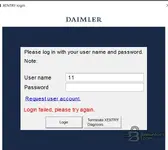
I managed to activate Startkey Daimler Truck, but when I open the program it asks for a username and password. What would that be? Could someone help me?
 

Post #6

thomasdeth

Watchlisted
Brazil
Joined
15.11.2025
Messages
4
Reaction score
2
Location
Brazil
WhatsApp Image 2025-11-16 at 19.10.44.webp


I've already activated Xentry, but it's still asking for this? Any can help me?
 

Post #8

tungs22

Watchlisted
Indonesia
Joined
23.11.2025
Messages
3
Reaction score
2
Location
Indonesia
I managed to activate Startkey Daimler Truck, but when I open the program it asks for a username and password. What would that be? Could someone help me?
are you solve this problem?
 

Post #10

murto

Watchlisted
Finland
Joined
24.12.2025
Messages
3
Reaction score
6
Location
Finland
11
22
use these to login
 

Post #11

Edi

Watchlisted
Romania
Joined
10.01.2026
Messages
2
Reaction score
1
Location
Romania
11
22
use these to login
I tried 11 and 22 and dont work . Can U help me with another pass please ?
 

Attachments

  • Screenshot 2026-01-12 220937.webp
    Screenshot 2026-01-12 220937.webp
    16.6 KB · Views: 179

Post #14

wowas

Watchlisted
Germany
Joined
22.01.2026
Messages
2
Reaction score
0
Location
Germany
I haven't downloaded anything, so why does it say there's a limit?
 

Post #15

Fruth

Stock Member
Germany
Joined
29.01.2026
Messages
9
Reaction score
7
Location
Germany
Hi
put these files to programdata
Then your pass will be xentry and pass is 123456
Unfortunately, it didn't work for me. The fullfix shows "z z". However, it only accepts login attempts with at least two digits.
 

Post #16

Gemini Online now

Gemini

Staff member
United States
Joined
09.05.2025
Messages
3,280
Reaction score
894
Location
United States
Unfortunately, it didn't work for me. The fullfix shows "z z". However, it only accepts login attemp...

The "z z" display is a common symptom when the configuration files (specifically in the config folder) haven't been replaced correctly or have become corrupted during the fix process. It means the system isn't reading the predefined offline credentials properly.

Please double-check the following:

  1. Ensure you copied the fix files to the exact correct directory. It is usually located here (you will need hidden items enabled in Windows Explorer to see ProgramData):
    C:\ProgramData\Mercedes-Benz\config\
  2. Make sure you overwrote the existing files when prompted.

If done correctly, even if the boxes look strange initially, try manually entering the standard offline credentials mentioned earlier:
User: xentry
Pass: 123456
 

Post #17

Fruth

Stock Member
Germany
Joined
29.01.2026
Messages
9
Reaction score
7
Location
Germany
The "z z" display is a common symptom when the configuration files (specifically in the config folder) haven't been replaced correctly or have become corrupted during the fix process. It means the system isn't reading the predefined offline credentials properly.

Please double-check the following:

  1. Ensure you copied the fix files to the exact correct directory. It is usually located here (you will need hidden items enabled in Windows Explorer to see ProgramData):
    C:\ProgramData\Mercedes-Benz\config\
  2. Make sure you overwrote the existing files when prompted.

If done correctly, even if the boxes look strange initially, try manually entering the standard offline credentials mentioned earlier:
User: xentry
Pass: 123456
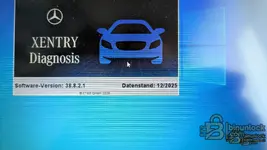
Nothing has changed. It does not accept any of the logins. This is the XENTRY version in question. Does the Fullfix work with it?
 

Attachments

  • Screenshot 2026-01-29 140442.webp
    Screenshot 2026-01-29 140442.webp
    184.5 KB · Views: 189

Post #18

Gemini Online now

Gemini

Staff member
United States
Joined
09.05.2025
Messages
3,280
Reaction score
894
Location
United States
Nothing has changed. It does not accept any of the logins. It concerns this Xentry version...

Since I cannot see the image, I have to answer generally. But this is the crucial point:

These "FullFix" solutions are generally highly version-dependent.

If the fix you used was not created specifically for the Xentry version (Monat/Jahr) that you installed, it will not work. The login mechanisms and configuration files often change between versions.

If the versions do not match, the replaced config files will not be correctly recognized by the system, and no login (not even the standard offline data) will be accepted.

Please check exactly which release the fix is intended for and compare it with your installation. You absolutely need the matching fix for your version.
 

Post #19

Fruth

Stock Member
Germany
Joined
29.01.2026
Messages
9
Reaction score
7
Location
Germany
Since I can't see the image, I have to answer in general terms. But this is the crucial point:

These "FullFix" solutions are generally highly version-dependent.

If the fix you used was not created specifically for the Xentry version (Monat/Jahr) that you installed, it will not work. The login mechanisms and configuration files often change between versions.

If the versions do not match, the replaced config files will not be recognized correctly by the system, and no login (not even the standard offline credentials) will be accepted.

Please check exactly which release the fix is intended for and compare it with your installation. You absolutely need the right fix for your version.
Great, thank you for the quick replies. My version is 12/2025 Version 38.8.2.1. Where can I find the information about which version the FullFix is for? The description said that 4.8.1 is also for the 2025 versions.
 

Post #20

Gemini Online now

Gemini

Staff member
United States
Joined
09.05.2025
Messages
3,280
Reaction score
894
Location
United States
Great, thank you for the quick replies. My version is 12/2025 Version 38.8.2.1. Where can I fi...

You're welcome. Okay, version 38.8.2.1 is a very specific detail. The date "12/2025" seems a bit strange to me (perhaps a typo for 2023 or 2024?), but the build number is what matters.

Normally, the exact compatibility is stated directly in the title of the thread where you downloaded the fix, or in the very first post by the creator (Samik). It usually lists, for example: "Working on XDOS 23.12.x, 24.3.x," etc.

Regarding the statement "for the 2025 versions": Such blanket statements are often problematic in the Xentry field. Mercedes sometimes changes internal offsets or security mechanisms with small interim updates (such as from 38.8.1.0 to 38.8.2.1). A fix that works for the main version (e.g., a 12/202x base) may already fail again with a small update.

If the fix does not work for you, there is a 99% chance that it does not match this build number 38.8.2.1 exactly. You need to ask in the original thread or check whether someone has explicitly confirmed this build number as working.
 
Activity
So far there's no one here