
AlfaOBD – FCA (Alfa/Fiat/Chrysler/Dodge/Jeep/RAM) Diagnostics
AlfaOBD — professional Android diagnostics for FCA group vehicles
What it does
AlfaOBD turns your Android device into a workshop-grade tool for Alfa Romeo, Fiat, Lancia, Abarth, Chrysler, Dodge, Jeep and RAM. Using a quality OBD interface (Bluetooth/BLE, USB-OTG or Wi-Fi), you can scan and clear faults, stream Live Data with graphs, run actuator tests, perform configurations/coding, and execute service procedures across many ECUs.


Highlights
Compatibility
• Vehicles: Alfa Romeo, Fiat, Lancia, Abarth, Chrysler, Dodge, Jeep, RAM (coverage depends on ECU/equipment).
• Adapters: reliable ELM327/ELM-compatible or OBDLink devices recommended for best stability.
• OS: Android 5.0+ (phones/tablets).
• Package here: AlfaOBD_v2.3.3.0.apk.
Quick start
Good practice: keep a stable power source during long sessions; run adaptations only when procedures are supported and safe; always save logs before clearing codes.
Tested environment
Checked on Android 12/13 with genuine-chip Bluetooth and Wi-Fi adapters; designed to operate on Android 5.0–14.
Disclaimer
This description summarizes publicly available information for educational/archival purposes. Any files referenced are hosted by third parties and were uploaded by unknown users; our community does not claim ownership. Rights holders may contact us for prompt assistance.


What it does
AlfaOBD turns your Android device into a workshop-grade tool for Alfa Romeo, Fiat, Lancia, Abarth, Chrysler, Dodge, Jeep and RAM. Using a quality OBD interface (Bluetooth/BLE, USB-OTG or Wi-Fi), you can scan and clear faults, stream Live Data with graphs, run actuator tests, perform configurations/coding, and execute service procedures across many ECUs.
Highlights
- Multi-ECU access: Body Computer (Delphi/Marelli), Engine, Transmission, ABS/ESC, Airbag, Central Gateway, Cluster and more (support varies by model/year).
- Faults: read all/confirmed DTCs with detailed info; monitor faults; clear codes when repairs are complete.
- ECU ID & status: read system ID, software/hardware versions and configuration.
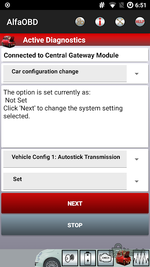
- Active diagnostics: actuator tests plus Car configuration change and coding/adaptations (e.g., Autostick transmission setting) where supported.
- Live Data: real-time parameters with plotted graphs and logging.
- Tools & logs: view/save session and gauge logs, export, email or upload to cloud.
- Flexible interfaces: works over Bluetooth, USB-OTG and Wi-Fi; adjustable baud, IP/port and timeouts.
Compatibility
• Vehicles: Alfa Romeo, Fiat, Lancia, Abarth, Chrysler, Dodge, Jeep, RAM (coverage depends on ECU/equipment).
• Adapters: reliable ELM327/ELM-compatible or OBDLink devices recommended for best stability.
• OS: Android 5.0+ (phones/tablets).
• Package here: AlfaOBD_v2.3.3.0.apk.
Quick start
- Plug in your OBD adapter; switch ignition to ON.
- Connect via Bluetooth/Wi-Fi/USB in AlfaOBD and choose brand/model.
- Select a control unit → use Faults, Read System ID/Status, Active Diagnostics or Plotted Data.
- Back up configuration before making coding or adaptation changes.
Good practice: keep a stable power source during long sessions; run adaptations only when procedures are supported and safe; always save logs before clearing codes.
Tested environment
Checked on Android 12/13 with genuine-chip Bluetooth and Wi-Fi adapters; designed to operate on Android 5.0–14.
Disclaimer
This description summarizes publicly available information for educational/archival purposes. Any files referenced are hosted by third parties and were uploaded by unknown users; our community does not claim ownership. Rights holders may contact us for prompt assistance.


