
BMW MGD1 FSC Creator - Offline FSC Generator for MG1/MD1 Engine ECUs
MGD1FSC is an offline Windows FSC file generator for BMW MG1/MD1 engine ECUs, including model years 2020 and newer.
The application generates FSC files locally and does not require a DME read, ENET/OBD session or vehicle connection during file generation.
MGD1FSC can create a single 188-byte FSC file for a selected feature or generate a complete ZIP package containing 22 predefined FSC files + README.
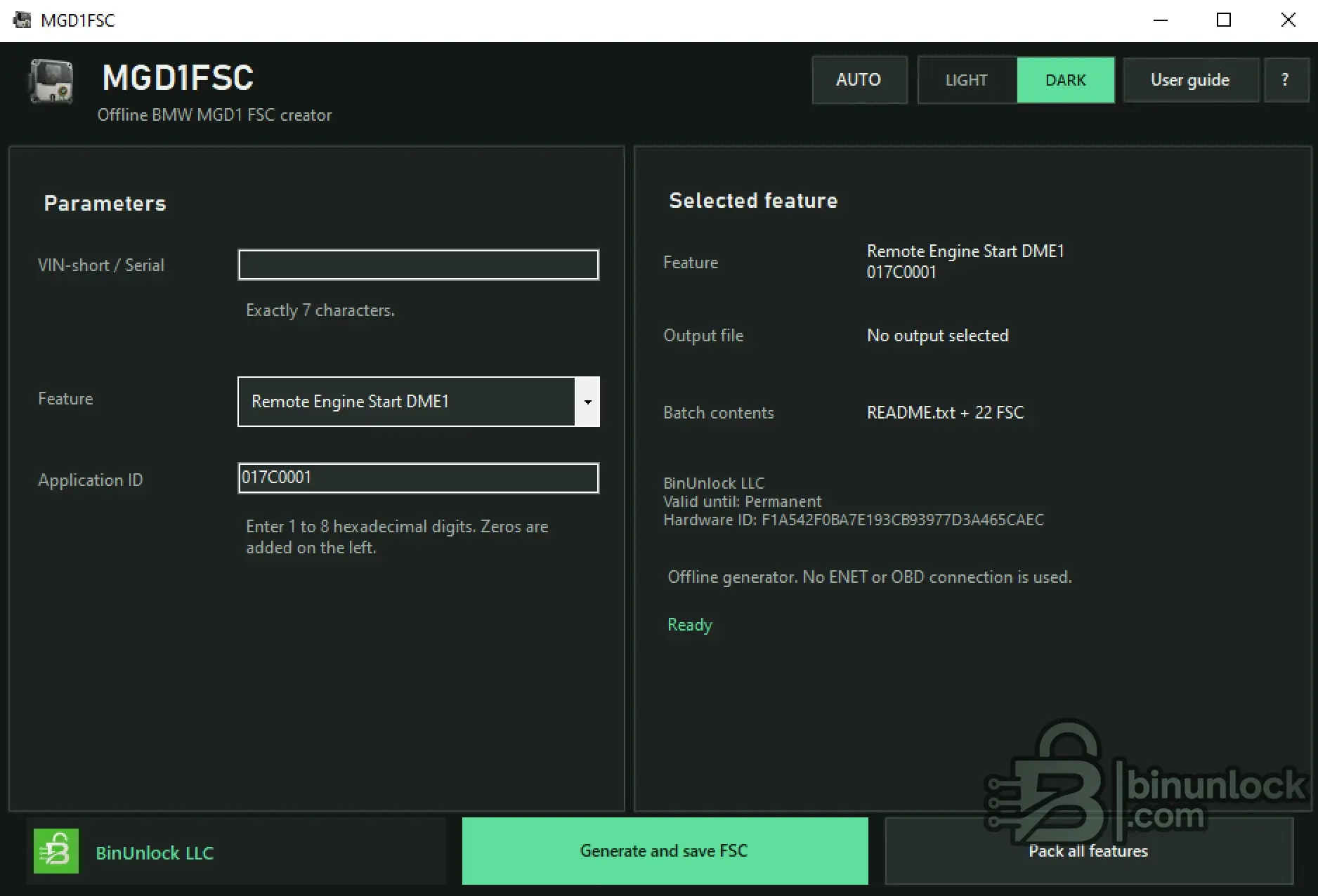
Main Features
Offline FSC Generation
MGD1FSC performs the FSC generation process locally on the computer.
No DME read, ENET / OBD diagnostic session or active vehicle connection is required to create the FSC file.
The MGD1FSC workflow ends after the generated .fsc file or FSC package is saved.
Vehicle communication and FSC storage are performed separately with E-Sys.
VIN-Short / Serial
The VIN-short / Serial field requires exactly the last 7 characters of the VIN.
Enter the value in uppercase and do not enter the complete VIN.
Example format:
Predefined Feature Selection
MGD1FSC includes a predefined FSC feature list covering General / Cross-Platform entries together with dedicated S58B30T0 and S63B44T4 groups.
The selected feature and corresponding Application ID are displayed before generation.
Example:
Custom Application ID
In addition to the predefined feature list, MGD1FSC supports a Custom Application ID.
Custom input accepts:
Example:
Custom Application IDs are generated as individual FSC files and are not included in the Pack all features package.
Generate a Single FSC
Use Generate and save FSC to create an FSC file for the currently selected feature or Custom Application ID.
Generated filename format:
A correctly generated individual FSC file has an exact size of:
Generate Complete FSC Package
The Pack all features function generates all 22 predefined FSC entries in a single package.
Generated package format:
Package contents:
Custom Application IDs are not included in Pack all features.
A Custom App ID must be generated separately using the single FSC generation function.
Supported FSC / App ID Reference
The current predefined list contains 22 FSC entries grouped by platform and engine family.
General / Cross-Platform
S58B30T0 - M2 / M3 / M4 / X3M / X4M (DME-86TO)
S63B44T4 - M5 / M8 / X5M / X6M (F90, F91, F92, F95, F96)
The generated FSC filename always uses the complete 8-digit Application ID.
Interface Languages
MGD1FSC features a multilingual interface with automatic system-language detection and 34 manually selectable languages.
Available interface languages:
English, العربية, Български, Čeština, Dansk, Deutsch, Ελληνικά, Español, Eesti, Suomi, Français, Hrvatski, Magyar, Bahasa Indonesia, Italiano, 日本語, 한국어, Lietuvių, Latviešu, Norsk, Nederlands, Polski, Português, Română, Русский, Slovenčina, Slovenščina, Srpski, Svenska, ไทย, Türkçe, Українська, 简体中文, 繁體中文.
The Auto / System option allows the interface language to follow the operating system automatically when supported.
Interface Themes
MGD1FSC provides three appearance modes:
Interface language and theme settings only change the application display and do not modify the generated FSC data.
HWID Activation & Licensing
MGD1FSC uses HWID-based licensing.
If no valid license is present, the activation window displays the computer Hardware ID / HWID.
Activation workflow:
Using the Generated FSC with E-Sys
MGD1FSC only creates the FSC file. Storage to the target ECU is performed separately with E-Sys.
Typical authorized workflow:
Only an accepted status reported by the target ECU confirms successful acceptance.
Safe Workflow Checks
Before generating or using an FSC:
Package Contents
The current software package contains:
User Guide
A multilingual PDF User Guide is included with the application.
The current PDF manual is available in:
The PDF covers:
The User Guide can also be opened directly from the MGD1FSC application.
File Integrity
File: MGD1FSC.exe
SHA-256:
VirusTotal:
View VirusTotal report
The VirusTotal report above corresponds to the executable identified by the exact SHA-256 hash shown above.
Important
MGD1FSC is an offline FSC file generator.
It does not connect to the vehicle, read the DME, write FSC data through OBD / ENET or validate ECU compatibility.
FSC storage is performed separately using E-Sys, and only the response from the target ECU confirms whether the generated FSC has been accepted.
Use generated data only within an authorized BMW vehicle configuration or service workflow and independently verify compatibility before deployment.
MGD1FSC is an offline Windows FSC file generator for BMW MG1/MD1 engine ECUs, including model years 2020 and newer.
The application generates FSC files locally and does not require a DME read, ENET/OBD session or vehicle connection during file generation.
MGD1FSC can create a single 188-byte FSC file for a selected feature or generate a complete ZIP package containing 22 predefined FSC files + README.
Main Features
- Offline BMW MG1/MD1 FSC generation
- BMW engine ECU support including model years 2020 and newer
- No DME read required for FSC generation
- No ENET connection required during generation
- No OBD connection required during generation
- Generate individual FSC files
- Exact single FSC file size: 188 bytes
- Generate complete package with 22 predefined FSC files
- README included in the complete FSC package
- VIN-short / Serial input
- Selectable predefined FSC features
- Custom Application ID support
- Automatic 8-digit App ID normalization
- Remote Engine Start FSC support
- Vmax FSC support
- M Driver's Package FSC support
- M Drive Professional FSC support
- Competition Package FSC support
- S58B30T0 feature group
- S63B44T4 feature group
- Multilingual interface - 34 languages
- Automatic system-language detection
- AUTO / LIGHT / DARK appearance modes
- HWID-based licensing
- Integrated User Guide access
Offline FSC Generation
MGD1FSC performs the FSC generation process locally on the computer.
No DME read, ENET / OBD diagnostic session or active vehicle connection is required to create the FSC file.
The MGD1FSC workflow ends after the generated .fsc file or FSC package is saved.
Vehicle communication and FSC storage are performed separately with E-Sys.
VIN-Short / Serial
The VIN-short / Serial field requires exactly the last 7 characters of the VIN.
Enter the value in uppercase and do not enter the complete VIN.
Example format:
Code:
AB12345Predefined Feature Selection
MGD1FSC includes a predefined FSC feature list covering General / Cross-Platform entries together with dedicated S58B30T0 and S63B44T4 groups.
The selected feature and corresponding Application ID are displayed before generation.
Example:
Code:
Remote Engine Start DME1
Support ID: 0x17C
Application ID: 017C0001
Custom Application ID
In addition to the predefined feature list, MGD1FSC supports a Custom Application ID.
Custom input accepts:
- 1 to 8 hexadecimal digits
- Characters 0-9 and A-F
- Automatic conversion to uppercase
- Automatic left-padding with zeros to exactly 8 hexadecimal digits
Example:
Code:
Input: 1
Normalized App ID: 00000001
Custom Application IDs are generated as individual FSC files and are not included in the Pack all features package.
Generate a Single FSC
Use Generate and save FSC to create an FSC file for the currently selected feature or Custom Application ID.
Generated filename format:
Code:
FSC_<SERIAL>_<APPID>.fscA correctly generated individual FSC file has an exact size of:
Code:
188 bytesGenerate Complete FSC Package
The Pack all features function generates all 22 predefined FSC entries in a single package.
Generated package format:
Code:
FSC_pack_<SERIAL>.zipPackage contents:
Code:
README
22 predefined FSC files
Custom Application IDs are not included in Pack all features.
A Custom App ID must be generated separately using the single FSC generation function.
Supported FSC / App ID Reference
The current predefined list contains 22 FSC entries grouped by platform and engine family.
General / Cross-Platform
Code:
0x17C  DME1: Release Remote Engine Start          017C0001
0x180  DME2: Release Remote Engine Start          01800001
0x095  Vmax - DME1 M cars                        00950001
0x07B  Vmax - DME2 M cars                        007B0001
S58B30T0 - M2 / M3 / M4 / X3M / X4M (DME-86TO)
Code:
0x188  M Driver's Package (DME-86TO)                              01880001
0x1A4  8.6.S (F97/F98 + G80/G82/G83) Competition Package (Werk)  01A40001
0x1AF  8.6.S (F97/F98 + G80/G82/G83) Basismodell (Werk)          01AF0001
0x1C1  8.6.S (G8x) M Drive Professional (Werk/Service)            01C10001
0x1DE  8.6.S G80 CS / G82 CSL - Pmax/Vmax (Werk)                 01DE0001
0x1E2  G82 GT4 Rennsport (Werk)                                   01E20001
0x1E3  G87 M2 Club Rennsport (Werk)                               01E30001
0x1E4  G87 M2 Cup Rennsport (Werk)                                01E40001
0x1E8  8.6.S (G8x AWD LCI) Competition Package (Werk)             01E80001
0x1EB  8.6.S G87 NM (new model) (Werk)                            01EB0001
0x1EC  8.6.S G87 CS (Werk)                                        01EC0001
0x1EE  8.6.S G87 CS Brasilien (Werk)                              01EE0001
0x1EF  8.6.M (G8x RWD) 375 kW (Werk)                              01EF0001
0x1F0  8.6.M (G8x) M Drive Professional (Werk/Service)            01F00001
0x1F1  8.6.M (G8x) M Driver's Package (Werk/Service)              01F10001
0x1F2  8.6.M (G8x AWD) 390 kW (Werk)                              01F20001
S63B44T4 - M5 / M8 / X5M / X6M (F90, F91, F92, F95, F96)
Code:
0x1AB  DME1 Competition Package                   01AB0001
0x1AC  DME2 Competition Package                   01AC0001
The generated FSC filename always uses the complete 8-digit Application ID.
Interface Languages
MGD1FSC features a multilingual interface with automatic system-language detection and 34 manually selectable languages.
Available interface languages:
English, العربية, Български, Čeština, Dansk, Deutsch, Ελληνικά, Español, Eesti, Suomi, Français, Hrvatski, Magyar, Bahasa Indonesia, Italiano, 日本語, 한국어, Lietuvių, Latviešu, Norsk, Nederlands, Polski, Português, Română, Русский, Slovenčina, Slovenščina, Srpski, Svenska, ไทย, Türkçe, Українська, 简体中文, 繁體中文.
The Auto / System option allows the interface language to follow the operating system automatically when supported.
Interface Themes
MGD1FSC provides three appearance modes:
- AUTO
- LIGHT
- DARK
Interface language and theme settings only change the application display and do not modify the generated FSC data.
HWID Activation & Licensing
MGD1FSC uses HWID-based licensing.
If no valid license is present, the activation window displays the computer Hardware ID / HWID.
Activation workflow:
- Start MGD1FSC.exe
- Copy the displayed HWID exactly
- Provide the HWID through the authorized license channel
- Load the license issued specifically for that HWID
- Restart the application if requested
Using the Generated FSC with E-Sys
MGD1FSC only creates the FSC file. Storage to the target ECU is performed separately with E-Sys.
Typical authorized workflow:
- Generate and save the required FSC in MGD1FSC
- Connect to the authorized vehicle using the correct E-Sys target and supported ENET / ICOM interface
- Use a stable external vehicle power supply
- Open Expert Mode > FSC Extended
- Select and identify the intended DME
- Verify the Support ID / Application ID
- Use the corresponding Store FSC function
- Select the generated FSC file
- Read the ECU-reported FSC status after writing
Only an accepted status reported by the target ECU confirms successful acceptance.
Safe Workflow Checks
Before generating or using an FSC:
- Confirm the last 7 VIN characters
- Confirm the intended target DME
- Verify the Support ID
- Verify the full 8-digit Application ID
- For Custom, use only 1 to 8 hexadecimal digits
- Confirm that a single FSC file is exactly 188 bytes
- Keep an untouched copy of generated data before deployment
- Use E-Sys only on an authorized vehicle
- Use the correct vehicle target and supported interface
- Maintain stable external vehicle power during ECU operations
- Check the ECU-reported FSC status after writing
Package Contents
The current software package contains:
Code:
MGD1FSC.exe
MGD1FSC-User-Guide-EN-DE-PL-RU.pdf
User Guide
A multilingual PDF User Guide is included with the application.
The current PDF manual is available in:
- English
- German
- Polish
- Russian
The PDF covers:
- Product scope and limitations
- Activation and HWID licensing
- Interface, language and themes
- Single FSC generation
- E-Sys FSC storage workflow
- Complete 22 FSC package generation
- Supported FSC / App ID reference
- Safe workflow and acceptance checks
- Troubleshooting
The User Guide can also be opened directly from the MGD1FSC application.
File Integrity
File: MGD1FSC.exe
SHA-256:
Code:
3d353e7528f5ff4c5e85a70b6ea48e9fd26a65990cb7a182f7cf20c91f6cc4ceVirusTotal:
View VirusTotal report
The VirusTotal report above corresponds to the executable identified by the exact SHA-256 hash shown above.
Important
MGD1FSC is an offline FSC file generator.
It does not connect to the vehicle, read the DME, write FSC data through OBD / ENET or validate ECU compatibility.
FSC storage is performed separately using E-Sys, and only the response from the target ECU confirms whether the generated FSC has been accepted.
Use generated data only within an authorized BMW vehicle configuration or service workflow and independently verify compatibility before deployment.


