BMW MGU BENCH — ID7 / ID8 Toolkit#
MGU BENCH is a Windows bench and file-service toolkit designed specifically for BMW MGU ID7 and ID8 head-unit storage media.
Unlike simple FSC generators or generic binary patchers, MGU BENCH works directly with a connected SD / MMC storage device containing the Linux EXT filesystem used by supported BMW MGU units.
The application provides controlled MGU detection, verified local backup, ID7/ID8 patching, virginizing, EXT filesystem browsing and a separate factory-format FSC generator.
All device detection starts in read-only mode. Raw writes are enabled only after the exact supported target has been recognized, the affected data has been backed up locally and the write operation has been explicitly confirmed.
Main Functions#
- Detect connected BMW MGU SD / MMC storage
- Scan Linux EXT volumes in read-only mode
- Identify supported MGU ID7 / ID8 layouts
- Validate known paths, file sizes and binary signatures
- Create a complete local backup before modification
- раtсh ID7 / ID8 using the verified supported file structures
- Virginize ID7 / ID8 using the dedicated factory-data workflow
- Reopen the device after writing and verify the result byte-for-byte
- Browse the raw EXT filesystem without mounting it in Windows
- Copy selected files from the MGU storage to the PC
- Generate original-format signed FSC files for supported ID7 and ID8 functions
- Generate navigation FSC sets by VIN and map region
- Offline workstation licensing
Protected Write Policy#
MGU BENCH is designed to avoid uncontrolled or blind writes to an unknown storage device.
The application follows a guarded workflow:
- The connected physical disk is scanned read-only.
- A compatible EXT volume must be detected and selected.
- The application checks the expected MGU paths, target files, sizes and signatures.
- Unknown, incomplete or ambiguous binary structures are rejected.
- The affected data is backed up locally before any write operation.
- The backup is verified before patching can continue.
- A raw write requires explicit user confirmation.
- After writing, the target is closed and reopened in read-only mode.
- The result is verified against the expected patched data.
No arbitrary byte editing is provided through the normal MGU раtсh workflow.
MGU Detection and SD/MMC Scanning#
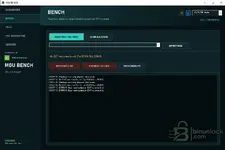
The BENCH workspace can scan:
- USB-connected storage
- SD cards
- MMC media
- All physical disks when the target is not detected by the standard removable-media scan
Use SCAN USB / SD / MMC first.
If no EXT volume is found, SCAN ALL DISKS performs a broader read-only physical-disk search.
After selecting the required EXT volume, use DETECT MGU to validate the connected storage against the supported MGU structures.
Do not select a disk only by its capacity or Windows drive letter. Always allow MGU BENCH to complete its target validation.
ID7 / ID8 Bench раtсh#
The раtсh ID7 / ID8 function implements the supported MGU bench-patching procedure on the exact recognized target files.
The workflow:
- Detects the required MGU structures
- Validates the supported target binaries
- Creates local backups of the affected files
- Applies the required restored signature blocks to the two supported MGU files
- Writes only after successful validation and confirmation
- Reopens the storage in read-only mode
- Performs a byte-level verification of the written result
The supported раtсh uses fixed, known 256-byte signature data for the recognized MGU structures rather than applying arbitrary modifications to unrelated binaries.
If the target files do not match the supported structures, the раtсh operation is rejected.
ID7 / ID8 Virginize#
The dedicated VIRGINIZE ID7 / ID8 operation provides a controlled factory-data restoration workflow for compatible MGU storage.
For a recognized target, the application replaces the required block_352 data using the exact supported 364-byte factory block.
As with the regular раtсh function:
- Target recognition is mandatory
- A backup is created first
- The source structure is validated
- The write requires explicit confirmation
- The written result is reopened and verified
Always preserve the original backup before performing module replacement or virginization work.
Automatic Local Backups#
Before a supported write operation, MGU BENCH creates a local backup of the data that will be changed.
Use OPEN BACKUPS to access the saved backup files.
Keep these backups in a separate safe location before continuing with additional module work.
A backup should be treated as part of the repair procedure, not as a disposable temporary file.
EXT Filesystem Browser#
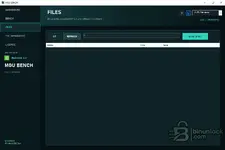
The integrated FILES workspace allows the selected Linux EXT volume to be inspected directly from Windows.
The filesystem can be browsed without mounting the partition as a normal Windows drive.
Available operations include:
- Navigate through EXT directories
- View filenames, object type and file size
- Move to the parent directory
- Refresh the current directory
- Copy selected files to the Windows PC
Use COPY TO PC to extract required files without modifying the source filesystem.
The browser is useful for inspection, backup and recovery of MGU files independently of the automated раtсh workflow.
FSC Factory Generator#
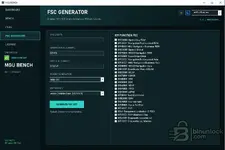
MGU BENCH includes a separate FSC GENERATOR for producing supported original-format BMW ID7 / ID8 FSC files.
The generator works with:
- VIN — last 7 characters
- Generator ID — 6 digits
- Order ID — 7 digits
- Target generation
- Map region
- Selected function FSCs
Generated files use the supported original ID7 / ID8 binary structure and RSA-signature format.
Supported FSC Functions#
The current generator provides selectable FSC functions including:
- 017D0001 — SpeechApp ROW
- 01730001 — Navigation Professional ROW
- 01910001 — MGU Navigation Business ROW
- 01CC0001 — Speech Global
- 01C90001 — MGU21 Navigation ROW
- 017E0001 — SpeechApp China
- 01720001 — Navigation Professional Asia
- 01900001 — MGU Navigation Business Asia
- 01C80001 — MGU21 Navigation Asia
- 01D10001 — Deactivate IPsec ADCAM
- 01D20001 — UCAP
- 01A70001 — KOMBI
- 01A80001 — ATM
- 01C50001 — BDC
- 01C60001 — NCAP
- 01CF0001 — hPAD
- 01D00001 — mPAD
- 01710001 — TouchCommand
- 01BE0001 — SXM
- 01CA0001 — Android Auto
- 017B0001 — Apple CarPlay
- 017A0001 — 4A
- 01AA — Component Protection set
- 01790001 — RAM diagnostic log
- 01760001 — Diagnostic log external
- 01770001 — Diagnostic log internal
Function availability and vehicle applicability depend on the exact MGU generation, software level and vehicle configuration.
Navigation FSC Generation#
Navigation FSC generation can be configured using the required target generation and map region.
The interface allows the appropriate navigation-related FSC functions to be combined into a generated set.
Always confirm the correct:
- Vehicle VIN
- MGU generation
- Generator ID
- Order ID
- Navigation type
- Map region
before generating the final FSC set.
Package Contents#
The downloaded package contains:
- MGUBENCH.exe — main application
- RUN-AS-ADMIN.cmd — administrator launcher for physical-disk access
- SHA256SUMS.txt — file-integrity hashes for the distributed package
Keep the complete package together.
Installation and Startup#
- Download and completely extract the package into a separate folder.
- Do not run MGU BENCH directly from a ZIP or RAR archive.
- Connect the required SD/MMC storage to the Windows computer using a reliable reader.
- Use RUN-AS-ADMIN.cmd when physical-disk access requires elevated Windows privileges.
- Open the BENCH section.
- Start with SCAN USB / SD / MMC.
- Use SCAN ALL DISKS only if the target EXT volume is not detected.
- Select the detected EXT volume and click DETECT MGU.
- Do not start a write operation until the program confirms a supported MGU target.
License#
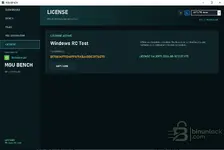
MGU BENCH uses offline workstation activation.
The LICENSE section displays:
- Current license state
- Licensed workstation name
- Hardware ID
- License validity
Use COPY HWID when the hardware identifier is required for activation.
License verification is performed locally and an activated workstation can remain licensed without an active internet connection.
Important Working Notes#
- Always preserve every automatically created backup
- Use a reliable SD/MMC reader and USB connection
- Do not disconnect the storage device during a write
- Do not allow Windows disk-management tools to initialize or format an unknown Linux partition
- Do not manually modify the EXT filesystem while an MGU operation is active
- Do not раtсh files from an unidentified or unsupported MGU software version
- Do not replace the supplied factory data with bytes from unrelated firmware
- After patching, allow MGU BENCH to complete its read-back verification
- Keep extracted original files and backups in a separate location
MGU BENCH is intended for authorized BMW MGU repair, bench servicing, module replacement, recovery and professional retrofit work.
File Integrity and VirusTotal#
For the current executable submitted for analysis:
SHA-256:
Code:
bde70942b6bf8584dd3768b2996dd7c03fdf3a9e4a27b608f5440c40a0708e18View the VirusTotal report for this exact SHA-256
The package also includes SHA256SUMS.txt so the downloaded files can be verified locally before use.
If the SHA-256 of your executable differs from the value shown above, this VirusTotal report does not apply to that file.