
Description
MG1-MD1 Engine Units EEPROM Odometer Tool is a Windows utility for reading, verifying and updating mileage records stored in supported Bosch MG1, MD1 and ECS engine-control-unit EEPROM files.
The program detects supported ECU types, displays the mileage records found in the EEPROM and calculates the corresponding CRC data before saving the modified result.
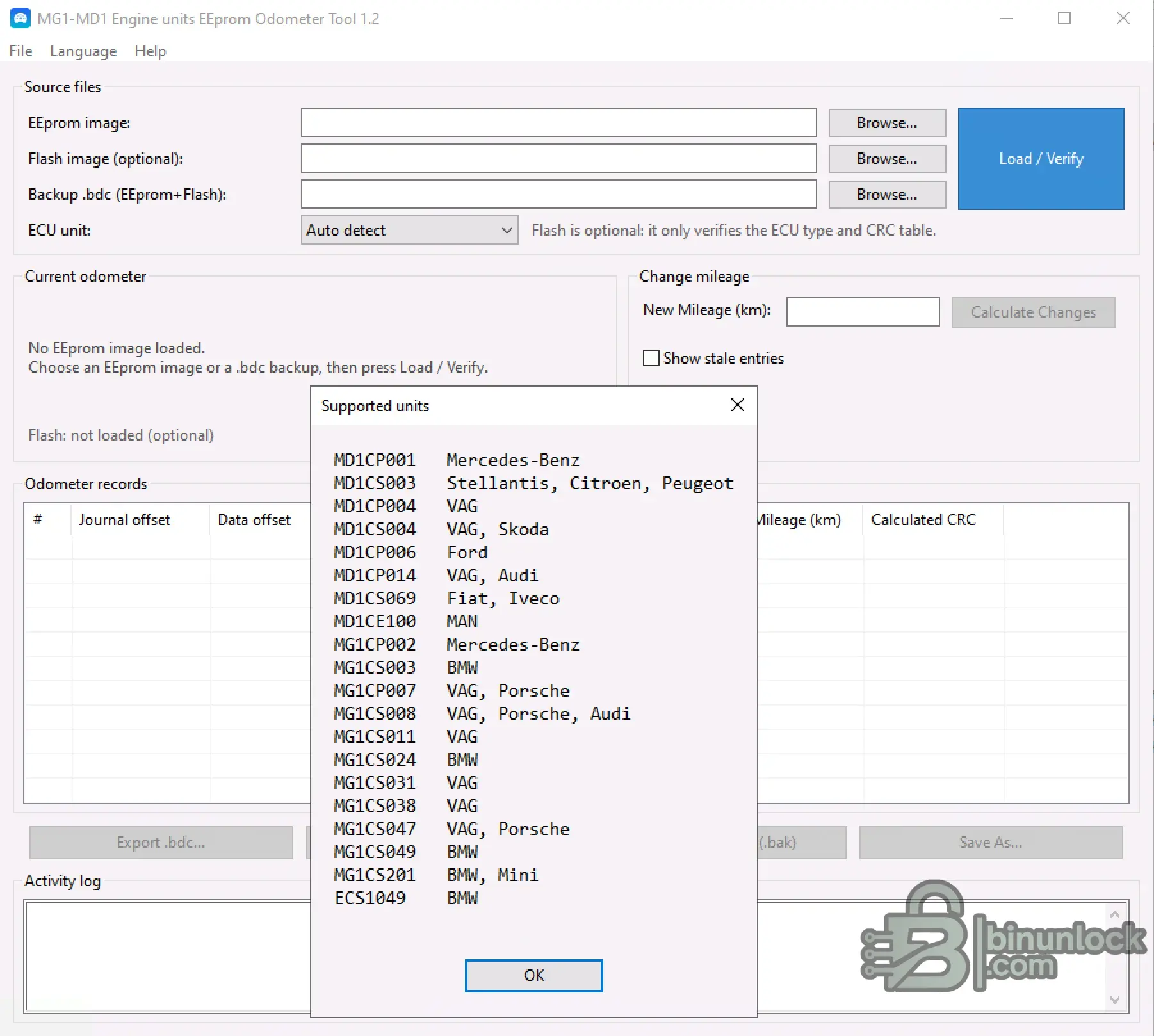
It supports 20 ECU families used by Mercedes-Benz, BMW, MINI, VAG, Audi, Porsche, Škoda, Ford, Stellantis, Citroën, Peugeot, Fiat, Iveco and MAN.
This is an ECU EEPROM file tool.
It does not connect directly to the vehicle and does not replace the ECU programmer required to read or write the control unit.
Main Features
Supported Source Files
The application provides three source-file options:
EEPROM Image
The EEPROM image contains the mileage records processed by the tool.
This is the primary file required for reading and changing the stored odometer value.
Flash Image — Optional
A matching Flash image can be loaded together with the EEPROM.
According to the application interface, the Flash file is used only to verify:
The mileage modification itself is performed in the EEPROM image.
BDC Backup — EEPROM + Flash
The program can also load a combined .bdc backup containing both EEPROM and Flash data.
A new BDC backup can be exported from the files loaded into the application.
ECU Detection and File Verification
After selecting the source file, click Load / Verify.
The program analyzes the data and attempts to identify the correct supported ECU definition.
Available selection modes include:
When an optional matching Flash file is supplied, the program can use it as additional verification for the ECU type and CRC configuration.
Important: A supported ECU family name does not guarantee compatibility with every hardware number, software number or EEPROM layout used within that family.
Always review the detection result before calculating or saving changes.
Odometer Records
The application displays the mileage information found inside the EEPROM in the Odometer records table.
Available information includes:
Some EEPROM files may contain more than one mileage record.
The Show stale entries option can be used to display older or inactive records that are not shown in the default view.
This allows the user to inspect the EEPROM structure before applying a new mileage value.
Changing the Mileage
To prepare a modified EEPROM:
Do not program the result until the detected ECU family, mileage records and calculated changes have been reviewed.
Supported ECU Families — 20 Units
Mercedes-Benz
Stellantis / Citroën / Peugeot
VAG / Audi / Škoda / Porsche
Ford
Fiat / Iveco
MAN
BMW / MINI
The vehicle-brand labels above reproduce the compatibility information displayed by the application.
Compatibility must still be verified against the exact ECU hardware, software and EEPROM structure.
Backup and Output Options
The program provides several ways to protect and save the working data:
Always keep an untouched copy of the original EEPROM and Flash before programming any modified data.
What the Tool Does Not Do
The application processes mileage-related records inside the supported engine ECU EEPROM file only.
Requirements
Important Information
Legal Use
This utility is intended for legitimate ECU replacement, repair, synchronization, testing and data-recovery work.
Mileage information must remain accurate and must comply with the disclosure, registration and consumer-protection laws applicable in your country.
Do not use the software to conceal a vehicle's actual mileage or misrepresent its service history.
MG1-MD1 Engine Units EEPROM Odometer Tool provides one interface for identifying supported ECU EEPROM files, reviewing stored mileage records, calculating updated values and generating CRC-corrected output data.
The program detects supported ECU types, displays the mileage records found in the EEPROM and calculates the corresponding CRC data before saving the modified result.
It supports 20 ECU families used by Mercedes-Benz, BMW, MINI, VAG, Audi, Porsche, Škoda, Ford, Stellantis, Citroën, Peugeot, Fiat, Iveco and MAN.
This is an ECU EEPROM file tool.
It does not connect directly to the vehicle and does not replace the ECU programmer required to read or write the control unit.
Main Features
- Automatic ECU detection — identifies supported MG1, MD1 and ECS EEPROM structures.
- Manual ECU selection — select the required ECU family when automatic detection is not suitable.
- Current mileage reading — displays the odometer value detected in the loaded EEPROM.
- Mileage editing — calculate the required changes for a new kilometer value.
- Multiple odometer-record detection — displays the mileage records found inside the EEPROM.
- CRC calculation — calculates CRC values for the supported odometer records.
- Stale-entry display — optionally show older or inactive entries detected in the source file.
- Journal and data offsets — shows the location of each detected mileage record.
- Optional Flash verification — use a matching Flash file to help verify the ECU type and CRC table.
- Combined BDC backup support — load or export a backup containing EEPROM and Flash data.
- Original-file backup — create a separate .bak backup before saving changes.
- Save As support — save the modified EEPROM as a separate output file.
- Activity log — records loading, verification, calculation and saving operations.
Supported Source Files
The application provides three source-file options:
EEPROM Image
The EEPROM image contains the mileage records processed by the tool.
This is the primary file required for reading and changing the stored odometer value.
Flash Image — Optional
A matching Flash image can be loaded together with the EEPROM.
According to the application interface, the Flash file is used only to verify:
- The detected ECU type
- The CRC table selected for the file
The mileage modification itself is performed in the EEPROM image.
BDC Backup — EEPROM + Flash
The program can also load a combined .bdc backup containing both EEPROM and Flash data.
A new BDC backup can be exported from the files loaded into the application.
ECU Detection and File Verification
After selecting the source file, click Load / Verify.
The program analyzes the data and attempts to identify the correct supported ECU definition.
Available selection modes include:
- Auto detect
- Manual selection of a supported ECU family
When an optional matching Flash file is supplied, the program can use it as additional verification for the ECU type and CRC configuration.
Important: A supported ECU family name does not guarantee compatibility with every hardware number, software number or EEPROM layout used within that family.
Always review the detection result before calculating or saving changes.
Odometer Records
The application displays the mileage information found inside the EEPROM in the Odometer records table.
Available information includes:
- Record number
- Journal offset
- Data offset
- Detected mileage in kilometers
- Calculated CRC
Some EEPROM files may contain more than one mileage record.
The Show stale entries option can be used to display older or inactive records that are not shown in the default view.
This allows the user to inspect the EEPROM structure before applying a new mileage value.
Changing the Mileage
To prepare a modified EEPROM:
- Load the EEPROM image or a compatible BDC backup.
- Optionally load the matching Flash image for additional verification.
- Select Auto detect or choose the ECU family manually.
- Click Load / Verify.
- Review the detected current odometer and record list.
- Enter the required value in New Mileage (km).
- Click Calculate Changes.
- Review the updated records and calculated CRC values.
- Create a backup of the original file if required.
- Save the modified EEPROM using Save As.
Do not program the result until the detected ECU family, mileage records and calculated changes have been reviewed.
Supported ECU Families — 20 Units
Mercedes-Benz
- MD1CP001
- MG1CP002
Stellantis / Citroën / Peugeot
- MD1CS003
VAG / Audi / Škoda / Porsche
- MD1CP004 — VAG
- MD1CS004 — VAG, Škoda
- MD1CP014 — VAG, Audi
- MG1CP007 — VAG, Porsche
- MG1CS008 — VAG, Porsche, Audi
- MG1CS011 — VAG
- MG1CS031 — VAG
- MG1CS038 — VAG
- MG1CS047 — VAG, Porsche
Ford
- MD1CP006
Fiat / Iveco
- MD1CS069
MAN
- MD1CE100
BMW / MINI
- MG1CS003 — BMW
- MG1CS024 — BMW
- MG1CS049 — BMW
- MG1CS201 — BMW, MINI
- ECS1049 — BMW
The vehicle-brand labels above reproduce the compatibility information displayed by the application.
Compatibility must still be verified against the exact ECU hardware, software and EEPROM structure.
Backup and Output Options
The program provides several ways to protect and save the working data:
- Export .bdc — create a combined EEPROM and Flash backup.
- Save backup (.bak) — save a backup copy of the source data.
- Save As — write the modified EEPROM to a separate file.
Always keep an untouched copy of the original EEPROM and Flash before programming any modified data.
What the Tool Does Not Do
- It does not connect directly to the vehicle.
- It does not read or write the physical ECU.
- It does not replace a Bench, Boot or BSL programmer.
- It is not an instrument-cluster odometer editor.
- It does not automatically synchronize mileage across every vehicle module.
- It does not advertise immobilizer, VIN, ISN, PIN or cloning functions.
The application processes mileage-related records inside the supported engine ECU EEPROM file only.
Requirements
- Windows computer
- Supported MG1, MD1 or ECS ECU EEPROM image
- Optional matching Flash image
- Compatible ECU programmer for physical read and write operations
- Stable ECU power supply when programming the modified file
Important Information
- Always save an untouched backup of the original EEPROM and Flash.
- Confirm the detected ECU family before calculating changes.
- Do not process files from an unsupported hardware or software variant.
- Review all detected mileage records and calculated CRC values.
- Verify the output before programming it back to the ECU.
- Do not interrupt ECU writing once it has started.
- Use a stable regulated power supply during Bench, Boot or BSL programming.
Legal Use
This utility is intended for legitimate ECU replacement, repair, synchronization, testing and data-recovery work.
Mileage information must remain accurate and must comply with the disclosure, registration and consumer-protection laws applicable in your country.
Do not use the software to conceal a vehicle's actual mileage or misrepresent its service history.
MG1-MD1 Engine Units EEPROM Odometer Tool provides one interface for identifying supported ECU EEPROM files, reviewing stored mileage records, calculating updated values and generating CRC-corrected output data.


