
Description
What you get
A fully configured VMware image combining PIWIS 4, PIWIS 3, and PIWIS 2 for Porsche diagnostics. Built for VAS6154 and compatible J2534 PassThru devices, it enables fast startup, wiring diagrams, guided fault finding, coding where supported, and safe snapshot rollback.

Highlights
Package contents
Compatibility notes
Covers Porsche platforms including 911 992 and 991, 718, Taycan, Cayenne, Panamera and Macan generations. Function availability varies by vehicle, firmware and market equipment. Online features and programming operations may require official access. Use a stable battery support unit for any configuration tasks.
Basic usage
Where to download VMware host software
Operating systems
Minimum system requirements
CPU with Intel VT-x or AMD-V, 16–32 GB RAM recommended, 200 GB free SSD storage, reliable USB 2.0 or 3.0, gigabit network for DoIP, administrator rights on the host, stable vehicle power supply for configuration tasks.
Disclaimer
Source of Files. All software and resources in this post are collected from public and open sources on the internet. We do not claim authorship or ownership. File Hosting. This forum does not host files. All links point to third party public cloud storage. We are not responsible for external content. User Responsibility. Software is provided for educational and evaluation purposes only. You use it at your own risk. Authors of the post and forum administration are not liable for any damage.
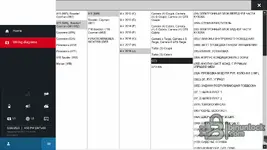

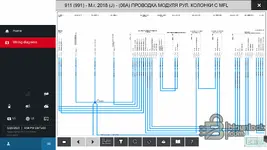
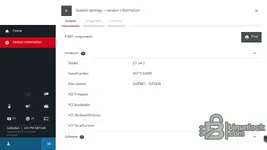
A fully configured VMware image combining PIWIS 4, PIWIS 3, and PIWIS 2 for Porsche diagnostics. Built for VAS6154 and compatible J2534 PassThru devices, it enables fast startup, wiring diagrams, guided fault finding, coding where supported, and safe snapshot rollback.
Highlights
- Model selection for 911, Taycan, Boxster, Cayman, Panamera, Macan and more
- Wiring diagrams viewer with filtering, zoom, print and quick navigation
- Guided fault finding, live values, logging and scan tool functions
- Support for VAS6154 DoIP and standard J2534 workflows on capable vehicles
- Preconfigured Windows guest, user profile, and clean baseline snapshot
Package contents
- windowsdesktop-runtime-8.0.21-win-x86.exe
- PIWIS3v42950PT_VM.7z.001
- PIWIS3v42950PT_VM.7z.002
- PIWIS3v42950PT_VM.7z.003
- PIWIS3v42950PT_VM.7z.004
- PIWIS3v42950PT_VM.7z.005
- PIWIS3v42950PT_VM.7z.006
- PIWIS3v42950PT_VM.7z.007
- PIWIS3v42950PT_VM.7z.008
- PIWIS3v42950PT_VM.7z.009
- PIWIS3v42950PT_VM.7z.010
- PIWIS3v42950PT_VM.7z.011
- PIWIS3v42950PT_VM.7z.012
- PIWIS3v42950PT_VM.7z.013
- PIWIS3v42950PT_VM.7z.014
Compatibility notes
Covers Porsche platforms including 911 992 and 991, 718, Taycan, Cayenne, Panamera and Macan generations. Function availability varies by vehicle, firmware and market equipment. Online features and programming operations may require official access. Use a stable battery support unit for any configuration tasks.
Basic usage
- Join all .7z parts with 7-Zip into the VM folder and extract
- Open the .vmx in VMware Workstation on Windows or Linux or in VMware Fusion on macOS
- Connect your VAS6154 or other J2534 interface then attach it to the VM via USB or network
- Start PIWIS, select the vehicle or model line and run diagnosis or wiring diagrams
- Work from the clean snapshot and create your own checkpoint after each session
Where to download VMware host software
- Windows host — Workstation Pro download article: https://knowledge.broadcom.com/external/article/344595/downloading-and-installing-vmware-workst.html
- Linux host — Workstation Pro for Linux on the same official page above
- macOS host — Fusion download article for Intel and Apple silicon: https://knowledge.broadcom.com/external/article/315638/download-and-install-vmware-fusion.html
- Product overview — Desktop hypervisors Workstation and Fusion: https://www.vmware.com/products/desktop-hypervisor/workstation-and-fusion
Operating systems
- Guest OS inside VM: Windows 10 Pro x64
- Host support: Windows 10 x64 and Windows 11 x64 with VMware Workstation
- Host support: macOS 12 or newer with VMware Fusion, Intel and Apple silicon as supported by the vendor
- Host support: Major Linux distributions with VMware Workstation for Linux
Minimum system requirements
CPU with Intel VT-x or AMD-V, 16–32 GB RAM recommended, 200 GB free SSD storage, reliable USB 2.0 or 3.0, gigabit network for DoIP, administrator rights on the host, stable vehicle power supply for configuration tasks.
Disclaimer
Source of Files. All software and resources in this post are collected from public and open sources on the internet. We do not claim authorship or ownership. File Hosting. This forum does not host files. All links point to third party public cloud storage. We are not responsible for external content. User Responsibility. Software is provided for educational and evaluation purposes only. You use it at your own risk. Authors of the post and forum administration are not liable for any damage.


