Scanmatik Multibrand J2534/RP1210 Diagnostic Suite
The Professional's Choice for J2534 Passthru & Multi-Brand Diagnostics.

This resource provides the complete software package for the Scanmatik 2 (SM2) and Scanmatik 2 PRO (SM2 PRO) diagnostic interface, version 2.21.22. Scanmatik is a professional, multi-protocol adapter that functions as both a versatile J2534 passthru device and a standalone diagnostic scanner for a wide variety of vehicle brands.
What is Scanmatik?
The Scanmatik 2 PRO is one of the most popular and reliable J2534 passthru devices on the market, used by professional tuners and diagnosticians worldwide. It allows you to work with a huge range of OEM diagnostic software (like ODIS, Xentry, GDS2) and aftermarket tuning tools that require a J2534 interface. Additionally, the native Scanmatik software provides powerful diagnostic capabilities for the brands listed below.
Key Features
- Full J2534 Compatibility: Use your SM2/SM2 PRO as a passthru device for dozens of third-party diagnostic and flashing applications.
- Multi-Platform Support: This package includes installers for both Windows PC and Android devices.
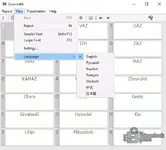
- Wide Vehicle Coverage: The native software supports a huge range of vehicles, including VAZ, GAZ, UAZ, KAMAZ, Daewoo, Chevrolet, Chery, BYD, Geely, Greatwall, Hyundai, Kia, Lifan, Mitsubishi, and more.
- Multi-Language Interface: The software interface supports numerous languages, including English, Russian, Spanish, German, French, and Polish.
- Instructional Content: The package includes video instructions and other helpful files to get you started.
What's Included in the Package?
- Scanmatik for Windows: `Scanmatik_2.21.22_Setup.exe`

- Scanmatik for Android: `Scanmatik_Android_2.21.22.apk`

- Drivers & Firmware: All necessary drivers and firmware files for the adapter.
- Instructions: Video tutorials and connection guides.

System Requirements & Hardware
- Operating System: This software has been tested on Windows 10 LTSC 2019 and various Android versions.
- Required Hardware: A genuine Scanmatik 2 (SM2) or Scanmatik 2 PRO (SM2 PRO) diagnostic adapter.
Disclaimer
This software is intended for use with a genuine Scanmatik adapter. Using incorrect software or performing programming functions with a passthru device carries risks and should only be done by experienced professionals. Use at your own risk.