
SMART-PROG AirBag Service Tool is an offline SRS crash-data service application backed by a large module database. It helps an authorized electronics technician select an airbag control unit by vehicle, manufacturer, part number, processor or EEPROM and then follow the supported dump-processing method.
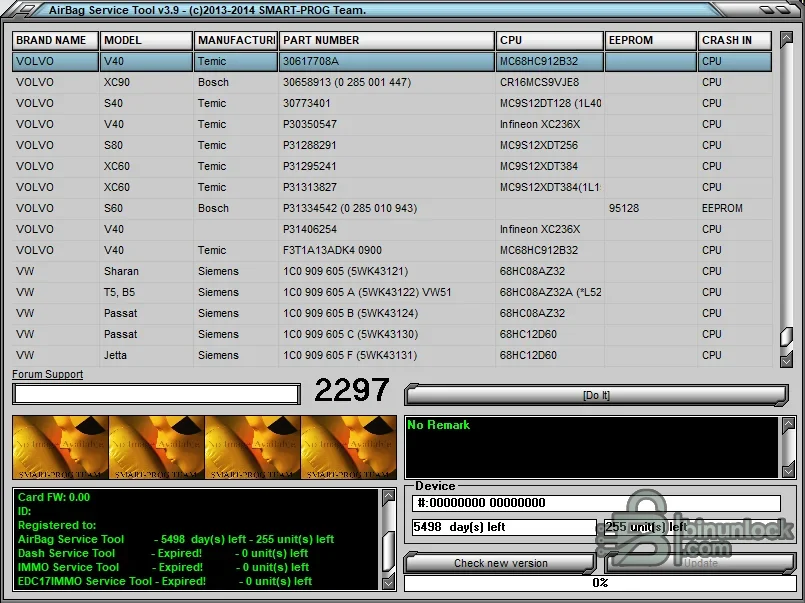
Supported vehicles, ECUs and files#
The local database exposes thousands of module entries rather than a single brand list. Visible examples include Volvo V40, S40, S60, S80, XC60 and XC90 and Volkswagen Sharan, T5, Passat and Jetta, with manufacturers such as Bosch, Siemens and Temic. Processor and memory examples include MC68HC912B32, CR16, MC9S12, Infineon XC236X and serial EEPROMs such as 95128. The exact part number remains the decisive compatibility key.- Supported SRS modules indexed by make, model, module maker, part number, MCU/EEPROM and crash-data location.
- EEPROM, microcontroller and module-specific dump workflows described by the selected database record.
- Hardware-assisted access where a SMART-PROG card/interface or an external memory programmer is required.
Functions#
- Search or filter the database to locate an exact SRS control-unit entry.
- Show the expected processor or EEPROM and the memory area containing crash information.
- Process a compatible read according to the selected module method and preserve an output for verification.
- Keep vehicle and electronics details together so similarly named modules are not confused.
System and hardware requirements#
- A Windows PC and the matching SMART-PROG security hardware/card where required by the application.
- A suitable EEPROM/MCU programmer, correct pinout and safe module-opening procedure for offline reads.
- An exact module label/part number and a complete verified original dump.
- Professional SRS diagnosis and service information for post-repair validation.
Recommended workflow#
- Diagnose and repair the physical restraint-system fault before modifying stored crash data.
- Photograph the label, identify the memory device and make multiple matching reads.
- Process only a copy selected through the exact database entry, compare output and retain the original.
- Reinstall and run OEM-level diagnostics, checking DTCs, configuration and warning-lamp behavior.


