
VDOEditor Cluster Configuration & Personalization
About this tool
VDOEditor is a desktop utility for configuring VDO instrument clusters found in selected VAG platforms. It works with saved EEPROM dumps to adjust regional options, indicators, menus, staging, backlight and logos. Support includes common 24C32 and 24C64 layouts.

Highlights
Package contents
Compatibility notes
Focus on VDO clusters with 24C32 or 24C64 EEPROM used in Volkswagen, Škoda, SEAT and Audi models. Some options such as Comfort menu apply only to specific years and clusters. Availability varies by vehicle and firmware. Results depend on the exact hardware and software level.
Basic usage
Operating systems
Windows 7, Windows 8, Windows 10, Windows 11 in x86 and x64 builds
Minimum system requirements
Dual-core CPU, 2 GB RAM, 50 MB free storage, standard display, local administrator rights, offline capable. USB connectivity for your programmer if required
Disclaimer
Source of Files. All software and resources in this post are collected from public and open sources on the internet. We do not claim authorship or ownership.
File Hosting. This forum does not host files. All links point to third party public cloud storage. We are not responsible for external content.
User Responsibility. Software is provided for educational and evaluation purposes only. You use it at your own risk. Authors of the post and forum administration are not liable for any damage.




VDOEditor is a desktop utility for configuring VDO instrument clusters found in selected VAG platforms. It works with saved EEPROM dumps to adjust regional options, indicators, menus, staging, backlight and logos. Support includes common 24C32 and 24C64 layouts.
Highlights
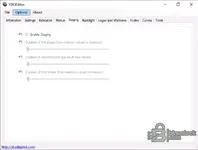
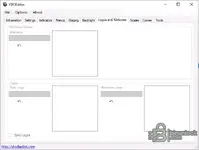
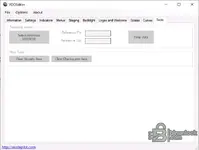
- Structured tabs for Settings, Indicators, Menus, Staging, Backlight, Logos and Welcome, Scales, Curves and Tools
- Regional parameters for temperature, distance, speed, time format and consumption format
- Feature toggles such as DRL, Low Beam, DPF and Side Assist indicators where supported
- Menu activation including Oil Temperature, Side Assist, Refuel Volume and Comfort where applicable
- Staging sweep timing with three adjustable phases and separate backlight controls
- Logo selection for welcome screen plus scale and curve editors for custom layouts
Package contents
- VDOEditor v1.0.3.6 application build
- Resources for panel layouts and logo presets
- ReadMe with basic notes
Compatibility notes
Focus on VDO clusters with 24C32 or 24C64 EEPROM used in Volkswagen, Škoda, SEAT and Audi models. Some options such as Comfort menu apply only to specific years and clusters. Availability varies by vehicle and firmware. Results depend on the exact hardware and software level.
Basic usage
- Read the cluster EEPROM with your preferred programmer and make a verified backup
- Open the dump in VDOEditor and select the matching layout or panel type
- Adjust required options in Settings, Indicators, Menus and Backlight
- Optionally configure staging timing, scales, curves and welcome logos
- Save the new file and write it back using standard safe workshop procedures
Operating systems
Windows 7, Windows 8, Windows 10, Windows 11 in x86 and x64 builds
Minimum system requirements
Dual-core CPU, 2 GB RAM, 50 MB free storage, standard display, local administrator rights, offline capable. USB connectivity for your programmer if required
Disclaimer
Source of Files. All software and resources in this post are collected from public and open sources on the internet. We do not claim authorship or ownership.
File Hosting. This forum does not host files. All links point to third party public cloud storage. We are not responsible for external content.
User Responsibility. Software is provided for educational and evaluation purposes only. You use it at your own risk. Authors of the post and forum administration are not liable for any damage.


