Post #1

- Joined
- 19.08.2026
- Messages
- 22
- Reactions
- 4
- Location
- 🇩🇪DEGermany
AutoTech Manager — a program for organizing everyday work with vehicles, customers, services, offers, and documents.
I created it primarily as a working tool for myself: so that vehicle and customer information would not remain scattered across notebooks, separate PDFs, folders, and old records. Gradually, the program grew into a complete workspace that I decided to share with other specialists as well.
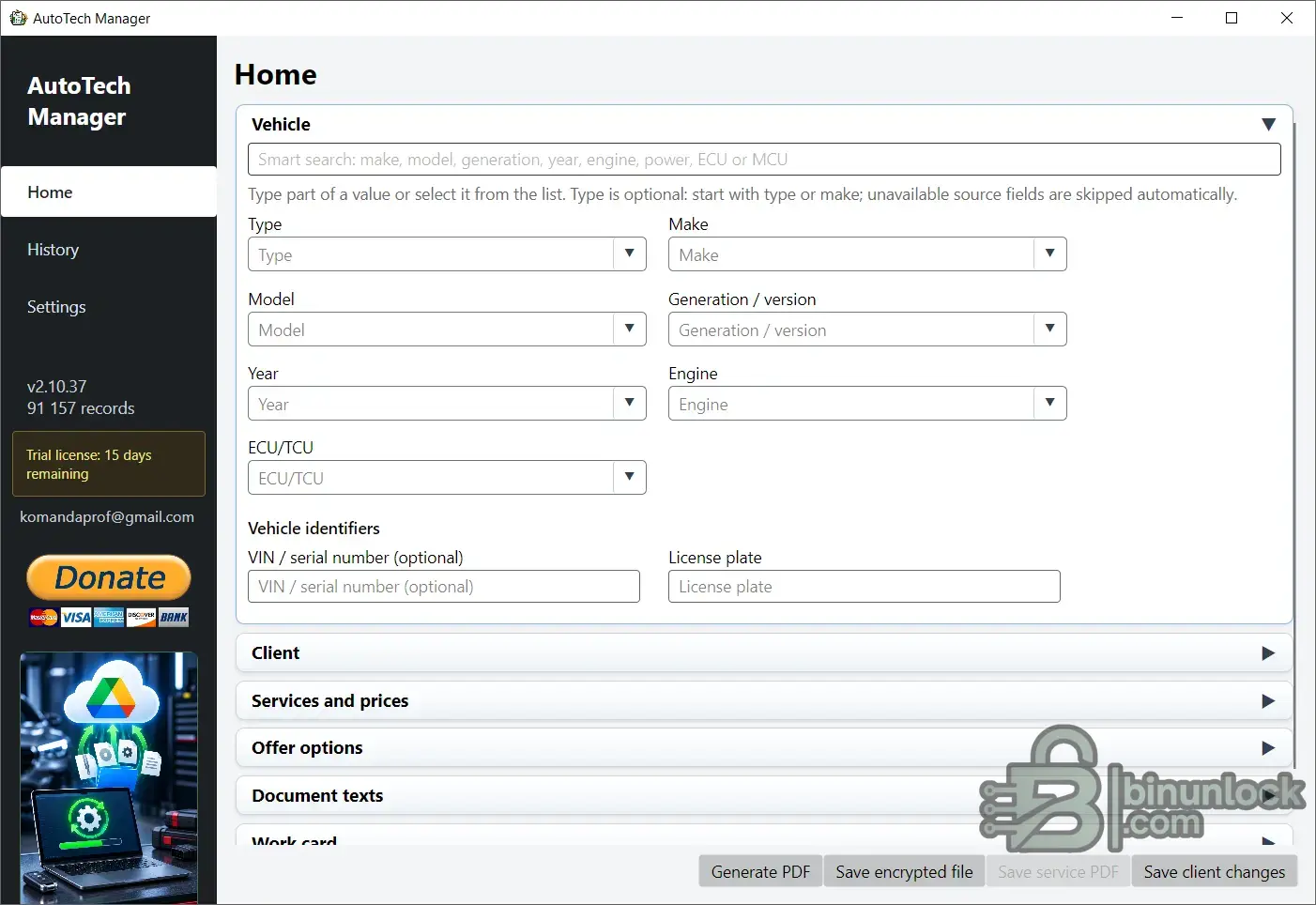
The core logic is as simple as possible:
Vehicle → Customer → Services → Parameters → PDF / Save
The program is not intended for flashing ECU/TCU or editing calibrations. Its purpose is to organize work around the vehicle and the customer.
Main features
• local vehicle database with search by make, model, year, engine, power, ECU, and MCU;
• customer and vehicle profiles;
• multiple vehicles for one customer;
• history of previous work and documents;
• creation of several offer options for one vehicle;
• custom services and saved templates;
• Net / Gross / Tax-free, VAT, percentage-based and fixed discounts;
• PS / kW / Nm projections with the ability to compare them with stock values;
• creation of customer PDF documents;
• separate internal PDF with internal information;
• work statuses: draft, offer, approved, in progress, completed, canceled;
• work map with individual stages, comments, and results;
• document revisions — a new version does not destroy the previous one;
• protected project files and backups;
• import and export of the customer database;
• ability to fully transfer data to another computer.
One customer can have multiple vehicles, and each vehicle can have its own history, services, and workspace. When a customer returns, there is no need to remember what was done several months ago: simply open their profile or history.
Working without a permanent internet connection
Most of AutoTech Manager works locally.
An internet connection is not required to search the local database for a vehicle, work with customers, history, templates, create PDFs, or create protected files.
The internet is used only for certain functions, such as updating the vehicle database and retrieving published developer information.
Data protection
The customer database and history can be protected with a master password.
For data transfer and backup, the program uses its own protected formats:
.ecuoffer — project for one vehicle;
.ecucustomers — customer database export;
.eogbackup — complete backup of transferable data.
When restoring a forgotten master password, you do not need to provide me with the old password.
Languages
The interface language and the language of the created document are selected independently of each other.
For example, you can work with a Ukrainian interface and create a customer document in German and English at the same time.
The current version offers 15 interface language options. Ukrainian, German, and English are the basic complete language sets; for some other languages, individual rare strings may temporarily be displayed in English.
Trial period
After installation, a 30-day trial period is available.
During this period, you can use the main PDF features, the customer database, history, and protected exports. Some additional features are available after activation.
Current version
AutoTech Manager 2.10.37
The download folder contains separate installers for:
• Windows x64
• Windows x86
• user guide
• demonstration data — to familiarize yourself with the program, you can first import the demo file via Settings → Files and folders → Import all data. The password is specified in the file name and repeated here: 20260907. After testing, it is recommended to remove the program using the installer, install it again, and start working with your own data.
Download the program
The complete user guide is also located in the download folder. It describes in detail the workflow from the first launch through the customer database, PDFs, history, backups, and data transfer.
Feedback
I am continuing to develop AutoTech Manager and am also already working on the next program, so sometimes I may not be able to respond immediately.
If I do not reply to a message or comment right away, this does not mean that I have not read it.
If you notice an error in the program, encounter unexpected behavior, or have an idea for making AutoTech Manager more convenient — be sure to write to me.
I am especially interested in:
• bugs that have been found;
• interface suggestions;
• ideas for new features;
• comments on the way the program works;
• suggestions for the vehicle database;
• real-world work scenarios that are currently missing.
If a suggestion is genuinely useful and technically feasible, I will try to take it into account in future versions.
The program is being developed specifically as a practical tool for everyday work, so real feedback from users is especially important to me.
I created it primarily as a working tool for myself: so that vehicle and customer information would not remain scattered across notebooks, separate PDFs, folders, and old records. Gradually, the program grew into a complete workspace that I decided to share with other specialists as well.
The core logic is as simple as possible:
Vehicle → Customer → Services → Parameters → PDF / Save
The program is not intended for flashing ECU/TCU or editing calibrations. Its purpose is to organize work around the vehicle and the customer.
Main features
• local vehicle database with search by make, model, year, engine, power, ECU, and MCU;
• customer and vehicle profiles;
• multiple vehicles for one customer;
• history of previous work and documents;
• creation of several offer options for one vehicle;
• custom services and saved templates;
• Net / Gross / Tax-free, VAT, percentage-based and fixed discounts;
• PS / kW / Nm projections with the ability to compare them with stock values;
• creation of customer PDF documents;
• separate internal PDF with internal information;
• work statuses: draft, offer, approved, in progress, completed, canceled;
• work map with individual stages, comments, and results;
• document revisions — a new version does not destroy the previous one;
• protected project files and backups;
• import and export of the customer database;
• ability to fully transfer data to another computer.
One customer can have multiple vehicles, and each vehicle can have its own history, services, and workspace. When a customer returns, there is no need to remember what was done several months ago: simply open their profile or history.
Working without a permanent internet connection
Most of AutoTech Manager works locally.
An internet connection is not required to search the local database for a vehicle, work with customers, history, templates, create PDFs, or create protected files.
The internet is used only for certain functions, such as updating the vehicle database and retrieving published developer information.
Data protection
The customer database and history can be protected with a master password.
For data transfer and backup, the program uses its own protected formats:
.ecuoffer — project for one vehicle;
.ecucustomers — customer database export;
.eogbackup — complete backup of transferable data.
When restoring a forgotten master password, you do not need to provide me with the old password.
Languages
The interface language and the language of the created document are selected independently of each other.
For example, you can work with a Ukrainian interface and create a customer document in German and English at the same time.
The current version offers 15 interface language options. Ukrainian, German, and English are the basic complete language sets; for some other languages, individual rare strings may temporarily be displayed in English.
Trial period
After installation, a 30-day trial period is available.
During this period, you can use the main PDF features, the customer database, history, and protected exports. Some additional features are available after activation.
Current version
AutoTech Manager 2.10.37
The download folder contains separate installers for:
• Windows x64
• Windows x86
• user guide
• demonstration data — to familiarize yourself with the program, you can first import the demo file via Settings → Files and folders → Import all data. The password is specified in the file name and repeated here: 20260907. After testing, it is recommended to remove the program using the installer, install it again, and start working with your own data.
Download the program
The complete user guide is also located in the download folder. It describes in detail the workflow from the first launch through the customer database, PDFs, history, backups, and data transfer.
Feedback
I am continuing to develop AutoTech Manager and am also already working on the next program, so sometimes I may not be able to respond immediately.
If I do not reply to a message or comment right away, this does not mean that I have not read it.
If you notice an error in the program, encounter unexpected behavior, or have an idea for making AutoTech Manager more convenient — be sure to write to me.
I am especially interested in:
• bugs that have been found;
• interface suggestions;
• ideas for new features;
• comments on the way the program works;
• suggestions for the vehicle database;
• real-world work scenarios that are currently missing.
If a suggestion is genuinely useful and technically feasible, I will try to take it into account in future versions.
The program is being developed specifically as a practical tool for everyday work, so real feedback from users is especially important to me.


