Post #61

- Joined
- 19.03.2026
- Messages
- 2
- Reactions
- 39
- Location
- 🇸🇦SASaudi Arabia
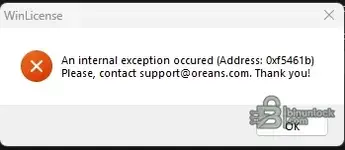
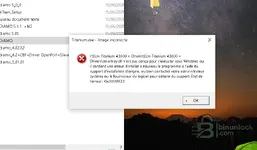
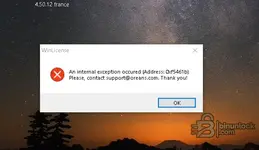
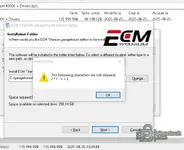
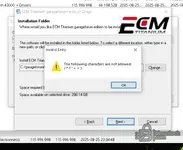
The game did not start after downloading.
martkey.dll.
martkey.dll.


It only works on Win 7I also wanted to add that I have performed all the options described here and I still have the same error. I don't know if I should download the file again because the antivirus deleted the file the first time it was uploaded.


New release thread for ECM Titanium (43000+ Drivers) - Full Driver-Based Remapping Software: discuss, share feedback, and get help.
The easy-to-use ECU remapping software with over 43,000 drivers that automatically find maps for you
- Bin
- ecu-remapping ecm-titanium
- 🗺️ ECU Map Editing Software
ECM Titanium (43000+ Drivers) - Full Driver-Based Remapping Software
The easy-to-use ECU remapping software with over 43,000 drivers that automatically find maps for you
Frequently Asked Questions
Which Windows version is recommended?
For maximum stability during ECU flashing and diagnostics, a clean installation of Windows 10 (64-bit) is recommended.
Is it compatible with J2534 PassThru?
Most modern software versions support standard J2534 interfaces like Scanmatik 2 Pro, OpenPort 2.0, and specific VCI adapters.
What's inside:
- Overview & screenshots
- Version history and compatibility
- Download link and setup notes
View full details and download — ECM Titanium (43000+ Drivers) - Full Driver-Based Remapping Software
New release thread for ECM Titanium (43000+ Drivers) - Full Driver-Based Remapping Software: discuss, share feedback, and get help.
The easy-to-use ECU remapping software with over 43,000 drivers that automatically find maps for you
- Bin
- ecu-remapping ecm-titanium
- 🗺️ ECU Map Editing Software
ECM Titanium (43000+ Drivers) - Full Driver-Based Remapping Software
The easy-to-use ECU remapping software with over 43,000 drivers that automatically find maps for you
Frequently Asked Questions
Which Windows version is recommended?
For maximum stability during ECU flashing and diagnostics, a clean installation of Windows 10 (64-bit) is recommended.
Is it compatible with J2534 PassThru?
Most modern software versions support standard J2534 interfaces like Scanmatik 2 Pro, OpenPort 2.0, and specific VCI adapters.
What's inside:
- Overview & screenshots
- Version history and compatibility
- Download link and setup notes
New release thread for ECM Titanium (43000+ Drivers) - Full Driver-Based Remapping Software: discuss, share feedback, and get help.
The easy-to-use ECU remapping software with over 43,000 drivers that automatically find maps for you
- Bin
- ecu-remapping ecm-titanium
- 🗺️ ECU Map Editing Software
ECM Titanium (43000+ Drivers) - Full Driver-Based Remapping Software
The easy-to-use ECU remapping software with over 43,000 drivers that automatically find maps for you
Frequently Asked Questions
Which Windows version is recommended?
For maximum stability during ECU flashing and diagnostics, a clean installation of Windows 10 (64-bit) is recommended.
Is it compatible with J2534 PassThru?
Most modern software versions support standard J2534 interfaces like Scanmatik 2 Pro, OpenPort 2.0, and specific VCI adapters.
What's inside:
- Overview & screenshots
- Version history and compatibility
- Download link and setup notes
New discussion thread for ECM Titanium (over 43,000 drivers) - Complete driver-based remapping software: discuss, share feedback, and get support.
The easy-to-use ECU remapping software with over 43,000 drivers that automatically find maps for you
- Bin
- ecu-remapping ecm-titanium
- 🗺️ ECU Map Editing Software
ECM Titanium (over 43,000 drivers) - Complete driver-based remapping software
Easy-to-use ECU remapping software with over 43,000 drivers that automatically find maps for you
Frequently Asked Questions
Which version of Windows is recommended?
To ensure maximum stability during ECU programming and diagnostics, a clean installation of Windows 10 (64-bit) is recommended.
Is it compatible with J2534 PassThru?
Most modern software versions support standard J2534 interfaces such as Scanmatik 2 Pro, OpenPort 2.0, and specific VCI adapters.
What's included:
But doesn't it work on W10??
- Overview and screenshots
- Version history and compatibility
- Download link and installation notes
Non va su w10 e w11 fcredo funzioni su w7Onestamente, non ho idea se sia possibile eseguirlo sulla build di Windows 11
I don't think it works on w10/11; I think it works on W7It doesn't seem to work for me either, smartkey.dll win 10 64bit

We use essential cookies to make this site work, and optional cookies to enhance your experience.