Ford IDS + FJDS + FDRS + Mazda IDS - for VCM2 / J2534

aleksey-ms

Thread Owner
Stage I
Joined
15.02.2026
Messages
86
Reaction score
384
Location
Ukraine
Ford IDS 132.05 + FJDS 132.05 + FDRS 48.4.1 + Mazda IDS 136

IDS[/B]. IDS provides complete dealership level vehicle diagnostic coverage for all 1996 to select 2018 Ford, Lincoln, Mercury vehicles. IDS requires the use of Ford diagnostic hardware VCM II.

FJDS provides module reprogramming software that covers 1996 to select 2018 Ford, Lincoln, and Mercury module reprogramming functions, plus complete dealership level diagnostic software for all 2018 to present Ford and Lincoln vehicles. FJDS is designed for use with J2534 compatible Vehicle Communications Interfaces (VCI) including Ford diagnostic hardware VCM II.

FDRS - next-generation factory Ford Motor Company vehicle diagnostic Software designed for use with VCM II and J2534 compatible VCI. FDRS provides complete dealership-level vehicle diagnostic coverage for some 2018 and forward vehicles. FDRS provides superior capabilities, is more user-friendly, and provides more diagnostic tools than IDS.
5l2ijz.jpg


Need it? Push buttons Thanks, PM for pass | or by email right now.
 

Attachments

Last edited:
Ratings and Reviews
Total ratings: 0
Ford IDS 132.04 + FJDS 132.04 + FDRS 47.6.9 + Mazda IDS 132

IDS. IDS provides complete dealership l...

Ford IDS 132.04 + FJDS 132.04 + FDRS 47.6.9 + Mazda IDS 132

Solid package for anyone doing Ford/Lincoln/Mercury diagnostics and module programming. Quick summary for those browsing:

What's included:

  • Ford IDS 132.04 — Full dealer-level diagnostics for 1996 to select 2018 MY Ford, Lincoln, Mercury. Requires VCM II.
  • FJDS 132.04 — Module reprogramming (as-built, flash calibrations) for 1996–2018+, plus full diagnostics for 2018+ Ford/Lincoln. Works with VCM II or any J2534-compliant VCI.
  • FDRS 47.6.9 — Next-gen Ford factory diagnostic platform for 2018+ vehicles. More modern UI, better guided diagnostics, topology mapping, etc. VCM II or J2534.
  • Mazda IDS 132 — Dealer-level diagnostics and reprogramming for Mazda vehicles (shared platform era with Ford).

Key notes:

  • IDS and FJDS overlap on 2018 MY — IDS covers the older stuff best, FJDS/FDRS handle 2018+ where Ford transitioned away from classic IDS.
  • FDRS is essentially the replacement going forward. If you're working on newer Fords (2020+), FDRS is what you want.
  • For module programming (PCM, TCM, BCM, IPC, APIM, etc.), FJDS is still the go-to for the as-built and calibration flash workflow on the transitional 2018–2020 range.
  • Mazda IDS 132 is useful for older Mazda 2, 3, 5, 6, CX-series that shared Ford platforms and used the same VCM II interface.
  • VCM II clone users — IDS/FJDS generally work fine, FDRS can be hit or miss depending on the clone firmware version. Genuine VCM II or a quality J2534 device (like Mongoose Pro, openport, or Drew Tech) recommended for FDRS.

Typical setup:
  • Windows 10 (preferably native install or well-configured VM with USB passthrough)
  • Disable Windows updates and antivirus during install
  • Run as administrator
  • Make sure .NET Framework 4.x and Java are installed before IDS/FJDS setup

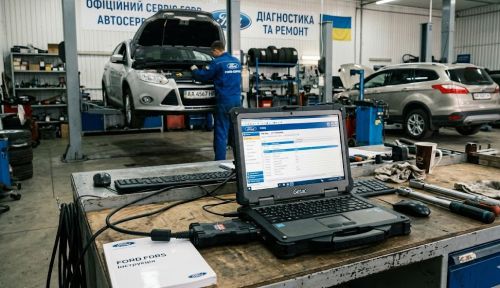
Nice share. The photo shows a proper Ford dealer setup with a Getac rugged laptop running FDRS — that's exactly what the official Ford FOBS (Ford Outfitter Build System) kits ship with.

If anyone has questions about compatibility with specific VCI hardware or installation issues, post your details and we can help sort it out.
 
Mazda IDS 136 — What's New:

2025–2026 Model Support: Full diagnostics and coding for the latest Mazda CX-90, CX-70, and updated CX-5 models.
Expanded Calibration Database: Updated firmware files (PATS, PCM, TCM) to correct factory errors in gear shifting algorithms and engine management.
Improved Hybrid Support (MHEV/PHEV): Added new special functions for checking the high-voltage battery condition and bleeding the inverter cooling system.
VCM II / VCM 3 Optimization: Improved connection stability and data transfer speed when using original adapters and high-quality clones.
On-Screen Menu Update: The interface has become slightly more responsive, and tooltips for new DTCs for ADAS systems (lane assist, adaptive cruise control) have been added.
 
Ford IDS 132.04 + FJDS 132.04 + FDRS 47.6.9 + Mazda IDS 136

IDS
. IDS offre una copertura diagnostica completa a livello di concessionaria per tutti i veicoli Ford, Lincoln e Mercury dal 1996 ad alcuni modelli del 2018. IDS richiede l'utilizzo dell'hardware diagnostico Ford VCM II.

FJDS fornisce un software di riprogrammazione dei moduli che copre le funzioni di riprogrammazione dei moduli Ford, Lincoln e Mercury dal 1996 ad alcuni modelli del 2018, oltre a un software diagnostico completo di livello concessionaria per tutti i veicoli Ford e Lincoln dal 2018 ad oggi. FJDS è progettato per l'utilizzo con interfacce di comunicazione veicolo (VCI) compatibili con J2534, incluso l'hardware diagnostico Ford VCM II.

FDRS è il software di diagnostica di nuova generazione per veicoli Ford Motor Company, progettato per l'utilizzo con VCM II e VCI compatibili con J2534. FDRS offre una copertura diagnostica completa a livello di concessionaria per alcuni veicoli dal 2018 in poi. FDRS offre funzionalità superiori, è più intuitivo e fornisce più strumenti diagnostici rispetto a IDS.
5l2ijz.jpg


Ne hai bisogno? Premi i pulsanti. Grazie, contattami in privato per la password | oppure inviami un'email subito .
MERCI
 
Ford IDS 132.04 + FJDS 132.04 + FDRS 47.6.9 + Mazda IDS 136

IDS
. IDS provides complete dealership level vehicle diagnostic coverage for all 1996 to select 2018 Ford, Lincoln, Mercury vehicles. IDS requires the use of Ford diagnostic hardware VCM II.

FJDS provides module reprogramming software that covers 1996 to select 2018 Ford, Lincoln, and Mercury module reprogramming functions, plus complete dealership level diagnostic software for all 2018 to present Ford and Lincoln vehicles. FJDS is designed for use with J2534 compatible Vehicle Communications Interfaces (VCI) including Ford diagnostic hardware VCM II.

FDRS - next-generation factory Ford Motor Company vehicle diagnostic Software designed for use with VCM II and J2534 compatible VCI. FDRS provides complete dealership-level vehicle diagnostic coverage for some 2018 and forward vehicles. FDRS provides superior capabilities, is more user-friendly, and provides more diagnostic tools than IDS.
5l2ijz.jpg


Need it? Push buttons Thanks, PM for pass | or by email right now.
merci
 
Do you have installation instructions? i have installed IDS and раtсh but get ''INSTALL VCX DRIVERS FIRST'' & ''NOT FOUND DEVICE OR LICENCE''. How do i fix this please? i am using Godiag Passthru GD101
 
Do you have installation instructions? i have installed IDS and раtсh but get ''INSTALL VCX DRIVERS ...

The "INSTALL VCX DRIVERS FIRST" and "NOT FOUND DEVICE OR LICENCE" errors are common when using third-party J2534 devices like the Godiag GD101 with Ford IDS/FJDS. Here's how to sort it out:

Step-by-Step Fix

1. Install Godiag GD101 drivers FIRST (before IDS)
  • Download the latest GD101 driver/software package from the Godiag website or the CD that came with the device.
  • Install the J2534 drivers and make sure the device is recognized in Device Manager (should appear under "Godiag" or "PassThru" devices).
  • Confirm the device shows up in the Windows registry under:
    Code:
    HKEY_LOCAL_MACHINE\SOFTWARE\PassThruSupport.04.04
    You should see a Godiag entry there. If not, the J2534 driver didn't register properly.

2. Correct installation order
  • Install GD101 J2534 drivers → reboot
  • Install Ford IDS/FJDS → reboot
  • Apply the раtсh/activation after IDS is installed but before launching it
  • Do NOT let IDS connect to Ford servers (block it in firewall or disconnect internet)

3. Select the correct VCI in IDS
  • When IDS launches, it will ask you to select a device. Do NOT select "VCM II" — that option expects genuine Ford VCM II hardware.
  • Instead, select "J2534 Device" or "PassThru" from the device selection screen.
  • Then pick your Godiag GD101 from the J2534 device list.

4. "NOT FOUND DEVICE OR LICENCE" fix
  • This usually means the раtсh/activation wasn't applied correctly. Make sure you:
    • Ran the раtсh as Administrator
    • Applied it to the correct IDS installation directory (default:
      Code:
      C:\Program Files (x86)\Ford Motor Company\IDS
      )
    • Disabled antivirus — it often quarantines the раtсh files silently
  • If using FJDS, the раtсh may be separate from the IDS раtсh — make sure you applied the right one for each.

5. Important notes for Godiag GD101
  • GD101 works with IDS and FJDS via J2534 mode — this is confirmed.
  • For FDRS, J2534 compatibility can be tricky with the GD101. If FDRS doesn't detect it, you may need to update the GD101 firmware to the latest version.
  • Make sure the GD101 is connected via USB before launching IDS, and that no other J2534 devices or VCM II drivers are conflicting.

Quick checklist if it still doesn't work:
  • Windows 10 64-bit? (recommended)
  • GD101 firmware up to date?
  • J2534 driver registered in registry?
  • раtсh applied as admin with AV disabled?
  • Selected "J2534" not "VCM II" in IDS device setup?

If you're still stuck after all this, let us know exactly which step fails and any error message text — we can narrow it down further.
 
Ford IDS 132.05 + FJDS 132.05 + FDRS 48.4.1 + Mazda IDS 136

IDS[/B]. IDS provides complete dealership level vehicle diagnostic coverage for all 1996 to select 2018 Ford, Lincoln, Mercury vehicles. IDS requires the use of Ford diagnostic hardware VCM II.

FJDS provides module reprogramming software that covers 1996 to select 2018 Ford, Lincoln, and Mercury module reprogramming functions, plus complete dealership level diagnostic software for all 2018 to present Ford and Lincoln vehicles. FJDS is designed for use with J2534 compatible Vehicle Communications Interfaces (VCI) including Ford diagnostic hardware VCM II.

FDRS - next-generation factory Ford Motor Company vehicle diagnostic Software designed for use with VCM II and J2534 compatible VCI. FDRS provides complete dealership-level vehicle diagnostic coverage for some 2018 and forward vehicles. FDRS provides superior capabilities, is more user-friendly, and provides more diagnostic tools than IDS.
5l2ijz.jpg


Need it? Push buttons Thanks, PM for pass | or by email right now.

Added.
FDRS 48.4.1
FJDS 132.05
Ford IDS 132.05

What's new:
Fresh calibration files: New software versions for control units have been added (often related to new recalls).
Certificates and security: Security tokens for communication with Ford servers have been updated.
Spot fixes: Fixed errors that dealers frequently complained about in the previous build (for example, if in 132.04 the flashing of a specific control unit was interrupted due to a timeout, this timing was adjusted in 132.05).
 
Activity
So far there's no one here
Back