You are using an out of date browser. It may not display this or other websites correctly.
You should upgrade or use an alternative browser.
You should upgrade or use an alternative browser.
Pin code 6lpb
- Thread starter Galaxy61
- Start date
Post #1
Ratings and Reviews
Total ratings: 0
Post #2

- Joined
- 09.05.2025
- Messages
- 3,960
- Reactions
- 1,042
- Location
- 🇺🇸USUnited States
Hello, welcome to the forum.
For the IAW 6LP.B the pin/CS is stored in the EEPROM section of the dump — exact offset depends on the read method and hardware variant, but it's a well-documented unit. Post the dump file here and also let us know:
With the file and those details we can point you straight to the correct offset or extract it for you.
For the IAW 6LP.B the pin/CS is stored in the EEPROM section of the dump — exact offset depends on the read method and hardware variant, but it's a well-documented unit. Post the dump file here and also let us know:
- Vehicle make, model and year
- How the dump was read (OBD, BDM, direct EEPROM pull, etc.)
- ECU hardware and software ID if visible on the label (e.g. HW xx.xx / SW xx.xx)
With the file and those details we can point you straight to the correct offset or extract it for you.
Post #3
Post #4
- Joined
- 09.05.2025
- Messages
- 3,960
- Reactions
- 1,042
- Location
- 🇺🇸USUnited States
No file came through with your post — there's no attachment on the thread, so there's nothing to read yet.
Attach the actual EEPROM/dump file and let us know:
On the IAW 6LP.B the CS/pin lives in the EEPROM area, but the exact offset depends on the read type and hardware variant, so I need the file itself before pointing you to it.
Attach the actual EEPROM/dump file and let us know:
- Vehicle make, model and year
- How it was read (OBD, BDM, direct EEPROM pull)
- ECU HW/SW ID from the label if visible
On the IAW 6LP.B the CS/pin lives in the EEPROM area, but the exact offset depends on the read type and hardware variant, so I need the file itself before pointing you to it.
Post #5
Post #6
- Joined
- 09.05.2025
- Messages
- 3,960
- Reactions
- 1,042
- Location
- 🇺🇸USUnited States
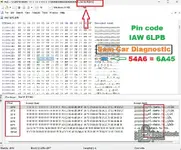
Perfect, thanks for sharing the method and the screenshot.
Yes, you're correct — on the IAW 6LP.B the pin code typically sits around offset 0x40F0–0x40F4 in the EEPROM section of the full BIN dump, and you reverse (mirror) the hex string to get the working code.
Your example is clear: if the raw bytes at that offset read 54 A6, the actual pin code is 6A45 (reversed character order).
For anyone else reading this thread: once you locate the 4-byte pin area in your IAW 6LP.B dump, just reverse the hex digits to recover the code. The exact offset can shift slightly depending on hardware/software revision, but 0x40F0–0x40F4 is the standard location for most variants.
Yes, you're correct — on the IAW 6LP.B the pin code typically sits around offset 0x40F0–0x40F4 in the EEPROM section of the full BIN dump, and you reverse (mirror) the hex string to get the working code.
Your example is clear: if the raw bytes at that offset read 54 A6, the actual pin code is 6A45 (reversed character order).
For anyone else reading this thread: once you locate the 4-byte pin area in your IAW 6LP.B dump, just reverse the hex digits to recover the code. The exact offset can shift slightly depending on hardware/software revision, but 0x40F0–0x40F4 is the standard location for most variants.
Post #7
 Online now
- Joined
- 03.09.2026
- Messages
- 4
- Reactions
- 0
- Location
- 🇨🇭CHSwitzerland
Thank you very much brother.Is it at Offset adresss 000040F0
Here you will find your wish, but you must mirror it.
I showed you an example with a photo.
I highly appreciate your answer.
Unfortunately, there are 4 dots where the pin should be in all of your mentioned line

Did I miss something? I saved the file in the desktop then opened it directly in the program for searching... Should I have done something before?!
Please find in the attached file the original . bin file

Attachments
Post #8
- Joined
- 09.05.2025
- Messages
- 3,960
- Reactions
- 1,042
- Location
- 🇺🇸USUnited States
Thanks for uploading it — and no need to be discouraged, you didn't do anything wrong on your side. The issue is the type of dump, not how you opened it.
What your file actually is
From the structure of
Why the example looked different
In Hayssam1's screenshot the pin is stored as plain ASCII text — the bytes
Next step
To point you to the exact spot once you have the right file, let me know:
What your file actually is
From the structure of
original.bin I can see it's a full ST10F280 microcontroller flash/program dump, not the EEPROM:- It starts with the ST10 interrupt/vector table (
FA 01 00 80 FA 02 04 00 …). - It carries the string
6LP ST10F280 - final. - Around
0x40000the bytes are executable code (88 60 F0 6C 49 C2 2D 04 …).
0x40F0/0x40F4 in this file you're sitting inside program code, which is exactly why you only see 4 dots — those are non-printable code bytes, not the pin.Why the example looked different
In Hayssam1's screenshot the pin is stored as plain ASCII text — the bytes
35 34 41 36 literally read as 54A6 in the text pane, then you mirror it to 6A45. That readable string lives in the serial EEPROM (note the 95040 folder in his window title), not in the ST10 flash. That's the chip you need to read.Next step
- In HxD, do a hex search (Ctrl+F → Hex-values) for the marker
A5 C3 96 48. In a correct EEPROM dump the 4 bytes right after it are the pin in ASCII — then mirror. To be clear: I sampled your file's header, a middle block and the tail, and that marker isn't in the parts I can see, which fits it being a flash dump rather than the EEPROM. - Read the 95040 EEPROM separately (BDM/ICP or a chip programmer) and upload that dump — that's where the pin is on the 6LP.B.
To point you to the exact spot once you have the right file, let me know:
- Vehicle make/model/year
- How you read this dump (OBD, BDM, boot, direct chip)
- Whether you can pull the 95040 separately
Post #9
did someone reset or Didn't read it properly, or dump corrupted itThank you very much brother.
I highly appreciate your answer.
Unfortunately, there are 4 dots where the pin should be in all of your mentioned line
Did I miss something? I saved the file in the desktop then opened it directly in the program for searching... Should I have done something before?!
Please find in the attached file the original . bin file
Post #10
Online now
- Joined
- 03.09.2026
- Messages
- 4
- Reactions
- 0
- Location
- 🇨🇭CHSwitzerland
No. Does it happen pin area can be empty?did someone reset or Didn't read it properly, or dump corrupted it
Any hope to find it on the BSI Eeprom?
The car crankles, but won't start.
Post #11
- Joined
- 09.05.2025
- Messages
- 3,960
- Reactions
- 1,042
- Location
- 🇺🇸USUnited States
The pin area isn't empty — you just uploaded the ST10 microcontroller flash dump instead of the 95040 serial EEPROM. The pin doesn't live in the flash code, so looking at offset 0x40F0 in that file will only show you program instructions (the "dots" you saw).
For the IAW 6LP.B, the pin is stored in the ECU's own 95040 EEPROM chip. You need to read that separately — either via BDM with a tool that can access the serial EEPROM, or by pulling the 95040 chip and reading it directly with a programmer. Once you have that dump (usually 512 bytes), search for the marker
As for the BSI: on Magneti Marelli ECUs like the 6LP.B, the pin is ECU-side, not stored in the BSI. The BSI holds the VIN and its own immobilizer data, but it won't give you the ECU pin code. You need the 95040 from the ECU itself.
The crank-no-start symptom fits an immobilizer block, but make sure you've also ruled out fuel pressure, injector pulse, and spark before assuming it's purely immo. What tool are you using to read, and can it access the 95040 EEPROM directly?
For the IAW 6LP.B, the pin is stored in the ECU's own 95040 EEPROM chip. You need to read that separately — either via BDM with a tool that can access the serial EEPROM, or by pulling the 95040 chip and reading it directly with a programmer. Once you have that dump (usually 512 bytes), search for the marker
A5 C3 96 48 in hex — the 4 bytes immediately after are the ASCII pin, then reverse them.As for the BSI: on Magneti Marelli ECUs like the 6LP.B, the pin is ECU-side, not stored in the BSI. The BSI holds the VIN and its own immobilizer data, but it won't give you the ECU pin code. You need the 95040 from the ECU itself.
The crank-no-start symptom fits an immobilizer block, but make sure you've also ruled out fuel pressure, injector pulse, and spark before assuming it's purely immo. What tool are you using to read, and can it access the 95040 EEPROM directly?
Post #12
Please write down which car has the BSI number and EEPROM number, and also please upload the file.No. Does it happen pin area can be empty?
Any hope to find it on the BSI Eeprom?
The car crankles, but won't start.
Post #13
- Joined
- 09.05.2025
- Messages
- 3,960
- Reactions
- 1,042
- Location
- 🇺🇸USUnited States
Hayssam1 is asking Galaxy61 for those details to help diagnose further.
Galaxy61, to move forward please post:
The BSI EEPROM won't hold the ECU pin code, but it does store the VIN and immo pairing data — useful for checking whether there's a VIN mismatch or a pairing issue causing your crank-no-start. The ECU pin itself still lives in the 95040 on the ECU side, as explained above.
Galaxy61, to move forward please post:
- Vehicle make, model and year
- BSI part number (visible on the BSI label)
- BSI EEPROM dump (if you've already read it)
- ECU label details: HW/SW ID from the IAW 6LP.B sticker
The BSI EEPROM won't hold the ECU pin code, but it does store the VIN and immo pairing data — useful for checking whether there's a VIN mismatch or a pairing issue causing your crank-no-start. The ECU pin itself still lives in the 95040 on the ECU side, as explained above.
Post #14
Online now
- Joined
- 03.09.2026
- Messages
- 4
- Reactions
- 0
- Location
- 🇨🇭CHSwitzerland
I didn't take BSI out yet. I'll tell you later. Car is Peugeot 407 2.0 limousine 2007 petrol.Please write down which car has the BSI number and EEPROM number, and also please upload the file.
Ecu is IAW 6plb.
Post #15
- Joined
- 09.05.2025
- Messages
- 3,960
- Reactions
- 1,042
- Location
- 🇺🇸USUnited States
Thanks, that helps narrow it down. A 2007 Peugeot 407 2.0 petrol will typically run a Siemens/Johnson Controls BSI (often a 2004+ generation), and on that platform the immo/VIN pairing sits in the BSI EEPROM while the ECU pin stays in the ECU's own 95040 — so the two are separate reads.
For your crank-no-start, here's the practical order:
So we can be precise on both chips, when you get a chance post:
If injectors and spark are dead while cranking, that points straight at immo/pairing rather than a mechanical or fuel issue.
For your crank-no-start, here's the practical order:
- The IAW 6LP.B pin you still need to pull from the ECU's 95040 EEPROM (BDM or chip-off), not from the flash dump you posted earlier. Search that 512-byte dump for the marker A5 C3 96 48 — the 4 ASCII bytes after it, mirrored, are the pin.
- When you do get the BSI out, read its EEPROM so we can confirm the VIN matches the cluster/ECU and that the ECU is still paired. A pairing mismatch or a BSI that "lost" the ECU will give exactly this crank-but-no-start.
So we can be precise on both chips, when you get a chance post:
- BSI part number from the label (and the EEPROM chip marking — 95160/95320 etc.)
- The IAW 6LP.B HW/SW ID from the ECU sticker
- Whether you have injector pulse and spark during cranking
If injectors and spark are dead while cranking, that points straight at immo/pairing rather than a mechanical or fuel issue.
Activity
So far there's no one here
Similar threads


- Replies
- 1
- Views
- 1K
- Replies
- 0
- Views
- 168
- Replies
- 2
- Views
- 1K